
Noise Blocker
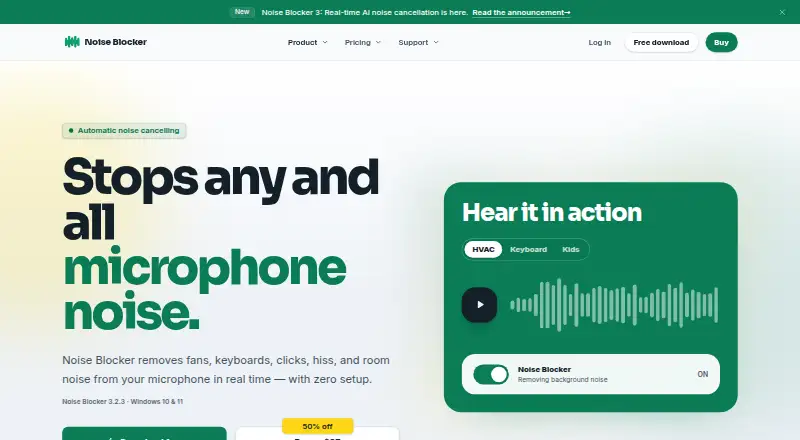
Noise Blocker is a Windows app that reduces microphone background sound in real time, including fans, keyboard noise, clicks, hiss, and room noise.
What Noise Blocker is
Noise Blocker is a Windows app that reduces microphone background sound in real time, including fans, keyboard noise, clicks, hiss, and room noise. Version 3 uses AI to separate a speaker’s voice from unwanted sounds, and is designed to run on everyday laptops. The maker says it works without tuning or a complicated setup. It is listed as compatible with Zoom, Google Meet, Discord, Slack, Teams, and OBS, and supports microphone audio for recording and streaming. Noise Blocker runs on Windows 10 and Windows 11; other operating systems are not currently supported. Processing adds about 80 milliseconds of latency, which varies by system. The free version allows 30 minutes of noise blocking per week. A Personal license costs $50, paid once and covers one person on up to three PCs, with 12 months of updates and priority support, indefinite use of covered versions, and a 14-day money-back guarantee. A personal license may be shared with household family members. Business trial requests are reviewed, and a trial requires approval.
Good
- AI separates speech from background sound.
- Works with Zoom, Google Meet, Discord, Slack, Teams, and OBS.
- Free version includes 30 minutes of weekly noise blocking.
- Personal license covers one person on up to three PCs.
- Personal license includes 12 months of updates and priority support.
Watch out
- Only supports Windows 10 and Windows 11.
- Audio processing adds about 80 milliseconds of latency.
- Free version is limited to 30 minutes weekly.
- Business trial requests require review and approval.
Who it suits
Noise Blocker suits Windows users who want to reduce microphone noise during calls, recordings, or streams. It may also suit households sharing a personal license across up to three computers.
Verdict
Noise Blocker offers a limited free option and a one-time Personal license for Windows microphone use. Consider its operating-system restriction and added audio latency before choosing it.
Plans and prices
From Noise Blocker's own pricing page, checked 5 Oct 2026.
| Plan | Price | What it gives you |
|---|---|---|
| Business trial | Free | Up to 20 employees or computers · request and approval required · 30-day trial; no card required |
| Free version | Free | 30 minutes of noise blocking per week · no email required |
| Personal license renewal | $30, paid once | Existing license key · 12 months of updates and priority support · One-time payment for another 12 months |
| Personal license | $50, paid once | One person · up to 3 PCs · 12 months of updates and priority support · indefinite use of covered versions · 14-day money-back guarantee · One-time payment |
| Business license | — | Per employee: one person on up to 2 computers · Per computer: one shared computer for any number of users · More than 200 licenses: custom quote · Graduated one-time pricing, excluding VAT: $70 each for 1–9 licenses, $60 each for 10–39, and $50 each for 40+ |
The facts
Each one read from Noise Blocker's own pages, with the date it was checked.
What it does
- AI noise cancellation
- Version 3 uses AI to separate the user's voice from unwanted background noise and is designed to run on everyday laptops.checked 5 Oct 2026
- Automatic setup
- The maker says the app works without tuning or complicated setup.checked 5 Oct 2026
- Business license limit
- Business pricing supports up to 200 licenses on the page; the maker offers a custom quote for larger rollouts.checked 5 Oct 2026
- Integrations
- The site lists Zoom, Google Meet, Discord, Slack, Teams, and OBS as compatible calling or recording apps.checked 5 Oct 2026
- Latency
- The FAQ says audio processing adds about 80 milliseconds of latency, varying by system.checked 5 Oct 2026
- License activation data
- For license validation, the maker may process activation history, app version, activation dates, and a hashed or pseudonymised device identifier.checked 5 Oct 2026
- Payment security
- The purchase page says card payments are processed by Stripe, a PCI Service Provider Level 1 processor, and the maker does not see or store payment details.checked 5 Oct 2026
- Personal license limit
- A personal license can be used on up to three computers at once and may be shared with family members in the household.checked 5 Oct 2026
- Privacy
- The privacy policy says website analytics are cookieless, do not create individual visitor profiles, and are not used for advertising or cross-site tracking.checked 5 Oct 2026
- Purpose
- Noise Blocker removes microphone background sounds such as fans, keyboards, clicks, hiss, and room noise in real time.checked 5 Oct 2026
- Support
- Personal licenses include 12 months of priority support, and the FAQ directs users with questions to email support.checked 5 Oct 2026
Money
- Business trial
- Business trial requests are reviewed, and the 30-day period starts when the first trial device connects; no card is required and there is no automatic charge.checked 5 Oct 2026
The company
- Headquarters
- Netherlandschecked 28 Sep 2026
Where it runs
- Supported OS
- Noise Blocker supports Windows 10 and Windows 11; the FAQ says other operating systems are not currently supported.checked 5 Oct 2026
The full review of Noise Blocker
Noise Blocker is a Windows utility that filters background noise from microphone audio during calls, recordings, and streams. It suits people who want a simple way to reduce everyday distractions without configuring audio filters. The free tier is tightly capped, but the one-time Personal license covers up to three PCs.
Overview
Version 3 uses AI to distinguish a speaker’s voice from sounds such as fans, keyboards, clicks, hiss, and room noise. The maker says it runs on everyday laptops and needs no tuning, which makes it appealing to users who want a straightforward cleanup tool rather than a configurable audio setup. Processing adds about 80 milliseconds of latency, depending on the system; that delay may be an unwelcome trade-off for uses where immediate microphone response matters.
Key features
- Live microphone cleanup: Noise Blocker works in real time and supports calls, recording, and streaming. It addresses background sounds picked up by a microphone, not a broad set of audio production needs.
- Compatibility with common apps: Zoom, Google Meet, Discord, Slack, Teams, and OBS are listed as compatible. That breadth should suit users who want to keep their existing meeting, chat, or streaming software.
- Privacy and payment handling: Website analytics are cookieless and are not used for individual profiles, advertising, or cross-site tracking. License validation may process activation history, app version, activation dates, and a hashed or pseudonymised device identifier. Stripe processes card payments, and the maker says it does not see or store card details.
- Support: Personal licenses include 12 months of priority support; questions can also be sent to email support.
Pricing
The Free version costs nothing and allows 30 minutes of noise blocking per week, with no email required. That is enough to try the basic idea, but the weekly cap makes it unsuitable as a regular, unrestricted solution.
The Personal license costs $50, paid once. It covers one person on up to three PCs, includes 12 months of updates and priority support, allows indefinite use of covered versions, and comes with a 14-day money-back guarantee. A household may share the license among family members. This is the clearest fit for an individual who wants regular use on several personal computers.
Existing license holders can pay $30, paid once for a Personal license renewal, adding another 12 months of updates and priority support. It is an optional renewal rather than the initial license price.
The Business trial costs nothing for a 30-day trial covering up to 20 employees or computers. Requests require approval; no card is required and there is no automatic charge. The trial period begins when the first trial device connects, so it suits teams that can coordinate evaluation after approval.
The Business license uses graduated one-time pricing, excluding VAT: $70 each for 1–9 licenses, $60 each for 10–39, and $50 each for 40 or more. Per-employee licensing covers one person on up to two computers; per-computer licensing covers one shared computer for any number of users. The page supports up to 200 licenses, with a custom quote for larger rollouts. Its seat model gives teams a choice between assigning access to people or shared machines.
Platforms
Noise Blocker supports Windows 10 and Windows 11 only; other operating systems are not currently supported. That makes it a poor choice for a Mac- or Linux-based workflow. It can be used with compatible calling apps and for recording or streaming, but audio processing adds roughly 80 milliseconds of latency, varying by system.
Who it's for
Noise Blocker is best for Windows users who want to reduce common microphone background noise without tuning settings, especially people using the listed meeting, chat, or streaming apps. The three-PC Personal license is practical for one person with multiple computers, while its employee and shared-computer business options accommodate different team setups. Look elsewhere if you need macOS or Linux support, cannot accept added audio delay, or need more than the free plan’s 30 minutes per week without buying a license.
Pros and cons
- Pros: AI noise reduction targets familiar household and office sounds; setup is intended to require no tuning; the Personal license covers up to three PCs and can be shared within a household.
- Cons: Windows 10 and 11 are the only supported operating systems; the free version is limited to 30 minutes per week; approximately 80 milliseconds of processing latency may not suit every use.
Alternatives
AI Noise Cancellation Software is a useful place to compare tools across the category.
- Kleervox is worth considering if you need Linux or web support, or prefer its free plan’s one hour of daily cleaning and included neural cancellation, echo cancellation, and virtual microphone.
- DeepFilterNet is a free, open-source option for users who want Linux, macOS, or Windows support.
- Noise Gator is a free, standalone, MIT-licensed choice for Windows or macOS.
- NVIDIA ShadowPlay is a free Windows option if you have a supported GPU and GeForce 551.52 driver or later.
- DeskBroadcast is a macOS alternative, with a free tier and a $79, paid once Pro plan for three Macs.
- NoiseTorch-ng is a free option for Linux users running PulseAudio or PipeWire.
- NoNoise Mac is a free, open-source, MIT-licensed alternative for macOS.
- Krisp AI Meeting Assistant is another paid option, with a free seven-day trial and support across Windows, macOS, iOS, Android, and browser extensions.
Verdict
Choose Noise Blocker if you use Windows 10 or 11, want uncomplicated real-time microphone noise reduction, and value a one-time Personal license that covers three PCs. Its main limitations are the short weekly free allowance, Windows-only support, and roughly 80 milliseconds of added latency. If those constraints conflict with your setup or use, a cross-platform or free alternative is the better choice.
Getting started
- Open the Noise Blocker website
- Choose the Free version, Personal license, or eligible Business trial
- Install it on a Windows 10 or Windows 11 computer
- Select your microphone as the audio source
- Use it with Zoom, Google Meet, Discord, Slack, Teams, or OBS
Limits worth knowing
The Free version permits 30 minutes of noise blocking per week. The Personal license covers one person on up to three computers; business trials cover up to 20 employees or computers for 30 days after approval.
Questions
Is there a free plan?
Yes. The Free version costs 0.00 USD and provides 30 minutes of noise blocking per week without requiring an email address.
How much does the Personal license cost?
It costs $50 as a one-time payment and includes 12 months of updates and priority support.
Which operating systems are supported?
Noise Blocker supports Windows 10 and Windows 11. Other operating systems are not currently supported.
Which apps work with Noise Blocker?
The site lists Zoom, Google Meet, Discord, Slack, Teams, and OBS as compatible calling or recording applications.
Can a personal license be shared?
A personal license can be used on up to three computers at once and shared with family members in the same household.
Is there a business trial?
Yes. A reviewed and approved business trial lasts 30 days, covers up to 20 employees or computers, requires no card, and does not charge automatically.
Alternatives to Noise Blocker
- 1

Krisp AI Meeting Assistant
AndroidiOSExtensionmacOS7.8From $8 a month - 2
DeepFilterNet
Free planOpen sourceAPILinuxmacOSSelf-hosted7.6Free plan - 3

DeskBroadcast
Free planmacOS7.3$79 one-time - 4
Kleervox
Free planWebLinuxWindows6.9Free plan - 5

neep
LinuxmacOSWindows6.3From $9 a month - 6
Supertone Clear
macOSWindows6.2$69 one-time