Kleervox
Kleervox is software for reducing background noise and speaker echo during calls.
What Kleervox is
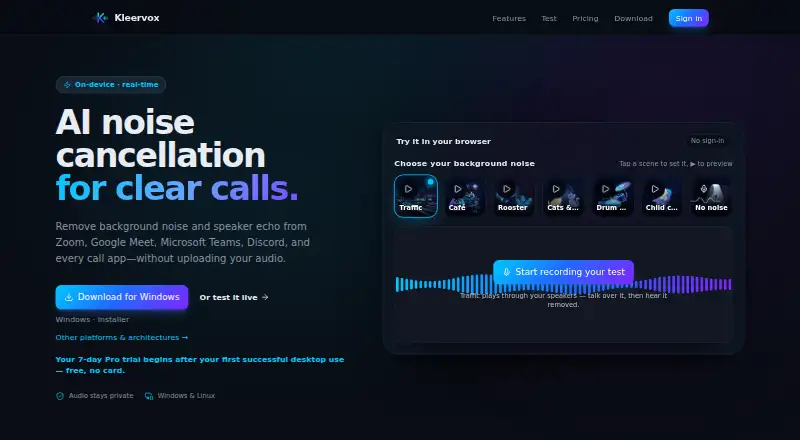
Kleervox is software for reducing background noise and speaker echo during calls. Its on-device neural noise cancellation separates speech from sounds such as keyboards, traffic, fans, and chatter. Echo cancellation helps prevent a caller’s voice from coming back through speakers into the microphone. Kleervox works as a virtual microphone in apps that allow microphone selection, including Zoom, Google Meet, Microsoft Teams, Discord, Slack, and OBS. Noise and echo processing run on the device. The maker says it does not upload, store, or inspect microphone audio, recordings, or cleaned output, though its privacy policy lists collection of sign-in details, usage metrics, installer activity, account state, sign-in history, website and demo analytics, and limited billing data. The Free plan provides one hour of cancellation daily; afterward the microphone works without cancellation until local midnight. New accounts get a seven-day Pro trial after first successful desktop use, without a card. Desktop downloads are available for Windows 10, Windows 11, and Linux; macOS is described as coming soon. Windows setup uses VB-CABLE, while Linux creates the virtual microphone automatically.
Good
- Processes noise and echo on-device.
- Works with Zoom, Meet, Teams, Discord, Slack, and OBS.
- Free plan includes one hour of daily cancellation.
- Seven-day Pro trial requires no card.
Watch out
- Free cancellation stops after one hour daily.
- Windows setup requires VB-CABLE.
- macOS is described as coming soon.
- Pro price is not listed.
Who it suits
Kleervox suits people who want noise and echo reduction across microphone-selecting call or streaming apps. It is available on Windows and Linux, with a web platform also listed.
Verdict
Kleervox offers device-based noise and echo cancellation through a virtual microphone, with a daily free allowance and a no-card Pro trial. Check its operating-system availability and the Windows setup requirement before choosing it.
Plans and prices
From Kleervox's own pricing page, checked 15 Oct 2026.
| Plan | Price | What it gives you |
|---|---|---|
| Free | Free | neural noise cancellation · acoustic echo cancellation · virtual microphone · on-device processing · 1h 0m cleaning per day · forever |
| Pro | — | everything in Free · unlimited daily cleaning · priority updates · cancel or downgrade anytime · monthly in advance; price shown at checkout/local currency |
The facts
Each one read from Kleervox's own pages, with the date it was checked.
What it does
- Account data
- The privacy policy says Kleervox collects Google sign-in details, daily usage metrics, installer activity, account state, sign-in history, website and demo analytics, and limited billing data.checked 29 Sep 2026
- Audio privacy
- Noise and echo cancellation run on-device, and the maker says microphone audio, recordings, and cleaned output are never uploaded, stored, or inspected.checked 29 Sep 2026
- Cancellation
- Cancelling keeps Pro active through the already-paid period and then automatically returns the account to Free.checked 15 Oct 2026
- Developer implementation
- The listed builder says Kleervox was built as a cross-platform desktop application using Electron, Tauri and WebAssembly.checked 15 Oct 2026
- Echo cancellation
- The app includes a separate acoustic echo-cancellation stage for remote voices that leak from speakers into the microphone.checked 15 Oct 2026
- Headphone recommendation
- Kleervox states that headphones are the most reliable way to eliminate speaker echo completely.checked 15 Oct 2026
- Independent directory score
- QT Intel displays a score of 62 for Kleervox and categorizes it as freemium.checked 15 Oct 2026
- Integrations
- Official examples include Zoom, Google Meet, Microsoft Teams, Discord, Slack, OBS, Jitsi, browser calls and audio recorders.checked 15 Oct 2026
- Licence
- The app, website, design and brand are proprietary and not open source; bundled third-party model/runtime components may have separate open-source licences.checked 15 Oct 2026
- Limit: market maturity
- The independent directory says Kleervox faces established competitors such as Krisp and NVIDIA RTX Voice and has weaker brand recognition and distribution.checked 15 Oct 2026
- Local processing
- Noise and echo processing run on the computer, with microphone audio not uploaded, stored or inspected by Kleervox.checked 15 Oct 2026
Where it runs
- Browser demo
- A no-sign-in browser demo lets users combine their microphone with sample noises and compare original and cleaned audio.checked 15 Oct 2026
- Call app compatibility
- It appears as a regular virtual microphone for apps that let users choose a microphone, including Zoom, Google Meet, Microsoft Teams, Discord, Slack, and OBS.checked 29 Sep 2026
- Linux setup
- Linux creates its virtual microphone at runtime through the audio server and needs no separate driver or kernel module.checked 15 Oct 2026
- Linux support
- Linux distribution options include a Debian/Ubuntu .deb package and an AppImage, with PipeWire and PulseAudio support.checked 15 Oct 2026
- macOS status
- The macOS application is described as coming soon and being in Apple notarization.checked 15 Oct 2026
The company
- Company address
- The company record gives Tinnegieter 4, 3894CA Zeewolde, Netherlands as the address.checked 15 Oct 2026
- Company founding
- LinkedIn states that Klevox.Studio was founded in 2025.checked 15 Oct 2026
- Company legal record
- Company.info lists the legal entity as Klevox Studio B.V. and classifies it under computer-program design and computer consultancy activities.checked 15 Oct 2026
- Company management
- The Company.info record names Z. Uretzky as management from 2025.checked 15 Oct 2026
- Company registration
- Company.info reports a new organization registration dated 22 July 2025 based on Dutch Chamber of Commerce data.checked 15 Oct 2026
- Company size
- LinkedIn lists Klevox.Studio as a one-person sole proprietorship headquartered in Zeewolde.checked 15 Oct 2026
Money
- Free plan limit
- Free includes one hour of noise cancellation per day; after the limit, the microphone continues without cancellation until the limit resets at local midnight.checked 29 Sep 2026
- Free usage limit
- After one hour of daily Free-plan cleaning, the microphone continues to work without cancellation until the local-midnight reset.checked 15 Oct 2026
The full review of Kleervox
Kleervox is a virtual microphone that cleans up call audio with on-device noise and echo cancellation. It suits people who want clearer speech across several call and streaming apps, especially Linux and Windows users. Its daily free allowance is useful for occasional calls, but the Windows cable setup and one-hour cap make it less convenient for everyday use.
Overview
Kleervox processes microphone audio in real time, separating speech from sounds such as keyboard clicks, traffic, fans, and nearby chatter. Echo cancellation also reduces the chance that callers hear their own voices leaking back through your speakers. Because apps access Kleervox as a regular virtual microphone, it can work with Zoom, Google Meet, Microsoft Teams, Discord, Slack, and OBS, provided the app lets you select a microphone.
Noise and echo cancellation run on the device. The maker says microphone audio, recordings, and cleaned output are never uploaded, stored, or inspected. That does not mean the service collects no account data: its privacy policy covers Google sign-in details, daily usage metrics, installer activity, account state, sign-in history, website and demo analytics, and limited billing data. Stripe handles subscription payments, and the maker says it does not store full card numbers.
Key features
- Neural noise cancellation: Filters common household, office, and street sounds while preserving speech. This is the main draw for people taking calls in noisy surroundings.
- Acoustic echo cancellation: Reduces speaker audio feeding back into the microphone, useful when you are not using headphones.
- Virtual microphone: Routes cleaned microphone audio into compatible call and streaming apps. Kleervox supports recording and streaming as well as calls.
- On-device audio processing: Keeps microphone audio and cleaned output off the maker’s servers, though account and usage data are still collected.
Pricing
Kleervox is freemium. The Free plan costs nothing and includes one hour of cleaning per day, neural noise cancellation, acoustic echo cancellation, and a virtual microphone for call apps. When the hour runs out, the microphone keeps working without cancellation until the allowance resets at local midnight. That makes Free a practical fit for shorter or occasional calls, not a dependable choice for long daily meeting schedules.
Pro has custom pricing and is billed monthly in advance, recurring until cancelled. It adds unlimited daily cleaning and priority updates, so it is the relevant option for regular users who cannot risk hitting the daily cap. New accounts get a free seven-day Pro trial, which starts after the first successful desktop use and requires no card. You can cancel or downgrade from the dashboard; Pro remains active through the paid period before reverting to Free.
Platforms
Public desktop downloads are available for Windows 10, Windows 11, and Linux. macOS is described as coming soon, so Mac users should not choose Kleervox expecting a current desktop version. Linux creates the virtual microphone automatically. On Windows, setup guides users through installing VB-Audio’s free VB-CABLE, an extra step that may put off anyone looking for a plug-and-play configuration.
Email support usually replies within one to two business days.
Who it's for
Kleervox is best for Linux or Windows users who make calls or recordings in noisy spaces and want noise and echo reduction to work across compatible apps. The daily free hour can cover lighter use, while Pro’s unlimited daily cleaning is a better fit for people who rely on cancellation throughout the workday. It is a poor fit for Mac users waiting for desktop support, or for anyone who needs uninterrupted free cancellation beyond an hour a day.
Pros and cons
- Pro: On-device audio processing keeps microphone audio, recordings, and cleaned output from being uploaded, stored, or inspected, according to the maker.
- Pro: One virtual microphone can serve compatible call, recording, and streaming apps instead of being limited to a single meeting service.
- Pro: The seven-day Pro trial requires no card and begins only after first successful desktop use.
- Con: Free cancellation stops after one hour each day, even though the microphone continues to work.
- Con: Windows setup requires installing VB-CABLE, while Linux creates the virtual microphone automatically.
- Con: macOS desktop support is not yet available.
- Con: The maker collects account and usage-related data even though it says audio itself stays on-device.
Alternatives
For a broader category comparison, see AI Noise Cancellation Software. Consider these alternatives if their platform or plan fits better:
- Noise Suppression for Voice is a free option for Linux, macOS, and Windows users who want coverage across those desktop systems.
- NVIDIA ShadowPlay is worth considering for Windows users with a supported GPU and GeForce 551.52 driver or later; its listed NVIDIA App plan is free.
- DeskBroadcast is a macOS alternative, with a free plan and a 79.00 USD one-time Pro payment for three Macs.
- NoiseTorch-ng is a free Linux option for systems using PulseAudio or PipeWire.
- NoNoise Mac is a free, open-source option for Mac users.
- Krisp AI Meeting Assistant is an alternative for people who want Android, iOS, or browser-extension support as well as desktop coverage; it has a seven-day free trial with no card required.
- neep offers a 14-day trial and an annual individual or small-team plan at $9 a year, with unlimited use and no daily minutes cap.
- Noise Gator is another free option for Windows and macOS.
Verdict
Choose Kleervox if you use Windows or Linux, want noise and echo cancellation across compatible apps, and value on-device audio processing. Its no-card trial makes Pro easy to evaluate, but the free hour is restrictive for full workdays and Windows requires an extra cable component. Look elsewhere if you need macOS support now, or want free cancellation without a daily cap.
Getting started
- Visit https://kleervox.com/ and create an account with Google sign-in.
- Download the desktop app for Windows 10, Windows 11 or Linux.
- On Windows, install VB-Audio’s free VB-CABLE for microphone setup; on Linux, the virtual microphone is created automatically.
- Use the Kleervox virtual microphone in a call app that lets you choose a microphone.
- Use the Free plan, or begin the seven-day Pro trial after first successful desktop use.
Limits worth knowing
The Free plan includes one hour of cleaning per day. After the limit, the microphone continues without cancellation until local midnight; Pro provides unlimited daily cleaning.
Questions
Is Kleervox free?
Yes. The Free plan costs nothing and includes one hour of cleaning per day, neural noise cancellation and acoustic echo cancellation.
How long is the Pro trial?
New accounts receive a free seven-day Pro trial after first successful desktop use. No card is required.
Which systems does Kleervox support?
Public desktop downloads are available for Windows 10, Windows 11 and Linux. macOS is described as coming soon.
Which apps can use Kleervox?
Kleervox works as a virtual microphone in apps that let users choose a microphone, including Zoom, Google Meet, Microsoft Teams, Discord, Slack and OBS.
What happens when the Free daily limit is reached?
The microphone continues without cancellation until the limit resets at local midnight.
How does Kleervox handle audio and payments?
The maker says microphone audio, recordings and cleaned output are never uploaded, stored or inspected. Stripe processes subscription payments, and the maker says it does not store full card numbers.
Alternatives to Kleervox
- 1

Krisp AI Meeting Assistant
AndroidiOSExtensionmacOS7.8From $8 a month - 2
DeepFilterNet
Free planOpen sourceAPILinuxmacOSSelf-hosted7.6Free plan - 3

DeskBroadcast
Free planmacOS7.3$79 one-time - 4

Noise Blocker
Free planWindows6.7$50 one-time - 5

neep
LinuxmacOSWindows6.3From $9 a month - 6
Supertone Clear
macOSWindows6.2$69 one-time