
NetSpot
NetSpot is a Wi-Fi app for planning networks, surveying wireless coverage, analyzing nearby networks, and troubleshooting.
What NetSpot is
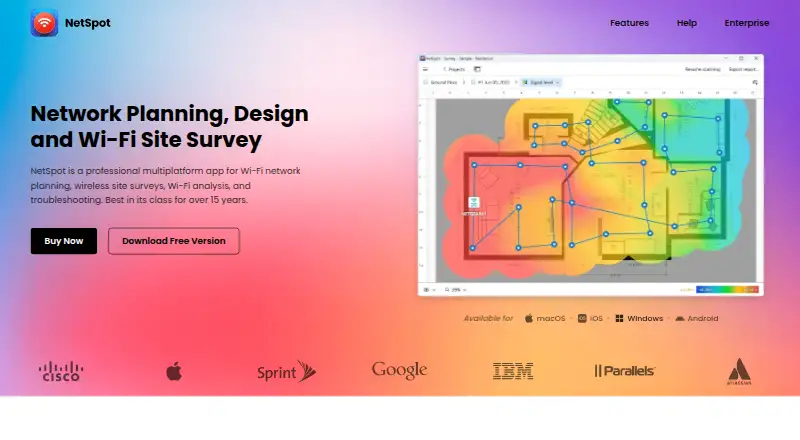
NetSpot is a Wi-Fi app for planning networks, surveying wireless coverage, analyzing nearby networks, and troubleshooting. Inspector mode displays nearby Wi-Fi networks with details such as channels, vendors, security type, bands, signal, and noise. Survey mode turns measurements into interactive, color-coded heatmaps, with more than 20 visualizations and customizable reports. Planning mode supports predictive surveys and network design, including multi-floor layouts. Survey data can be exported as PDF or CSV, and heatmaps saved as PNG. Active survey throughput testing can use Iperf 3 or custom speed-test servers. NetSpot says survey, scan, heatmap, network, and location data are processed locally rather than automatically sent to Etwok. Desktop editions support offline activation and can run fully offline afterward. Optional anonymized, aggregated usage statistics can be disabled in Preferences. The free edition is for macOS and Windows. Its seven-day full-featured PRO trial requires a valid corporate email and an explanation for the request.
Good
- Inspector displays channel, security, band, signal, and noise details.
- Survey mode offers more than 20 visualizations.
- Exports include PDF, CSV, and PNG formats.
- Desktop editions can run fully offline after activation.
Watch out
- Free edition is listed for macOS and Windows.
- PRO trial requires a valid corporate email and an explanation.
- PRO limits surveys to 50 zones.
Who it suits
NetSpot suits people planning Wi-Fi networks, surveying coverage, or diagnosing nearby wireless conditions. PRO is described for individuals and solopreneurs, while Enterprise is intended for teams and organizations.
Verdict
NetSpot brings network inspection, heatmap surveys, and predictive planning into one Wi-Fi toolkit. Consider its trial requirements and PRO survey limits before selecting an edition.
Plans and prices
From NetSpot's own pricing page, checked 20 Sep 2026.
| Plan | Price | What it gives you |
|---|---|---|
| NetSpot Pro | $199, paid once | 1 user · 1 technician · 50 zones per project · 50 snapshots per zone · 500 data points per snapshot · Lifetime license; perpetual one-time purchase |
| NetSpot Pro | Priced on request | 1 user · 1 technician · 50 zones per project · 50 snapshots per zone · 500 data points per snapshot |
| NetSpot Enterprise | Priced on request | 10 users · 10 technicians · Unlimited zones · Unlimited snapshots · Unlimited data points |
| NetSpot Free | Free | Personal and evaluation use · Free edition for macOS and Windows |
| NetSpot Enterprise Lifetime License | — | 10 users + 10 technicians · Unlimited zones, snapshots, and data points · Pay once; all updates included |
| NetSpot Enterprise Annual Subscription | — | 10 users + 10 technicians · Unlimited zones, snapshots, and data points · Annual subscription; renews automatically every 12 months unless canceled |
| NetSpot PRO Annual Subscription | — | 1 user + 1 technician · 50 zones per project · 50 snapshots per zone · 500 data points per snapshot · Annual subscription; renews automatically every 12 months unless canceled |
| NetSpot PRO Lifetime License | — | 1 user + 1 technician · 50 zones per project · 50 snapshots per zone · 500 data points per snapshot · Pay once; all updates included |
The facts
Each one read from NetSpot's own pages, with the date it was checked.
What it does
- Enterprise audience
- NetSpot describes Enterprise as intended for teams and organizations, while PRO is for individuals and solopreneurs.checked 29 Sep 2026
- Exports
- Survey data can be exported as PDF or CSV, and heatmaps can be saved as PNG.checked 29 Sep 2026
- Inspector mode
- Inspector mode displays nearby Wi-Fi networks and details such as channels, vendors, security type, bands, signal, and noise.checked 29 Sep 2026
- Integrations
- The features page describes Iperf 3 or custom speed-test servers for active survey throughput testing.checked 29 Sep 2026
- Offline use
- The desktop editions support offline activation, and NetSpot says the app can run entirely offline after activation.checked 29 Sep 2026
- Optional analytics
- The app may send anonymized, aggregated usage statistics, which users can disable in NetSpot Preferences.checked 29 Sep 2026
- Privacy
- NetSpot says survey, scan, heatmap, network, and location data are processed locally and are not automatically sent to Etwok.checked 29 Sep 2026
- PRO limits
- The PRO plan allows up to 50 zones per survey, 50 snapshots per zone, and 500 data points per snapshot.checked 29 Sep 2026
- Purpose
- NetSpot is a Wi-Fi app for network planning, wireless site surveys, analysis, and troubleshooting.checked 29 Sep 2026
- Security
- Etwok says it uses access controls and encryption in transit to protect the limited personal data it holds.checked 29 Sep 2026
- Support
- NetSpot provides email support at [email protected].checked 29 Sep 2026
- Surveys and heatmaps
- Survey mode creates interactive, color-coded Wi-Fi heatmaps, with more than 20 visualizations and customizable reports.checked 29 Sep 2026
The company
- Founded
- 2010checked 23 Sep 2026
- Headquarters
- New Castle, Delaware, USAchecked 23 Sep 2026
Money
- Planning
- Planning mode supports predictive Wi-Fi surveys and network design, including multi-floor planning.checked 29 Sep 2026
- Trial conditions
- The 7-day full-featured PRO trial requires a valid corporate email and an explanation for the request.checked 29 Sep 2026
The full review of NetSpot
Overview
NetSpot is a Wi-Fi toolkit for inspecting networks, surveying coverage, and planning wireless layouts. It suits people who need more than a quick signal check, especially those mapping coverage or designing multi-floor networks. Its breadth is a strength, but PRO survey quotas and a corporate-email requirement for the trial make it less convenient for casual evaluation.
NetSpot brings inspection, heatmaps, and predictive planning together, so a user can move from diagnosing a wireless environment to documenting or designing it. That range is most useful to network professionals and serious site owners; someone who only wants a basic scan may not need its survey and planning depth.
Key features
Inspect and troubleshoot
Inspector mode shows nearby networks with their channels, vendors, security types, bands, signal, and noise. Spectrum analysis, channel recommendations, and historical analysis add context for diagnosing interference or tracking changes. This makes NetSpot more useful than a simple list of visible networks, though the strongest differentiation is in its broader survey and planning tools.
Survey coverage
Survey mode produces interactive, color-coded heatmaps, with more than 20 visualizations and customizable reports. Survey data exports to PDF or CSV, and heatmaps can be saved as PNG. Those outputs help turn a site walk into material that can be reviewed or shared, rather than leaving coverage observations as informal notes.
PRO caps each survey at 50 zones, each zone at 50 snapshots, and each snapshot at 500 data points. That is a defined ceiling for individual projects, and may constrain unusually large or repeated surveys.
Plan and test
Planning mode supports predictive surveys and network design, including multi-floor projects. Active survey throughput testing can use Iperf 3 or custom speed-test servers. Together, these capabilities make NetSpot a stronger fit for planned deployments than a tool focused only on finding nearby networks.
Privacy and operation
NetSpot says survey, scan, heatmap, network, and location data are processed locally rather than automatically sent to Etwok. Desktop editions support offline activation and can run entirely offline after activation. Optional anonymized, aggregated usage statistics can be disabled in Preferences. Etwok says it protects the limited personal data it holds with access controls and encryption in transit. Email support is available at [email protected].
Pricing
NetSpot is freemium, with a free edition and paid options; the pricing note gives a starting price of $199, while the named paid plans use custom pricing. NetSpot Free costs nothing and is for personal and evaluation use on macOS and Windows. It offers a way to begin without a purchase, but does not provide the published PRO survey capacity or Enterprise team allowances.
The PRO Annual Subscription has custom pricing and renews automatically every 12 months unless canceled. It covers 1 user and 1 technician, with 50 zones per project, 50 snapshots per zone, and 500 data points per snapshot. It is aimed at individuals and solopreneurs who need substantive survey tools but can work within those caps. PRO Lifetime License also has custom pricing, costs once, includes all updates, and carries the same user, technician, and survey limits; it avoids recurring renewal but not the project ceilings.
The Enterprise Annual Subscription has custom pricing, renews automatically every 12 months unless canceled, and includes 10 users and 10 technicians with unlimited zones, snapshots, and data points. Enterprise Lifetime License has custom pricing, is paid once, includes all updates, and offers the same team size and unlimited survey capacity. These editions suit organizations that need multiple practitioners or cannot accept PRO quotas; the tradeoff is that their price is custom rather than a published amount.
A 7-day full-featured PRO trial requires a valid corporate email and an explanation for the request. That gives qualified evaluators access to the full PRO feature set, but makes trial access less straightforward for personal users.
Platforms
NetSpot supports Windows, macOS, iOS, and Android. The free edition is for macOS and Windows, so mobile support should not be mistaken for free-edition availability across every platform.
Who it's for
NetSpot is a strong match for individuals surveying offices or homes, network specialists troubleshooting coverage, and teams planning multi-floor deployments. Its offline desktop operation and local processing are useful for work that should stay on the device. It is less compelling for someone who needs only a lightweight network scan, or for larger survey work if the PRO caps or custom-priced Enterprise editions do not fit.
Pros and cons
- Pros: Inspection, site surveys, and predictive planning share one toolkit, which reduces the need to switch between separate stages of wireless work.
- Pros: Heatmaps, more than 20 visualizations, customizable reports, and PDF, CSV, and PNG exports support clear documentation.
- Pros: Local data processing and fully offline desktop operation after activation provide useful control over survey workflows.
- Cons: PRO limits zones, snapshots, and data points, so demanding projects may require Enterprise.
- Cons: The full-featured trial lasts seven days and requires a corporate email plus an explanation, a barrier for personal evaluators.
- Cons: Named paid plans have custom pricing, making it difficult to compare their cost before requesting it.
Alternatives
WiFiman is the better fit for readers who want a free, ad-free mobile app; its desktop edition is limited to UniFi Device Discovery and Teleport VPN, rather than NetSpot's survey and planning scope.
Hamina Planner is another freemium planning option for readers comparing Wi-Fi design tools; its Planner plan starts at from $590 (priced on request).
inSSIDer suits readers seeking a narrower Wi-Fi scanning and visualization option: its free download requires a free Oscium account, and MetaGeek Plus costs $200 a year.
Parkdale is a free alternative for readers comparing free utilities.
Kismet is a free, open-source alternative for readers who prefer that model.
AirMagnet Survey PRO is another freemium survey option.
Acrylic Wi-Fi Heatmaps is a Windows heatmap alternative with a free trial but no free plan.
DTNT is another freemium Windows option.
For category comparisons, browse Wi-Fi Analyzer Software or Network Diagnostic Software.
Verdict
Choose NetSpot if you need one app for wireless inspection, detailed site surveys, and predictive planning, especially for multi-floor design or documented coverage work. Its main advantage is that end-to-end range; look elsewhere if you only need a simple scanner, need uncapped surveying without an Enterprise quote, or want a trial that does not require corporate details.
Getting started
- Visit the NetSpot website.
- Choose a supported platform: Android, iOS, macOS, or Windows.
- Use the free edition on macOS or Windows for personal or evaluation use.
- Request the seven-day PRO trial with a valid corporate email and an explanation.
- Choose PRO for individual use or Enterprise for teams and organizations.
Limits worth knowing
The free edition is for personal and evaluation use and is available for macOS and Windows. PRO permits up to 50 zones per survey, 50 snapshots per zone, and 500 data points per snapshot; Enterprise allows unlimited zones, snapshots, and data points. The PRO trial lasts seven days and requires a valid corporate email and an explanation.
Questions
Is NetSpot free?
Yes. NetSpot Free costs nothing and is for personal and evaluation use on macOS and Windows.
How much do paid plans cost?
The listed PRO and Enterprise annual and lifetime plan prices are not provided here.
Which platforms does NetSpot support?
The listed platforms are Android, iOS, macOS, and Windows. The free edition is for macOS and Windows.
Does NetSpot offer a free trial?
Yes. The full-featured PRO trial lasts seven days and requires a valid corporate email and an explanation for the request.
Can NetSpot run offline?
Desktop editions support offline activation, and NetSpot says the app can run entirely offline after activation.
What are the PRO survey limits?
PRO allows up to 50 zones per survey, 50 snapshots per zone, and 500 data points per snapshot.
Alternatives to NetSpot
- 1

Hamina Planner
iOSWebAPILinux7.6From $590 a year - 2

inSSIDer
Free planAndroidmacOSWindows7.6From $200 a year - 3

WiFiman
Free planAndroidiOSLinuxmacOS7.4Free plan - 4
Vistumbler
Free planAndroidWindows6.6Free plan - 5
DTNT
Free planWindows6.4$59 one-time - 6
Wi-Fi Scanner
Free planWindows6.4$99.95 one-time