
inSSIDer
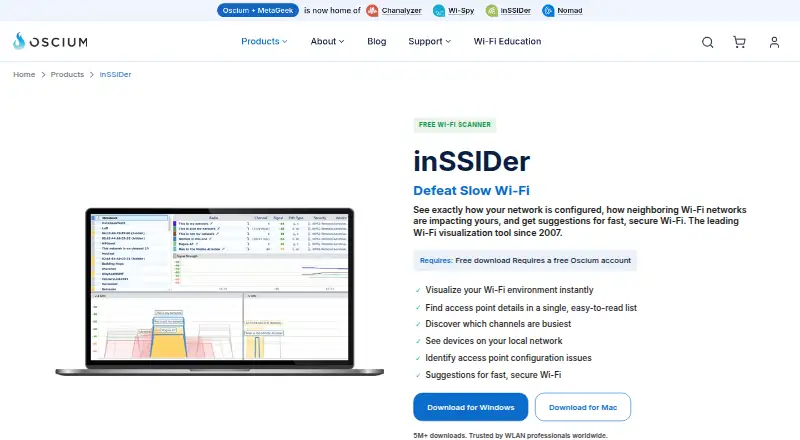
inSSIDer is Wi-Fi analysis software that visualizes nearby wireless networks and helps explain their effect on a local connection.
What inSSIDer is
inSSIDer is Wi-Fi analysis software that visualizes nearby wireless networks and helps explain their effect on a local connection. It shows access point details including channel, channel width, signal strength, Wi-Fi generation, maximum data rate, and security. A channel table indicates how busy each Wi-Fi channel is, which can help users identify a relatively quiet option. The software can scan a local network for connected devices and identify the type and name of many of them. It also analyzes Wi-Fi configuration and describes what is working well, what could improve, and what needs attention. The free download provides scanning and visualization and requires a free Oscium account. MetaGeek Plus adds packet capture, RF spectrum analysis, network snapshots, client traffic analytics, cloud sync, and team collaboration; these Plus features are currently Windows-only. A scanner cannot directly detect interference from non-Wi-Fi devices such as microwaves, Bluetooth, or cordless phones. The product is listed for Windows and macOS, and MetaGeek Plus costs $200 a year.
Good
- Displays channel, signal strength, generation, data rate, and security.
- Channel table shows relative channel activity.
- Scans local network devices and identifies many by type and name.
- Free scanning and visualization download is available.
- Report export and historical analysis are listed.
Watch out
- Free download requires a free Oscium account.
- MetaGeek Plus features are currently Windows-only.
- Cannot directly see interference from non-Wi-Fi devices.
Who it suits
inSSIDer suits wireless professionals and people scanning a home network or surveying an enterprise campus. It is useful for users who want to inspect nearby access points, local devices, and channel activity.
Verdict
inSSIDer provides detailed views of nearby Wi-Fi networks and configuration, with a free scanning option and paid advanced features. Note the Windows-only limit for MetaGeek Plus and the scanner’s inability to detect non-Wi-Fi interference directly.
Plans and prices
From inSSIDer's own pricing page, checked 15 Oct 2026.
| Plan | Price | What it gives you |
|---|---|---|
| inSSIDer Free | Free | Wi-Fi environment visualization · access-point details · busy-channel view · local-network device scan · configuration suggestions |
| MetaGeek Plus | $200 a year | Packet analysis · network snapshots · client traffic analytics · cloud sync · advanced diagnostics · free trial included · $200/year |
The facts
Each one read from inSSIDer's own pages, with the date it was checked.
What it does
- Access point details
- It displays channel, channel width, signal strength, Wi-Fi generation, maximum data rate, and security for nearby access points.checked 30 Sep 2026
- Access-point details
- The application puts important access-point capabilities and configuration details into one list.checked 15 Oct 2026
- Acquisition
- Dealroom records Oscium's acquisition of MetaGeek in October 2024.checked 15 Oct 2026
- Acquisition operations
- Oscium's announcement says Oscium and MetaGeek would continue operating independently in the short term while their products and teams were integrated over time.checked 15 Oct 2026
- API availability
- The inSSIDer Technician API returns scan data as JSON, with documentation supplied to customers and prospects on request by email.checked 15 Oct 2026
- Audience
- Oscium says its tools serve wireless professionals and can be used for scanning a home network or surveying an enterprise campus.checked 30 Sep 2026
- Channel analysis
- Its Channels Table shows how busy each channel is to help users choose quieter channels.checked 15 Oct 2026
- Cloud sync
- MetaGeek Plus includes synchronization of data across devices through the cloud.checked 15 Oct 2026
- Configuration checks
- The software analyzes Wi-Fi configuration and explains what is working well, what could improve, and what needs fixing.checked 30 Sep 2026
- Configuration guidance
- The software analyzes Wi-Fi settings and explains problems and recommended fixes in plain language.checked 15 Oct 2026
- Documentation
- Oscium's support center provides user guides, getting-started material, release notes, videos and troubleshooting articles for inSSIDer.checked 15 Oct 2026
- Hardware integration
- Wi-Fi 7 tri-band packet capture can use the WLAN Pi Go adapter with MetaGeek Plus.checked 15 Oct 2026
- Hardware requirement
- The maker says the free scanner uses the Wi-Fi adapter already in a Windows laptop; WLAN Pi Go can be paired for Wi-Fi 7 tri-band packet capture with MetaGeek Plus.checked 30 Sep 2026
- Integrations
- MetaGeek Plus adds packet capture, RF spectrum analysis, network snapshots, client traffic analytics, cloud sync through My.MetaGeek.com, and team collaboration.checked 30 Sep 2026
- Interference limit
- A Wi-Fi scanner cannot directly see interference from non-Wi-Fi devices such as microwaves, Bluetooth, and cordless phones.checked 30 Sep 2026
- LAN discovery
- inSSIDer scans the local network and lists connected devices, often identifying device type and name.checked 15 Oct 2026
- Licence
- The current software is distributed under Oscium's proprietary, non-exclusive and non-transferable end-user licence rather than an open-source licence.checked 15 Oct 2026
Where it runs
- Android review complaint
- An AppBrain reviewer wanted the Android app to recommend the best channel and expose desktop-style wireless-mode diagnostics.checked 15 Oct 2026
- Limit: Mac feature gap
- Oscium's Mac beta guide says the Mac release does not contain all Windows capabilities and does not support MetaGeek Plus.checked 15 Oct 2026
The company
- Company founded
- Oscium says it was founded in 2010 by two brothers.checked 15 Oct 2026
- Company headquarters and size
- LinkedIn lists Oscium as a privately held Oklahoma City company with 2–10 employees.checked 15 Oct 2026
- Company legal name
- The end-user agreement identifies the licensor as Oscium, LLC.checked 15 Oct 2026
- Founded
- 2010checked 28 Sep 2026
- Headquarters
- Monument, Colorado, United Stateschecked 28 Sep 2026
The full review of inSSIDer
Overview
inSSIDer is a Wi-Fi analysis tool for people who want to understand nearby networks and improve a wireless setup, from home users to wireless professionals. It is strongest when you need actionable detail about access points, channel use, and configuration; deeper analysis and team workflows require MetaGeek Plus.
Key features
For nearby access points, inSSIDer displays channel, channel width, signal strength, Wi-Fi generation, maximum data rate, and security. That makes it useful for comparing neighboring networks and spotting settings that may be affecting your connection. The Channels Table shows channel congestion, and channel recommendations point toward a relatively quiet option. This helps with Wi-Fi configuration, but it is not a complete interference diagnosis: the scanner cannot directly detect non-Wi-Fi sources such as microwaves, Bluetooth, or cordless phones.
Local-network scanning can identify the type and name of many connected devices, helping users see what is attached to a home or workplace network. Configuration checks explain what is working, what could improve, and what needs fixing, making the tool more useful than a simple access-point display. Report export and historical analysis support documenting changes and reviewing performance over time.
MetaGeek Plus adds packet capture, RF spectrum analysis, network snapshots, client traffic analytics, cloud sync through My.MetaGeek.com, and team collaboration. Those capabilities suit professional troubleshooting and shared work, but Plus is currently Windows-only. The free scanner uses a Windows laptop’s built-in Wi-Fi adapter; WLAN Pi Go can be paired with Plus for Wi-Fi 7 tri-band packet capture.
Pricing
inSSIDer Free costs nothing. It requires a free Oscium account and includes Wi-Fi scanning and visualization, making it the right starting point for users who need to inspect nearby networks without advanced workflows.
MetaGeek Plus costs $200 a year and adds the advanced features, including packet capture, spectrum analysis, network snapshots, client analytics, cloud sync, and collaboration. It is the better fit for professionals who need those tools, but the Windows-only restriction rules it out for users who need Plus on macOS. The free tier gives up these advanced capabilities.
Platforms
inSSIDer supports Windows and macOS, but the free scanner and MetaGeek Plus features are currently Windows-only. Oscium says its tools can be used both for home-network scanning and for enterprise campus surveys. It also provides a support knowledge base with troubleshooting and optimization articles, tutorials, and lessons.
Oscium says it uses encryption in transit and at rest, pseudonymization, least-privilege access, and need-to-know controls, while noting that it cannot warrant information security. Its privacy policy says it collects network information including IP address, access-point vendor, and throughput test results for analysis and performance history; users should weigh that data collection before connecting network details to an account.
Who it's for
inSSIDer is a good choice for home users who want more than a signal-strength reading and for wireless professionals who need channel, configuration, and device visibility. Plus is aimed at users who need packet capture, spectrum analysis, or team workflows. It is not the right tool for diagnosing interference from non-Wi-Fi devices, and macOS users cannot use the Plus feature set.
Pros and cons
- Pros: Detailed access-point fields and a channel-congestion table make nearby network conditions easier to compare.
- Pros: Device identification, configuration guidance, report export, and historical analysis support both troubleshooting and follow-up.
- Pros: Plus brings packet capture, spectrum analysis, and collaboration into one advanced tier.
- Cons: MetaGeek Plus features are Windows-only, limiting advanced use on macOS.
- Cons: The scanner cannot directly detect non-Wi-Fi interference, so it cannot diagnose every source of poor wireless performance.
- Cons: The free scanner requires a free Oscium account, and Oscium collects network data for analysis and performance history.
Alternatives
Wi-Fi Analyzer Software and Network Diagnostic Software offer category-level comparisons for readers still weighing their options.
Choose NetSpot if you want a freemium option available on Android and iOS as well as desktop platforms; its free edition is for personal and evaluation use on macOS and Windows.
WiFiman is a free, ad-free mobile app across Android and iOS, while its desktop support is limited to UniFi Device Discovery and Teleport VPN.
Parkdale is another free option, available on Android, macOS, and Windows.
Kismet is free and open source, with support for Linux, macOS, Windows, API, and self-hosted use.
DTNT is a Windows freemium alternative whose free tier includes Wi-Fi surveying, live channel view, IP scanning, speed tests with saved history, profile review, and one-time ping.
Hamina Planner is a freemium alternative for Linux, macOS, web, and Windows, with a starting price of $590.
AirMagnet Survey PRO is a freemium option for macOS and Windows.
WiFiAnalyzer is a free Android alternative.
Verdict
Choose inSSIDer if you need detailed visibility into nearby Wi-Fi networks, channel congestion, connected devices, and configuration guidance, with a free way to start. Look elsewhere if you need Plus on macOS or need to identify interference from non-Wi-Fi devices directly.
Getting started
- Open the inSSIDer product website
- Create a free Oscium account for the free download
- Install inSSIDer on Windows or macOS
- Use the Windows laptop Wi-Fi adapter for scanning
- Choose MetaGeek Plus for advanced Windows features
Limits worth knowing
The free download provides Wi-Fi scanning and visualization and requires a free Oscium account. MetaGeek Plus features are currently Windows-only and cost $200 a year; non-Wi-Fi interference is outside a scanner's direct visibility.
Questions
Is there a free version?
Yes. inSSIDer Free costs nothing and is billed as a free download, with a free Oscium account required.
What does MetaGeek Plus cost?
MetaGeek Plus costs $200 a year.
Which platforms are supported?
inSSIDer is listed for Windows and macOS. MetaGeek Plus features are currently Windows-only.
What does MetaGeek Plus add?
It adds packet capture, RF spectrum analysis, network snapshots, client traffic analytics, My.MetaGeek.com cloud sync, and team collaboration.
Can it detect microwave or Bluetooth interference?
No. A Wi-Fi scanner cannot directly see interference from non-Wi-Fi devices such as microwaves, Bluetooth, and cordless phones.
Alternatives to inSSIDer
- 1

Hamina Planner
iOSWebAPILinux7.6From $590 a year - 2
NetSpot
Free planAndroidiOSmacOSWindows7.4$199 one-time - 3

WiFiman
Free planAndroidiOSLinuxmacOS7.4Free plan - 4
Vistumbler
Free planAndroidWindows6.6Free plan - 5
DTNT
Free planWindows6.4$59 one-time - 6
Wi-Fi Scanner
Free planWindows6.4$99.95 one-time