
Narranta
Narranta is a content operations platform for editorial teams that coordinates planning, production, and approvals alongside an existing publishing system.
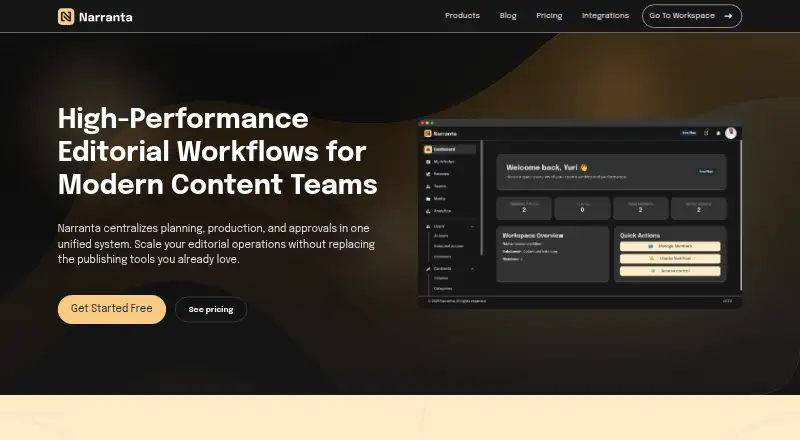
What Narranta is
Narranta is a content operations platform for editorial teams that coordinates planning, production, and approvals alongside an existing publishing system. Its central workspace holds drafts, structured content metadata, and automatic saves. Writers, editors, and stakeholders can edit drafts together, leave contextual comments, and assign review ownership. Content can move through stages such as Draft, Review, and Approved, with an owner for each stage. Teams can manage multiple publications from one login, keeping teams and permissions separate. Narranta also describes performance tracking, editorial insights, and production analytics. It can connect with publishing tools through API, plugin, or export, though WordPress, Ghost, Notion, Wix, Webflow, and Squarespace integrations are marked “Coming Soon.” The free plan costs nothing and is limited to one publication and three articles for a solo creator. The Creator Plan is $9 a month; higher plans are also listed. Narranta’s privacy policy describes access controls and encrypted connections, while noting that no online service can guarantee absolute security.
Good
- Drafts save automatically.
- Review stages can have assigned owners.
- Separate publications have isolated teams and permissions.
- Connects through API, plugin, or export.
Watch out
- Free plan allows only three articles.
- Free plan is limited to one publication.
- Listed integrations are marked “Coming Soon.”
Who it suits
Narranta is aimed at editorial teams coordinating contributors, reviews, and multiple publications. Its free plan is specifically limited to a solo creator.
Verdict
Narranta brings collaborative drafting and approval stages into a workspace designed to sit beside an existing CMS. The free tier is narrow, while paid plans start at $9 a month.
Plans and prices
From Narranta's own pricing page, checked 20 Oct 2026.
| Plan | Price | What it gives you |
|---|---|---|
| Free Plan | Free | Up to 3 articles · 1 publication · Limited media uploads · Solo creator only · Basic analytics · Public writer profile · Narranta branding · No custom domain · $0 forever |
| Creator Plan | $19 a month | Up to 100 articles · Up to 5 team members · Up to 2 publications · 1 custom domain · Own logo and branding · Basic SEO settings · Standard analytics · $19 /mo |
| Publisher Plan | $79 a month | Everything in Creator · Unlimited team members · Unlimited publications and media · API access for integrations · Priority technical support · Light-touch custom onboarding · $79 /mo |
| Agency / Teams | Priced on request | Multi-client and multi-brand workspaces · SSO when available · Dedicated onboarding · SLA and priority support · Custom seat and publication packages · Custom, from $199 to $499 a month |
The facts
Each one read from Narranta's own pages, with the date it was checked.
What it does
- Analytics
- The product describes content performance tracking, editorial insights, and production analytics.checked 29 Sep 2026
- API access
- Yes: the Publisher plan includes API access for integrations.checked 19 Oct 2026
- Collaboration
- Editors, writers, and stakeholders can collaboratively edit drafts, leave contextual comments, and assign clear review ownership.checked 29 Sep 2026
- Draft management
- It provides a centralized editorial workspace, structured content metadata, and automatic draft saving.checked 29 Sep 2026
- Integrations
- WordPress, Ghost, Notion, Wix, Webflow, and Squarespace are listed as integrations marked “Coming Soon.”checked 29 Sep 2026
- Multiple publications
- Teams can manage separate publications with isolated teams and permissions from one login.checked 29 Sep 2026
- Privacy limits
- The privacy policy says no online service can guarantee absolute security and notes that retention periods and a current subprocessor list should be documented or added before publication.checked 29 Sep 2026
- Product
- Narranta centralizes editorial planning, production, and approvals for content teams without requiring them to replace their publishing tools.checked 29 Sep 2026
- Publishing stack
- Narranta is designed to work alongside an existing CMS, and its integrations page says connections can be made via API, plugin, or export.checked 29 Sep 2026
- Security
- The privacy policy says Narranta uses access controls, encrypted connections, and other reasonable technical and organizational measures to protect personal information.checked 29 Sep 2026
- Support
- The Help Center directs users to email [email protected] for workspace help and asks them to include their workspace name and a short description of the issue.checked 29 Sep 2026
- Who it is for
- Narranta describes itself as a content operations platform for editorial teams, including teams coordinating contributors, approvals, and multiple publications.checked 29 Sep 2026
Where it runs
- Approval workflow
- Content can move through structured stages such as Draft, Review, and Approved, with owners assigned to each stage.checked 29 Sep 2026
The full review of Narranta
Overview
Narranta is a workspace for planning, drafting, and approving content alongside an existing publishing system. It is best suited to editorial teams coordinating contributors or multiple publications. Its structured handoffs are the main draw; solo creators may find the free plan’s three-article cap too tight.
Key features
Drafts, structured content metadata, and automatic saving sit in one editorial workspace. Writers, editors, and stakeholders can edit collaboratively, comment in context, and assign review ownership. This can make responsibility clearer across a review cycle, though it means teams must coordinate in Narranta while retaining their publishing tools.
Content can move through stages such as Draft, Review, and Approved, with an owner assigned to each stage. Calendar views and task assignments extend that workflow into planning. Teams can also manage separate publications with isolated teams and permissions from one login, a useful distinction for groups handling multiple editorial operations rather than a single creator’s output.
Narranta describes content performance tracking, editorial insights, and production analytics. It is designed to work beside an existing CMS, with connections via API, plugin, or export. WordPress, Ghost, Notion, Wix, Webflow, and Squarespace are marked “Coming Soon,” so teams relying on one of those integrations should not assume it is ready.
Pricing
The Free Plan costs nothing, billed $0 /yr. It allows up to 3 articles and 1 publication, with limited media uploads and basic analytics. It is solo creator only, includes a public writer profile and Narranta branding, and has no custom domain. That is a low-commitment way to try a single-publication workflow, but the article cap and solo restriction make it unsuitable for a team.
The Creator Plan costs $9 a month, billed $9 /mo. It raises the allowance to 100 articles, up to 5 team members, and up to 2 publications, while adding 1 custom domain, custom branding, priority article review, basic SEO, and standard analytics. Media uploads remain limited. It is the practical entry point for a small team, but not for a growing operation that needs more publications or richer analytics.
The Publisher Plan costs $29 a month, billed $29 /mo. It includes unlimited articles and media uploads, up to 20 team members, up to 10 publications, custom domains, advanced analytics, RBAC, team management, and removal of Narranta branding. Those higher operational limits make it the better fit for established multi-publication teams; it costs more but removes several Creator constraints.
The Enterprise Plan has custom pricing. It includes everything in Publisher, unlimited team members and media uploads, a dedicated account manager, API access, SSO, priority technical support, and custom onboarding and training. It is aimed at organizations that need those enterprise services rather than simply higher article volume.
Platforms
Narranta is available on web and through an API. The product is designed to accompany an existing CMS rather than replace it. Its privacy policy says it uses access controls, encrypted connections, and other reasonable technical and organizational measures to protect personal information, while acknowledging that no online service can guarantee absolute security.
Workspace help is handled by email at [email protected]; users are asked to include their workspace name and a short description of the issue.
Who it's for
Narranta is aimed at content operations teams coordinating contributors, approvals, and multiple publications. Its review ownership, staged approvals, and publication-level permissions are most compelling when several people share responsibility for getting content ready. A solo creator with modest output can use the free tier, but may not need the collaboration structure.
Pros and cons
- Pros: Assigned owners and contextual comments give teams a defined way to handle reviews instead of leaving handoffs unclear.
- Pros: Isolated teams and permissions across multiple publications support organizations managing more than one editorial operation.
- Cons: The free tier is limited to three articles, one publication, and solo use, so it does not demonstrate the team workflow at no cost.
- Cons: Named integrations including WordPress and Notion are marked “Coming Soon,” which may constrain teams expecting a ready-made connection.
Alternatives
For a wider set of content calendar options, see Content Calendar Software.
- CoSchedule is worth considering if Android or iOS access matters; its Starter plan is $29 a month billed annually, with a monthly option at $39/month, and includes one user seat and three social profiles.
- Sheetlane is an alternative for teams whose work centers on spreadsheets: its free plan includes one workspace, three users, 1,000 AI credits per month, and unlimited spreadsheets and rows.
- Nelio Content is a self-hosted, web-based option with a free STARTER plan that includes unlimited sites, limited automations, and three social profiles per site.
- PublishPress Planner may suit WordPress-oriented planning needs, with a free plan that includes a content calendar, overview, board, notifications, and Google Calendar export.
- Strive Content Calendar offers a web-based free Lite plan with a calendar, unscheduled drafts, pipeline board and list, editorial statuses, checklists, and notes.
- Uix Page Builder is a free, self-hosted page builder rather than an editorial operations platform.
- Scompler is another option for teams comparing content operations platforms.
- Optimizely Configured Commerce uses individually packaged pricing arranged through Optimizely.
Verdict
Choose Narranta if your editorial team needs explicit review ownership, staged approvals, and separation between multiple publications while keeping its current CMS. The main reason to look elsewhere is that the free plan is too narrow for team use and several named integrations are still coming soon.
Alternatives to Narranta
- 1
StoryChief Broadcasts
Free planAndroidiOSWebAPI8.0Free plan - 2
CoSchedule
Free planAndroidiOSWebExtension7.9From $29 a month - 3
Annum
AndroidiOSWeb7.7From $99 a month - 4

Nelio Content
Free planOpen sourceWebAPISelf-hosted7.4Free plan - 5
Newsmind Stories
AndroidiOSWebSelf-hosted6.9From €39 a month - 6

Storyflow
Free planWeb6.8From $9.99 a month