
N-able Take Control
N-able Take Control is remote support software for IT businesses and managed service providers helping customers with device issues.
What N-able Take Control is
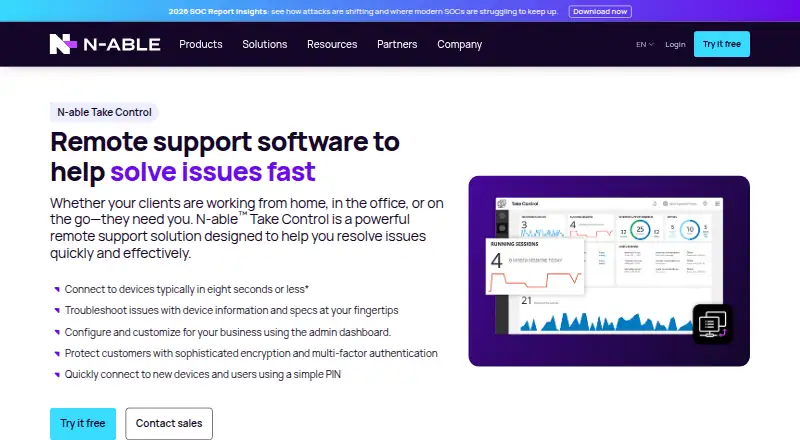
N-able Take Control is remote support software for IT businesses and managed service providers helping customers with device issues. It supports attended sessions through downloaded applets and unattended access through installed agents, across Windows, macOS, Linux, iOS, and Android. Technicians can use live chat, file transfers, and troubleshooting tools; connections are typically established in under eight seconds. The Take Control plan lists one simultaneous technician login and 50 registered devices. Take Control Plus lists one simultaneous login and 500 registered devices, and adds tools such as batch scripting, registry editing, real-time session monitoring, and technician performance reporting. Security features include multi-factor authentication, IP access controls, idle-session timeouts, encrypted sessions, signed commands, and session logging. The service integrates with N-sight RMM, N-central, and Passportal. It is paid, with pricing available on request, and has no free plan. A free 30-day trial is available after registration, without requiring a credit card.
Good
- Attended and unattended support modes
- Windows, macOS, Linux, iOS, and Android support
- File transfer and session recording
- 30-day trial without a credit card
- Integrates with N-sight RMM and N-central
Watch out
- No free plan
- Pricing is available on request
- Trial requires registration
- Take Control plan lists 50 registered devices
Who it suits
It suits MSPs and IT businesses supporting customer devices across desktop and mobile platforms. The Plus plan may fit teams needing scripting, session monitoring, and performance reporting.
Verdict
Take Control combines remote support across desktop and mobile systems with file transfer, troubleshooting, and security controls. Buyers should request pricing and compare the listed device limits and features of the two plans.
Plans and prices
From N-able Take Control's own pricing page, checked 11 Oct 2026.
| Plan | Price | What it gives you |
|---|---|---|
| Take Control | Priced on request | 1 simultaneous technician login · 50 registered devices · 0 end-user licenses |
| Take Control Plus | Priced on request | 1 simultaneous technician login · 500 registered devices · 10 end-user licenses |
The facts
Each one read from N-able Take Control's own pages, with the date it was checked.
What it does
- Access mode
- bothchecked 20 Sep 2026
- Auditing
- The security guide says session actions are logged, video recording can be made mandatory, and Windows sessions are recorded in the machine’s Event Viewer.checked 11 Oct 2026
- Compliance
- The security guide lists data-center certifications including HIPAA, FIPS, ISO 27001, ISO 9001, NIST 800-53, PCI-DSS, and SOC 1 and SOC 2 Type II.checked 11 Oct 2026
- Core features
- The product page lists live chat, file transfers, device troubleshooting tools, and connections typically in under eight seconds.checked 11 Oct 2026
- File transfer
- Yeschecked 20 Sep 2026
- Integrations
- Take Control integrates with N-sight RMM and N-central for remote connections and file transfers, and with Passportal for password injection.checked 11 Oct 2026
- Intended users
- N-able presents Take Control as a remote support tool for MSPs and IT businesses supporting customer devices.checked 11 Oct 2026
- Plus features
- Take Control Plus adds batch scripting, registry editing, Secrets Vaults, real-time session monitoring, surveys, and technician performance reporting.checked 11 Oct 2026
- Purpose
- N-able Take Control is remote support software designed to help resolve customer device issues remotely.checked 11 Oct 2026
- Security
- The security guide says sessions use AES-256 CTR with HMAC-SHA256 and ephemeral Diffie–Hellman key exchange, and that session commands are digitally signed.checked 11 Oct 2026
- Security controls
- N-able lists multi-factor authentication, IP access controls, and idle-session timeouts among Take Control security features.checked 11 Oct 2026
- Session recording
- Yeschecked 20 Sep 2026
- Support modes
- It provides attended support through downloaded applets and unattended support through installed agents.checked 11 Oct 2026
The company
- Founded
- 2000checked 4 Oct 2026
- Headquarters
- Burlington, Massachusetts, USAchecked 4 Oct 2026
Money
- Free plan
- Nochecked 20 Sep 2026
- Support during trial
- N-able says trial users can access technical support and do not need a credit card to get started.checked 11 Oct 2026
- Trial
- Prospective customers must register to activate a free 30-day trial before downloading.checked 11 Oct 2026
Where it runs
- Managed devices
- 50checked 20 Sep 2026
- Mobile apps
- Yeschecked 20 Sep 2026
- Platform support
- N-able lists Windows, Mac, Linux, iOS, and Android support, with native iOS and Android technician apps.checked 11 Oct 2026
- Supported platforms
- Windows,macOS,Linux,iOS,Androidchecked 20 Sep 2026
Alternatives to N-able Take Control
- 1

DWService
Free planOpen sourceAndroidiOSWebAPI9.2From $40 a year - 2

ManageEngine Remote Access Plus
Free planAndroidiOSWebAPI9.0From $75 a year - 3

Zoho Assist
Free planAndroidiOSWebLinux8.9From $10 a month - 4

HopToDesk
Free planAndroidiOSLinuxmacOS8.8From $159 a year - 5

ThinLinc
Free planAndroidiOSWebLinux8.7From $103 a year - 6
TeamViewer Remote
Free planAndroidiOSWebLinux8.5Free plan