MusiCraft AI Audio Enhancer
MusiCraft AI Audio Enhancer is a web-based AI music agent for creating and working with tracks.
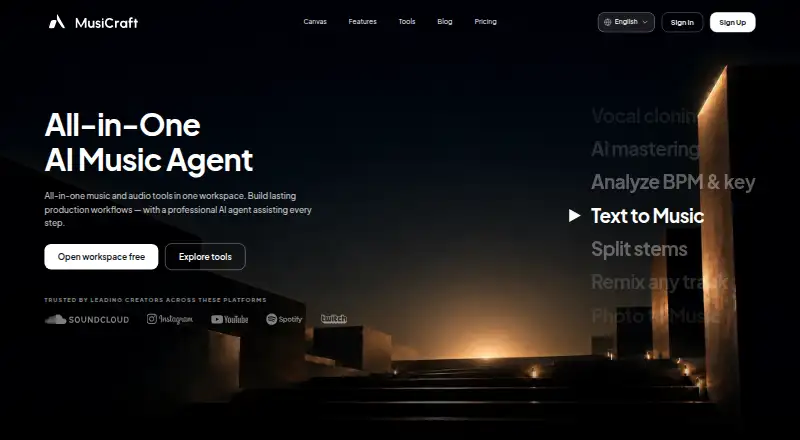
What MusiCraft AI Audio Enhancer is
MusiCraft AI Audio Enhancer is a web-based AI music agent for creating and working with tracks. It turns text prompts or photos into music; its text-to-music tool creates melodies, harmonies, drums, and bass across more than 100 genres. Other listed tools include splitting vocals, drums, bass, and melody into stems, and remixing a track in a new style while preserving its BPM and melodic identity. The site also lists photo-to-music, cover art, artist logo design, music analysis, vocal cloning, and AI mastering. The Free plan includes 50 credits and two editing runs per month, with preview playback only and downloads locked. Paid subscribers may use qualifying music created during an active paid subscription for personal and commercial purposes; free-plan music is excluded. The maximum file duration is 8 minutes. The API is not publicly available, and integration or platform requests are reviewed case by case.
Good
- Text-to-music supports over 100 genres.
- Stem Splitter separates vocals, drums, bass, and melody.
- Remixes preserve BPM and melodic identity.
- Paid plans include commercial use for qualifying music.
- Support typically replies within one business day.
Watch out
- Free-plan downloads are locked.
- Free music is excluded from the commercial license.
- Maximum file duration is 8 minutes.
- API is not publicly available.
Who it suits
MusiCraft may suit short-form creators, bedroom producers, independent artists, and brands looking for web-based music creation or editing tools. People who need downloads or commercial use should note the free-plan and licensing limits.
Verdict
MusiCraft combines music generation with tools for stems, remixes, and related artwork. The Free plan is preview-only for downloads, so check the paid-plan and license conditions if you need usable files.
Plans and prices
From MusiCraft AI Audio Enhancer's own pricing page, checked 15 Oct 2026.
| Plan | Price | What it gives you |
|---|---|---|
| Free | Free | 50 credits/month · 2 editing runs/month · preview playback only · downloads locked |
| Basic | $7.49 a month | 9,600 credits/year · 20 editing runs/month · MP3, stem and image downloads · credits valid 12 months · $89.88 billed annually |
| Pro | $14.99 a month | 24,000 credits/year · unlimited editing runs · MP3, stem and image downloads · credits valid 12 months · $179.88 billed annually |
| Studio | $29.99 a month | 72,000 credits/year · unlimited editing runs · stem WAV mode · commercial license · credits valid 12 months · $359.88 billed annually |
| Business | $79.99 a month | 240,000 credits/year · unlimited editing runs · stem WAV mode · commercial license · priority generation queue · $959.88 billed annually |
The facts
Each one read from MusiCraft AI Audio Enhancer's own pages, with the date it was checked.
What it does
- AI data processing
- The privacy policy says prompts, uploads, generated assets and metadata may be processed by AI, storage and infrastructure providers.checked 15 Oct 2026
- AI mastering
- MusiCraft offers mastering intended to produce loud, clear and balanced releases for services such as Spotify and Apple Music.checked 15 Oct 2026
- API access
- MusiCraft says its API is not publicly available and reviews integration, partnership, or platform requests case by case.checked 29 Sep 2026
- API availability
- The developer page says the API is not publicly available and integration requests are reviewed case by case.checked 15 Oct 2026
- Audience
- MusiCraft says it builds for short-form creators, bedroom producers, independent artists, and brands.checked 29 Sep 2026
- Commercial license
- The commercial license says paid subscribers may use qualifying music created during an active paid subscription for personal and commercial purposes; free-plan music is excluded.checked 29 Sep 2026
- Commercial licensing
- The pricing page says Studio and Business include commercial licensing and downloadable license certificates.checked 15 Oct 2026
- Credit expiry rule
- Monthly-plan credits expire at the next reset, while annual-plan credits are granted upfront and remain available until renewal.checked 15 Oct 2026
- Enhancer formats
- The enhancer accepts MP3, WAV, M4A and FLAC files within the tool limits, with lossy sources expected to benefit most.checked 15 Oct 2026
- Enhancer limitation
- The enhancer states it cannot undo deliberate low-pass filtering, missing mids or poor mixing decisions.checked 15 Oct 2026
- Enhancer modes
- Audio enhancement can process a whole song or focus on vocals only, with before-and-after comparison and History exports.checked 15 Oct 2026
- Enhancer purpose
- AI Audio Enhancer targets codec damage in roughly 32–128 kbps lossy files rather than acting as a loudness booster or EQ brightener.checked 15 Oct 2026
- Export formats
- Paid plans are described as exporting WAV 24-bit/44.1 kHz, MP3 320 kbps and FLAC without watermarks.checked 15 Oct 2026
- Google Play reach
- The Android listing shows more than 100,000 downloads and an Everyone content rating.checked 15 Oct 2026
- Open-source status
- AlternativeTo lists MusiCraft AI as a proprietary, freemium subscription product.checked 15 Oct 2026
Where it runs
- Browser delivery
- The stem splitter says it works entirely in a browser without plugins, a DAW or desktop installation.checked 15 Oct 2026
- Independent platform listing
- AlternativeTo lists the product as an online application and records no user comments or reviews on its page.checked 15 Oct 2026
- Notable app update
- Google Play lists the Android app as updated on October 24, 2025, adding image uploads for song generation and a more powerful V5 model.checked 15 Oct 2026
The company
- Company copyright notice
- The site footer attributes MusiCraft AI to Sphoten Ltd and carries a 2026 copyright notice.checked 15 Oct 2026
- Company legal operator
- MusiCraft's privacy policy identifies Sphoten Ltd, a company registered in the United Kingdom, as the operator.checked 15 Oct 2026
- Maker
- MusiCraft AI is operated by Sphoten Ltd, which its privacy policy describes as registered in the United Kingdom.checked 29 Sep 2026
Money
- Free plan
- Yeschecked 22 Sep 2026
- Free-plan download limit
- The Free plan offers preview playback, with downloads locked.checked 29 Sep 2026
- Limit: free generation cap
- A Google Play reviewer complained that the free tier allowed only one prompt producing two songs before requiring Pro.checked 15 Oct 2026
The full review of MusiCraft AI Audio Enhancer
MusiCraft AI Audio Enhancer is a web-based music creation and editing suite for people making or reshaping tracks. It is best suited to short-form creators, bedroom producers, independent artists, and brands looking for generation and production tools together. Its range is appealing, but the free plan cannot download files.
Overview
MusiCraft is broader than an audio enhancer: it generates music from text or photos and offers tools for editing tracks and creating related artwork. That makes it a better fit for building or adapting music than for a workflow focused solely on cleaning up noisy recordings. Files can be up to eight minutes long, a useful ceiling for many short pieces and song sections, but not for longer recordings.
Key features
Generate and reshape tracks
Text prompts produce tracks with melodies, harmonies, drums, and bass across more than 100 genres. Music Remix reworks a track’s harmony, arrangement, and instrumentation while retaining its BPM and melodic identity. Together, these tools suit creators seeking new material or stylistic variations; they are less relevant if the main need is audio repair.
Separate stems and build a release package
The Stem Splitter separates vocals, drums, bass, and melody, giving producers components to work with individually. MusiCraft also offers lyrics, photo-to-music, cover art, artist logo design, music analysis, vocal cloning, and AI mastering. This breadth can consolidate parts of a creative workflow, though the free plan’s locked downloads prevent users from taking finished files away.
Limits and account considerations
Editing-run allowances range from two per month on Free to 20 on Basic and unlimited runs on Pro, Studio, and Business. Credits are allocated by plan and paid-plan credits are granted annually at once, with a 12-month validity period. The API is not publicly available; integration, partnership, and platform requests are considered case by case. MusiCraft is operated by UK-registered Sphoten Ltd. Its privacy policy describes access controls, encryption in transit where appropriate, authentication controls, monitoring, and internal restrictions. Payments are handled by Stripe or another provider, and MusiCraft says it does not store full card numbers. Support is available at [email protected], with typical replies within one business day.
Pricing
Free is free and includes 50 credits per month, two editing runs per month, and preview playback only; downloads are locked. It is useful for previewing the service, not for exporting usable music.
Paid plans are billed annually, with credits granted all at once and valid for 12 months:
| Plan | Price | Credits and editing runs |
|---|---|---|
| Basic | $7.49 a month (billed $89.88 billed annually) | 9,600 credits per year; 20 editing runs per month |
| Pro | $14.99 a month (billed $179.88 billed annually) | 24,000 credits per year; unlimited editing runs |
| Studio | $29.99 a month (billed $359.88 billed annually) | 72,000 credits per year; unlimited editing runs |
| Business | $79.99 a month (billed $959.88 billed annually) | 240,000 credits per year; unlimited editing runs |
Basic is the entry point for users who need downloads and can work within 20 monthly runs. Pro removes that run cap; Studio and Business provide progressively larger annual credit pools for heavier use. The commercial license covers qualifying music created during an active paid subscription for personal and commercial use; Free-plan music is excluded. No seat allowances are stated, so teams should confirm suitability before buying.
Platforms
MusiCraft runs on the web. Its eight-minute file limit and browser-based access make it suited to shorter projects rather than long-form audio workflows.
Who it's for
Short-form creators, bedroom producers, independent artists, and brands are the clearest fit, particularly when they want generation, stem separation, remixing, and supporting artwork tools in one service. It is a weaker choice for people who only need restoration, longer file handling, or downloadable results without a paid subscription.
Pros and cons
- Pro: Text-to-music spans more than 100 genres and creates tracks with multiple musical components, giving creators room to start from prompts.
- Pro: Stem splitting and remixing address different production tasks, from separating parts to restyling a track while preserving its tempo and melodic identity.
- Pro: Paid subscribers can use qualifying subscription-period music commercially as well as personally.
- Con: Free users can preview but cannot download, so the free tier cannot deliver usable exported files.
- Con: Files are capped at eight minutes, and the API is not publicly available.
- Con: Paid credits arrive all at once and expire after 12 months, making the annual allocation important to plan around.
Alternatives
For broader browsing, see AI Music Generators or AI Audio Restoration Software. Consider a restoration-focused option when cleaning audio matters more than generating or remixing music:
- Neural Analog is worth considering if you want a free tier with 30-second input, 6 processing minutes per month, and broad platform support, including desktop, web, and API.
- Decrackle Audio AI offers a free web, API, and self-hosted option with 30 minutes of processing monthly, 10MB storage, basic denoising, and MP3 output; choose it when those restoration limits fit better than MusiCraft’s music-creation focus.
- Denoise is a mobile option for Android and iOS users who want to import and denoise audio, hear a full before-and-after preview, and pay to save or export.
- Selekt Audio Restoration is a web alternative with a seven-day trial that requires a payment method and renews at $5/month or $50/year unless canceled.
- Cathar is a free option for Linux and macOS.
- CEDAR Cambridge is a paid macOS and Windows modular hardware and software system with custom pricing.
- Wave Arts Master Restoration Suite 6 is a $99, paid once macOS and Windows option with five restoration plug-ins; choose it if you want plug-ins and have a compatible host.
- Cine Sound is another paid web option.
Verdict
Choose MusiCraft if you want a single web service for AI music generation, stems, and remixing, and are prepared to pay for downloadable files. Its strongest reason to choose it is that creative breadth; look elsewhere if your priority is dedicated audio restoration, mobile use, or long recordings.
Getting started
- Open the MusiCraft website in a web browser.
- Choose the free plan or a paid plan.
- Use a text prompt or photo to create music, or select another listed tool.
- For paid access, choose a plan starting at $7.49 per month billed annually.
- Keep files within the 8-minute duration limit.
Limits worth knowing
The free plan includes 50 credits and two editing runs per month, and permits preview playback only; downloads are locked. The Basic plan starts at $7.49 per month billed annually and provides 9,600 credits per year and 20 editing runs per month; its credits are granted at once and valid for 12 months.
Questions
Is MusiCraft free?
Yes. Its Free plan costs nothing and includes 50 credits and two editing runs per month, with preview playback only.
What does the Basic plan cost?
Basic is $7.49 a month, billed as $89.88 annually. Its 9,600 credits are granted at once and valid for 12 months.
What platforms does MusiCraft support?
MusiCraft is available on the web.
Can I use music commercially?
Qualifying music created during an active paid subscription may be used for personal and commercial purposes. Free-plan music is excluded.
Does MusiCraft offer an API?
Its API is not publicly available. Integration, partnership, and platform requests are reviewed case by case.
Who operates MusiCraft?
MusiCraft AI is operated by Sphoten Ltd, which its privacy policy describes as registered in the United Kingdom.
Alternatives to MusiCraft AI Audio Enhancer
- 1

Denoise
Free planAndroidiOS7.8From $2.99 a month - 2

Neural Analog
Free planWebAPILinuxmacOS7.7From €8.25 a month - 3

Decrackle Audio AI
Free planWebAPISelf-hosted7.3From $180 a year - 4
Selekt Audio Restoration
Free planWeb7.3From $50 a year - 5
PD Cleaner
Free planOpen sourceWindows7.0Free plan - 6

LANDR ReHance
WebmacOSWindows6.5From $11.99 a month