
MuMu Player
MuMu Player is an emulator for running Android games and apps on a PC or Mac.
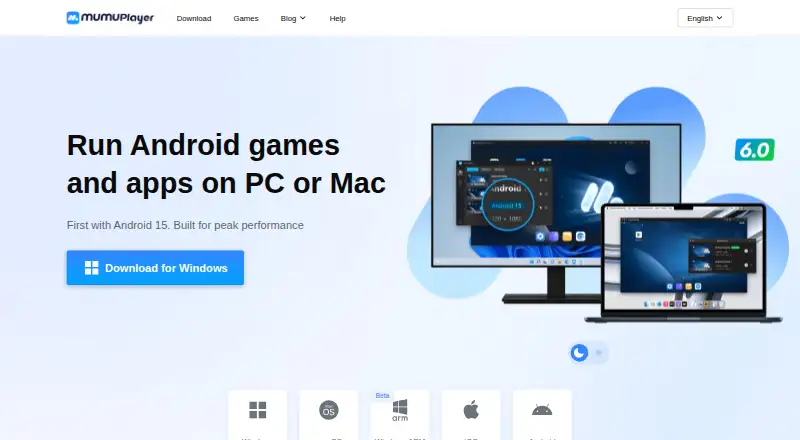
What MuMu Player is
MuMu Player is an emulator for running Android games and apps on a PC or Mac. Its homepage says Android 15 and Android 12 instances can run simultaneously, and the product supports Google Play, multiple instances, keyboard mapping, and gamepads. Users can install APK, APKS, and XAPK files manually, use the in-emulator game center, or use its browser. Controls also include keyboard and mouse, mainstream joysticks, and Mac touchpad gestures. The homepage advertises up to 480 FPS, 4K visuals, and full GPU acceleration, and claims a three-second launch, 30% faster game loading, and 25% higher average FPS. Version 1.5.4 and later add command-line Android device management, ADB connection, and controls for network connections and airplane mode. Downloads list Windows 8 or later, macOS on Apple Silicon, and Windows ARM, which is marked beta. Mac users who have not previously used MuMuPlayer for Mac can try it free for seven days; continued use requires membership payment. Membership price is shown before purchase.
Good
- Supports Google Play and multiple instances.
- Allows keyboard mapping and gamepad controls.
- Manual installation supports APK, APKS, and XAPK.
- Supports Android 15 and Android 12 instances simultaneously.
- Offers a seven-day Mac trial to eligible users.
Watch out
- Windows ARM is marked beta.
- Mac trial eligibility excludes previous MuMuPlayer for Mac users.
- Continued use after the Mac trial requires membership payment.
- Premium membership price appears immediately before purchase.
Who it suits
MuMu Player suits people who want to run Android games or apps on a computer and use mapped controls, gamepads, or multiple instances. Its command-line tools may also suit users managing Android devices from version 1.5.4 onward.
Verdict
MuMu Player is aimed at running Android apps and games on desktop, with several installation paths and control options. Check the listed operating system requirements and the Mac trial conditions before choosing it.
Plans and prices
From MuMu Player's own pricing page, checked 4 Oct 2026.
| Plan | Price | What it gives you |
|---|---|---|
| MuMuPlayer Premium | — | Paid membership features; Windows features include game acceleration and translation, and removal of MuMu-served ads in Android devices; macOS and mobile access require membership · Auto-renewing; monthly billing period. Price is shown immediately before purchase. |
| MuMuPlayer Premium | — | Paid membership features; Windows features include game acceleration and translation, and removal of MuMu-served ads in Android devices; macOS and mobile access require membership · Auto-renewing; quarterly billing period. Price is shown immediately before purchase. |
| MuMuPlayer Premium | — | Paid membership features; Windows features include game acceleration and translation, and removal of MuMu-served ads in Android devices; macOS and mobile access require membership · Auto-renewing; annual billing period. Price is shown immediately before purchase. |
The facts
Each one read from MuMu Player's own pages, with the date it was checked.
Where it runs
- Android versions
- The homepage says it supports Android 15 and Android 12 instances simultaneously.checked 4 Oct 2026
- App installation
- Users can install APK, APKS, and XAPK files manually, download apps from the in-emulator game center, or use its browser.checked 4 Oct 2026
- Desktop platforms
- Windows, macOS, Windows on ARMchecked 19 Sep 2026
- Keyboard mapping
- Yeschecked 19 Sep 2026
- Supported platforms
- The download page lists Windows 8 or later, macOS on Apple Silicon, and Windows ARM, which is marked beta.checked 4 Oct 2026
What it does
- Controls
- The homepage says it supports keyboard and mouse controls, mainstream joysticks, and Mac touchpad gestures.checked 4 Oct 2026
- Data practices
- The privacy policy says it does not sell personal information and does not share it for cross-context behavioural advertising.checked 4 Oct 2026
- Developer tools
- The homepage says version 1.5.4 and later provide command-line Android device management, ADB connection, and controls for network connections and airplane mode.checked 4 Oct 2026
- Gamepad support
- Yeschecked 19 Sep 2026
- Google Play support
- Yeschecked 19 Sep 2026
- Graphics
- The homepage advertises up to 480 FPS, 4K visuals, and full GPU acceleration.checked 4 Oct 2026
- Intended use
- The product runs Android games and apps on PC or Mac.checked 4 Oct 2026
- Multi-instance
- The homepage advertises unlimited instances and says Android 15 and Android 12 can run simultaneously.checked 4 Oct 2026
- Performance
- The homepage claims launch in 3 seconds, 30% faster game loading, and 25% higher average FPS.checked 4 Oct 2026
- Privacy and security
- The privacy policy says MuMuPlayer implements administrative, technical, and physical safeguards and does not view, record, or store remote-session screen content, audio, files, keystrokes, or input.checked 4 Oct 2026
- Product
- MuMuPlayer is an emulator for playing mobile and other platform games on computers or devices.checked 4 Oct 2026
- Root access
- Nochecked 19 Sep 2026
- Support
- The homepage links to tutorials and a Help Center for guides and solutions.checked 4 Oct 2026
Money
- Mac trial
- A 7-day free trial is available for Mac devices that have not previously used MuMuPlayer for Mac; membership payment is required afterward to continue using the service.checked 4 Oct 2026
Alternatives to MuMu Player
- 1

Genymotion Desktop
Free planLinuxmacOSWindows7.4From $49 a year - 2

BlueStacks App Player
Free planmacOSWindows7.3From $7.99 a month - 3
LDPlayer
Free planWindows6.6Free plan - 4
GameLoop
Free planAndroidWindows6.5Free plan - 5
Google Play Games on PC
Free planAndroidWindows6.3Free plan - 6

MEmu Play
Free planWindows6.3Free plan