GameLoop
GameLoop is a free Windows Android emulator and gaming platform for playing mobile games on a PC.
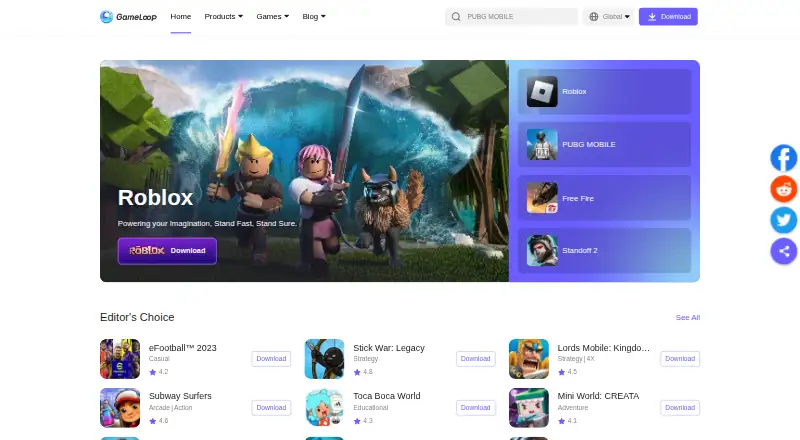
What GameLoop is
GameLoop is a free Windows Android emulator and gaming platform for playing mobile games on a PC. The product page describes it as the official emulator for PUBG Mobile and Arena of Valor, and the exclusive emulator for Call of Duty Mobile. Users can personalize key controls for every hero, and the emulator lists keyboard mapping, gamepad support and multiple instances. GameLoop says its self-developed AOW engine is used for PUBG Mobile, Arena of Valor and other games. Its product page says no VT adjustment is required and advertises faster startup. Tencent Protect is described as an anti-cheat system developed by GameLoop and Tencent Games Anti-Cheat Center. The privacy policy says security information—including device, network, process, memory and driver details—is collected to detect cheating, support a fair environment and address crashes. A listed minimum configuration is Windows 8.1 or 10 64-bit, GTX 1050, i3-8300, 8 GB RAM and 1 GB storage.
Good
- Supports keyboard mapping and gamepads.
- Allows multiple instances.
- Key controls can be personalized for every hero.
- Lists PUBG Mobile and Arena of Valor as official emulator titles.
Watch out
- Requires Windows 8.1 or 10 64-bit at minimum.
- Minimum graphics requirement is GTX 1050.
- Minimum listed memory is 8 GB RAM.
- Collects security-related device and system information.
Who it suits
It suits Windows PC players who want to play mobile games with keyboard controls or a gamepad. Check the listed minimum system requirements and note that the privacy policy describes collection of security-related information.
Verdict
GameLoop focuses on mobile gaming on Windows, with customizable controls and multiple instances. Its stated minimum requirements and security-data collection are important considerations before installing.
Plans and prices
From GameLoop's own pricing page, checked 1 Oct 2026.
| Plan | Price | What it gives you |
|---|---|---|
| GameLoop emulator | Free | Windows PC emulator · mobile games and apps |
The facts
Each one read from GameLoop's own pages, with the date it was checked.
What it does
- Anti-cheat
- Tencent Protect is described as an anti-cheat system developed by GameLoop and Tencent Games Anti-Cheat Center.checked 1 Oct 2026
- Engine
- GameLoop uses a self-developed AOW engine for PUBG Mobile, Arena of Valor and other games.checked 1 Oct 2026
- Gamepad support
- Yeschecked 19 Sep 2026
- Key controls
- Users can personalize key controls for every hero.checked 1 Oct 2026
- Login integrations
- The privacy policy says users may log in through Facebook or Google, with GameLoop generating a UUID for those methods.checked 1 Oct 2026
- Multi-instance
- Yeschecked 19 Sep 2026
- Performance
- GameLoop claims better performance on all PC models, especially low-end machines.checked 1 Oct 2026
- Product
- GameLoop is an Android emulator and gaming platform for playing mobile games on PC.checked 1 Oct 2026
- Rendering
- The product page advertises top-class rendering technology for smoother picture quality.checked 1 Oct 2026
- Security data
- GameLoop collects device, network, process, memory, driver and related security information to detect cheating, provide a fair environment and solve crashes.checked 1 Oct 2026
- Server locations
- The privacy policy states that GameLoop servers are located in Germany, the United States, India, Singapore and Thailand.checked 1 Oct 2026
- Startup
- The product page says GameLoop requires no VT adjustment and offers faster startup with no threshold.checked 1 Oct 2026
- Support
- GameLoop provides FAQs covering customer support, technical issues, PUBG, Arena of Valor and other questions.checked 1 Oct 2026
- Support channel
- The privacy policy says users can contact GameLoop through its Discord server for support or feedback.checked 1 Oct 2026
- Supported games
- The site describes GameLoop as the official emulator for PUBG Mobile and Arena of Valor and the exclusive emulator for Call of Duty Mobile.checked 1 Oct 2026
- System requirements
- A GameLoop app page lists minimum requirements of Windows 8.1/10 64-bit, GTX 1050, i3-8300, 8 GB RAM and 1 GB storage.checked 1 Oct 2026
Where it runs
- Desktop platforms
- Windowschecked 19 Sep 2026
- Keyboard mapping
- Yeschecked 19 Sep 2026
Money
- Free plan
- Yeschecked 19 Sep 2026
The company
- Headquarters
- Hong Kongchecked 28 Sep 2026
The full review of GameLoop
GameLoop is a Windows Android emulator and gaming platform built around mobile games on PC. It is best suited to players who want customizable keyboard or gamepad controls and multiple instances, especially for the titles it promotes. Its free plan is appealing, but the stated PC requirements and security-data collection deserve consideration.
Overview
GameLoop combines Android emulation with a gaming platform. It describes itself as the official emulator for PUBG Mobile and Arena of Valor, and the exclusive emulator for Call of Duty Mobile. That focus gives players of those games a clear reason to consider it; for general Android app use, its gaming emphasis makes it a less obvious fit.
GameLoop uses its own AOW engine for PUBG Mobile, Arena of Valor and other games. It promotes smoother rendering and better performance across PC models, particularly lower-end machines, as well as faster startup without VT adjustment. Those claims should be weighed against its stated minimum requirements: Windows 8.1 or 10 64-bit, GTX 1050, i3-8300, 8 GB RAM and 1 GB storage. A PC that does not meet them may not be a suitable choice.
Key features
Controls and multiple instances
Keyboard mapping, gamepad support and multi-instance mode make the emulator more adaptable to PC play. Players can personalize controls for each hero, which is useful when preferred inputs differ by character. Multiple instances also support running more than one emulator session, though they do not remove the need for a capable PC.
Gaming performance and protection
The AOW engine is GameLoop’s foundation for its featured games, while its rendering technology is intended to improve picture smoothness. Tencent Protect, developed with Tencent Games Anti-Cheat Center, is intended to detect cheating and support fair play. GameLoop also says startup requires no VT adjustment. These are useful gaming-focused aims, but the performance language is a product claim rather than a substitute for checking the minimum specification.
Support and account access
FAQs cover technical issues, customer support, PUBG, Arena of Valor and other questions. Users can also contact GameLoop through its Discord server for support or feedback. Facebook and Google login are supported; for those methods, GameLoop generates a UUID.
Pricing
The GameLoop emulator is free: its plan costs nothing and covers a Windows PC emulator for mobile games and apps. That makes it a straightforward option for players who want its gaming tools without a subscription. No paid GameLoop plan is described, so there is no stated paid tier to compare against.
Platforms
GameLoop is available for Windows, with Android games and apps as its focus. The minimum specification is Windows 8.1 or Windows 10 64-bit, GTX 1050, i3-8300, 8 GB RAM and 1 GB storage. Those requirements matter even though GameLoop promotes performance on lower-end machines. It also supports keyboard mapping, gamepads and multiple instances.
Who it's for
GameLoop is a strong fit for Windows players interested in PUBG Mobile, Arena of Valor or Call of Duty Mobile who value customizable controls and multiple instances. It is less compelling for someone seeking a general-purpose Android emulator, or for a PC that does not meet the stated minimum requirements. Players should also consider its collection of detailed security information before installing.
Pros and cons
Pros
- Free Windows emulator: the plan covers mobile games and apps without a stated subscription charge.
- Gaming-oriented controls: keyboard mapping, gamepad support and per-hero customization suit PC play.
- Multi-instance mode: supports running multiple emulator sessions.
- Focused anti-cheat system: Tencent Protect is designed to detect cheating and support a fair gaming environment.
- Multiple support routes: FAQs and Discord cover common questions, technical issues and feedback.
Cons
- High stated minimum specification: the GTX 1050, i3-8300 and 8 GB RAM requirement may rule out some PCs despite performance claims for lower-end machines.
- Gaming-first positioning: its clearest strengths are tied to games rather than general Android app use.
- Extensive security-data collection: device, network, process, memory, driver and related information is collected for anti-cheat, fair play and crash resolution.
Alternatives
For a broader comparison of Windows-focused options, browse Android Emulators for PC or Android emulators.
- Genymotion Desktop is worth considering for Linux or macOS as well as Windows, or for educational use; its free personal edition is limited and its Educational plan costs $49 a year.
- BlueStacks App Player is another free option for Windows and macOS, with a paid BlueStacks Prime plan at $7.99 a month billed.
- Android-x86 is a free, open-source option for Linux or self-hosted use, rather than a Windows emulator.
- MEmu Play is a free Windows emulator supported by advertisements.
- Google Play Games on PC is a free Android and Windows option; games or in-game items may cost extra.
- NovaPlay is a free Windows download for Windows 10/11 64-bit that requires hardware virtualization.
- MuMu Player offers an auto-renewing premium membership billed monthly; the price is shown before purchase.
Verdict
Choose GameLoop if you want a free Windows emulator with game-oriented controls and multi-instance play, particularly for the titles it promotes. Its strongest reason to choose it is that focused gaming setup; its strongest reason to look elsewhere is the combination of substantial stated minimum requirements and broad security-data collection.
Getting started
- Open the GameLoop website
- Use a Windows 8.1 or 10 64-bit PC meeting the listed requirements
- Install the free GameLoop emulator
- Sign in with Facebook or Google, if desired
- Connect a supported gamepad or configure keyboard mappings
- Use FAQs or Discord for support and feedback
Limits worth knowing
The free emulator requires Windows 8.1 or 10 64-bit, a GTX 1050, an i3-8300, 8 GB of RAM, and 1 GB of storage at minimum. The listed desktop platform is Windows.
Questions
Is GameLoop free?
Yes. GameLoop lists a free plan listed as free.
Which platforms does GameLoop support?
Its listed platforms are Android and Windows, with Windows identified as the desktop platform.
Can GameLoop run multiple instances?
Yes. Multi-instance mode is listed as supported.
Which games does GameLoop officially support?
The site describes it as the official emulator for PUBG Mobile and Arena of Valor, and the exclusive emulator for Call of Duty Mobile.
What information does GameLoop collect for security?
Its privacy policy describes collection of device, network, process, memory, driver, and related security information to detect cheating, support fair play, and solve crashes.
Alternatives to GameLoop
- 1

Genymotion Desktop
Free planLinuxmacOSWindows7.4From $49 a year - 2

BlueStacks App Player
Free planmacOSWindows7.3From $7.99 a month - 3
LDPlayer
Free planWindows6.6Free plan - 4

MuMu Player
AndroidiOSmacOSWindows6.6 - 5
Google Play Games on PC
Free planAndroidWindows6.3Free plan - 6

MEmu Play
Free planWindows6.3Free plan