Move Genesis
Move Genesis is a paid, on-premise markerless motion-capture system for professional studios and production pipelines.
What Move Genesis is
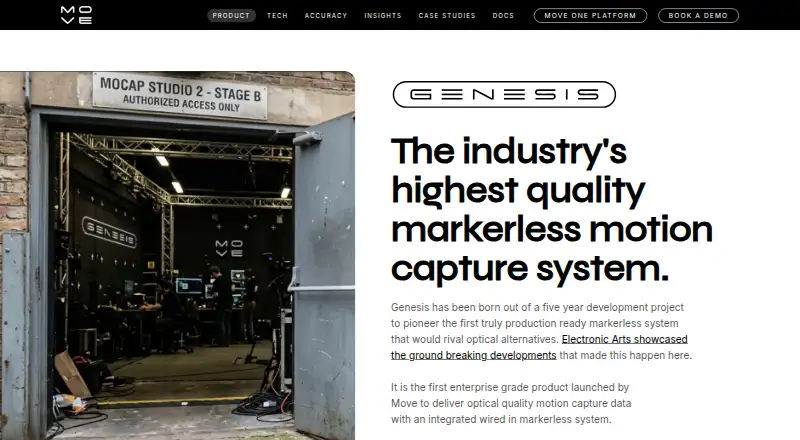
Move Genesis is a paid, on-premise markerless motion-capture system for professional studios and production pipelines. It uses multiple camera feeds and local Nvidia GPUs to identify human key points in 2D views and reconstruct movement in 3D. Genesis supports real-time pre-visualisation and a one-click post-processing solve. The listed capacity is up to eight actors, 240 fps, 4K video, six to 12 cameras, and unlimited processing. Move recommends at least six Z CAM E2-M4 Mark II cameras, while Genesis can also process RGB or grayscale feeds from many Vicon or OptiTrack cameras using their calibration. Peel Capture handles camera setup, triggering, video preparation, and shoot-file management. Supported outputs include FBX, BVH, GLB, USDZ, Blender, C3D, and JSON. The system runs locally and generally needs no internet connection after installation. Requirements include Nvidia GPUs, Ubuntu 24.04 with driver 580, 64 GB RAM, and NVMe storage. Pricing is by contact, and processing requires a license requested through the application.
Good
- Reconstructs 3D motion from multiple camera feeds
- Supports real-time preview and post-processing
- Captures up to eight actors
- Offers many export formats
- Runs locally after installation
Watch out
- Requires Nvidia GPU hardware
- Needs six to 12 Z-Cams
- Pricing and processing license require contact
- Designed for Ubuntu environments
Who it suits
Genesis suits professional studios needing local, markerless motion capture and control over production data. It is designed for teams with Nvidia hardware, supported cameras, and Ubuntu systems.
Verdict
Genesis combines local GPU processing with markerless capture, hybrid camera support, and broad export options. Its hardware, operating-system, and licensing requirements make it a specialized system for professional studios.
Plans and prices
From Move Genesis's own pricing page, checked 8 Oct 2026.
| Plan | Price | What it gives you |
|---|---|---|
| Move Genesis | Priced on request | Pricing by contact · Hardware cost depends on system configuration |
The facts
Each one read from Move Genesis's own pages, with the date it was checked.
What it does
- Calibration and sync
- Supported Z-Cam features include checkerboard calibration and timecode sync.checked 8 Oct 2026
- Camera support
- Move recommends Z CAM E2-M4s Mark II cameras and says Genesis can also process feeds from many existing Vicon or OptiTrack cameras.checked 8 Oct 2026
- Capture capacity
- The overview lists up to 8 actors, 240 fps, 4K video, 6–12 cameras, and unlimited processing.checked 8 Oct 2026
- Existing mocap cameras
- Genesis can process RGB or grayscale feeds from many existing Vicon or OptiTrack cameras, using their calibration for a hybrid setup.checked 8 Oct 2026
- Export formats
- Listed outputs include FBX, BVH, GLB, USDZ, Blender, C3D, and JSON formats.checked 8 Oct 2026
- Hardware
- The system requires Nvidia GPU hardware and 6–12 Z-Cams; Move recommends at least 6 Z CAM E2-M4 Mark II cameras for capture.checked 8 Oct 2026
- Hardware limits
- The equipment page lists NVIDIA RTX 40, 50, and A-series GPUs, 64 GB RAM, and an NVMe SSD; it recommends at least 1 TB of project storage.checked 8 Oct 2026
- Integration
- Genesis integrates with Peel Capture for camera configuration and triggering, video preparation, and shoot file management.checked 8 Oct 2026
- Intended users
- Move describes Genesis as an enterprise-grade system for professional studios and production pipelines.checked 8 Oct 2026
- Licensing
- Processing requires a license requested through the application and provided by Move AI.checked 8 Oct 2026
- Live and post-processing
- Genesis supports real-time pre-visualisation and a one-click post-processing solve.checked 8 Oct 2026
- Local operation
- Genesis runs locally, and its general operation does not require an internet connection after installation.checked 8 Oct 2026
- Motion reconstruction
- Its deep learning system identifies human key points across 2D camera feeds and reconstructs motion in 3D.checked 8 Oct 2026
- Operating system
- The equipment requirements specify Ubuntu 24.04 and Nvidia driver 580; the official package repository lists Ubuntu 22.04 LTS or 24.04 LTS.checked 8 Oct 2026
- Pricing
- The product page's configurator displays estimated hardware costs and says the estimate is illustrative; it directs customers to contact Move for a system estimate.checked 8 Oct 2026
- Processing
- The system runs locally on Nvidia GPUs and provides real-time pre-visualisation and a one-click post-processing solve.checked 8 Oct 2026
- Product
- Genesis is an on-premise markerless motion capture system that uses multiple camera feeds and local Nvidia GPUs to produce motion capture data.checked 8 Oct 2026
- Purpose
- Genesis is an on-premise markerless motion-capture system that reconstructs 3D motion from multiple 2D camera feeds.checked 8 Oct 2026
- Security and privacy
- Move says local processing gives studios data sovereignty; its privacy policy says it does not use video, motion data, or output files to actively try to identify people.checked 8 Oct 2026
- Support
- The product page links to a contact-support form and offers live or remote demonstrations.checked 8 Oct 2026
The company
- Headquarters
- London, United Kingdomchecked 28 Sep 2026
Alternatives to Move Genesis
- 1
XR Animator
Free planOpen sourceAndroidWebLinuxmacOS8.5Free plan - 2
Move AI
Free planiOSWebAPILinux8.2From $18 a month - 3

Rokoko Create
Free planAndroidiOSWebAPI8.2From $12 a month - 4

Rokoko Studio
Free planAndroidiOSWebAPI8.2Free plan - 5

Animaze
Free planAndroidiOSAPImacOS8.1From $19.99 a year - 6

Plask Motion
Free planWebAPIExtensionmacOS7.8From $18 a month