
Moonlight Web
Moonlight Web is a free, open-source server for streaming a gaming PC to devices that have a modern browser.
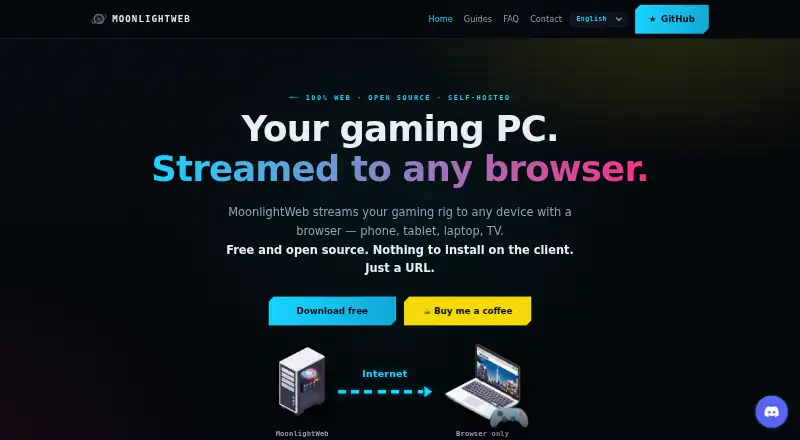
What Moonlight Web is
Moonlight Web is a free, open-source server for streaming a gaming PC to devices that have a modern browser. Install the server on the gaming PC; clients open a URL, without needing an app or account. The maker states support for streams up to 4K HDR at 240 fps and latency under 20 ms over Wi-Fi. Browser decoding uses WebCodecs for H.264, HEVC, and AV1, depending on codec support. Xbox and PlayStation controllers, keyboards, pointer-lock mouse, touch trackpad, and virtual keyboard are supported. The client can discover and pair with Sunshine, Wolf, and MultiSeat hosts. Remote streams use direct peer-to-peer WebRTC, with an outgoing connection to an introduction server and no public web ports exposed. Sessions allow up to four players, including the host. The gaming PC needs a hardware-encoding-capable GPU, and clients need a modern browser. Linux hosts require x64 and a supported recent distribution; HDR on Linux hosts is not implemented. The project is GPL-3.0 licensed, with no accounts, subscriptions, or paid tiers.
Good
- No app or account is needed on clients.
- Supports H.264, HEVC, and AV1 browser decoding.
- Works with Xbox and PlayStation controllers.
- Sessions support up to four players.
- No subscriptions or paid tiers.
Watch out
- The host requires a hardware-encoding-capable GPU.
- Clients need a modern browser.
- Linux-host HDR is not implemented.
- Available codecs depend on browser decoding support.
Who it suits
Moonlight Web suits people who want to stream a gaming PC to browser-equipped phones, tablets, computers, or TVs. It is also suited to local sessions with up to three invited friends, provided the host has a capable GPU.
Verdict
Moonlight Web offers browser-based access to a gaming PC without requiring a client app or account. Its usefulness depends on a suitable host GPU and browser codec support.
Plans and prices
From Moonlight Web's own pricing page, checked 4 Oct 2026.
| Plan | Price | What it gives you |
|---|---|---|
| MoonlightWeb | Free | Free, open-source (GPL-3.0) · no accounts, subscriptions, or paid tiers |
The facts
Each one read from Moonlight Web's own pages, with the date it was checked.
What it does
- Analytics
- The website uses self-hosted, cookieless Umami analytics and says it does not store visitors’ IP addresses.checked 4 Oct 2026
- Client setup
- The client needs no app or account; users open a URL in a browser.checked 4 Oct 2026
- Compatible hosts
- MoonlightWeb can discover and pair with Sunshine, Wolf and MultiSeat hosts on the network.checked 4 Oct 2026
- Controls
- Xbox and PlayStation controllers with rumble, keyboard, pointer-lock mouse, touch trackpad and virtual keyboard are supported.checked 4 Oct 2026
- Data collection
- Optional anonymous usage statistics include resolution, frame rate, codec, connection type, session duration, app version and operating system; the maker says no statistics are sent before consent.checked 4 Oct 2026
- Discovery and pairing
- Finds other hosts using mDNS and pairs them with a PIN; Sunshine, Wolf, and MultiSeat hosts can be discovered from the same page.checked 4 Oct 2026
- Latency
- Uses WebRTC UDP with adaptive congestion control and states latency is under 20 ms over Wi-Fi.checked 4 Oct 2026
- License and pricing
- The project is GPL-3.0 licensed, with no accounts, subscriptions or paid tiers; the maker mentions optional tips.checked 4 Oct 2026
- Multiplayer
- A session supports up to four players, including the host and up to three invited friends.checked 4 Oct 2026
- Notable limits
- The gaming PC needs a GPU capable of encoding, and the client needs a modern browser; available codecs depend on browser decoding support.checked 4 Oct 2026
- Product
- MoonlightWeb is a free, open-source, self-hosted server that streams a gaming PC to devices with a modern browser.checked 4 Oct 2026
- Purpose
- A self-hosted server streams a gaming PC to devices with a modern browser; only the gaming PC needs the server installed.checked 4 Oct 2026
- Remote connections
- Remote streams use direct peer-to-peer WebRTC; an outgoing connection to an introduction server helps browsers find the PC, and no public web ports are exposed.checked 4 Oct 2026
- Remote play
- Streams use direct peer-to-peer WebRTC; remote access uses an outgoing connection to an introduction server and does not require exposed web ports.checked 4 Oct 2026
- Security
- Hosts pair with a PIN, and the remote entry link is served over HTTPS; the maker says streams go directly from the PC to the browser.checked 4 Oct 2026
- Streaming
- Supports up to 4K HDR at up to 240 fps with H.264, HEVC, and AV1 hardware decoding through WebCodecs.checked 4 Oct 2026
- Streaming performance
- The maker states support for up to 4K HDR at 240 fps and under 20 ms latency over Wi-Fi.checked 4 Oct 2026
- Support
- The FAQ directs users with unanswered questions to GitHub.checked 4 Oct 2026
- Supported server systems
- The gaming PC server supports Windows, Apple Silicon macOS and Linux; the browser client can run on devices including phones, tablets, laptops and TVs.checked 4 Oct 2026
- Video codecs
- The browser client supports H264, HEVC and AV1 decoding through WebCodecs, with unavailable codecs greyed out.checked 4 Oct 2026
- Video enhancement
- Client-side WebGPU upscaling and sharpening uses SGSRv1 and FSR1 shaders, with no extra load on the gaming PC.checked 4 Oct 2026
Where it runs
- Linux requirements
- The Linux guide requires x64 with a hardware-encoding-capable GPU and a distribution at least as recent as Ubuntu 22.04, Debian 12 or Fedora 36; Linux-host HDR is not implemented yet.checked 4 Oct 2026
- Platforms
- The server runs on Windows, Apple Silicon macOS, or Linux, while phones, tablets, laptops, and TVs use a browser as the client.checked 4 Oct 2026
The full review of Moonlight Web
Moonlight Web is a free, open-source way to stream games from a self-hosted gaming PC to a modern browser. It best suits players who want to play across phones, tablets, laptops or TVs without installing a client. Its flexibility is appealing, but performance still rests on capable encoding hardware and browser codec support.
Overview
Only the gaming PC needs a server installed; clients connect by opening a URL, with no app or account. That makes Moonlight Web a practical choice for households using a mix of devices, though browser access does not make an unsuitable host PC or browser compatible.
On a local network, the service can find Sunshine, Wolf and MultiSeat hosts through mDNS and pair with them using a PIN. Remote play uses direct peer-to-peer WebRTC, with an outgoing connection to an introduction server helping the browser locate the PC. The design avoids exposing public web ports, and the maker says the stream itself travels directly from PC to browser.
Key features
Moonlight Web states support for up to 4K HDR at 240 fps and latency under 20 ms over Wi-Fi, using WebRTC over UDP with adaptive congestion control. Those targets make it promising for responsive play, but they depend on the host’s encoding GPU, network and browser rather than guaranteeing the same result on every setup.
The client can decode H.264, HEVC and AV1 through WebCodecs, greying out codecs unavailable in a given browser. That gives compatible devices room to use modern formats while making browser support a meaningful compatibility check. WebGPU-based upscaling and sharpening with SGSRv1 and FSR1 shaders runs on the client, avoiding extra processing load on the gaming PC.
Input options include Xbox and PlayStation controllers with rumble, keyboard, pointer-lock mouse, touch trackpad and virtual keyboard. A session supports up to four players: the host and as many as three invited friends, making local co-op possible without limiting the service to solo play.
Pricing
MoonlightWeb costs nothing. The GPL-3.0 project has no accounts, subscriptions or paid tiers, and the maker mentions optional tips. There is no trial because there is no paid plan to trial; the free offering is the complete stated product rather than a capped entry tier.
Platforms
The server supports Windows, Apple Silicon macOS and Linux hosts. Linux hosting requires x64, a GPU capable of hardware encoding, and a distribution at least as recent as Ubuntu 22.04, Debian 12 or Fedora 36. Linux-host HDR is not implemented yet, so Linux users seeking HDR should treat that as a concrete limitation.
Clients run in modern browsers on PC, Mac, tablets, phones and TVs. The broad reach is a strength, but an older browser or one without the needed decoding support can narrow codec choices or prevent the intended experience. The host GPU must also support encoding.
Who it's for
This is a strong fit for people who already have a gaming PC and want browser access from several kinds of device, or want to invite friends into a local co-op session. It is less suitable for anyone seeking cloud gaming without maintaining a host PC, or for a setup whose GPU cannot encode video. Privacy-conscious users can decline optional usage statistics; the maker says none are sent before consent. The website uses self-hosted, cookieless Umami analytics and says it does not store visitors’ IP addresses.
Pros and cons
- Pro: Browser access needs no client app or account, which is useful when switching among phones, computers and TVs.
- Pro: Direct peer-to-peer remote streams avoid exposed public web ports, while PIN pairing helps control host access.
- Pro: Client-side WebGPU enhancement and support for several controller and keyboard inputs broaden the ways to play without shifting enhancement work to the host PC.
- Con: The host needs a hardware-encoding-capable GPU, so this is not a workaround for a weak or incompatible gaming PC.
- Con: Codec availability depends on browser decoding support, and Linux-host HDR is not implemented.
Alternatives
Game Remote Play Software is the category list for comparing remote-play options.
- Parsec is worth considering if freemium access and its Personal non-commercial desktop streaming and sharing plan better match your use; it also has an Individuals (Warp) plan at $8.33 a month.
- Moonlight Game Streaming is another free option if you prefer its listed Android, iOS, Linux, macOS and Windows platform set over browser-based clients.
- Steam is a broader free software choice when access to games and content, whose prices vary, matters more than a dedicated browser streaming route.
- Chiaki-ng is a free, open-source PlayStation Remote Play client for readers specifically seeking that kind of client.
- Greenlight is a free, MIT-licensed option if you want its listed Linux, macOS, web and Windows platform coverage.
- Sunshine is a free, self-hosted project that runs on your own hardware; consider it if you want the host project rather than Moonlight Web’s browser client approach.
- PXPlay is a paid alternative at €12.99, paid once, with a single-user license for Windows, Linux and Mac and multiple personal machines on the same plan.
- PlayStation Plus Cloud Streaming suits Windows users looking for a paid cloud-streaming subscription with game catalogs and online multiplayer; Premium costs $19.99 a month and continues until canceled.
Verdict
Choose Moonlight Web if you have an encoding-capable gaming PC and want free, account-free browser streaming across devices, with remote play that does not require exposed web ports. Look elsewhere if you need cloud gaming without a host PC, or if your hardware and browser cannot meet its encoding and decoding requirements.
Getting started
- Open the Moonlight Web website.
- Install the server on the gaming PC running Windows, Apple Silicon macOS, or Linux.
- Open the client URL in a modern browser on a supported device.
- Discover a compatible host and pair with its PIN.
- Connect supported controllers, keyboard, mouse, or touch controls as needed.
Limits worth knowing
Moonlight Web has no paid tiers or subscription limits. The gaming PC needs a hardware-encoding-capable GPU; Linux hosting requires x64 and a supported recent distribution, and Linux-host HDR is not implemented. Codec availability depends on browser decoding support.
Questions
Does Moonlight Web cost anything?
The project is free and has no subscriptions or paid tiers. The maker mentions optional tips.
What devices can run the client?
The client runs in modern browsers on PCs, Macs, tablets, phones, and TVs.
Which systems can host the server?
The gaming PC server supports Windows, Apple Silicon macOS, and Linux.
Is Moonlight Web open source?
Yes. It is licensed under GPL-3.0.
What does a client need to connect?
A client needs a modern browser and opens a URL; it needs no app or account.
How many people can join a session?
Up to four players can participate, including the host and up to three invited friends.
Alternatives to Moonlight Web
- 1

Parsec
Free planAndroidWebAPILinux8.2From $8.33 a month - 2
PXPlay
Free planAndroidiOSLinuxmacOS8.0Free plan - 3

Moonlight Game Streaming
Free planOpen sourceAndroidiOSLinuxmacOS7.8Free plan - 4

Steam
Free planAndroidiOSWebAPI7.7Free plan - 5
PeaSyo
Free planAndroidiOSLinuxmacOS6.7Free plan - 6
Artemis Qt
Free planLinuxmacOSWindows6.5Free plan