Monokle
Monokle Desktop is a free, open-source IDE for creating, exploring, and validating Kubernetes YAML configurations.
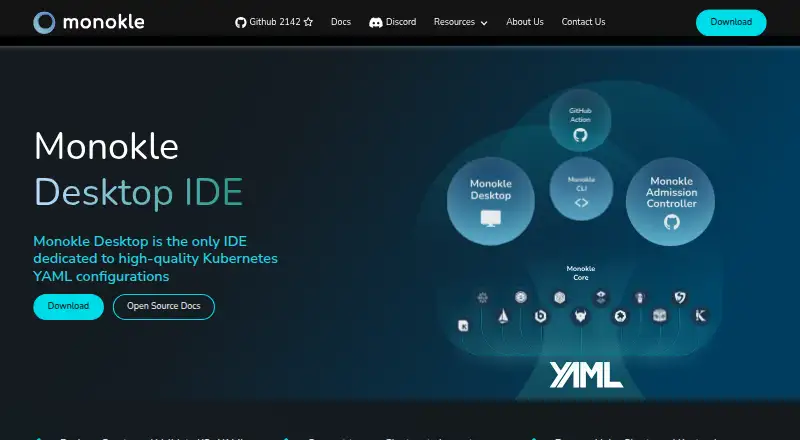
What Monokle is
Monokle Desktop is a free, open-source IDE for creating, exploring, and validating Kubernetes YAML configurations. It supports template-based resource creation, forms, Kubernetes-aware editing, schemas, and CRDs. Users can compare Git branches or repositories, resources across namespaces and clusters, and local configuration against the state of a running cluster. Real-time validation surfaces configuration issues; custom policies and output from CLI tools can also be checked. Helm charts and Kustomize overlays can be dry-run and previewed before deployment. For cluster inspection, Monokle can show resources, dependencies, Kubernetes events, and pod logs to help troubleshoot configuration issues. Listed integrations include Flux, Argo CD, Istio CRDs, Cert-Manager CRDs, Sealed Secrets, CDK8s, Tanka, and KPT. The download page describes it as a manifest creation, validation, and compliance IDE for developers, and a cluster inspection and troubleshooting tool for SREs. Kubeshop announced the end of Monokle Cloud and its accompanying GitHub app, while Monokle open-source products would continue in their GitHub repositories. Monokle Desktop is available for Linux, macOS, and Windows under an open-source MIT license.
Good
- Real-time validation and custom policy support
- Previews Helm charts and Kustomize overlays
- Compares local configuration with running cluster state
- Inspects cluster events and pod logs
Watch out
- Monokle Cloud and its GitHub app were announced for shutdown
- Desktop platforms listed are Linux, macOS, and Windows
Who it suits
Monokle suits developers creating, validating, and comparing Kubernetes manifests, as well as SREs inspecting clusters and troubleshooting configuration issues.
Verdict
Monokle Desktop combines manifest editing and validation with cluster inspection and troubleshooting tools. The commercial Cloud application was announced for shutdown, while the listed open-source products continue in their repositories.
Plans and prices
From Monokle's own pricing page, checked 3 Oct 2026.
| Plan | Price | What it gives you |
|---|---|---|
| Monokle Desktop | Free | Open-source MIT license |
The facts
Each one read from Monokle's own pages, with the date it was checked.
What it does
- Cloud product status
- Kubeshop announced that support for the commercial Monokle Cloud application was ending; Monokle open-source products would continue in their GitHub repositories.checked 3 Oct 2026
- Cloud shutdown
- The end-of-life announcement said Monokle Cloud and its accompanying GitHub app would be shut down over the coming weeks.checked 3 Oct 2026
- Cluster inspection
- It can inspect cluster resources, dependencies, Kubernetes events, and pod logs, and can help troubleshoot or fix configuration issues.checked 3 Oct 2026
- Comparison
- It can compare Git branches or repositories, resources across namespaces and clusters, and local configuration with running cluster state.checked 3 Oct 2026
- Editing
- It supports template-based resource creation, forms, Kubernetes-aware source editors, schemas, and CRDs.checked 3 Oct 2026
- Helm and Kustomize
- It can dry-run and preview Helm charts and Kustomize overlays before deployment.checked 3 Oct 2026
- Integrations
- The site describes support for Flux, Argo CD, Istio CRDs, Cert-Manager CRDs, Sealed Secrets, CDK8s, Tanka, and KPT.checked 3 Oct 2026
- Intended users
- The download page describes Monokle as a manifest creation, validation, and compliance IDE for developers and a cluster inspection and troubleshooting tool for SREs.checked 3 Oct 2026
- Other open-source tools
- The announcement lists Monokle CLI, the Monokle VS Code Extension, and Monokle Admission Controller among the open-source products continuing in their repositories.checked 3 Oct 2026
- Product
- Monokle Desktop is an IDE for creating, exploring, and validating Kubernetes YAML configurations.checked 3 Oct 2026
- Validation
- It provides real-time validation and configuration error visibility, supports custom policies, and can validate output from CLI tools.checked 3 Oct 2026
The company
- Founded
- 2021checked 28 Sep 2026
- Maker
- Monokle is made by Kubeshop, which describes itself as focused on the cloud-native ecosystem.checked 3 Oct 2026
Where it runs
- Platforms
- The download page offers desktop downloads for macOS, Windows, and Linux, and links to a Chrome extension.checked 3 Oct 2026
The full review of Monokle
Monokle Desktop is a Kubernetes IDE for creating, exploring and validating YAML configurations. It suits developers working on manifests and SREs inspecting live clusters. Its strongest case is bringing editing, validation and troubleshooting into one open-source desktop tool; it is not a substitute for the commercial Monokle Cloud, which is shutting down.
Overview
Monokle combines configuration work with visibility into running Kubernetes environments. Developers can create resources from templates and forms, then edit them in Kubernetes-aware source editors backed by schemas and CRDs. SREs can inspect cluster resources, dependencies, events and pod logs, and use those views to troubleshoot configuration issues.
That breadth makes Monokle a practical fit when configuration changes and cluster state need to be considered together. The trade-off is that the product spans several workflows; teams looking only for a focused policy engine or runtime security tool may prefer a more narrowly targeted alternative.
Key features
Manifest authoring and validation
Real-time validation surfaces configuration errors while manifests are being edited. Custom policies and validation of CLI-generated output extend checks beyond files authored directly in the IDE. Support for Helm and Kustomize dry-runs and previews gives teams a way to review rendered configuration before deployment.
Comparison and cluster troubleshooting
Monokle compares Git branches or repositories, resources across namespaces and clusters, and local configuration against running cluster state. Those comparisons can help identify drift or differences before they become deployment surprises. Cluster inspection also includes resource dependencies, Kubernetes events and pod logs, with tools to help fix configuration problems.
Ecosystem support
Integrations and supported formats include Flux, Argo CD, Istio CRDs, Cert-Manager CRDs, Sealed Secrets, CDK8s, Tanka and KPT. This range makes Monokle relevant to teams using varied Kubernetes configuration workflows, though it does not change the product's central focus on manifests and cluster inspection.
Pricing
Monokle Desktop: free, under an open-source MIT license. The free plan is the product's sole stated desktop plan, so there is no paid desktop tier to compare or upgrade to.
Monokle Cloud is a separate commercial application, and Kubeshop announced that Monokle Cloud and its accompanying GitHub app would be shut down over the coming weeks. Teams choosing Monokle should therefore plan around the continuing open-source products rather than depend on Cloud.
Platforms
Monokle Desktop is available as an extension and for Linux, macOS and Windows. The product also has open-source companion tools: Monokle CLI, the Monokle VS Code Extension and Monokle Admission Controller. Kubeshop says these open-source products will continue in their GitHub repositories.
Who it's for
Developers who create and validate Kubernetes manifests are the clearest fit, especially if they need to preview Helm charts or Kustomize overlays and compare configuration changes. SREs can benefit from its cluster inspection and troubleshooting views. It is less compelling for teams seeking a managed commercial Cloud application, or a tool dedicated solely to policy enforcement or security posture.
Pros and cons
- Pros: Manifest editing, real-time validation and cluster inspection share one desktop workflow, which can help teams connect configuration changes with live state.
- Pros: Branch, repository, namespace and cluster comparisons provide several ways to spot configuration differences.
- Pros: The MIT-licensed Desktop plan costs nothing, and the product supports Helm, Kustomize and a broad set of Kubernetes ecosystem tools.
- Cons: Monokle Cloud and its GitHub app are being shut down, so teams seeking the commercial hosted application should look elsewhere.
- Cons: Its wide manifest and cluster workflow may be more than needed for teams seeking only a focused policy engine or security product.
Alternatives
Kubernetes Security Software is the category directory for comparing tools in this area.
- Fairwinds Polaris is a free, open-source policy engine aimed at small teams; choose it when a focused policy engine is a better fit than Monokle's IDE and cluster-inspection combination.
- Kubescape offers a free Apache 2.0 CLI and Kubernetes operator for self-hosting; choose it when that format and deployment model suit your work better.
- CloudSploit has a free self-hosted open-source version and a commercial hosted version with custom pricing; consider it when those deployment options fit your needs.
- Kyverno is a free Apache 2.0 open-source project; choose it when that project is a better match for your requirements.
- KSPM Pro has a free plan for one Kubernetes cluster with real-time scans and CIS coverage; consider it when that defined free-plan scope fits.
- Tetragon is a free open-source project for Kubernetes, Linux and container installations; consider it as another open-source option.
- Falco is a free open-source option; consider it as another open-source option.
- KubeLinter is a free Apache 2.0 project with no paid tiers; consider it as another open-source option.
Verdict
Choose Monokle Desktop if you want a free, open-source workspace for authoring and validating Kubernetes manifests alongside inspecting cluster state. Its most persuasive advantage is the combination of those workflows, including comparisons and pre-deployment previews. Look elsewhere if you need Monokle Cloud's commercial hosted experience, or want a more narrowly focused security or policy tool.
Getting started
- Open the Monokle website
- Choose the Desktop download or extension option
- Install it on Linux, macOS, or Windows
- Create or open Kubernetes YAML configurations
- Connect configurations or clusters for comparison and inspection
Limits worth knowing
Monokle Desktop is offered at no cost under an open-source MIT license. Monokle Cloud and its accompanying GitHub app are scheduled for shutdown, while the open-source products continue in their repositories.
Questions
How much does Monokle Desktop cost?
The Monokle Desktop plan is free and uses an open-source MIT license.
Which platforms can run Monokle?
The listed platforms are Linux, macOS, and Windows, with an extension option also available.
Who makes Monokle?
Monokle is made by Kubeshop, which focuses on the cloud-native ecosystem.
Is Monokle Cloud still available?
Kubeshop announced that Monokle Cloud and its accompanying GitHub app would be shut down. Open-source products continue in their GitHub repositories.
What Kubernetes tools does Monokle integrate with?
Listed integrations include Flux, Argo CD, Istio CRDs, Cert-Manager CRDs, Sealed Secrets, CDK8s, Tanka, and KPT.
Does Monokle support cluster operations?
It can inspect cluster resources, dependencies, Kubernetes events, and pod logs, and compare local configuration with running cluster state.
Alternatives to Monokle
- 1
Kubescape
Free planOpen sourceAPILinuxmacOSSelf-hosted8.2From $30 a month - 2
Kyverno
Free planOpen sourceWebAPILinuxmacOS7.7Free plan - 3

Open Policy Agent Gatekeeper
Free planOpen sourceAPILinuxSelf-hosted7.2Free plan - 4

Sysdig Secure
WebAPILinuxmacOS7.2From $20 a month - 5

Fairwinds Polaris
Free planWebLinuxmacOSSelf-hosted7.1Free plan - 6
Trivy Operator
Free planOpen sourceAPILinuxSelf-hosted6.9Free plan