MonitorDock
MonitorDock is a free Windows utility that replaces taskbars on secondary monitors with per-monitor docks, and can optionally replace the primary taskbar too.
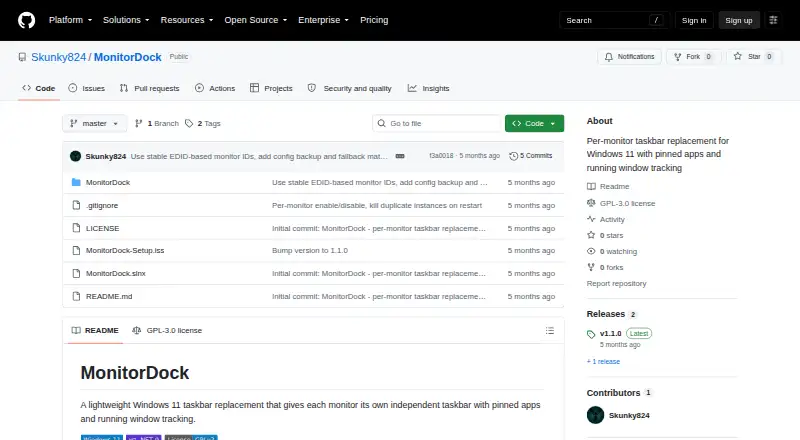
What MonitorDock is
MonitorDock is a free Windows utility that replaces taskbars on secondary monitors with per-monitor docks, and can optionally replace the primary taskbar too. Each monitor can have its own pinned apps, while running windows appear only on the screen where they are located. Users can drag items to reorder them, pin apps or close windows from a right-click menu, and configure clicking to minimize. The bar height can be adjusted from 32–72px and icon size from 16–48px. MonitorDock can hide secondary Windows taskbars and filter windows from secondary monitors out of the primary taskbar. It can start with Windows and runs in the system tray; double-clicking its tray icon opens the Control Panel. The v1.1.0 release says docks hide while a fullscreen app is active on their monitor and return afterward. The project is licensed under GNU GPL v3.0 and lists Windows 10/11 (64-bit) as requirements. The README recommends installing with a Windows installer; building from source requires the .NET 9 SDK. Settings and crash logs are stored under %AppData%\MonitorDock.
Good
- Separate pinned apps for each monitor.
- Running windows appear only on their monitor.
- Configurable bar height and icon size.
- Hides docks during fullscreen apps.
Watch out
- Requires Windows 10/11 (64-bit).
- Building from source requires the .NET 9 SDK.
- No external service integrations are listed.
Who it suits
MonitorDock suits Windows users who organize apps across multiple monitors, and the README says it also works with one monitor. It may appeal to users who want separate pinned apps and windows on each display.
Verdict
MonitorDock focuses on per-monitor taskbar replacement, with controls for pinned apps, running windows, and dock appearance. It is limited to Windows 10/11 64-bit, and source builds require the .NET 9 SDK.
Plans and prices
From MonitorDock's own pricing page, checked 4 Oct 2026.
| Plan | Price | What it gives you |
|---|---|---|
| Free | Free | GPL-3.0 licensed · Windows 10/11 (64-bit) |
The facts
Each one read from MonitorDock's own pages, with the date it was checked.
Where it runs
- Appearance
- Bar height is configurable from 32–72px and icon size from 16–48px.checked 4 Oct 2026
- Pinned apps
- Users can configure pinned apps separately for each monitor.checked 4 Oct 2026
- Windows taskbars
- MonitorDock can hide secondary Windows taskbars and filter secondary-monitor windows from the primary taskbar.checked 4 Oct 2026
What it does
- Configuration and logs
- Settings and crash logs are stored under %AppData%\MonitorDock.checked 4 Oct 2026
- Dock controls
- The dock supports drag-to-reorder, a right-click menu to pin apps or close windows, and configurable click-to-minimize behavior.checked 4 Oct 2026
- Fullscreen behavior
- The v1.1.0 release says the dock automatically hides when a fullscreen app is active on its monitor and reappears after fullscreen ends.checked 4 Oct 2026
- Installation
- The README recommends a Windows installer and also documents building from source with the .NET 9 SDK.checked 4 Oct 2026
- Integrations
- The README documents selecting applications from .exe or .lnk files and does not list external service integrations.checked 4 Oct 2026
- Intended use
- The README describes the product as a solution for Windows 11 users managing apps across multiple monitors and says it also works with one monitor.checked 4 Oct 2026
- License
- The project is licensed under GNU General Public License v3.0.checked 4 Oct 2026
- Purpose
- MonitorDock replaces taskbars on secondary monitors, and optionally the primary monitor, with per-monitor docks.checked 4 Oct 2026
- Requirements
- The initial release lists Windows 10/11 (64-bit) as requirements.checked 4 Oct 2026
- Startup and tray
- It can start with Windows and runs in the system tray, where double-clicking opens the Control Panel.checked 4 Oct 2026
- Window tracking
- Running windows appear only on the monitor where they are located.checked 4 Oct 2026
Alternatives to MonitorDock
- 1

DisplayFusion
Free planAndroidiOSAPIWindows7.9$34 one-time - 2

TaskbarX
Free planOpen sourceWindows7.6$1.09 one-time - 3

GitHub CodeQL
Free planWebExtensionLinuxmacOS7.5From $30 a month - 4
Winstep Nexus Dock
Free planWindows6.7$12.95 one-time - 5

Deskloom
Free planWindows6.4Free plan - 6
MyDockFinder
Windows6.4$4.99 one-time