Moni Proxy
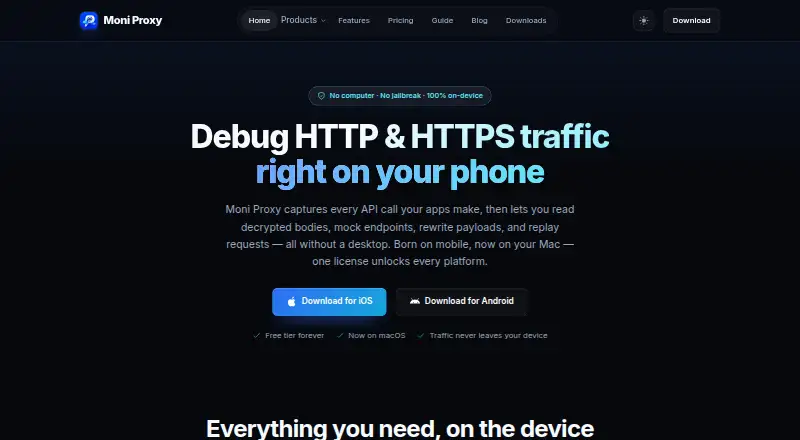
Moni Proxy captures and inspects HTTP/HTTPS traffic directly on devices, with tools to mock, rewrite, and replay requests.
What Moni Proxy is
Moni Proxy captures and inspects HTTP/HTTPS traffic directly on devices, with tools to mock, rewrite, and replay requests. For HTTPS inspection, users complete a guided local certificate authority setup; request details include method, status, host, path, size, and duration. Rules can create local mocks, rewrite requests, override DNS, block traffic, or pause at breakpoints. Compose lets users build requests by editing the method, URL, headers, and JSON body, then replay them. The tool also generates typed models from JSON responses in Swift, Dart, Kotlin, and TypeScript.
Its Toolbox includes JSON formatting, Base64, URL encoding, hashes, JWT decoding, QR tools, timestamps, and a regex tester. The free plan costs nothing and includes limited rules, 20 Compose requests per day, seven-day history, one paired device, Dart code generation, and HAR export. Downloads are listed for iOS, Android, and macOS; Windows and Linux desktop releases are marked as coming soon. The maker says capture and processing happen locally and request payloads or decrypted traffic are not sent to its servers. Root or jailbreak is not required, according to the maker.
Good
- Captures and displays HTTP/HTTPS request details.
- Rules can mock, rewrite, block, or pause traffic.
- Compose requests can be edited and replayed.
- Generates typed models in four listed languages.
- Root and jailbreak are not required, according to the maker.
Watch out
- Free plan limits Compose to 20 requests daily.
- Free history lasts seven days.
- Windows and Linux desktop releases are coming soon.
- HTTPS inspection requires local certificate authority setup.
Who it suits
Moni Proxy suits mobile and API developers, QA and test engineers, and security testers inspecting apps they are authorized to test. Its free plan may suit individual use with limited rules and history.
Verdict
Moni Proxy combines on-device traffic inspection with request editing, replay, and rule-based testing. Check the free-tier limits and platform availability against the devices and workflows you need.
Plans and prices
From Moni Proxy's own pricing page, checked 15 Oct 2026.
| Plan | Price | What it gives you |
|---|---|---|
| Free | Free | Unlimited HTTPS captures · 1 active Map Local rule · 1 active rewrite rule · 1 active breakpoint · 3 DNS overrides · 3 ignore-host rules · 20 Compose requests/day · 7-day history · 1 paired device · Dart code generation · HAR export |
| Free Plan | Free | 1 active mock, rewrite, and breakpoint rule each · 3 DNS override rules · 3 ignore-host rules · 20 Compose requests/day · 7-day history · 1 paired device · Dart code generation · HAR export |
| Desktop | $71, paid once | 1 desktop device/seat · macOS, Windows and Linux license · all Pro features · personal and commercial use · transferable · 1 year of updates · one-time payment |
| Multi-Device | $79, paid once | 3 devices: 1 desktop, 1 iOS and 1 Android · all Pro features · transferable · 1 year of updates · one-time payment |
| Team 5 | $129, paid once | 5 seats · desktop, iOS and Android per seat · perpetual · centralized seat management · priority email support · one-time payment |
| Team 10 | $229, paid once | 10 seats · desktop, iOS and Android per seat · perpetual · centralized seat management · priority email support · one-time payment |
The facts
Each one read from Moni Proxy's own pages, with the date it was checked.
Where it runs
- Android requirement
- The download page lists Android 8.0 (Oreo) or later.checked 15 Oct 2026
- Apple App Store pricing
- The listing shows in-app purchase prices of $79.99, $49.99 and $8.99 for Moni Proxy Premium products.checked 15 Oct 2026
- Apple App Store privacy
- Apple's listing reports that the developer declares no data collected.checked 15 Oct 2026
- Available platforms
- The downloads page lists iOS and Android apps and a macOS installer; it labels Windows and Linux desktop releases as Phase 2 and coming soon.checked 7 Oct 2026
- iOS requirement
- The download page lists iOS 15.0 or later for the mobile app.checked 15 Oct 2026
- Limit: Linux availability
- Linux binaries are marked Coming Soon as a Phase 2 desktop release.checked 15 Oct 2026
What it does
- Breakpoints
- Breakpoint rules pause requests or responses so headers, bodies and statuses can be edited before continuation.checked 15 Oct 2026
- Built-in utilities
- Its Toolbox includes JSON formatting, Base64, URL encoding, hashes, JWT decoding, QR generation and scanning, timestamps, and a regex tester.checked 7 Oct 2026
- Certificate security
- The root certificate and private key are generated on-device; the guide says the private key never leaves the device and can be removed through OS settings.checked 15 Oct 2026
- Code generation
- JSON responses can be converted into typed Swift Codable, Dart, Kotlin serialization and TypeScript models.checked 15 Oct 2026
- Compose and replay
- Compose creates requests from scratch and captured calls can be resent, edited and replayed; Pro adds saved workspaces.checked 15 Oct 2026
- Desktop requirements
- The download page lists Intel and Apple Silicon Macs, Windows 10/11 64-bit, and Linux AppImage/Deb/RPM packages planned for Phase 2.checked 15 Oct 2026
- Developer toolbox
- The built-in toolbox includes JSON formatting, Base64, URL encoding, hashes, JWT decoding, QR tools, timestamps and regex testing.checked 15 Oct 2026
- Exports
- HAR export is free, while Pro adds multiline cURL scripts, native .moniproxy bundles and multi-session archives.checked 15 Oct 2026
- Exports and history
- Free users can export HAR and retain history for seven days; Pro adds cURL, .moniproxy, and multi-session exports with unlimited history.checked 7 Oct 2026
- Google Play privacy
- Google Play's data-safety section states no data shared with third parties and no data collected.checked 15 Oct 2026
- HTTPS capture
- A local VPN and a device-installed certificate let the Android app capture Wi-Fi or cellular HTTP/HTTPS traffic and display decrypted requests.checked 15 Oct 2026
- Independent user feedback
- AppPage.net shows one Android user review reading “great” and reports 100+ installs.checked 15 Oct 2026
- Intended users
- The maker describes the product for mobile and API developers, QA and test engineers, and security testers inspecting apps they are authorized to test.checked 7 Oct 2026
- JavaScript extensibility
- Pro JavaScript interceptors provide onRequest and onResponse hooks with helper APIs and execute locally on the device.checked 15 Oct 2026
- Licence information
- The official comparison page calls HTTP Toolkit open source but does not name an open-source licence for Moni Proxy.checked 15 Oct 2026
- Limit: certificate pinning
- The maker's QA guide warns that apps using certificate pinning cannot be intercepted unless pinning is disabled in the test build.checked 15 Oct 2026
- Limit: no public API
- The published product, guide and download pages describe in-app JavaScript hooks and code generation but provide no public HTTP API or SDK documentation.checked 15 Oct 2026
The company
- Maker details
- The opened maker pages identify the product as Moni Proxy but do not state a maker name, headquarters, or founding date.checked 7 Oct 2026
The full review of Moni Proxy
Overview
Moni Proxy is a mobile-focused HTTP/HTTPS traffic inspector with request editing, replay, and rule-based testing. It suits developers and QA engineers who need to inspect app traffic on iOS or Android without rooting or jailbreaking a device. Its local capture and capable testing tools are compelling, but the free tier is tightly capped and desktop availability is uneven.
Key features
Moni Proxy decrypts HTTP and HTTPS traffic after a guided local certificate-authority setup, then shows each call’s method, status, host, path, size, and duration. That gives app developers and authorized security testers useful context for diagnosing API behavior, though HTTPS inspection requires accepting the certificate configuration.
Its rules engine can map local responses, rewrite requests, override DNS, block hosts, and pause at breakpoints. Free users can keep one active rule of each type, with three DNS overrides and three ignore-host rules; that is enough to explore or handle a small test case, but more complex scenarios need Pro. Compose lets users create or edit a request’s method, URL, headers, and JSON body, then replay captured calls.
JSON responses can generate typed models in Swift, Dart, Kotlin, and TypeScript. The built-in Toolbox adds JSON formatting, Base64 and URL encoding, hashes, JWT decoding, QR generation and scanning, timestamps, and a regex tester. Free exports are limited to HAR, and history lasts seven days; Pro adds cURL, .moniproxy, and multi-session exports, with unlimited history.
Devices pair over a local network by QR code or host and port. Free supports one paired device; Pro supports up to five. The maker says capture, SSL decryption, mocking, and scripting happen locally and that request payloads and decrypted traffic are not sent to its servers. It also says the apps use native VPN profiles and certificate configurations rather than requiring root or jailbreak.
Pricing
The Free Plan costs nothing. It includes one active mock, rewrite, and breakpoint rule each; three DNS override rules; three ignore-host rules; 20 Compose requests per day; seven-day history; one paired device; Dart code generation; and HAR export. It is a useful starting point, but the daily Compose quota, single-device pairing, and narrow export options limit sustained or multi-device workflows.
Desktop costs $71, paid once, as a one-time payment for a perpetual license covering one device on macOS, Windows, or Linux. It includes all Pro features, personal and commercial use, a transferable license, and one year of updates. Multi-Device costs $79, paid once, also as a one-time payment for a perpetual license; it covers three devices—one desktop, one iOS, and one Android—with the same Pro, use, transfer, and update terms. The small price step makes Multi-Device the clearer fit for individual testers switching between desktop and mobile.
Team 5 costs $129, paid once for five perpetual seats; Team 10 costs $229, paid once for ten. Each seat covers desktop, iOS, and Android, with centralized seat management, priority email support, and one year of updates. These plans suit teams that need shared seat administration; buyers should note that updates are included for one year, not indefinitely.
Platforms
The iOS app requires iOS 15.0 or later, and the Android app requires Android 8.0 or later. The downloads page lists iOS and Android apps and a macOS installer. Windows and Linux desktop releases are labeled Phase 2 and coming soon, so buyers needing either desktop version now should not rely on the plan’s platform coverage alone.
Who it's for
Moni Proxy is best suited to mobile and API developers, QA and test engineers, and security testers inspecting apps they are authorized to test. It is particularly relevant when local traffic inspection, editable replay, and lightweight mocks matter more than a generous free allowance. It is a weaker fit for Windows- or Linux-first workflows until those desktop releases arrive, or for anyone who needs broader free-tier quotas.
Pros and cons
- Pros: HTTP/HTTPS inspection, request editing, replay, breakpoints, and response mocks combine in one workflow.
- Pros: Local capture and no-root/no-jailbreak operation suit mobile testing without modifying device security status.
- Pros: A perpetual individual license starts at $71, paid once, and the 79.00 USD Multi-Device option covers desktop plus both major mobile platforms.
- Cons: Free Compose use stops at 20 requests per day, with just one paired device and seven days of history.
- Cons: The Free Plan generates models only in Dart and exports only HAR; richer exports and unlimited history require Pro.
- Cons: Windows and Linux desktop releases are still marked as coming soon.
Alternatives
Web Debugging Proxies is the broader category directory for comparing tools. Choose HTTP Toolkit if web access or its free basic interception, inspection, breakpoints, and HTTP client tools better match your setup. Fluxzy is another freemium option, with a free Community Edition for personal use and support for self-hosted environments.
Reqable is worth comparing if its free Community plan’s 100MB storage and three rules each for rewriting, scripts, breakpoints, gateways, and mirrors suit your needs. Choose NetworkSpy if its limited LLM token-stream analysis or custom viewer builder is more relevant; its free plan also includes breakpoints, resource mapping, and scripting. mitmproxy is a free, open-source interactive HTTPS proxy for readers who prefer that approach.
Whistle is another free option. Choose Mediator for a free, Apache-2.0-licensed GUI proxy focused on gRPC debugging. Fiddler Everywhere is a paid alternative with a free trial; its Lite plan starts at $10 a month.
Verdict
Moni Proxy is a strong choice for mobile developers and QA teams who want local HTTP/HTTPS inspection alongside editable replay, mocking, and cross-platform model generation. Its one-time individual licenses are appealing for multi-device work, but the free caps are restrictive and Windows and Linux desktop releases are not yet ready. Choose it when mobile testing is the priority; look elsewhere if you need those desktop releases now or a more generous free workflow.
Getting started
- Visit the Moni Proxy website.
- Choose the app for iOS, Android, or macOS; Windows and Linux desktop releases are marked as coming soon.
- On iOS, use iOS 15.0 or later; on Android, use Android 8.0 or later.
- Set up the guided local certificate authority to inspect HTTPS traffic.
- Pair a device over the local network using a QR code or host and port.
- Use the free plan or choose a paid plan for additional features.
Limits worth knowing
The free plan allows one active mock, rewrite, and breakpoint rule each, three DNS override rules, three ignore-host rules, 20 Compose requests per day, seven-day history, one paired device, Dart code generation, and HAR export. The paid Desktop plan costs $71, paid once-time payment and covers one device with one year of updates.
Questions
Is Moni Proxy free?
Yes. Its Free Plan costs nothing and includes limited rules, 20 Compose requests per day, seven-day history, one paired device, Dart code generation, and HAR export.
How much do paid plans cost?
Desktop costs $71, paid once-time payment, Multi-Device costs $79, paid once-time payment, Team 5 costs $129, paid once-time payment, and Team 10 costs $229, paid once-time payment.
Which platforms are available?
The downloads page lists iOS and Android apps and a macOS installer. Windows and Linux desktop releases are marked as Phase 2 and coming soon.
Does it require root or jailbreak?
The maker says Android root and iOS jailbreak are not required; Moni Proxy uses native system VPN profiles and certificate configurations.
What does Moni Proxy do with captured traffic?
The maker says capture, SSL decryption, mocking, and scripting happen locally, and request payloads or decrypted traffic are not sent to its servers.
What does Pro add?
Pro adds cURL, .moniproxy, and multi-session exports, unlimited history, and support for more paired devices. Team 5 and Team 10 also include priority email support.
Alternatives to Moni Proxy
- 1

Fluxzy
Free planOpen sourceAndroidiOSAPILinux8.4€49 one-time - 2

NetworkSpy
Free planOpen sourceAndroidiOSAPILinux8.4From $18 a year - 3
Reqable
Free planAndroidiOSAPILinux8.0From $49.90 a year - 4
ProxyHawk
Free planAndroidiOSmacOS7.8From ₹3,750 a year - 5

mitmproxy
Free planOpen sourceWebAPILinuxmacOS7.7Free plan - 6
Proxyman
AndroidiOSAPILinux7.6From $99 a year