
NetworkSpy
NetworkSpy is an application-level HTTP/HTTPS debugging tool for capturing and analyzing network traffic.
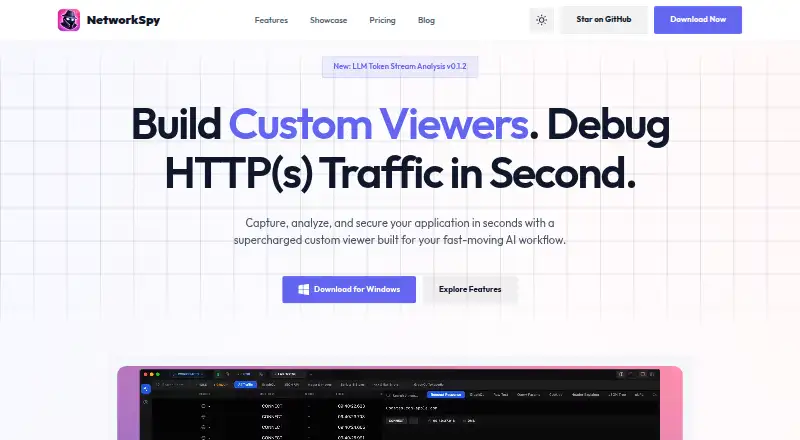
What NetworkSpy is
NetworkSpy is an application-level HTTP/HTTPS debugging tool for capturing and analyzing network traffic. It can intercept HTTPS, inspect request metadata, compare requests side by side, and let users edit and replay requests. Breakpoints can pause or change live traffic, and response mocking is supported. NetworkSpy also inspects WebSocket messages in real time and supports gRPC with Protobuf decoding. Its LLM analyzer displays streaming tokens, token usage, and per-chunk latency; custom viewers can help visualize proprietary binary or other structured data. It runs on Linux, macOS, and Windows, and physical iOS and Android devices can be configured to use it as a proxy. The privacy policy says inspected traffic stays on the user's machine and is not collected or monitored. A free plan is available; Personal costs $18 a year, Professional $29 a year, and Business $149 a month. License terms limit individual licenses to one device.
Good
- Inspects HTTPS, WebSockets, and gRPC traffic.
- Can edit, replay, and mock requests.
- Breakpoints can pause or change live traffic.
- Inspected traffic stays local, according to its policy.
- Free plan available.
Watch out
- Individual licenses are limited to one device.
- Team Starter costs $49 a month.
- Business costs $149 a month.
Who it suits
NetworkSpy suits developers who need to inspect, edit, replay, or mock network traffic across desktop and mobile devices. Its token analysis, custom viewers, and team plans may also suit people debugging AI streams or working with colleagues.
Verdict
NetworkSpy brings request inspection, editing, replay, breakpoints, and response mocking into one debugging tool. Check the device-license limit and plan features against your workflow before choosing a paid plan.
Plans and prices
From NetworkSpy's own pricing page, checked 15 Oct 2026.
| Plan | Price | What it gives you |
|---|---|---|
| Free | Free | Core features · limited LLM token analysis · limited breakpoints · limited resource mapping · limited custom viewer builder · limited scripting |
| Personal | $18 a year | Full HTTP Debug Proxy Kit · GraphQL and JSON inspectors · LLM Token Analyzer · Custom Viewer Builder + AI · 1 device · Direct Discord access · $18/year |
| Professional | $29 a year | Everything in Personal · AI Viewer with custom providers · MCP · priority email support · $29/year |
| Team Starter | $49 a month | Up to 5 users · centralized team billing · shared plugin presets · standard team dashboard · $49/mo |
| Lifetime | $99, paid once | Everything in Pro · beta features · lifetime updates · $99 one-time |
| Business | $149 a month | Up to 20 users · audit logs and activity · SSO and SAML integration · priority 24/7 support · $149/mo |
| Enterprise | Priced on request | Unlimited user seats · custom security reviews · on-premise deployment · dedicated account manager · Custom |
The facts
Each one read from NetworkSpy's own pages, with the date it was checked.
What it does
- Account data
- The privacy policy says NetworkSpy collects email addresses, license keys, and anonymous device identifiers for licensing and account purposes.checked 4 Oct 2026
- AI analysis
- LLM-powered analysis explains payload behavior and flags possible logic errors.checked 15 Oct 2026
- AI traffic analysis
- Its LLM analyzer visualizes streaming tokens, tracks token usage, and shows latency for each chunk.checked 4 Oct 2026
- AI viewer limit
- The maker states that built-in LLM viewers target OpenAI-compatible completions endpoints and are not intended to provide full backend observability for complete agent-loop timelines.checked 15 Oct 2026
- Architecture
- The GitHub repository describes a cross-platform Tauri application built with Rust and React, storing analyzed traffic in a local SQLite database.checked 15 Oct 2026
- Changelog update
- Version 1.2.0, dated May 1, 2026, added Protobuf, gRPC and custom binary inspection, regex global search, a 40% lower memory footprint, accessibility refinements and faster Windows/Linux startup.checked 15 Oct 2026
- Comparison engine
- A side-by-side comparison engine diffs request headers, bodies and response states to reveal regressions.checked 15 Oct 2026
- Custom viewers
- Users can build and plug in custom visualizers for proprietary binary or structured payload formats.checked 15 Oct 2026
- Developer setup
- The repository documents cloning the project, running bun install, launching with bun run tauri dev and building with bun run tauri build.checked 15 Oct 2026
- Documentation depth
- The repository includes separate files for custom viewers, features, MCP, security, contributing and installation, indicating implementation-level documentation and extension guidance.checked 15 Oct 2026
- Extensibility
- The product supports custom viewers for visualizing proprietary binary formats or other structured data.checked 4 Oct 2026
- Extensibility praise
- Product Hunt’s maker response says custom viewers can aggregate multiple traffic inspections and be versioned in GitHub for team sharing.checked 15 Oct 2026
- GraphQL support
- GraphQL inspection parses nested queries, mutations and fragments with schema-aware views.checked 15 Oct 2026
- HTTPS interception
- The product provides full HTTPS interception with automatic certificate management and one-click trust setup.checked 15 Oct 2026
- Integrations
- The site lists a native Model Context Protocol bridge for connecting traffic to AI agents and SSO/SAML integration on the Business plan.checked 4 Oct 2026
- Licence
- The public repository is marked Apache-2.0 licensed, while the product website footer states that the web application is released under MIT License.checked 15 Oct 2026
- License limit
- The pricing FAQ says an individual license is limited to one device and team licenses are per-seat.checked 4 Oct 2026
- Live breakpoints
- Breakpoints can pause live traffic and change payloads or status codes before delivery.checked 15 Oct 2026
- LLM streaming
- The LLM analyzer visualizes streaming tokens, token usage and latency for each response chunk.checked 15 Oct 2026
- MCP integration
- A native Model Context Protocol bridge lets AI agents query local NetworkSpy traffic logs.checked 15 Oct 2026
Where it runs
- Linux limitation
- Official Linux releases provide .deb packages only; RPM or AppImage builds require cloning the repository and running the release workflow manually.checked 15 Oct 2026
- Mobile device inspection
- The pricing FAQ says physical iOS and Android devices can be configured to use NetworkSpy as a proxy for traffic inspection.checked 4 Oct 2026
The company
- Maker origin
- The maker said NetworkSpy grew from personal experience using network inspection to understand API data flows and project behavior.checked 15 Oct 2026
- Maker positioning
- The maker described the product as focused on understanding and exploring traffic with custom payload viewers rather than only capturing requests.checked 15 Oct 2026
The full review of NetworkSpy
NetworkSpy is a desktop HTTP and HTTPS debugging application for developers who need to capture, alter, replay, and compare application traffic. It is particularly well suited to work involving gRPC, WebSockets, mobile proxies, or LLM streams. The free tier makes it approachable, but the one-device individual license and sharply different team pricing deserve attention before purchase.
Overview
NetworkSpy brings capture, HTTPS interception, request metadata inspection, and side-by-side request comparison into one workspace. Request and response editing, replay, breakpoint rules, and response mocking let you reproduce an exchange, pause it, or test how an application behaves after its traffic is changed. That combination is more useful than a passive packet view when debugging a stubborn API interaction or constructing a repeatable scenario.
Inspected traffic remains local to your machine rather than being collected or monitored by NetworkSpy. The service still collects email addresses, license keys, and anonymous device identifiers for accounts and licensing, so local traffic privacy does not mean the product is account-free.
Key features
- Inspection and intervention: HTTPS interception and metadata views expose the details needed to diagnose requests. Editing, replay, breakpoints, and mocking turn that diagnosis into controlled experiments, although the value depends on having a workflow that needs active manipulation rather than simple logging.
- Protocol coverage: gRPC support includes Protobuf decoding, while WebSockets provide real-time message streaming. These capabilities make NetworkSpy a stronger fit for structured and persistent connections than a tool limited to ordinary HTTP exchanges.
- LLM analysis: The analyzer visualizes streaming tokens, tracks token usage, and reports latency for each chunk. That is useful for examining incremental model responses and their timing, not merely the final payload.
- Extensibility and integrations: Custom viewers can present proprietary binary formats or other structured data. A native Model Context Protocol bridge connects traffic to AI agents, and Business adds SSO/SAML for organizational identity management.
- Device inspection: Physical iOS and Android devices can be configured to use NetworkSpy as a proxy. It therefore extends desktop debugging to mobile traffic, subject to the license device limit on individual plans.
Pricing
The Free plan costs nothing and includes core features, with limited LLM token-stream analysis, breakpoints, resource mapping, custom viewer building, and scripting. It is a sensible way to learn the interface or handle occasional debugging, but the explicit limits make it a poor choice for sustained AI or automation-heavy work.
Personal costs $18 a year (billed $18/year) for one device. It adds the full HTTP debug proxy kit, GraphQL and JSON inspectors, the LLM Token Analyzer, and Custom Viewer Builder + AI. This is the practical upgrade for an individual who needs complete inspection tooling on a single primary machine; moving between computers is constrained by the one-device license.
Professional is $29 a year (billed $29/year). It includes Personal features, an AI Viewer with custom providers, MCP, and priority email support. The modest annual step-up suits developers who need provider flexibility, agent connectivity, or faster support rather than additional seats.
Team Starter costs $49 a month (billed $49/mo) for up to five users, centralized billing, shared plugin presets, and a standard team dashboard. It is the entry point for a small group, but costs substantially more than an individual annual license. Business costs $149 a month (billed $149/mo) for up to 20 users, audit logs and activity, SSO/SAML, and priority 24/7 support. Choose it when governance and identity controls justify the recurring cost. Enterprise uses custom pricing and offers unlimited user seats, custom security reviews, on-premise deployment, and a dedicated account manager.
Lifetime costs 99.00 USD once (billed $99 one-time), with everything in Pro, beta features, and lifetime updates. It favors a long-term individual buyer who does not need team administration. A free trial is offered, and the pricing page states a 30-day money-back guarantee; the Terms of Service generally deny refunds except where required by law or covered by the refund policy, so buyers should verify the applicable condition.
Platforms
NetworkSpy runs on macOS, Linux, and Windows. Downloads include Apple Silicon support, Debian/Ubuntu packages, and Windows 10/11 support. Physical iOS and Android devices can send traffic through it for inspection, extending its desktop coverage without making those mobile operating systems native desktop platforms.
Who it's for
Choose NetworkSpy if you develop APIs, desktop or mobile applications, streaming services, or LLM features and need to inspect and alter traffic rather than merely observe it. Personal and Professional fit solo developers; Team Starter suits up to five collaborators, while Business and Enterprise address larger groups that need auditability, SSO, support coverage, or on-premise deployment. It is less compelling for a user who needs several personal devices under one license or only occasional basic HTTP viewing.
Pros and cons
Pros
- Editing, replay, breakpoints, and response mocking support repeatable fault isolation.
- gRPC/Protobuf, WebSockets, and LLM token timing cover modern streaming workloads.
- Traffic stays local, and custom viewers plus MCP extend the tool beyond built-in formats.
- Plans range from a capped free tier to lifetime and governed business options.
Cons
- Individual licenses are limited to one device, restricting multi-machine workflows.
- Team pricing is monthly and rises sharply from the low-cost personal plans.
- Free-tier limits affect LLM analysis, breakpoints, viewers, and scripting.
- Refund language differs between the 30-day guarantee and the generally restrictive Terms of Service.
Alternatives
Browse the Web Debugging Proxies list for a wider category comparison. Choose HTTP Toolkit instead if you need Android, iOS, web, and desktop coverage with a free Hobbyist plan that includes interception, breakpoints, and HTTP client tools. Moni Proxy is a fit when explicit free quotas for mocks, rewrites, DNS overrides, and compose requests match your needs. Pick Fluxzy for a free personal Community Edition or a perpetual Pro option across desktop, mobile, API, and self-hosted deployments. Reqable suits users who prefer a free one-device Community tier with 100MB storage and capped rule counts. Probe is an alternative with a free plan covering HTTPS interception, mobile debugging, scripting, collections, and session saving. Proxyfor, Tucano Proxy, and mitmproxy are free options; the latter is an open-source interactive HTTPS proxy.
Verdict
NetworkSpy is a strong choice for developers who need one tool for manipulated HTTP traffic, modern protocols, mobile proxying, and LLM stream analysis. Its main reason to choose it is the breadth of active debugging controls; its main reason to look elsewhere is the one-device individual license and comparatively expensive monthly team tiers.
Alternatives to NetworkSpy
- 1

Fluxzy
Free planOpen sourceAndroidiOSAPILinux8.4€49 one-time - 2
Moni Proxy
Free planAndroidiOSLinuxmacOS8.0$71 one-time - 3
Reqable
Free planAndroidiOSAPILinux8.0From $49.90 a year - 4
ProxyHawk
Free planAndroidiOSmacOS7.8From ₹3,750 a year - 5

mitmproxy
Free planOpen sourceWebAPILinuxmacOS7.7Free plan - 6
Proxyman
AndroidiOSAPILinux7.6From $99 a year