Milo
Milo is a free, open-source desktop browser for Linux, macOS, and Windows that places web pages, browsing context, and AI agents in one workspace.
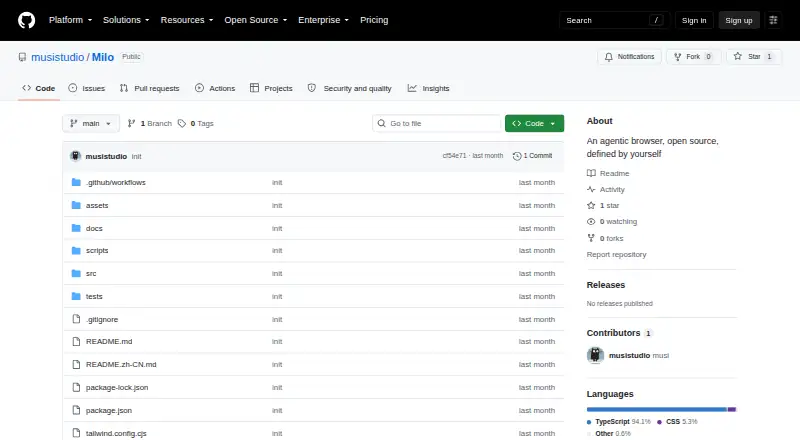
What Milo is
Milo is a free, open-source desktop browser for Linux, macOS, and Windows that places web pages, browsing context, and AI agents in one workspace. Its agent workspace handles longer browser tasks such as page-aware inspection, navigation, extraction, organization, and multi-step automation while showing task state. A local learning system can turn observed workflows into reusable guidance. The start page can be customized with widgets, embeds, notes, and shortcuts, and users can write scripts that augment web pages. Milo provides a compatibility layer for selected Chrome extensions and supports OpenAI-compatible providers for agents, translation, and learning. Browser functions include downloads, passkeys, page translation, split views, workspace profiles, bookmarks, and browsing history, with history and bookmarks import from Chromium-based browsers. Privacy mode, task history, interruption, resumable sessions, and provider settings provide controls over autonomous activity. Milo is built with Electron, React, TypeScript, and a local browser automation runtime. Package targets include macOS DMG, Windows NSIS, and Linux AppImage.
Good
- Free and open source
- Supports Linux, macOS, and Windows
- Long-running agent workspace
- Imports Chromium history and bookmarks
- Provides resumable sessions and privacy controls
Watch out
- No listed releases on the repository page
- Chrome extension support is limited to selected extensions
- AI providers require user configuration
- Autonomous features depend on local browser runtime
Who it suits
It is aimed at knowledge workers handling research, operations, communication, procurement, analytics, writing, administration, dashboards, or internal tools. It suits users who want browser automation alongside customizable workspace context.
Verdict
Milo combines a desktop browser with agent workflows, local learning, scripts, and workspace customization. Its broad desktop packaging and user-control features make it relevant to knowledge work involving repeated web tasks.
The facts
Each one read from Milo's own pages, with the date it was checked.
What it does
- Agent workflows
- Milo says its agent can navigate, inspect, extract, organize, and automate multi-step web tasks with user-visible state.checked 9 Oct 2026
- AI providers
- Milo supports configurable OpenAI-compatible providers for agents, translation, and learning.checked 9 Oct 2026
- Core tools
- Listed capabilities include a long-running agent workspace, a page-aware AI sidebar, customizable start-page widgets, notes, and docked shortcuts.checked 9 Oct 2026
- Desktop packaging
- The README documents packaging a macOS arm64 app and creating a release installer such as a DMG.checked 4 Oct 2026
- Extensibility
- Milo supports user scripts, local widget packages using milo:// and widget:// protocols, and a compatibility layer for selected Chrome extensions.checked 9 Oct 2026
- Extensions
- Milo provides a compatibility layer for selected Chrome extensions.checked 4 Oct 2026
- Imports
- Milo supports importing browsing history and bookmarks from Chromium-based browsers.checked 4 Oct 2026
- Intended users
- The README describes knowledge workers doing research, operations, communication, procurement, analytics, writing, administration, and work with dashboards or internal tools as Milo's audience.checked 9 Oct 2026
- Local data
- The README says local learning assets provide workflow guidance, site skills, and behavior summaries.checked 4 Oct 2026
- Local learning
- Milo says its learning system can turn observed workflows into reusable guidance while keeping data local.checked 9 Oct 2026
- Memory
- Milo says its learning system can turn observed workflows into reusable local guidance.checked 4 Oct 2026
- Privacy controls
- The project describes privacy mode, task history, interruption, resumable sessions, and provider settings as controls for user-managed autonomy.checked 4 Oct 2026
- Product
- Milo describes itself as an AI native desktop browser that brings the web, user context, and autonomous agents into one workspace.checked 9 Oct 2026
- Release status
- The repository page shows no listed releases.checked 9 Oct 2026
- Technical base
- Milo is built with Electron, React, TypeScript, and a local browser automation runtime.checked 9 Oct 2026
- Technology
- Milo is built with Electron, React, TypeScript, and a local browser automation runtime.checked 4 Oct 2026
- User control
- The README lists privacy mode, task history, interruption, resumable sessions, and provider settings as controls for user-directed autonomy.checked 9 Oct 2026
- Widgets and scripts
- Users can customize the start page with widgets, embeds, notes, and shortcuts, and author scripts to augment web pages.checked 4 Oct 2026
- Workspace context
- Browsing sessions, tabs, bookmarks, downloads, page state, and learned behavior can become structured context.checked 9 Oct 2026
Where it runs
- Browser features
- The listed browser features include downloads, passkeys, page translation, split views, workspace profiles, bookmarks, and browsing history.checked 4 Oct 2026
- Other browser features
- The README lists Chromium-based history and bookmark import, downloads, passkeys, page translation, split views, and workspace profiles.checked 9 Oct 2026
- Platform packages
- The package configuration specifies macOS DMG, Windows NSIS, and Linux AppImage build targets.checked 9 Oct 2026
The company
- Maker profile
- The GitHub maker profile lists Hangzhou as its location; it does not state a founding date or headquarters designation.checked 9 Oct 2026