MigrationMerlin
MigrationMerlin is a free Windows tool for moving user state from one PC to another, aimed at sysadmins and power users.
What MigrationMerlin is
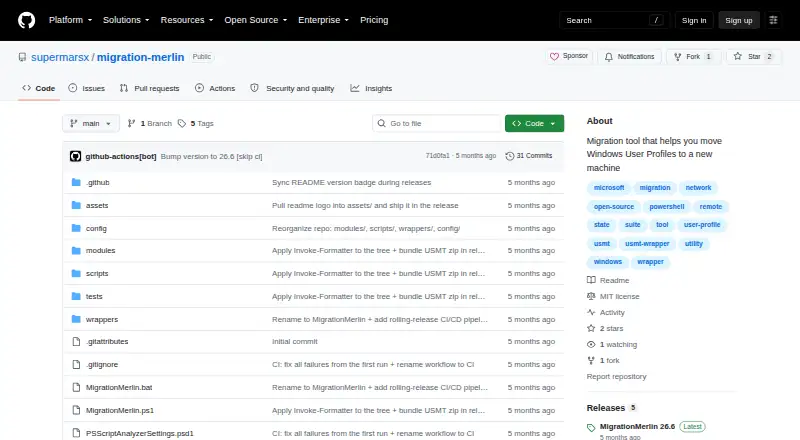
MigrationMerlin is a free Windows tool for moving user state from one PC to another, aimed at sysadmins and power users. It wraps Microsoft's User State Migration Tool, including scanstate.exe and loadstate.exe, and provides an interactive, arrow-key-driven text interface plus numbered batch wrappers. Both PCs must run Windows 10 or Windows 11, have administrator privileges, and be reachable on the same network with SMB port 445 open. The tool can set up an SMB transfer share on the destination PC, including a firewall rule; optional controls can restrict share access to a source user and scope the rule to a source IP address. IncludeUsers and ExcludeUsers options let users select profiles. ExtraData can include taskbar pins, Wi-Fi profiles, power plans, and items covered by custom migration XML. Migration stores can be encrypted with AES-256, but the README says there is no recovery path if the key is lost. The tool displays progress, file counts, and throughput during capture and restore, and writes transcript logs with credentials masked. The MIT-licensed project publishes ZIP downloads on GitHub Releases as rolling releases.
Good
- Select profiles with IncludeUsers and ExcludeUsers.
- Can set up an SMB transfer share.
- Optional AES-256 encryption for migration stores.
- Shows progress, file counts, and throughput.
- Logs mask credentials.
Watch out
- Both PCs must run Windows 10 or Windows 11.
- Both PCs need administrator privileges.
- SMB port 445 must be open between PCs.
- Lost encryption keys have no recovery path.
Who it suits
MigrationMerlin is for Windows sysadmins and power users moving profiles and settings between PCs. It suits transfers where both computers meet its Windows, administrator, and network requirements.
Verdict
MigrationMerlin offers selectable profile migration, transfer setup, and optional encryption for Windows PCs on the same network. Check the prerequisites first, and keep any encryption key safe because the project documents no recovery path if it is lost.
Plans and prices
From MigrationMerlin's own pricing page, checked 5 Oct 2026.
| Plan | Price | What it gives you |
|---|---|---|
| MigrationMerlin | Free | MIT-licensed software · Windows 10/11 · Administrator privileges on both PCs · Both PCs must share a network with SMB port 445 open |
The facts
Each one read from MigrationMerlin's own pages, with the date it was checked.
What it does
- Access controls
- Optional settings can restrict share access to a source user and scope the firewall rule to a source IP address.checked 5 Oct 2026
- Distribution
- The project describes itself as a rolling release and says downloadable ZIP artifacts are attached to GitHub releases.checked 5 Oct 2026
- Downloads
- The project publishes downloadable ZIP artifacts on GitHub Releases as rolling releases.checked 5 Oct 2026
- Encryption
- It can encrypt the migration store with AES-256, and the README says there is no recovery path if the encryption key is lost.checked 5 Oct 2026
- Extra data
- An ExtraData option can include taskbar pins, Wi-Fi profiles, power plans, and items covered by the custom migration XML configuration.checked 5 Oct 2026
- Interface
- It provides an interactive, arrow-key-driven TUI and numbered batch wrappers for a step-by-step migration.checked 5 Oct 2026
- License
- The repository links to an MIT license.checked 5 Oct 2026
- Logging
- The toolkit writes transcript logs to the migration folder's Logs directory and masks credentials in those logs.checked 5 Oct 2026
- Migration engine
- It wraps Microsoft's User State Migration Tool, including scanstate.exe and loadstate.exe.checked 5 Oct 2026
- Migration extras
- Its ExtraData option can include taskbar pins, Wi-Fi profiles, power plans, and configured rules for browsers, developer tools, SSH, Git, and VSCode.checked 5 Oct 2026
- Profile selection
- IncludeUsers and ExcludeUsers options let users choose which profiles to migrate.checked 5 Oct 2026
- Progress and logs
- It displays live progress, file counts, and throughput during capture and restore, and writes transcript logs with credential masking to the migration folder's Logs directory.checked 5 Oct 2026
- Purpose
- MigrationMerlin is a PC-to-PC user-state migration tool for Windows sysadmins and power users.checked 5 Oct 2026
- Requirements
- Both PCs need administrator privileges and must be reachable on the same network with SMB port 445 open between them.checked 5 Oct 2026
- Support and testing
- The repository documents a Pester v5 test suite with an expected baseline of 645 passed, 0 failed, and 2 environment-gated skipped tests.checked 5 Oct 2026
- Testing
- The README describes a Pester v5 test suite with about 645 tests and an expected baseline of 645 passed, 0 failed, and 2 skipped.checked 5 Oct 2026
- Transfer
- The toolkit can automatically set up an SMB transfer share on the destination PC, including a firewall rule.checked 5 Oct 2026
- Transfer setup
- It can automatically configure an SMB transfer share on the destination PC, including a firewall rule.checked 5 Oct 2026
The company
- Maker
- The linked GitHub profile identifies the maker as Mariana, username supermarsx.checked 5 Oct 2026
Where it runs
- Supported Windows versions
- The source and destination PCs must run Windows 10 or Windows 11.checked 5 Oct 2026
- USMT wrapper
- It wraps Microsoft's User State Migration Tool, including scanstate.exe and loadstate.exe, with an interactive text UI and batch wrappers.checked 5 Oct 2026
The full review of MigrationMerlin
Overview
MigrationMerlin is a free Windows utility for moving user state from one PC to another, built around Microsoft’s User State Migration Tool. It suits sysadmins and power users who can prepare both machines for a network transfer. Its selective profiles, optional encryption, and guided workflow are useful, but the Windows and SMB prerequisites make it a poor fit for casual or cross-platform moves.
Key features
An arrow-key-driven text interface and numbered batch wrappers organize migration into steps. Live progress, file counts, and throughput give operators a view of capture and restore, while transcript logs are written to the migration folder’s Logs directory with credentials masked. These are practical safeguards for a managed transfer; the actual migration engine remains Microsoft’s USMT tools, including scanstate.exe and loadstate.exe.
MigrationMerlin can configure an SMB share on the destination PC and add a firewall rule, avoiding some manual setup. IncludeUsers and ExcludeUsers allow profile selection rather than an all-or-nothing move. Optional controls can restrict share access to a source user and narrow the firewall rule to a source IP address, which is preferable when the transfer should be limited to a particular source.
ExtraData can bring along taskbar pins, Wi-Fi profiles, power plans, and items covered by custom migration XML, including configured rules for browsers, developer tools, SSH, Git, and VSCode. AES-256 encryption can protect the migration store, but losing its key leaves no recovery path. That makes key custody essential, not an optional cleanup task.
Both PCs must run Windows 10 or 11, have administrator privileges, share a network, and allow SMB port 445 between them. The requirement is reasonable in a controlled environment but rules out transfers where network access or firewall changes are unavailable.
Pricing
MigrationMerlin costs nothing. Its single free plan is MIT-licensed software for Windows 10/11 and carries no stated seat or migration quota. There is no cheaper tier that drops features: the meaningful costs are the required administrator access and network setup. ZIP downloads are attached to GitHub releases, which the project describes as rolling releases, so this is not a fixed-version release cadence.
Platforms
MigrationMerlin is for Windows PCs only, specifically Windows 10 or Windows 11 on both the source and destination. It transfers over the network using SMB, with port 445 open between the machines.
Who it's for
This is best for Windows administrators or technically confident users who need to select profiles and settings, preserve specific extras, and keep a migration’s progress and logs visible. It is not the right choice for a move between different operating systems or for PCs that cannot share an SMB connection.
Pros and cons
- Pros: Selective user profiles and ExtraData make it possible to tailor what moves rather than copy every profile indiscriminately.
- Pros: Automatic SMB share and firewall setup, plus optional source-user and source-IP restrictions, support a more controlled network transfer.
- Pros: AES-256 encryption and credential-masked logs add useful protection and operational visibility.
- Cons: Both PCs need Windows 10/11, administrator privileges, and SMB port 445 connectivity, limiting where the tool can be used.
- Cons: An encryption key cannot be recovered if lost, so encryption adds a serious key-management obligation.
Alternatives
PC Migration Software is the broader category to compare if MigrationMerlin’s Windows-and-SMB requirements do not suit your move.
- IObit Uninstaller is a Windows uninstaller rather than a user-state migration tool; choose it to remove apps and clean up leftovers instead of transferring profiles.
- EaseUS Todo PCTrans is worth comparing if you want a freemium Windows transfer product: its free tier caps transfers at 2 GB and five programs, while its monthly Pro plan is $49.95 a month.
- Endstate offers a free, unlimited-machines option as well as a cloud plan; compare it if those terms matter more than MigrationMerlin’s specified SMB workflow.
- Super Grate is another free Windows option to consider.
- ForensiT Transwiz is another free Windows option to consider.
- NiloShift has a free non-commercial MIT-licensed plan and a separate commercial license; it is a comparison point if licensing terms are central to your choice.
- PC Migration Pro has a free edition for three computers, making it an alternative to compare for a small number of machines.
- PickMeApp offers free tools with no license or expiration, another option to compare for Windows software moves.
Verdict
Choose MigrationMerlin if you need a free, selective Windows user-state migration and can provide administrator access and a same-network SMB path on both PCs. Its guided USMT workflow, migration extras, and optional encryption are useful strengths. Look elsewhere if the PCs cannot meet those prerequisites—or if you cannot safely retain an encryption key that has no recovery path.
Alternatives to MigrationMerlin
- 1
Endstate
Free planOpen sourceLinuxmacOSSelf-hostedWindows7.8Free plan - 2
EaseUS Todo PCTrans
Free planWindows6.6From $59.95 a year - 3
PC Migration Pro
Free planWindows6.5$19.95 one-time - 4
PickMeApp
Free planWindows6.5From $10 a year - 5
ForensiT User Profile Wizard
Free planWindows6.4From $3.50 a year - 6

ManageEngine OS Deployer
Free planWebWindows6.4From $645 a year