
Meshy
Meshy creates 3D assets from text, images or creative concepts that users can preview, edit and export.
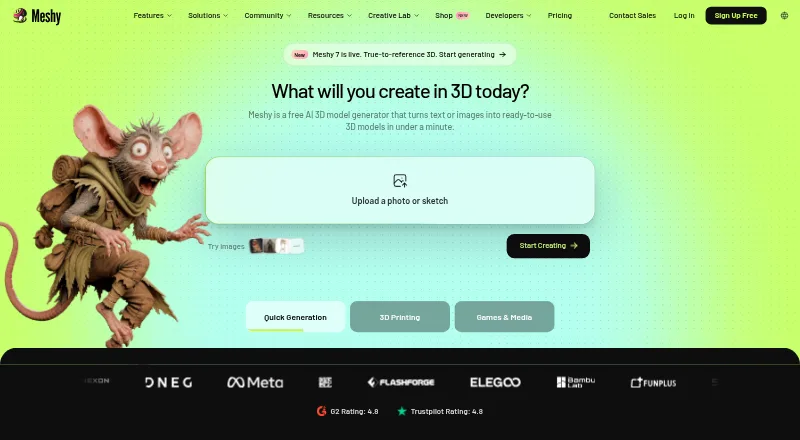
What Meshy is
Meshy creates 3D assets from text, images or creative concepts that users can preview, edit and export. Text-to-3D produces textured models from written prompts, while Image-to-3D can use photos, sketches or concept art. For characters, Meshy can automatically rig humanoid and quadruped models and offers more than 600 motion presets. Its 3D-printing tools check model printability and can repair some export issues. Integrations include Blender, Unity, Unreal Engine, Godot, Roblox Studio, Bambu Studio, OrcaSlicer and Creality Print, alongside a REST API and MCP server. The iOS and Android app syncs projects with the web app and exports common 3D formats. Free-plan assets use a CC BY 4.0 license, which requires attribution for commercial use, while premium subscribers own assets they create. The web app has a 100 MB upload limit for AI texturing and accepts one model at a time.
Good
- Creates textured models from text and images
- Offers more than 600 motion presets
- Integrates with major 3D and game tools
- Mobile apps sync projects with the web app
Watch out
- Web texturing uploads are limited to 100 MB
- Web app accepts one model at a time
- Free assets require attribution for commercial use
Who it suits
Meshy suits 3D artists, game developers and 3D-printing hobbyists who want to create assets from text or images. Its listed use cases also include product design, education, film and VR/AR.
Verdict
Meshy brings model generation, character animation and 3D-printing checks into one asset-creation tool. Check the free-plan asset license and web-app upload limits before choosing a workflow.
Plans and prices
From Meshy's own pricing page, checked 20 Sep 2026.
| Plan | Price | What it gives you |
|---|---|---|
| Studio 1× | $70 a month | 5,500 credits · 1 included seat · Includes 1 seat; additional seats cost $10/month per seat. |
| Studio 3× | — | 16,800 credits |
| Studio 5× | — | 28,000 credits |
| Free | Free | 100 credits/month · up to 10 assets/month · 10 Meshy 6 Lite downloads/month · 1 concurrent task · low priority · CC BY 4.0 · $ 0 per month |
| Pro | $20 a month | 1,000 credits/month · up to 100 assets/month · unlimited downloads · 10 concurrent tasks · high priority · API access · $ 20 per month billed yearly; $ 20 billed monthly |
| Premium | $40 a month | 3,000 credits/month · up to 300 assets/month · unlimited downloads · 30 concurrent tasks · priority higher than Pro · $ 40 per month billed yearly; $ 40 billed monthly |
| Studio | $70 a month | 5,500 credits/month · up to 550 assets/month · unlimited downloads · 60 concurrent tasks · single team workspace · $ 70 per month billed yearly; $ 70 billed monthly |
| Ultra | $100 a month | 8,000 credits/month · up to 800 assets/month · unlimited downloads · 100 concurrent tasks · highest priority · $ 100 per month billed yearly; $ 100 billed monthly |
| Enterprise | Priced on request | Custom credits · 100+ concurrent tasks · customizable queue · enterprise API and support · Custom price |
The facts
Each one read from Meshy's own pages, with the date it was checked.
What it does
- 3D printing
- Meshy describes generated meshes as watertight and manifold and supports printability checking, repair and automatic splitting.checked 15 Oct 2026
- AI texturing
- The service generates PBR texture sets including albedo, normal, metallic and roughness maps.checked 15 Oct 2026
- Animation
- Meshy auto-rigs humanoid and quadruped characters and offers more than 600 motion presets.checked 29 Sep 2026
- API
- Meshy provides a REST API at api.meshy.ai with text-to-3D, image-to-3D, texturing, remesh, rigging and animation endpoints.checked 15 Oct 2026
- API access limit
- API keys require Pro or higher, while the Free plan has no general API access.checked 15 Oct 2026
- API documentation
- The API documentation publishes OpenAPI 3.1 YAML and JSON specifications with form-encoded requests and JSON responses.checked 15 Oct 2026
- API rate limits
- Pro, Premium, Ultra and Studio plans allow 20 requests per second, while Enterprise allows 100 requests per second with customizable queue capacity.checked 15 Oct 2026
- API retention
- Non-Enterprise API assets are retained for a maximum of three days; Enterprise retention is indefinite.checked 15 Oct 2026
- Asset rights
- Premium subscribers own assets they create, while free-plan assets are licensed under CC BY 4.0 and require attribution for commercial use.checked 29 Sep 2026
- Blender requirements
- The Blender plugin requires Blender 4.2.6 or newer, internet access and a Pro-or-higher Meshy plan; Linux is not officially supported.checked 15 Oct 2026
- Changelog update
- The October 14, 2026 API changelog raised the model_url upload limit from 100 MB to 400 MB while retaining a 100 MB limit for data URIs.checked 15 Oct 2026
- Compliance
- The maker site displays ISO 27001:2022, SOC 2, and GDPR badges and links to a Trust Center.checked 29 Sep 2026
- Documentation depth
- The documentation covers web workspace usage, API endpoints, pricing, rate limits, retention, webhooks, developer platform tools and integrations.checked 15 Oct 2026
- Export formats
- Documented exports include GLB, FBX, OBJ, STL, USDZ and 3MF.checked 15 Oct 2026
- Funding news
- A July 21, 2026 press release announced nearly $400 million in Series B funding at a $1.5 billion valuation.checked 15 Oct 2026
- Growth news
- The July 2026 funding announcement reported more than 12 million registered users and over 100 million generated models.checked 15 Oct 2026
- Image to 3D
- Uploaded photos, sketches or concept art can be converted into 3D models.checked 15 Oct 2026
- Integrations
- Official integrations include Blender, Unity, Unreal, Godot, Roblox, 3ds Max, Maya, ZBrush, ComfyUI and multiple slicers.checked 15 Oct 2026
- Intended users
- Meshy says it is built for 3D artists, game developers, and 3D printing hobbyists, and describes use cases including product design, education, film, and VR/AR.checked 29 Sep 2026
The company
- Company
- The maker identifies the company as Meshy LLC and says its team is rooted in Silicon Valley with a global team.checked 29 Sep 2026
- Company size and headquarters
- LinkedIn lists Meshy as privately held with 51–200 employees and headquarters in Sunnyvale, California.checked 15 Oct 2026
- Founded
- Dealroom lists Meshy as founded in 2021 by Dr. Ethan Hu.checked 15 Oct 2026
- Headquarters
- Sunnyvale, California, USAchecked 23 Sep 2026
Money
- Free plan
- Yeschecked 20 Sep 2026
The full review of Meshy
Meshy is a 3D asset creation tool for turning text, images and sketches into editable, exportable models, with character animation and 3D-printing checks alongside generation. It suits creators who want those steps and integrations in one workflow. The free plan is useful for a limited start, but its download cap and asset-license terms matter if you plan to publish or sell your work.
Overview
Meshy brings model creation, texturing, rigging and export together across web, iOS and Android, with API access for connected workflows. Its reach extends from game development and product design to education, film and VR/AR; hobbyists can also use it to prepare models for printing. That breadth is appealing if you need more than a prompt-to-model tool, though the web app’s upload limit can constrain texturing work on larger files.
Meshy’s web-app data is stored with Amazon Web Services in the United States, and the company says it is not shared or used for training without consent. The maker displays ISO 27001:2022, SOC 2 and GDPR badges and links to a Trust Center. Product questions, help and issue reports are directed to its Discord community.
Key features
Generate and texture 3D assets
Text-to-3D creates textured models from written descriptions; image-to-3D turns photos, sketches or concept art into textured meshes. Meshy also offers sketch-to-3D and AI texturing. This range makes it useful for getting from a visual idea to a model without starting from geometry alone, but it does not remove the need to review and edit the result before using it.
Rig and animate characters
Meshy automatically rigs humanoid and quadruped characters and provides more than 600 motion presets. That makes it a stronger fit for creators who need animated characters as well as static assets. If animation is the main task, a dedicated animation alternative may be a better match.
Check models for 3D printing
Meshy says its printable models are watertight and manifold, while its printability check scans exports and repairs edge cases automatically. This is a practical addition for hobbyists preparing generated assets for fabrication, though it is not a reason to skip reviewing an export before printing.
Connect to creative tools and export
Native integrations include Blender, Unity, Unreal Engine, Godot, Roblox Studio, Bambu Studio, OrcaSlicer and Creality Print; Meshy also offers a REST API and MCP server. Exports include GLB, FBX, OBJ, STL, USDZ, 3MF, BLEND and DXF. The mobile app syncs projects with the web app and exports common formats including STL, GLB, FBX, OBJ, USDZ and 3MF.
For AI texturing in the web app, uploads are capped at 100 MB and only one model can be processed at a time. That is manageable for single-asset work, but a bottleneck for larger files or batches.
Pricing
Meshy is freemium. Free costs nothing, billed monthly, and includes 100 credits and 10 free downloads per month for Meshy 6 Lite models. It is a reasonable way to explore the workflow, but the download cap and Lite-model restriction limit sustained use. Free-plan assets are licensed under CC BY 4.0; commercial use requires attribution.
Pro costs $20 a month, billed monthly, for 1,000 credits and 10 concurrent tasks. It is the entry paid tier and lifts the free-plan’s small credit allowance, but still limits parallel work. Premium costs $40 a month, billed monthly, for 3,000 credits and 30 concurrent tasks; Ultra costs $100 a month, billed monthly, for 8,000 credits and 100 concurrent tasks. Those higher tiers suit heavier workflows that benefit from more credits and simultaneous tasks.
Studio 1× costs $70 a month and includes 5,500 credits and one seat; additional seats cost $10/month per seat. Studio 3× includes 16,800 credits and Studio 5× includes 28,000 credits; both have custom pricing. The Studio plan also has custom pricing. Enterprise has custom pricing, with custom credit allocations, multiple workspaces, SAML SSO and dedicated account management, making it the team-oriented option. Premium subscribers own the assets they create, unlike free users, who must follow the CC BY 4.0 attribution requirement.
Platforms
Meshy is available on web, iOS and Android, and provides API access. The mobile apps sync projects with the web app. Its broad integrations make it easier to carry assets into 3D editors, game engines and slicers, rather than treating generation as a standalone destination.
Who it's for
Meshy is best suited to 3D artists and game developers who want generation, texturing and character animation in the same toolkit, and to printing hobbyists who value automated printability checks. Its integrations and API also suit studios connecting asset creation to existing pipelines. It is less compelling for users who need to process large or multiple models at once in the web app, or who require unrestricted commercial rights on a free tier.
Pros and cons
- Pros: Text, image and sketch inputs cover several routes from concept to textured model.
- Pros: Humanoid and quadruped auto-rigging, over 600 motion presets and printing checks extend the product beyond static model generation.
- Pros: Integrations, API access and common export formats give creators several ways to move assets into other tools.
- Cons: The free plan allows only 10 monthly downloads of Meshy 6 Lite models, and commercial use requires attribution under CC BY 4.0.
- Cons: The web app’s 100 MB upload cap and one-model-at-a-time limit restrict larger or batch texturing workflows.
- Cons: Concurrent tasks scale by paid tier, so users needing greater parallel capacity face a higher monthly cost.
Alternatives
For a different 3D-generation option, Goblin3D has a free tier with 150 starter credits, public models, a standard queue and one concurrent 3D generation; consider it if that starting allowance and queue setup better suit your needs.
DeepMotion Animate 3D offers a freemium workflow with 25 credits per month, clips up to 20 seconds, support for two persons and 1080p output; choose it if those animation-specific limits align better with your task.
AnnoMotion is another freemium alternative, with a free plan and a Mini plan available for a one-time 1.00 GBP.
Other options include Spritefy, Hyper3D Rodin, Masterpiece X, Scenario and SpriteShip. For category comparisons, browse AI 3D Model Generators, AI Game Asset Generators, Game 3D Modeling Software, 3D Avatar Software, Game Character Creation Software and 3D modeling software.
Verdict
Choose Meshy if you want one tool to generate and texture 3D assets, animate characters and prepare models for printing, with integrations to carry work into other software. Its strongest case is that breadth; its clearest drawbacks are the free tier’s download and licensing limits and the web app’s single-file upload constraint. Creators who need more throughput or commercial ownership should weigh the paid tiers before building a workflow around it.
Getting started
- Open the Meshy website or use its iOS or Android app.
- Create an asset from a text description, image, sketch, or concept.
- Preview and edit the generated model.
- Choose a plan based on the available credits and task limits.
- Export the model in a supported format or use a listed integration.
Limits worth knowing
The Free plan includes 100 credits and 10 free monthly downloads for Meshy 6 Lite models. Free-plan assets are licensed under CC BY 4.0 and require attribution for commercial use.
Questions
Is Meshy free?
Yes. The Free plan costs nothing and includes 100 credits and 10 monthly downloads for Meshy 6 Lite models.
How much do paid plans cost?
Pro is $20/mo, Premium is $40 a month, Ultra is $100 a month, and Studio 1× is $70 a month. Additional Studio 1× seats cost $10/month per seat.
Which platforms does Meshy support?
Meshy lists Android, iOS, web, and API. Its mobile apps sync projects with the web app.
Can I use Meshy models in other software?
Meshy lists integrations with Blender, Unity, Unreal Engine, Godot, Roblox Studio, Bambu Studio, OrcaSlicer, and Creality Print. It also offers a REST API and MCP server.
Who owns assets made with Meshy?
Premium subscribers own assets they create. Free-plan assets use a CC BY 4.0 license and require attribution for commercial use.
What export formats are supported?
Listed export formats include GLB, FBX, OBJ, STL, USDZ, 3MF, BLEND, and DXF.
Alternatives to Meshy
- 1
Rhino 3D
Free planiOSAPILinuxmacOS8.9Free plan - 2

Tripo AI
Free planAndroidiOSWebAPI8.8From $20 a month - 3

Onshape
Free planAndroidiOSWeb8.7From $1,500 a year - 4

SketchUp
Free planiOSWebWindows8.6From $55 a year - 5

ZBrush
Free planiOSAPImacOSWindows8.6Free plan - 6

Blockbench
Free planOpen sourceAndroidiOSWebAPI8.6Free plan