MConverter
MConverter is an online platform for converting video, audio, image, e-book, document, subtitle, and archive formats.
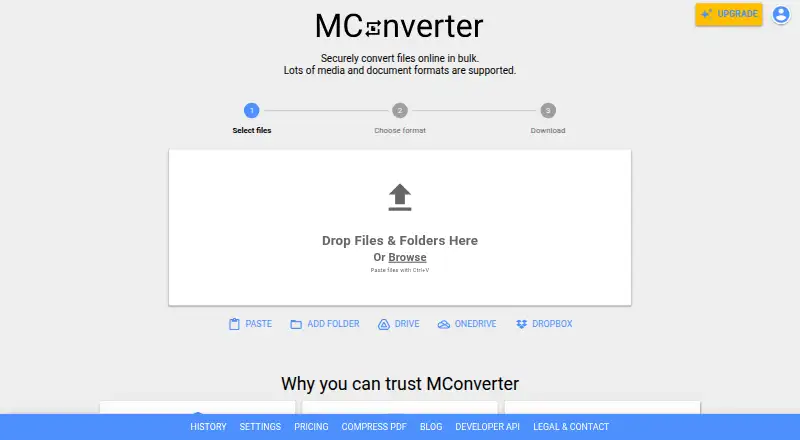
What MConverter is
MConverter is an online platform for converting video, audio, image, e-book, document, subtitle, and archive formats. It can process multiple files at once, including different input formats converted to a single target format, and accepts folders with compatible files in subfolders. Files can be selected from Google Drive, Microsoft OneDrive, and Dropbox, while a Google Workspace Marketplace app supports conversions in Drive. An API is available for automated file conversion and PDF compression, including integration with Make.com and similar platforms. MConverter has a free plan allowing 15 files per day, up to 8 files at once, and 100 MB per file. Paid monthly options are Plus at $12.99 a month, Pro at $25.99 a month, and Max at $33.99 a month, with higher concurrent-file and file-size limits across those plans. The service says each file runs in a separate isolated environment and uploaded files are automatically deleted four hours after conversion; immediate deletion is also available. It lists TLS 1.3 and HSTS for transfers. MConverter began as a personal hobby project in 2017 and is based in Sofia, Bulgaria.
Good
- Converts several file categories.
- Processes multiple source formats to one target.
- Accepts folders with compatible subfolder files.
- Connects to Google Drive, OneDrive, and Dropbox.
- Offers API-based conversion automation.
Watch out
- Free plan is limited to 15 files per day.
- Free plan allows 8 files at once.
- Free plan has a 100 MB per-file limit.
Who it suits
MConverter suits people who need to convert varied file types, including batches or folders. Its cloud connections and API may fit users moving files between storage services or automating conversions.
Verdict
MConverter combines broad format support with batch, folder, cloud, and API workflows. Its free plan has specific daily, concurrent-file, and file-size caps.
Plans and prices
From MConverter's own pricing page, checked 15 Oct 2026.
| Plan | Price | What it gives you |
|---|---|---|
| Free Plan | Free | 15 conversions per 24 hours · 8 files per batch · 100 MB per file · daily limit may fall to 3 with ad blocking |
| Free | Free | 15 files/day · 8 files at once · 100 MB/file |
| Plus | $12.99 a month | 250 files at once · 1 GB per file · unlimited daily conversions · no ads · no branding · conversion history · human support · File Explorer/Finder integration · monthly |
| Pro | $25.99 a month | 750 files at once · 2 GB per file · unlimited daily conversions · no ads · no branding · conversion history · priority human support · File Explorer/Finder integration · monthly |
| Max | $33.99 a month | 1000 files at once · 10 GB per file · unlimited daily conversions · no ads · no branding · conversion history · priority human support · File Explorer/Finder integration · monthly |
| Plus | $116.99 a year | 250 files at once · 1 GB per file · unlimited daily conversions · no ads · no branding · conversion history · human support · File Explorer/Finder integration · yearly |
| Pro | $186.99 a year | 750 files at once · 2 GB per file · unlimited daily conversions · no ads · no branding · conversion history · priority human support · File Explorer/Finder integration · yearly |
| Max | $249.99 a year | 1000 files at once · 10 GB per file · unlimited daily conversions · no ads · no branding · conversion history · priority human support · File Explorer/Finder integration · yearly |
| One-Day Pass | — | Full access for 24 hours · all Plus features · no subscription |
The facts
Each one read from MConverter's own pages, with the date it was checked.
What it does
- API
- The maker advertises a public MConverter API for automated conversions and PDF compression, with Make.com integration support.checked 15 Oct 2026
- API documentation depth
- The developer dashboard page states that JavaScript is required and exposes only a loading screen in the fetched HTML.checked 15 Oct 2026
- Automation
- MConverter provides an API for automated file conversion and PDF compression that can integrate with Make.com and similar platforms.checked 30 Sep 2026
- Batch conversion
- The service can process multiple files together, including compatible files with different source formats targeting one output format.checked 15 Oct 2026
- Bug bounty
- MConverter says it pays independent researchers who responsibly report security vulnerabilities.checked 15 Oct 2026
- Clipboard input
- Files can be pasted from the clipboard with Ctrl+V or Command+V, while mobile users can use a Paste button.checked 15 Oct 2026
- Cloud integrations
- The picker supports Google Drive, Microsoft OneDrive and Dropbox, and a Google Workspace Marketplace app can convert files directly in Drive.checked 15 Oct 2026
- Data-center certifications
- The company says its cloud providers hold ISO/IEC 27001 and SOC 2 certifications.checked 15 Oct 2026
- File retention
- Uploaded and converted files are automatically deleted from MConverter servers within four hours, with immediate deletion available.checked 15 Oct 2026
- Folder input
- Users can drag folders and MConverter selects compatible files in the folder and its subfolders.checked 15 Oct 2026
- Infrastructure certifications
- MConverter says it uses cloud providers with ISO/IEC 27001 and SOC 2 certifications.checked 30 Sep 2026
- Limit: occasional errors
- A user testimonial reproduced on the official site mentions occasional errors, although the developer responded quickly to feedback.checked 15 Oct 2026
- Notable news: conversion engine
- A May 22, 2026 product update announced animated JPEG XL creation, animated AVIF frame export, animated WebP-to-AVIF conversion and improved metadata retention.checked 15 Oct 2026
- PDF compression
- Basic, strong and extreme compression modes are offered, with reductions of up to 90% depending on the file.checked 15 Oct 2026
Where it runs
- Browser extension
- The Chrome extension supports right-click extraction from images, video and audio players, address-bar format commands and PDF compression.checked 15 Oct 2026
The company
- Company history
- MConverter's journey began in 2017 as a personal hobby project by software engineer Martin Minchev.checked 30 Sep 2026
- Company legal name
- The official company information identifies the operator as MCONVERTER OOD, registration number 207553144.checked 15 Oct 2026
- Company location
- MCONVERTER OOD lists its address in the Lozenets District of Sofia, Bulgaria.checked 30 Sep 2026
- Company size
- LinkedIn lists MConverter as a partnership with 2–10 employees.checked 15 Oct 2026
- Founded
- 2017checked 28 Sep 2026
- Founded story
- MConverter says Martin Minchev began the project as a personal hobby in 2017 while he was a high-school student.checked 15 Oct 2026
- Headquarters
- The company lists Kozyak Street, Lozenets District, Sofia 1407, Bulgaria.checked 15 Oct 2026
Money
- Limit: advertising and free restrictions
- Trustpilot complaints include needing to watch advertisements for larger files or objecting that the service is not completely free.checked 15 Oct 2026
- Notable news: free plan
- On February 20, 2026, MConverter announced raising the free batch limit from 2 to 8 files and the daily limit from 10 to 15 conversions.checked 15 Oct 2026
The full review of MConverter
MConverter is an online service for converting media, documents, e-books, subtitles and archives, with companion apps and an API. It suits people handling mixed batches or recurring cloud-based conversion jobs. Its breadth is useful, but the free tier’s modest file and daily limits make it a better starting point than a dependable large-file workflow.
Overview
MConverter brings several file types into one conversion service, and can send files from different source formats to the same target format in a batch. Folder input also reaches compatible files in subfolders. These options are useful for organizing a varied queue; occasional users converting a single file may not need the added workflow flexibility.
Google Drive, Microsoft OneDrive and Dropbox file selection can reduce manual transfers. A Google Workspace Marketplace app supports conversion in Drive, while an API enables automated file conversion and PDF compression, including integration with Make.com and similar platforms. That makes MConverter more compelling for repeated tasks than for users seeking only a one-off desktop converter.
Key features
Security and retention are relevant strengths for an online file service. MConverter says each file runs in a separate isolated environment, transfers use TLS 1.3 and HSTS, and uploaded files are deleted from its servers four hours after conversion; users can also delete them immediately. The company says it processes files in-house and does not sell, rent or share them for advertising or marketing. Its cloud providers hold ISO/IEC 27001 and SOC 2 certifications. These are stated safeguards, not a reason to upload material that should not leave your control.
The plan limits shape what the service can handle. Free permits 15 files per day, eight files at once and 100 MB per file. Paid tiers raise the simultaneous-file and size ceilings and remove the daily conversion cap, so users with recurring queues or larger files will need to pay.
Pricing
MConverter is freemium, with a free plan and a free trial. Free costs nothing and allows 15 files per day, eight at once and 100 MB per file. It is suitable for light use, but the daily quota and file-size ceiling can rule it out for regular or large jobs.
Plus costs $12.99 a month, billed monthly. It allows 250 files at once, 1 GB per file, unlimited daily conversions and no ads, and includes human customer support. It is the sensible paid step for regular users who do not need the larger Pro or Max ceilings.
Pro costs $25.99 a month, billed monthly, and raises the concurrent limit to 750 files and the per-file limit to 2 GB; it also includes unlimited daily conversions and priority human support. Max costs $33.99 a month, billed monthly, and increases those ceilings to 1,000 files at once and 10 GB per file, with priority human support. Pro suits heavier batch work; Max is for users whose files exceed Pro’s 2 GB limit or whose queues need its larger concurrency allowance.
The One-Day Pass gives full access for 24 hours, including all Plus features, without a subscription. Its price is custom pricing. That makes it a possible fit for a short burst of conversion work, rather than a recurring workload.
Platforms
MConverter supports Android, iOS, Linux, macOS, Windows and web, as well as an extension and API. Its web and cloud workflows suit users who move between devices; the API is the more relevant option for automated conversion.
Who it's for
MConverter is a strong fit for people who convert varied file types in batches, work from folders or cloud storage, or want an API for repeatable tasks. The free tier gives occasional users a way to try those workflows, but users who regularly exceed 15 files a day or 100 MB per file should consider a paid plan. Anyone who prefers a free local converter or does not need cloud access may be better served elsewhere.
Pros and cons
- Pros: Broad format coverage and mixed-source batch conversion make it practical for diverse queues.
- Pros: Folder input, cloud file selection and API automation cover both manual and repeatable workflows.
- Pros: Immediate deletion is available, alongside automatic deletion four hours after conversion.
- Cons: Free use stops at 15 files per day, eight at once and 100 MB per file, a tight ceiling for frequent or large jobs.
- Cons: Pro and Max cost more than Plus; their higher concurrency and file-size allowances matter mainly to heavier workloads.
Alternatives
Browse file conversion software for more options. AnyConv is worth considering for free browser-based conversion: its free plan allows uploads up to 100 MB, up to 60 files per hour and requires no registration. Choose Freemake Video Converter if its core conversion features and no-expiration free plan suit your needs; a Mega Pack lifetime license is also offered.
Pandoc is a free software option released under the GPL. XnConvert may fit private, educational or non-profit use at no cost; its company license is 6.50 EUR for 100 or more licenses. Any Video Converter is another freemium alternative for macOS and Windows, with a free plan described as including basic features.
Convertio is a close cloud-oriented alternative with a Lite plan at $11.99 a month, billed cancel anytime, offering a 1 GB maximum file size, 1,000 monthly conversion credits and 50 concurrent conversions. Pick it if those terms fit better than MConverter’s Plus plan. HandBrake and Shutter Encoder are free alternatives for Linux, macOS and Windows; Shutter Encoder is described as having no limitations or advertising and being supported by donations.
Verdict
Choose MConverter if you need broad format coverage with batch, folder, cloud or API workflows, and are willing to pay when the free caps become restrictive. Its strongest reason to look elsewhere is the constrained free tier: light users may manage within it, but frequent converters and large-file users need a paid plan or a different fit.
Getting started
- Open https://mconverter.eu/.
- Choose the web service or an available platform: Android, iOS, Linux, macOS, Windows, or extension.
- Select files from your device, a folder, Google Drive, OneDrive, or Dropbox.
- Choose a target format and convert; the service also supports batch conversion.
- For automated workflows, use the API, which can integrate with Make.com and similar platforms.
- Choose the Free plan or a paid monthly plan; a free trial is available.
Limits worth knowing
The Free plan allows 15 files per day, 8 files at once, and 100 MB per file. Plus allows 250 files at once and 1 GB per file; Pro allows 750 files at once and 2 GB per file; Max allows 1,000 files at once and 10 GB per file. Paid plans include unlimited daily conversions.
Questions
Is MConverter free?
Yes. The Free plan costs nothing and allows 15 files per day, 8 at once, and 100 MB per file. A free trial is also available.
What do the paid plans cost?
Plus costs $12.99 a month, Pro costs $25.99 a month, and Max costs $33.99 a month. Each is billed monthly.
Which platforms does MConverter support?
MConverter lists Android, iOS, Linux, macOS, web, Windows, an extension, and an API.
Can MConverter convert files from cloud storage?
It supports selecting files from Google Drive, Microsoft OneDrive, and Dropbox. A Google Workspace Marketplace app supports conversion in Google Drive.
Does MConverter have an API?
Yes. The API supports automated file conversion and PDF compression and can integrate with Make.com and similar platforms.
How does MConverter handle uploaded files?
MConverter says each file is converted in a separate isolated environment. Uploaded files are automatically deleted four hours after conversion, and immediate deletion is also available.
Alternatives to MConverter
- 1

Convertio
Free planAndroidiOSWebAPI8.3From $6.99 a month - 2
FreeConvert GIF Maker
Free planAndroidiOSWebAPI8.2From $12.99 a month - 3
GrabzIt
Free planAndroidiOSWebAPI8.2Free plan - 4
Zamzar API
Free planAndroidiOSWebAPI8.2From $25 a month - 5

CloudConvert Audio Converter
Free planAndroidiOSWebAPI8.1From $10 a month - 6
XnConvert
Free planAndroidLinuxmacOSWindows7.9€6.50 one-time