Any Video Converter
Any Video Converter is a video and audio conversion app for Windows and macOS.
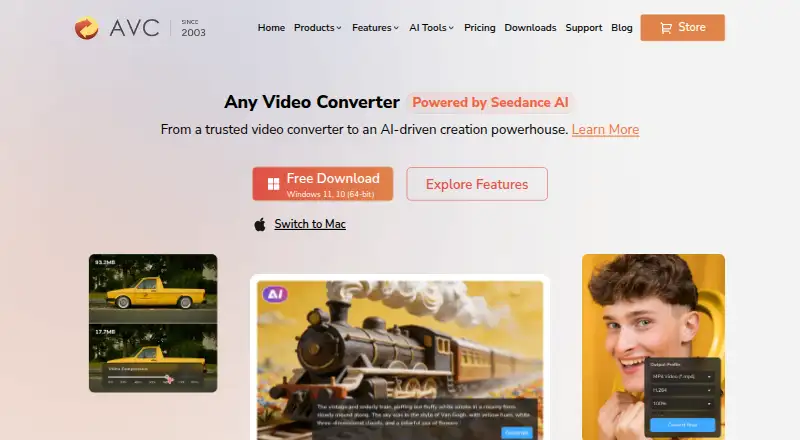
What Any Video Converter is
Any Video Converter is a video and audio conversion app for Windows and macOS. It supports batch conversion, audio extraction, hardware acceleration, and output video resolution up to 4K. Listed video formats include MP4, MOV, MKV, M2TS, M4V, MPEG, AVI, WMV, ASF, OGV, and WEBM; audio formats include MP3, M4A, OGG, WAV, AAC, FLAC, and OPUS. The maker also lists support for more than 1,000 video and audio formats and downloads from over 1,000 sites. Its tools include video downloads, compression, and basic editing, while AI functions include image and video generation, video enhancement, transcription, and audio splitting. The free plan includes basic conversion, downloads, compression, and editing, but does not promise all premium AI capabilities. Free, Pro, and Ultimate desktop apps are listed. Paid prices shown include Pro at $39.95, paid once and Ultimate at $29.95, paid once. Monthly and annual subscriptions automatically renew unless canceled before renewal.
Good
- Batch conversion and hardware acceleration are listed.
- Outputs video up to 4K resolution.
- Supports listed video and audio formats.
- Free plan includes basic conversion and editing.
Watch out
- Free tier does not promise all premium AI capabilities.
- Subscriptions renew automatically unless canceled before renewal.
- Credit pack purchases are final and non-refundable.
Who it suits
It suits Windows or macOS users who need conversion, downloads, compression, or audio extraction. The free plan covers basic tools; users seeking AI capabilities should note that the free tier does not promise all premium features.
Verdict
Any Video Converter combines format conversion with downloads, compression, editing, and audio extraction. The free plan covers basic tools, while premium AI access is not promised at that tier.
Plans and prices
From Any Video Converter's own pricing page, checked 28 Sep 2026.
| Plan | Price | What it gives you |
|---|---|---|
| Free | Free | Free download with basic features. · Unlimited video downloads · 1000+ formats conversion · Unlimited video compression · Basic video editing tools |
| Pro | $39.95, paid once | The page lists $49.95 / $79.95. · Unlimited video downloads · 1000+ formats conversion · GPU acceleration and batch conversion · Screen recording in HD and 4K · DVD burning · Monthly |
| Ultimate | $29.95, paid once | The page lists $69.95 / $89.95. · Unlimited video downloads · 1000+ formats conversion · GPU acceleration and batch conversion · AI creation credits · AI video enhancement · Monthly |
The facts
Each one read from Any Video Converter's own pages, with the date it was checked.
What it does
- AI Features
- AI capabilities include image and video generation, video enhancement, transcription, and audio splitting.checked 28 Sep 2026
- Audio extraction
- Yeschecked 20 Sep 2026
- Batch conversion
- Yeschecked 20 Sep 2026
- Batch Conversion
- Batch conversion is described as high-speed and bulk processing at 130X.checked 28 Sep 2026
- Credit Refunds
- Credit pack purchases are final and non-refundable.checked 28 Sep 2026
- Format Support
- The product supports more than 1000 video and audio formats.checked 28 Sep 2026
- Hardware acceleration
- Yeschecked 20 Sep 2026
- Hardware Acceleration
- The feature list includes GPU acceleration and an ultra-fast mode.checked 28 Sep 2026
- Maximum output resolution
- 4kchecked 20 Sep 2026
- Output formats
- MP4,MOV,MKV,M2TS,M4V,MPEG,AVI,WMV,ASF,OGV,WEBM; audio: MP3,M4A,OGG,WAV,AAC,FLAC,OPUSchecked 20 Sep 2026
- Paid from
- 19.95checked 20 Sep 2026
- Payment Security
- Payment data exchanged during checkout is SSL-secured.checked 28 Sep 2026
- Refund Policy
- Monthly and yearly plans have a 5-day guarantee; permanent plans have a 30-day guarantee.checked 28 Sep 2026
- Software Security
- The company states that its product is bug-free and 100% clean.checked 28 Sep 2026
The company
- Company Experience
- The company states 23 years of experience and 630 million customers.checked 28 Sep 2026
- Company Identity
- The copyright holder named on the page is Anvsoft Inc.checked 28 Sep 2026
- Founded
- 2003checked 28 Sep 2026
Where it runs
- Desktop Apps
- Products include Any Video Converter Free, Free for Mac, Pro, and Ultimate.checked 28 Sep 2026
- Supported platforms
- cross-platformchecked 20 Sep 2026
- Supported Platforms
- The page lists Windows 11/10 64-bit and macOS 12 and above, plus macOS 10.15-11.checked 28 Sep 2026
Money
- Free Limits
- The free tier has basic features and does not promise all premium AI capabilities.checked 28 Sep 2026
- Free plan
- Yeschecked 20 Sep 2026
- Free Tier
- A free plan includes basic conversion, downloads, compression, editing, and other tools.checked 28 Sep 2026
- Subscription Billing
- Monthly and annual subscriptions automatically renew unless canceled before renewal.checked 28 Sep 2026
The full review of Any Video Converter
Overview
Any Video Converter is a desktop media utility from Any Video Converter, a company founded in 2003. It is best suited to Windows and macOS users who want conversion alongside downloads, compression and basic editing. For routine media tasks, the free plan is a useful starting point; users who need premium AI tools should weigh the paid tiers and their billing terms.
Key features
The app handles more than 1,000 video and audio formats, with batch conversion, hardware acceleration and output up to 4K. Video formats include MP4, MOV, MKV, M2TS, M4V, MPEG, AVI, WMV, ASF, OGV and WEBM; audio formats include MP3, M4A, OGG, WAV, AAC, FLAC and OPUS. That breadth is useful for mixed media libraries, while the 4K output ceiling makes it a less suitable fit for workflows that require higher-resolution exports.
It also supports downloads from more than 1,000 sites, including HD, 2K, 4K, 8K and HDR video, plus compression, basic editing and audio extraction. AI capabilities include image and video generation, video enhancement, transcription and audio splitting. The free plan covers core tasks but does not promise all premium AI capabilities, so AI-focused users should consider a paid plan rather than assume the free tier includes the full toolkit.
Pricing
The Free plan costs nothing. It includes unlimited video downloads, conversion across 1,000+ formats, unlimited compression and basic editing. That is a strong fit for everyday conversion and file-management needs, but it does not promise the full set of premium AI capabilities.
The Pro plan is shown at $39.95, paid once, billed Monthly; the page also lists $49.95 / $79.95. It adds GPU acceleration and batch conversion, HD and 4K screen recording, and DVD burning alongside unlimited downloads and 1,000+ format conversion. This tier makes more sense for people who need those specific tools than for users who only need basic conversion. The Ultimate plan is shown at $29.95, paid once, billed Monthly; the page also lists $69.95 / $89.95. It adds AI creation credits and AI video enhancement, making it the closer fit for users seeking AI features, though credit purchases are final and non-refundable.
Monthly and annual subscriptions automatically renew unless canceled before renewal. Monthly and yearly plans have a 5-day guarantee; permanent plans have a 30-day guarantee. Free tech support and updates are included.
Platforms
Any Video Converter has desktop products for Windows and macOS, including Any Video Converter Free, Free for Mac, Pro and Ultimate. The platform choice is straightforward for desktop users on either system, but it is not a fit for someone seeking a Linux version.
Who it's for
Choose it if you want one Windows or Mac desktop app for broad format conversion, batch work, downloads, compression and basic edits, with the option to pay for additional AI and recording features. Look elsewhere if you need Linux support, output beyond 4K, or premium AI access without a subscription or credit purchase.
Pros and cons
- Pros: More than 1,000 supported formats and batch conversion cover varied conversion needs.
- Pros: The free tier includes unlimited downloads and compression as well as basic editing, not just conversion.
- Pros: Download support spans more than 1,000 sites and includes high-resolution and HDR video.
- Cons: Maximum output resolution is 4K, which rules it out for higher-resolution export needs.
- Cons: The free tier does not promise all premium AI capabilities, and paid subscription plans renew automatically unless canceled.
- Cons: Credit pack purchases are final and non-refundable.
Alternatives
HandBrake is a free option for users who want conversion on Linux as well as macOS or Windows. Shutter Encoder suits readers who prefer a completely free, unrestricted tool with no advertising and donation support. DivX Converter is worth considering if DivX, MKV, HEVC and MP4 support with device and format presets is the priority.
Format Factory is a free Windows desktop alternative for users who want all functions free. FFmpeg is another free option for Windows, macOS and Linux. Freemake Video Converter offers core conversion without expiration on Android, macOS and Windows.
VSDC Free Video Converter is a free Windows choice when export presets, audio extraction and joining, trimming or splitting video are the key needs. Wondershare UniConverter is a paid Windows and Mac alternative with a yearly plan that includes 4K/8K conversion and 600 bonus credits.
For more options, browse Video Converter Software or File Conversion Software.
Verdict
Any Video Converter is a practical pick for Windows and Mac users who want broad format support and useful download, compression and editing tools in a free desktop package. Its strongest reason to choose it is the range of everyday media tasks covered at no cost; its clearest reason to look elsewhere is the 4K output cap or the need for premium AI tools without paid-plan terms.
Getting started
- Visit https://www.any-video-converter.com/home/.
- Choose the desktop product for macOS or Windows.
- Select the free plan or review the paid options.
- Download the chosen desktop product.
Limits worth knowing
The free tier includes basic tools and does not promise all premium AI capabilities. Monthly and annual subscriptions renew automatically unless canceled before renewal; monthly and yearly plans have a 5-day guarantee, while permanent plans have a 30-day guarantee. Credit pack purchases are final and non-refundable.
Questions
Is Any Video Converter free?
Yes. The Free plan is listed as free and includes basic conversion, downloads, compression and editing tools.
Which platforms does it support?
The desktop platform list includes macOS and Windows.
What does the free tier include?
It includes basic conversion, downloads, compression and editing. It does not promise all premium AI capabilities.
What are the paid prices?
The pricing details also list Pro at $39.95, paid once and Ultimate at $29.95, paid once.
Does it support batch conversion and audio extraction?
Yes. Batch conversion and audio extraction are listed features.
What are the subscription and refund terms?
Monthly and annual subscriptions automatically renew unless canceled before renewal. Monthly and yearly plans have a 5-day guarantee; permanent plans have a 30-day guarantee, and credit pack purchases are final and non-refundable.
Alternatives to Any Video Converter
- 1
Bitmovin Encoding
Free planAndroidiOSWebAPI8.8From $0.03 a month - 2

Convertio
Free planAndroidiOSWebAPI8.7From $6.99 a month - 3
Wondershare UniConverter
AndroidiOSExtensionmacOS8.3From $49.99 a year - 4
HitPaw Video Converter
AndroidiOSWebAPI8.2From $39.95 a year - 5

MediaCoder
Free planAPISelf-hostedWindows8.0A$189 one-time - 6

FFmpeg
Free planLinuxmacOSSelf-hostedWindows7.8Free plan