
MatterScribe
MatterScribe converts legal audio into searchable, speaker-labeled rough transcripts for hearings, depositions, client meetings, and other recordings.
What MatterScribe is
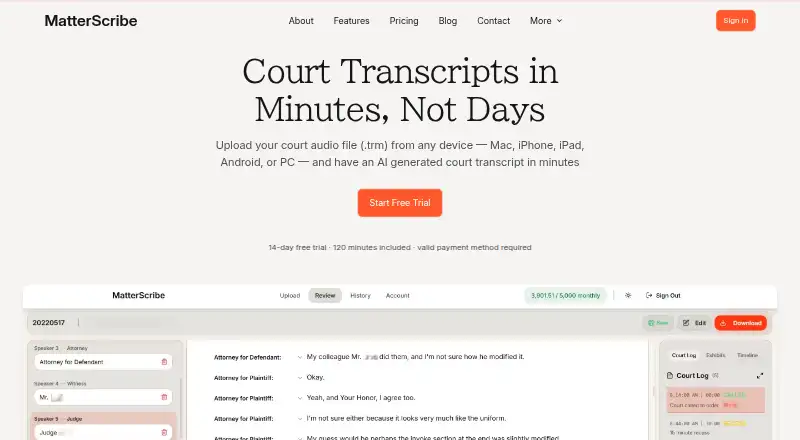
MatterScribe converts legal audio into searchable, speaker-labeled rough transcripts for hearings, depositions, client meetings, and other recordings. It can read ForTheRecord .TRM files directly while preserving multi-channel audio, and also supports a range of audio and video formats plus exports from Zoom, Teams, and Google Meet. Its Review Dashboard provides synced playback, transcript search and editing, and AI-generated court logs and key points. Users can export transcripts as PDF or DOCX with speaker labels and timestamps, or extract source audio as MP3. MatterScribe transcribes 22 languages plus English, detects mixed-language recordings, and can show labeled English machine translations beside the original. Its 14-day trial includes 120 minutes and requires a valid payment method. Pay-As-You-Go is listed at $0 /month plus $0.10/min, with 30 free minutes and three-day file retention. The service uses AES-256 encryption at rest and TLS in transit on SOC 2-compliant infrastructure. Its output is a working transcript, not a certified or court-admissible transcript.
Good
- Reads .TRM files without format conversion
- Dashboard supports synced playback, search, and editing
- Exports transcripts with speaker labels and timestamps
- Supports mixed-language recordings
Watch out
- Transcripts are not certified or court-admissible
- Trial requires a valid payment method
- File retention ranges from three to 30 days by plan
Who it suits
MatterScribe is aimed at attorneys, paralegals, court reporters, mediators, arbitrators, legal-aid organizations, and pro se litigants who need searchable working transcripts.
Verdict
MatterScribe offers legal audio transcription with review and export tools. Its transcripts are rough working documents, so it does not replace certified court reporting.
Plans and prices
From MatterScribe's own pricing page, checked 30 Sep 2026.
| Plan | Price | What it gives you |
|---|---|---|
| Pay-As-You-Go | Free | Pay only for transcription · 3 days file retention · card on file required · 30 free minutes · $0 /month + $0.10/min |
| Professional | $25 a month | 500 minutes/month · 7 days file retention · listen, review, edit · minute packs roll over up to one year · $25 /month |
| Professional Plus | $50 a month | 1,250 minutes/month · 30 days file retention · email support · listen, review, edit · minute packs roll over up to one year · $50 /month |
| Firm Administered | $80 a month | 2,500 shared minutes/month · multiple members with admin controls · advanced dashboards · priority support · account isolation · minute packs roll over up to one year · $80 /month |
| Professional | $270 a year | 500 minutes/month · 7 days file retention · listen, review, edit · minute packs roll over up to one year · $270 /year |
| Professional Plus | $540 a year | 1,250 minutes/month · 30 days file retention · email support · listen, review, edit · minute packs roll over up to one year · $540 /year |
| Firm Administered | $864 a year | 2,500 shared minutes/month · multiple members with admin controls · advanced dashboards · priority support · account isolation · minute packs roll over up to one year · $864 /year |
The facts
Each one read from MatterScribe's own pages, with the date it was checked.
What it does
- Audience
- MatterScribe is built for attorneys, paralegals, court reporters, mediators, arbitrators, legal-aid organizations and pro se litigants.checked 30 Sep 2026
- Data policy
- MatterScribe does not use uploaded files to train or improve AI models and does not share audio or transcript content with third parties for their own purposes.checked 30 Sep 2026
- Exports
- Transcripts can be exported as PDF or DOCX, and source audio can be extracted as MP3; exports include speaker labels and timestamps.checked 30 Sep 2026
- Languages
- MatterScribe transcribes 22 languages plus English, detects mixed-language recordings and can show clearly labeled English machine translations beside original text.checked 30 Sep 2026
- Not certified
- MatterScribe produces rough working transcripts and does not replace certified court reporters or provide court-admissible certified transcripts.checked 30 Sep 2026
- Purpose
- MatterScribe converts court hearings, depositions, client meetings and other legal audio into searchable, speaker-labeled rough transcripts.checked 30 Sep 2026
- Retention
- Audio files and transcripts are retained according to the plan, with 3 days for trial and pay-as-you-go, 7 days for Professional and 30 days for Professional Plus or Firm.checked 30 Sep 2026
- Review tools
- The Review Dashboard provides synced audio playback, full-text search, transcript editing and AI-generated court logs and key points.checked 30 Sep 2026
- Security
- Files and transcripts use AES-256 encryption at rest and TLS encryption in transit on SOC 2-compliant cloud infrastructure.checked 30 Sep 2026
- Supported inputs
- Supported formats include .TRM, .TRS, MP3, WAV, M4A, OGG, WEBM, FLAC, AAC, MP4, MOV, AVI, MKV and exports from Zoom, Teams and Google Meet.checked 30 Sep 2026
- TRM support
- It reads ForTheRecord .TRM files directly without proprietary players or format conversion and preserves multi-channel audio.checked 30 Sep 2026
Money
- Trial
- The service offers a 14-day free trial with 120 minutes and requires a valid payment method.checked 30 Sep 2026
The full review of MatterScribe
Overview
MatterScribe is an automated legal-audio transcription service for people who need searchable drafts they can review and edit. Its direct handling of ForTheRecord recordings and courtroom-oriented review tools make it a strong fit for legal teams working with hearing and deposition audio.
It accepts .TRM and .TRS files, common audio and video formats, and exports from Zoom, Teams and Google Meet. Direct .TRM reading preserves multi-channel audio without proprietary players or conversion, a practical advantage for ForTheRecord users. The result remains a rough working transcript, not a certified court transcript.
Key features
Review and export
The Review Dashboard pairs synced audio playback with full-text search and transcript editing, helping reviewers locate and correct passages against the recording. AI-generated court logs and key points can aid review, but do not turn the transcript into a certified record. PDF and DOCX exports include speaker labels and timestamps; source audio can also be extracted as MP3.
Language support
Transcription covers 22 languages plus English, with detection for mixed-language recordings. Clearly labeled English machine translations can appear beside original text, useful for navigating multilingual material while keeping the original visible.
Security and retention
Files and transcripts are encrypted with AES-256 at rest and TLS in transit on SOC 2-compliant cloud infrastructure. Uploaded content is not used to train or improve AI models, and its audio or transcript content is not shared with third parties for their own purposes. Retention depends on the plan: three days for trial and pay-as-you-go, seven for Professional, and 30 for Professional Plus or Firm.
Pricing
The 14-day free trial includes 120 minutes and requires a valid payment method. That is enough to assess a modest workload, but its three-day retention and limited minutes make it a short evaluation rather than a continuing free tier.
- Pay-As-You-Go: $0.00 per month, billed $0/month plus $0.10/min. It includes 30 free minutes, three-day retention, and requires a card on file. There is no monthly transcription allowance; this suits occasional jobs, though per-minute charges can add up with regular use.
- Professional: $25.00 per month, billed $25/month, for 500 minutes/month, seven-day retention, and listening, review and editing. Minute packs roll over for up to one year. This is the lower-cost fit for a solo practitioner or small workload, with less included time and shorter retention than higher plans.
- Professional Plus: $50.00 per month, billed $50/month, for 1,250 minutes/month, 30-day retention, email support, and listening, review and editing. Minute packs roll over for up to one year. It suits heavier individual use or work that benefits from a longer review window.
- Firm Administered: $80.00 per month, billed $80/month, for 2,500 shared minutes/month, multiple members with admin controls, advanced dashboards, priority support and account isolation. Minute packs roll over for up to one year. Its shared quota and controls make it the relevant tier for firms rather than a lone user.
Platforms
MatterScribe is available on Android, iOS, macOS, web and Windows, so it can accommodate teams working across desktop and mobile devices.
Who it's for
Attorneys, paralegals, court reporters, mediators, arbitrators, legal-aid organizations and pro se litigants can use it to produce and refine searchable drafts from legal audio. It is especially well suited to ForTheRecord .TRM workflows and teams that need labeled speakers, timestamps and exportable working documents. Anyone requiring certified or court-admissible transcripts should use a certified court-reporting service instead.
Pros and cons
Pros
- Direct .TRM support: Reads ForTheRecord files without a proprietary player or format conversion and preserves multi-channel audio.
- Review-focused workflow: Synced playback, search, editing, court logs and key points support checking a draft against its audio.
- Useful exports: PDF and DOCX output retains speaker labels and timestamps, and source audio can be extracted as MP3.
- Plan choice by workload: Per-minute pay-as-you-go and monthly quotas cover occasional use through shared firm workloads.
Cons
- Not a certified record: Rough working transcripts do not replace certified court reporters or provide court-admissible certification.
- Short retention on entry options: Trial and pay-as-you-go files remain for three days; Professional extends that to only seven.
- Trial requires payment details: The 14-day trial requires a valid payment method, and its 120-minute allowance is capped.
Alternatives
Compare legal transcription software if you want to weigh this against other tools by category.
- ArcaScribe is a freemium option for macOS and Windows users comparing desktop alternatives.
- Rev may suit users who want a freemium service with Android, iOS, web and API access; its free plan includes English-only transcription, 45 AI transcription and caption minutes/month, five files at once and one user.
- SoniClear Transcriber 10 is worth considering for Windows or web users who prefer manual playback and transcription without cloud transcription time on its free player plan.
- WhisperAI Legal Transcription offers a free tier with five minutes/month, a 5 GB maximum file size and basic speaker labels; consider it for a smaller trial workload.
- HappyScribe Legal is another freemium option for Android, iOS and web.
- FTR Justice Cloud is a paid alternative available via API, macOS, web and Windows.
- StillWren is a freemium web alternative.
- Transcrify is a paid web option with a free trial; its Basic plan is $5.00 per month billed yearly ($60/year) and includes 10h transcription, 40 files, a 50 MB maximum single file, transcription chat and summaries, and PDF/DOCX export.
Verdict
MatterScribe is a sensible choice for legal professionals who need editable, searchable drafts—especially those handling ForTheRecord audio—and value structured review and labeled exports. Its plan range can serve occasional users as well as firms, but the short retention on lower tiers and non-certified output are decisive limits. Choose it for working transcripts, not when a proceeding requires a certified record.
Getting started
- Open matterscribe.com.
- Start the 14-day free trial, which includes 120 minutes and requires a valid payment method, or choose Pay-As-You-Go.
- Upload a supported recording or ForTheRecord .TRM file.
- Use the Review Dashboard to play synced audio, search, and edit the transcript.
- Export the transcript as PDF or DOCX, or extract the audio as MP3.
Limits worth knowing
The trial includes 120 minutes and retains files for 3 days. Pay-As-You-Go includes 30 free minutes and charges $0.10/min, with 3-day retention; Professional includes 500 minutes/month and 7-day retention.
Questions
How much does MatterScribe cost?
Pay-As-You-Go is $0 /month plus $0.10/min. Professional is $25 /month, Professional Plus is $50 /month, and Firm Administered is $80 /month.
Does MatterScribe have a free trial?
Yes. The 14-day trial includes 120 minutes and requires a valid payment method.
What platforms does MatterScribe support?
The listed platforms are Android, iOS, macOS, web, and Windows.
What file formats can MatterScribe transcribe?
Supported inputs include .TRM, .TRS, MP3, WAV, M4A, OGG, WEBM, FLAC, AAC, MP4, MOV, AVI, and MKV, as well as exports from Zoom, Teams, and Google Meet.
Are MatterScribe transcripts certified?
No. MatterScribe produces rough working transcripts and does not provide certified, court-admissible transcripts.
How long are files retained?
Retention is 3 days for the trial and Pay-As-You-Go, 7 days for Professional, and 30 days for Professional Plus or Firm Administered.
Alternatives to MatterScribe
- 1
Rev
Free planAndroidiOSWebAPI8.1From $25.49 a month - 2

HappyScribe Legal
Free planAndroidiOSWebAPI7.9From €8.50 a month - 3
SoniClear Transcriber 10
Free planWebWindows6.9From $360 a year - 4
WhisperAI Legal Transcription
Free planiOSWebAPIExtension6.9From $14.99 a month - 5

Filevine
Free planWebAPI6.8Free plan - 6
Interpret AI
AndroidWeb6.6From $8.99 a month