WhisperAI Legal Transcription
WhisperAI Legal Transcription turns audio and video into editable, searchable transcripts for legal and other professional work.
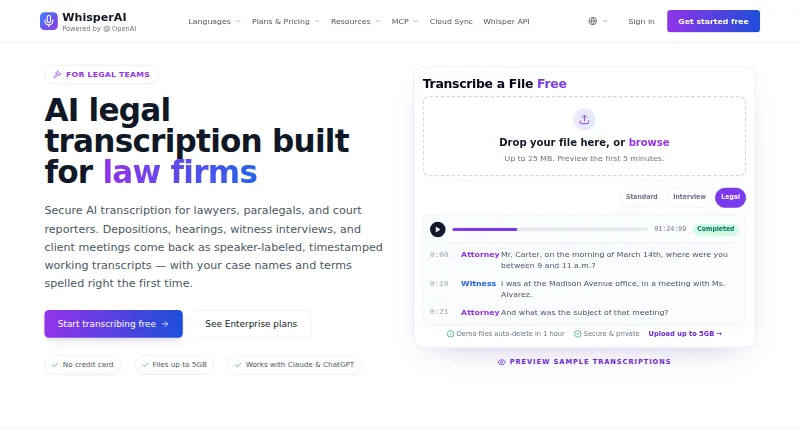
What WhisperAI Legal Transcription is
WhisperAI Legal Transcription turns audio and video into editable, searchable transcripts for legal and other professional work. It can identify speakers, add timestamps, produce AI summaries, translate transcripts, and export them as PDF, DOCX, TXT, SRT, or VTT files. Its Legal preset keeps legal terms and role references, along with clearly spoken hesitations, repetitions, fillers, and false starts. Users can provide up to 100 case-specific terms or names per file to guide spelling. Files can be up to 5 GB, and speaker labels can identify roles such as Counsel, Witness, or Judge. The product is available through an API, extension, iOS app, and web. Its MCP connector works with Claude and ChatGPT on every plan, and Google Drive Cloud Sync can transcribe new files in selected folders. Transcripts are working drafts for preparation and review, not certified court records. The security program is SOC 2-aligned, not SOC 2 certified.
Good
- Legal preset retains clearly spoken hesitations and repetitions.
- Add up to 100 case-specific terms per file.
- Exports include PDF, DOCX, TXT, SRT, and VTT.
- Free plan includes five minutes per month.
- Files up to 5 GB are supported.
Watch out
- Free plan includes five minutes per month.
- Transcripts are not certified court records.
- Security program is SOC 2-aligned, not certified.
Who it suits
It suits lawyers, paralegals, and court reporters handling depositions, hearings, witness interviews, or client meetings. It may also suit other professionals who need searchable transcripts with speaker labels and timestamps.
Verdict
WhisperAI Legal Transcription offers legal-focused transcript handling, including role labels, case-specific terms, and multiple export formats. Treat its transcripts as drafts for preparation and review, not official court records.
Plans and prices
From WhisperAI Legal Transcription's own pricing page, checked 29 Sep 2026.
| Plan | Price | What it gives you |
|---|---|---|
| Free | Free | 5 minutes/month · 5 GB max file size · basic speaker labels |
| Premium | $14.99 a month | 120 minutes/month · 5 GB max file size · 5 files at a time · basic speaker labels · $14.99/month |
| Business Pro | $24.99 a month | Unlimited transcription · 5 GB max file size · 10 files at a time · $24.99/month |
| Enterprise | $75 a month | 5 seats included · unlimited transcription per seat · additional seats $15/seat/month · $75/month |
| Developer API | $99 a month | 10,000 minutes · $0.006 per minute overage · 5 GB max file size · $99/mo |
The facts
Each one read from WhisperAI Legal Transcription's own pages, with the date it was checked.
The company
- Company details
- WhisperAI Technology Inc. says it was founded in 2025 and is headquartered in Los Angeles, California.checked 29 Sep 2026
What it does
- Court record limitation
- WhisperAI transcripts are working drafts for preparation, review, and internal notes, not certified court records.checked 29 Sep 2026
- Data handling
- The legal page says OpenAI processes content under a DPA with no use of customer content for model training, and users can delete recordings, transcripts, or their account.checked 29 Sep 2026
- File limits and exports
- Audio or video files up to 5 GB can be uploaded, with transcript export formats including PDF, DOCX, TXT, SRT, and VTT.checked 29 Sep 2026
- Integrations
- The MCP connector works with Claude and ChatGPT on every plan, and Google Drive Cloud Sync can automatically transcribe new files in selected folders.checked 29 Sep 2026
- Key terms
- Users can provide up to 100 case-specific names or terms per file to guide spelling in the transcript.checked 29 Sep 2026
- Legal preset
- The Legal preset preserves legal terminology and role references and keeps fillers, hesitations, repetitions, and false starts when clearly spoken.checked 29 Sep 2026
- Legal users
- The legal transcription page describes the product for lawyers, paralegals, and court reporters handling depositions, hearings, witness interviews, and client meetings.checked 29 Sep 2026
- Security
- The security page says data is encrypted in transit with TLS 1.3 and at rest with AES-256, and its security program is SOC 2-aligned rather than SOC 2 certified.checked 29 Sep 2026
- Speaker labels and timestamps
- The product detects speakers, allows role labels such as Counsel, Witness, or Judge, and adds timestamps throughout the transcript.checked 29 Sep 2026
- Support
- Support is available by email at [email protected] and through the Help Center, with typical replies within one business day.checked 29 Sep 2026
- Upcoming integrations
- The legal page says OneDrive, Dropbox, and Box Cloud Sync support is coming soon.checked 29 Sep 2026
- What it does
- WhisperAI turns audio and video into searchable, editable transcripts with speaker labels, AI summaries, translation, and export options for legal and other professional users.checked 29 Sep 2026
The full review of WhisperAI Legal Transcription
WhisperAI Legal Transcription turns audio and video into searchable, editable text for lawyers, paralegals, and court reporters. It is a strong fit for preparing and reviewing legal recordings; look elsewhere if you need certified court records.
Overview
The Legal preset is designed to retain the character of legal speech, including terminology, role references, and clearly spoken fillers, hesitations, repetitions, and false starts. That can make transcripts of depositions, hearings, witness interviews, and client meetings more useful for close review than a version that smooths out disfluencies. The trade-off is that transcripts remain working drafts for preparation, review, and internal notes—not official court records.
Case-specific spelling guidance is unusually concrete: users can enter up to 100 names or terms for each file. Speaker detection, role labels, and timestamps also help reviewers find passages and track attribution. These features support review, but do not remove the need to check the transcript against its recording.
Key features
- Legal preset and key terms: The preset aims to preserve legal language and spoken detail, while a list of up to 100 case-specific terms per file guides spelling. That is useful for matter-specific names, though reviewers should confirm important wording.
- Speaker labels and timestamps: WhisperAI detects speakers, timestamps the transcript, and lets users apply roles such as Counsel, Witness, or Judge. This makes navigation and attribution more practical during review; labels still need checking where accuracy matters.
- File handling and exports: Uploads can be up to 5 GB, and transcripts can be exported as PDF, DOCX, TXT, SRT, or VTT. The range suits both document review and subtitle workflows, although the file-size ceiling does not increase on the listed lower paid plans.
- Additional workflow tools: The product also offers AI summaries and translation. Its MCP connector works with Claude and ChatGPT on every plan, and Google Drive Cloud Sync can automatically transcribe new files in selected folders. OneDrive, Dropbox, and Box sync are planned, not current features.
- Security and control: Data is encrypted in transit with TLS 1.3 and at rest with AES-256. The security program is SOC 2-aligned, not SOC 2-certified. OpenAI processes content under a DPA, with no customer-content training use; users can delete recordings, transcripts, or their account.
Pricing
The free plan costs nothing and includes 5 minutes per month, a 5 GB maximum file size, and basic speaker labels. It is useful for a small sample or occasional short recording, but its monthly allowance is too limited for sustained legal work.
Premium costs $14.99 a month, billed $14.99/month, for 120 minutes per month, files up to 5 GB, up to five files at a time, and basic speaker labels. It is the lowest-cost paid choice for modest workloads; the minute cap is the main constraint. Business Pro costs $24.99 a month, billed $24.99/month, and adds unlimited transcription and capacity for ten files at a time, while retaining the 5 GB file limit. It suits regular users who would exceed Premium’s allowance.
Enterprise costs $75 a month, billed $75/month, and includes five seats with unlimited transcription per seat; additional seats cost $15/seat/month. It is the team option for a small group needing separate seats. Developer API costs $99 a month, billed $99/mo, and includes 10,000 minutes, a 5 GB maximum file size, and overages at $0.006 per minute. That plan fits API-driven workflows with substantial volume, rather than an individual primarily using the app interface.
Platforms
WhisperAI is available through API, extension, iOS, and web. This gives legal users several access routes, while the API plan is priced and metered separately from the standard transcription plans.
Who it's for
Choose WhisperAI for legal teams and professionals who need editable drafts with role-aware speaker labels, timestamps, and a way to guide spelling for case-specific terms. Its larger paid plans also suit recurring or team transcription needs. It is not the right choice when the deliverable must itself be a certified court record.
Pros and cons
- Pro: The Legal preset retains clearly spoken disfluencies as well as legal terminology, which supports closer review of testimony and interviews.
- Pro: Up to 100 case-specific names or terms per file, plus role labels and timestamps, gives reviewers useful controls over spelling and navigation.
- Pro: Multiple export formats and Google Drive auto-transcription can fit document-based and folder-based workflows.
- Con: Free transcription is capped at 5 minutes per month, and Premium at 120 minutes per month, limiting those plans for heavier workloads.
- Con: Transcripts are drafts rather than certified records, so they cannot replace an official court record.
- Con: SOC 2 alignment is not SOC 2 certification, a distinction teams with certification requirements should weigh.
Alternatives
For a broader category comparison, see Legal Transcription Software.
- MatterScribe is worth considering for pay-as-you-go use: its listed plan charges $0.10/min, retains files for 3 days, requires a card, and includes 30 free minutes.
- Rev may suit readers who want a freemium transcription option with 45 AI transcription and caption minutes per month on its free plan.
- SoniClear Transcriber 10 offers a manual-playback option without cloud transcription time, or a paid Pro plan for cloud transcription.
- Filevine is an alternative for readers seeking matter and document management alongside optional deposition and AI packages; it uses custom pricing.
- HappyScribe Legal is another freemium legal transcription option.
- StillWren may appeal to readers seeking a free plan with 50 minutes monthly without an account or 300 minutes with one.
- FTR Justice Cloud is another option to consider.
- ArcaScribe is another freemium option to consider.
Verdict
WhisperAI Legal Transcription is best for legal professionals who want editable, terminology-aware drafts with speaker roles and timestamps, and who can review those drafts against the recording. Its main advantage is the combination of legal-focused controls and flexible exports; its main limitation is that it cannot provide certified court records.
Alternatives to WhisperAI Legal Transcription
- 1
Rev
Free planAndroidiOSWebAPI8.1From $25.49 a month - 2

HappyScribe Legal
Free planAndroidiOSWebAPI7.9From €8.50 a month - 3

MatterScribe
Free planAndroidiOSWebmacOS7.3From $270 a year - 4
SoniClear Transcriber 10
Free planWebWindows6.9From $360 a year - 5

Filevine
Free planWebAPI6.8Free plan - 6
Interpret AI
AndroidWeb6.6From $8.99 a month