
Mastt Schedule
Mastt Schedule manages construction project timelines, phases, milestones and dependencies in a web platform.
What Mastt Schedule is
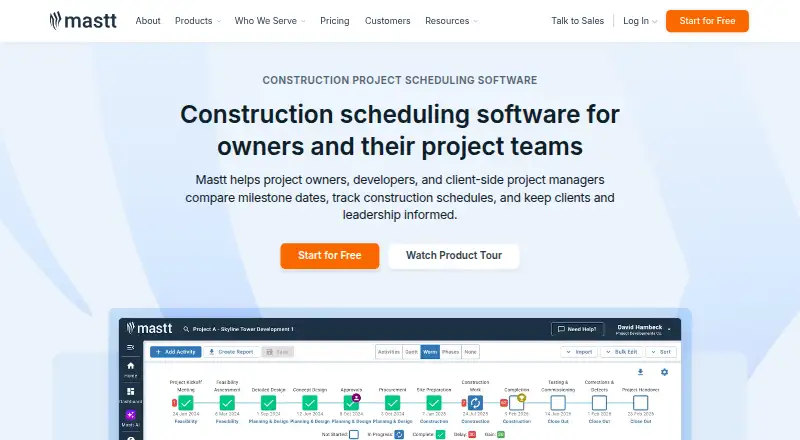
Mastt Schedule manages construction project timelines, phases, milestones and dependencies in a web platform. Teams can build schedules from scratch or adapt templates with standardized phases and milestones. Existing Microsoft Project XML and Primavera P6 XER schedules can be imported for tracking and reporting. Activities appear in Gantt views, with checklists available for tracking activity tasks. Dashboards summarize schedule progress, and invited clients can review information through view-only links or PDF downloads. Program dashboards bring together schedule details from linked projects. The free Starter plan covers one project and requires no credit card. Professional costs $165 a month, billed month-to-month; it includes unlimited users, adjustable project licences and Cost, Risk, Schedule and Dashboard modules. Enterprise pricing is custom and includes unlimited projects, programs and portfolios, ERP and business-system integrations, SSO and dedicated customer success. Mastt says the platform is accessible through a modern browser without special software or hardware. It also says it uses TLS 1.2 or higher, conducts regular penetration testing with NCC Group, and hosts data in Microsoft Azure.
Good
- Imports Microsoft Project XML and Primavera P6 XER schedules.
- Includes customizable schedule templates.
- Gantt views show schedule activities.
- Free Starter plan covers one project.
- Program dashboards combine linked project schedules.
Watch out
- Starter is limited to one project.
- Professional costs $165 a month.
- No mobile apps are listed.
Who it suits
Mastt Schedule is aimed at construction professionals, including project owners, developers and project management consultants. It may suit teams managing schedules across individual projects or linked project programs.
Verdict
Mastt Schedule covers schedule creation, tracking and program-level visibility in a browser. The free plan is limited to one project, while Professional adds adjustable project licences and broader modules for a monthly fee.
Plans and prices
From Mastt Schedule's own pricing page, checked 14 Oct 2026.
| Plan | Price | What it gives you |
|---|---|---|
| Starter | Free | first project free · no credit card · unlimited users · unlimited budgets and contracts · up to 10 payments · tutorials and support · month-to-month |
| Professional | $165 a month | from $165 per project monthly · additional projects · external users · unlimited Cost, Risk, Schedule and Dashboard modules · AI Assistant and AI contract/payment review · month-to-month |
| Agent | Priced on request | agentic AI counterpart · Ask, Agent, Knowledge, Templates, Workflows and integrations · custom quote |
| Enterprise | Priced on request | unlimited AI usage · unlimited projects, programs and portfolios · dedicated customer success · ERP and business-system integrations · SSO and advanced security · custom quote |
The facts
Each one read from Mastt Schedule's own pages, with the date it was checked.
What it does
- Activity tracking
- Schedule activities can be viewed in Gantt visualizations, and activity tasks can be tracked with checklists.checked 8 Oct 2026
- AI data policy
- Mastt says prompts and responses are not used to train AI models and AI processing is region-specific through Amazon Bedrock, Anthropic and Mistral services.checked 14 Oct 2026
- API and extensibility
- A Mastt engineering article describes a Go-based API used internally for data retrieval and transformation, but no public API reference or SDK download is provided on the reviewed pages.checked 14 Oct 2026
- Availability claim
- The security page claims average uptime above 99.95% since launch.checked 14 Oct 2026
- Cross-project oversight
- Program dashboards bring schedule information from linked projects together while retaining each project's separate schedule.checked 14 Oct 2026
- Data hosting
- Mastt says it uses Microsoft Azure, with customer data stored in US data centers for the Americas and Australian data centers for Australia and other customers.checked 8 Oct 2026
- Deployment model
- Mastt is cloud-first, browser-accessed and requires no local deployment or software installation.checked 14 Oct 2026
- Documentation
- The help center provides dated how-to guides with prerequisites, step-by-step procedures and linked video walkthroughs for schedule work.checked 14 Oct 2026
- Identity integrations
- Enterprise authentication supports Microsoft Entra ID/Active Directory and Okta through SSO, with MFA and role-based permissions.checked 14 Oct 2026
- Integrations
- Mastt states that it offers pre-built integrations for Power BI and accounting platforms and can customize integrations.checked 14 Oct 2026
- Intended users
- Mastt describes its scheduling software as built for construction professionals, including project owners, developers and project management consultants.checked 8 Oct 2026
- Limit: AI accuracy
- A reviewer says AI auto-fill still makes simple errors in some cases.checked 14 Oct 2026
- Limit: budget updates
- One reviewer reports that changing sub-budgets does not always automatically update the overall budget, creating a checking risk.checked 14 Oct 2026
- Limit: contract extensions
- Reviewers report no dedicated Extension of Time module or effective formal EOT approval tracking.checked 14 Oct 2026
- Limit: external resources
- A reviewer says Mastt has limited external guidance beyond its own YouTube channel and support materials.checked 14 Oct 2026
- Limit: flexibility
- Reviewers mention that some areas are less flexible than self-managed spreadsheets and that certain desired functions are missing.checked 14 Oct 2026
- Limit: learning curve
- Several reviewers say new users need time and training to learn the platform after moving from spreadsheets.checked 14 Oct 2026
Where it runs
- Browser access
- Mastt says the platform is accessible from a modern web browser without special software or hardware.checked 8 Oct 2026
The company
- Company founding
- Mastt was founded in 2019 by Doug Vincent, Jamie Cerexhe and Raman Nambiar.checked 14 Oct 2026
- Company funding profile
- Crunchbase identifies Mastt as a private Series A company with 12 investors, including Artesian VC.checked 14 Oct 2026
- Company headquarters and size
- LinkedIn lists Mastt as privately held, headquartered in Sydney, NSW, with 11–50 employees.checked 14 Oct 2026
- Company legal name
- Crunchbase lists the legal entity as Mastt Group Pty Ltd.checked 14 Oct 2026
- Founded
- 2019checked 28 Sep 2026
- Headquarters
- Sydney, Australiachecked 28 Sep 2026
The full review of Mastt Schedule
Mastt Schedule is a browser-based construction scheduling platform for project owners, developers and project management consultants. It suits teams that need to create or track project timelines and review progress across linked projects. Its strongest case is combining schedule tracking with client sharing and program dashboards; teams needing a mobile app should look elsewhere.
Overview
Teams can build schedules from scratch or use templates to set standard phases and milestones. Importing Microsoft Project XML and Primavera P6 XER files gives teams a route to track and report on schedules created in those tools. Gantt views show activity timing, while task checklists provide a way to follow activity progress.
Progress dashboards summarize schedules, and invited clients can view schedule information through read-only links or PDF downloads. Program dashboards consolidate information from linked projects, which is useful for reviews across a construction program rather than just one timeline.
Key features
Scheduling and reporting
Imports are useful for organizations with established Microsoft Project or Primavera P6 schedules; templates suit teams seeking more consistent phases and milestones, while building from scratch allows a different structure. Gantt charts and checklists cover both schedule-level visibility and activity tracking. Client sharing is deliberately view-only, so it supports reporting without providing clients an editing route.
Security and support
Mastt says it uses TLS 1.2 or higher and conducts regular penetration testing with NCC Group. It hosts customer data in Microsoft Azure data centers in the US for the Americas and in Australia for Australia and other customers. Support ranges from self-service tutorials and resources to phone, email or help-center support, with priority handling for Enterprise customers.
Pricing
The free Starter plan costs nothing, is billed month-to-month and includes the first project with no credit card required. Its one-project cap makes it a sensible way to start a single schedule, but not to manage a broader program.
Professional costs $165 a month, billed month-to-month at an average cost per project. It includes unlimited users, and project licences can be added or reduced as needed. Cost, Risk, Schedule and Dashboard modules are included, making it the more suitable choice for teams that need multiple projects or broader project visibility. The price is tied to project licences rather than a stated user cap.
Enterprise has custom pricing and includes unlimited projects, programs and portfolios, ERP and business-system integrations, SSO and dedicated customer success. It fits organizations needing those integrations or portfolio scale, though the move from a free single project to custom pricing is a substantial step. Agent is also custom pricing and can be added to any Platform plan or bought standalone; it includes AI agent features, workflows and integrations.
Platforms
Mastt Schedule runs in a modern web browser and requires no special software or hardware. There are no mobile apps, so teams that need a dedicated phone or tablet app should consider alternatives with mobile support.
Who it's for
This is a focused option for construction owners, developers and project management consultants who need schedules, progress reporting and client visibility in a browser. The free plan suits one-project use; Professional is better for teams scaling project licences and using several modules; Enterprise is aimed at organizations that need unlimited program and portfolio scope or business-system integrations. It is less suitable for people who require mobile apps.
Pros and cons
- Pros: Microsoft Project XML and Primavera P6 XER imports help teams bring existing schedules into a tracking and reporting workflow.
- Pros: Gantt views, activity checklists, client sharing and program dashboards span activity tracking through portfolio review.
- Pros: Professional allows project licences to be adjusted and includes unlimited users, avoiding a stated per-user cap.
- Cons: Starter is limited to one project, so multi-project use requires a paid plan.
- Cons: There are no mobile apps; access is through a browser.
- Cons: Enterprise and Agent use custom pricing, which makes their cost less straightforward to assess than Starter or Professional.
Alternatives
Browse Construction Scheduling Software for more options in the category. Consider usBIM.platform if you want a free basic configuration with 10 GB of cloud storage and online applications, or need support for Android, iOS or Windows as well as web.
Open Planner Studio is a better fit for readers seeking free, open-source software with Gantt charts, critical-path analysis and resource planning across Linux, macOS, web or Windows, and no per-seat licence fees. Trimble Quadri is worth considering if a free read-only model-viewing tool with commenting and measurement is the priority, or if self-hosted and API options matter.
Asta Powerproject may suit a single Windows-PC user prepared to pay £695 a year, excluding VAT, for its single-user subscription. LookAhead is another paid option with Android, iOS and web platforms.
Nialli Visual Planner offers a 30-day full-access trial with no credit card required and a single-plan subscription at $1,400 a year; it is an option for readers who want a trial before committing. Oracle Primavera Cloud is a paid alternative with Android, iOS, API and web platforms and named-user monthly services.
TeamGantt is worth comparing if a web, iOS and Android option with a free plan is more useful; its Personal plan is limited to one user, one project and 40 tasks.
Verdict
Mastt Schedule is a strong match for construction teams that want browser-based schedule creation, progress reporting and project-level or program-level visibility, especially when they already use Microsoft Project or Primavera P6. The free plan is a practical single-project start, and Professional adds adjustable project licences and broader modules. Look elsewhere if mobile apps are essential or if the single-project free tier is not enough and a custom-priced Enterprise plan is too large a commitment.
Alternatives to Mastt Schedule
- 1
ConstructionOnline
Free planAndroidiOSWebAPI8.3From $300 a year - 2

Oracle Primavera Cloud
AndroidiOSWebAPI7.6 - 3

Buildlr
AndroidiOSWeb7.4 - 4

Autodesk Forma Schedule
AndroidiOSWebAPI7.3From $800 a year - 5
Nialli Visual Planner
AndroidiOSWebmacOS6.9From $1,400 a year - 6

Asta Powerproject
AndroidiOSWebmacOS6.8From £695 a year