MailStyler
MailStyler is desktop software for making newsletter and email templates with a drag-and-drop editor.
What MailStyler is
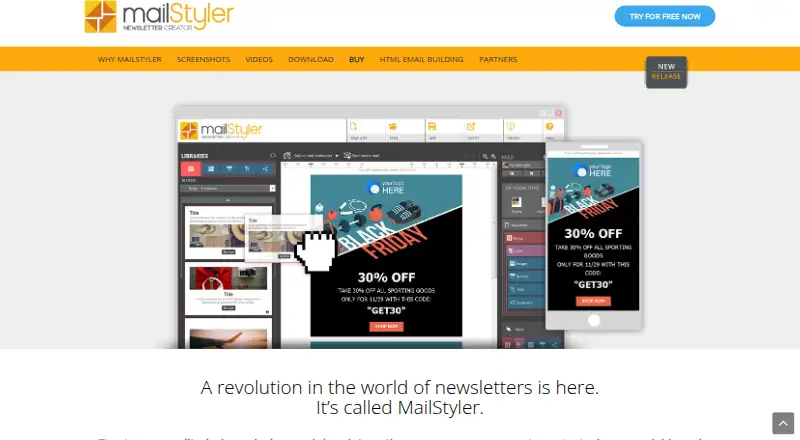
MailStyler is desktop software for making newsletter and email templates with a drag-and-drop editor. It generates responsive newsletters in HTML with inline CSS, and lets users edit blocks, move or remove items, and add elements from personal or software libraries. Image tools support repositioning and resizing pictures within frames and applying image and text effects. Ready-to-customize templates are included. Templates can be exported for Gmail, Thunderbird, and Outlook; compatibility with eMailChef, SendBlaster, and Mailchimp is also listed. Users can save or open templates through Dropbox, Google Drive, and OneDrive. Export formats include EML and HTML, with PDF also listed. The free demo is available indefinitely, but exported files are scrambled and cannot be used as finished exports. MailStyler runs on Windows, and there is no native Mac version, though the FAQ provides instructions for running it on OS X. Paid licenses include assistance and updates for the first year; afterward, the software continues to work and those services may be extended for a fee.
Good
- Drag-and-drop editing with reusable content blocks.
- Generates responsive HTML with inline CSS.
- Supports EML, HTML, and PDF exports.
- Templates can be stored with three named cloud services.
Watch out
- Free demo exports are scrambled and unusable as finished templates.
- There is no native Mac version.
- Paid license assistance and updates cover only the first year.
Who it suits
MailStyler suits people creating email or newsletter templates who want a visual editor and exports for listed email tools. It is aimed at Windows users; Mac users would need to follow the maker's OS X instructions.
Verdict
MailStyler provides visual template editing and several export and storage options for desktop users. The free demo is useful only for exploring the software, since its exports cannot serve as finished templates.
Plans and prices
From MailStyler's own pricing page, checked 9 Oct 2026.
| Plan | Price | What it gives you |
|---|---|---|
| MailStyler Free Demo | Free | No license required · trial exports are scrambled · limited image library · limited template gallery · Lifetime license |
| MailStyler Basic | $9,900, paid once | Unlimited exports · no cloud space · limited image library and template gallery · 1 computer · assistance and updates for 1 year · One-off payment; lifetime license |
| MailStyler Pro | $19,900, paid once | Unlimited exports · unlimited cloud space · over 3.5 million images · full template gallery · 1 computer · assistance and updates for 1 year · One-off payment; lifetime license |
| MailStyler Server | — | Unlimited exports · unlimited cloud space · over 3.5 million images · full template gallery · 1 Windows Server and up to 25 clients · assistance and updates for 1 year · One-off payment; lifetime license |
The facts
Each one read from MailStyler's own pages, with the date it was checked.
What it does
- Cloud storage
- Templates can be saved to or opened from Dropbox, Google Drive, and OneDrive.checked 9 Oct 2026
- Custom blocks
- Users can edit blocks, move or delete items, and add elements from personal or software libraries.checked 9 Oct 2026
- Email integrations
- Templates can be exported to Gmail, Thunderbird, and Outlook, and the features page lists compatibility with eMailChef, SendBlaster, and Mailchimp.checked 9 Oct 2026
- Export formats
- The software can save templates in EML and HTML formats, and the features page also lists PDF export.checked 9 Oct 2026
- Image editing
- The editor lets users reposition and resize images within frames and apply image and text effects.checked 9 Oct 2026
- Privacy and GDPR
- The maker's GDPR page says its document explains what data Delivery Tech collects, why, how long it is kept, where it is stored, and how users can manage, export, or delete it.checked 9 Oct 2026
- Purpose
- MailStyler is desktop software for creating newsletter and email templates with a drag-and-drop editor.checked 9 Oct 2026
- Responsive HTML
- The software automatically generates responsive newsletters using HTML with inline CSS.checked 9 Oct 2026
- Support and updates
- Paid licenses include assistance and updates for the first year; after that, the software continues to work and assistance and updates may be extended for a fee.checked 9 Oct 2026
- Templates
- MailStyler includes ready-to-customize templates created by professional graphic designers.checked 9 Oct 2026
Money
- Free demo limit
- The free demo is available indefinitely, but exported files appear scrambled and cannot be used as finished exports.checked 9 Oct 2026
The company
- Headquarters
- San Diego, California, United Stateschecked 28 Sep 2026
Where it runs
- Mac support
- There is no native Mac version, though the FAQ says users can run it on OS X by following the linked instructions.checked 9 Oct 2026
- Windows requirements
- The download page lists Windows 8, 8.1, 10, and 11, plus Windows Server 2016 and 2019, among its system requirements.checked 9 Oct 2026
The full review of MailStyler
MailStyler is desktop software for designing newsletter and email templates with a visual, drag-and-drop editor. It is best suited to Windows-based teams that want reusable layouts and local control rather than a browser-only builder. Its responsive output and broad integrations are useful, but usable exports and the richest assets require a substantial one-time purchase.
Overview
MailStyler concentrates on template production rather than campaign delivery. You can start with professionally designed templates, modify their blocks, and build repeatable layouts from personal or built-in content libraries. Templates can be saved to or opened from Dropbox, Google Drive, and OneDrive, which helps users move projects between supported storage services.
Finished designs can be exported toward Gmail, Thunderbird, and Outlook. The feature list also names eMailChef, SendBlaster, and Mailchimp compatibility. That makes MailStyler a practical design stage for several email workflows, although the software itself is not presented as a sending platform.
Key features
The drag-and-drop editor automatically creates responsive newsletter HTML with inline CSS. Inline styling improves portability into email clients, while responsive markup gives layouts a better chance of adapting across screen sizes. Users can edit blocks, move or delete individual items, and add elements from either personal or software libraries. Reusable blocks are therefore useful for recurring headers, calls to action, and other repeated content.
Image tools allow repositioning and resizing inside frames, along with image and text effects. These controls are more flexible than simply swapping a picture in a fixed placeholder, but the available asset pool depends on the license. Basic and the free demo have limited image libraries and template galleries; Pro and Server include the full gallery and more than 3.5 million images.
MailStyler saves templates in EML and HTML, and its features page also lists PDF export. The combination is sensible for email handoff and archival output, provided the user has a licensed edition.
Pricing
MailStyler Free Demo costs nothing with a lifetime license and no license required. It can be used indefinitely to explore the editor, but trial exports are scrambled and cannot serve as finished templates. The image library and template gallery are limited, so this is an evaluation version rather than a production plan.
MailStyler Basic costs 9900.00 USD as a one-off payment for a lifetime license. It adds unlimited exports and includes one computer, but keeps limited image and template galleries and provides no cloud space. Assistance and updates are included for the first year.
MailStyler Pro costs 19900.00 USD as a one-off lifetime purchase for one computer. It includes unlimited exports, unlimited cloud space, the full template gallery, and more than 3.5 million images. MailStyler Server costs 149900.00 USD once and covers one Windows Server plus up to 25 clients, with the same unlimited exports, cloud space, full gallery, and image library as Pro. Both paid editions include assistance and updates for one year. After that, the software continues to work, while support and updates may be extended for a fee.
Platforms
MailStyler supports Windows, with the download requirements naming Windows 8, 8.1, 10, 11, Windows Server 2016, and Windows Server 2019. There is no native Mac version; the FAQ describes a way to run it on OS X through linked instructions, so Mac users should expect a workaround rather than a dedicated application.
Who it's for
MailStyler fits designers, marketers, and small teams that prefer a desktop editor, need reusable email blocks, and exchange templates with established mail clients or services. Pro is the sensible choice when a large image and template library or cloud storage matters. Basic suits buyers who need unlimited exports but can work with narrower assets and local storage. Server is aimed at organizations distributing the tool across up to 25 clients. The demo is appropriate only for learning the interface.
Pros and cons
Pros
- Responsive HTML with inline CSS: produces email-oriented output that is easier to transfer into client workflows.
- Reusable block editing: moving, deleting, and library-based additions support repeatable layouts.
- Multiple storage and export paths: Dropbox, Google Drive, OneDrive, EML, HTML, and listed mail integrations broaden handoff options.
- Large Pro and Server asset libraries: more than 3.5 million images and the full gallery reduce the need to source assets elsewhere.
Cons
- High upfront pricing: Basic, Pro, and especially Server require large one-time payments rather than a low-cost subscription.
- Demo exports are unusable: indefinite access does not provide a free production tier.
- Mac support is indirect: there is no native macOS application.
- Basic limits assets and storage: buyers who need broad libraries or cloud space must move to Pro.
- Support and updates are time-limited: the first year is included, with later extensions available for a fee.
Alternatives
For a browser-first or lower-cost workflow, Stripo offers a free plan with two members, four exports per month, five daily test emails, and ten stored emails, while its Basic plan is $20 a month. Choose Beefree (now RGE Studio) when web access and a free starter allowance of ten designs and six monthly exports matter. MJML is a free, MIT-licensed open-source option with a REST API for teams comfortable working from a markup-oriented foundation. Mail Designer 365 is a Mac-focused alternative with a free Karlsfeld tier and paid Mac plans. Canary is a broader email application with templates and a free plan across desktop, mobile, web, and extension platforms. Blocks Edit, Dragble, and EmailBuilder.ai are alternatives for readers seeking web-based collaborative, project-oriented, or AI-assisted builders.
See the Email Design Software list for more options.
Verdict
Choose MailStyler if you want a Windows desktop workspace for reusable, responsive email templates and are prepared to pay for unrestricted exports. Pro is the strongest fit for individual professionals who need cloud storage and extensive assets, while Server targets multi-client Windows deployments. Look elsewhere if you require a native Mac app, a genuinely usable free export tier, or a lower initial commitment.
Alternatives to MailStyler
- 1
Canary
Free planOpen sourceAndroidiOSWebAPI8.4From $36 a year - 2
MJML
Free planOpen sourceWebAPIExtensionLinux7.6Free plan - 3

Blocks Edit
Free planWebAPI7.4Free plan - 4

EmailBuilder.ai
Free planWebAPIExtension7.4From $39 a month - 5
MailEditor
Free planWebAPIExtension7.4From $9 a month - 6

Mela
Free planWebAPI7.4From $33 a month