
Mail Designer 365
Mail Designer 365 is a Mac email design app for creating and sending branded campaigns.
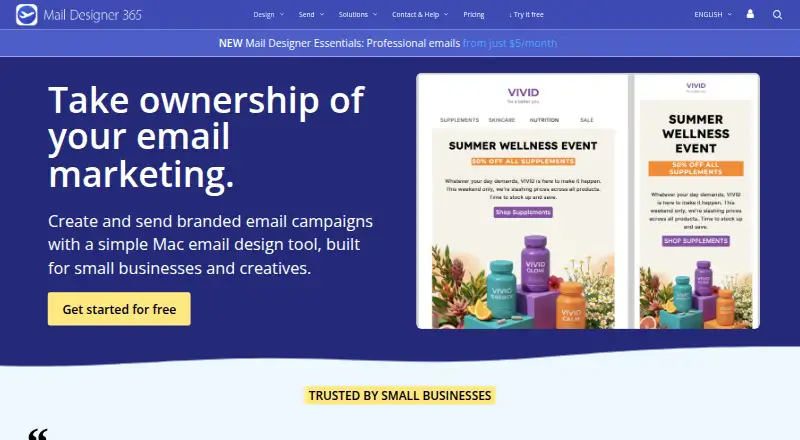
What Mail Designer 365 is
Mail Designer 365 is a Mac email design app for creating and sending branded campaigns. Its drag-and-drop editor builds responsive newsletters from text, images, buttons, links and layout blocks without code. The template gallery lists 291 newsletter templates, and the app creates a mobile-optimized version with a preview. Campaign tools include scheduling, contact import, audience segmentation and reports on opens, clicks, unsubscribes and bounces. Contacts can be imported using a Mailchimp or Campaign Monitor API key. Its API can fill design placeholders and send messages automatically, including from FileMaker workflows. Each API delivery uses 25 stamps; regular campaign delivery uses one stamp per recipient as a base. Browser participants, including Windows users, can preview and discuss drafts, but editing shared designs requires the Mac app and a plan. The free Karlsfeld plan includes 500 stamps per month and allows up to 20 designs to be stored and fully edited; additional designs can be viewed but not changed or saved. Paid Essentials pricing is $5 per month, and a 7-day trial is listed.
Good
- Drag-and-drop editing needs no code.
- Lists 291 newsletter templates.
- Creates a mobile-optimized version with preview.
- Campaign reports cover opens, clicks and bounces.
- API can automate sending from FileMaker workflows.
Watch out
- Shared-design editing requires the Mac app.
- Free Karlsfeld limits fully editable designs to 20.
- API delivery uses 25 stamps per email.
Who it suits
Mail Designer 365 suits small businesses and creatives creating branded email campaigns, including restaurants, retail, real estate, agencies and ecommerce. Shared-design editing requires a Mac app, though browser participants can preview and discuss drafts.
Verdict
Mail Designer 365 combines visual newsletter creation with campaign sending and reporting. Check the Mac editing requirement, design limit and stamp use against your planned workflow.
Plans and prices
From Mail Designer 365's own pricing page, checked 9 Oct 2026.
| Plan | Price | What it gives you |
|---|---|---|
| Karlsfeld | Free | 500 stamps/month · included with each Mac Design Plan · up to 20 editable designs |
| Mail Designer Essentials | $5 a month | Professional emails |
| London | — | 25,000 stamps/month |
| Capetown | — | 50,000 stamps/month |
| Paris | — | 15,000 stamps/month |
| Roma | — | 5,000 stamps/month |
| Seoul | — | 100,000 stamps/month · Link Rescue available from this plan onwards |
The facts
Each one read from Mail Designer 365's own pages, with the date it was checked.
What it does
- API limit
- Each API delivery uses 25 stamps; regular campaign delivery uses one stamp per recipient as a base.checked 9 Oct 2026
- Audience
- The maker presents Mail Designer for small businesses and creatives, and names restaurants, retail, real estate, agencies, and ecommerce among its audiences.checked 9 Oct 2026
- Compliance
- The maker states that all equinux products and services comply with the EU General Data Protection Regulation (GDPR).checked 9 Oct 2026
- Editor
- Its visual drag-and-drop editor lets users build responsive newsletters with text, images, buttons, links, and layout blocks without writing code.checked 9 Oct 2026
- Integrations
- The product supports importing contacts using a Mailchimp or Campaign Monitor API key, and its API can fill design placeholders and send emails automatically, including from FileMaker workflows.checked 9 Oct 2026
- Mobile design
- The app automatically creates a mobile-optimized version of a design and provides a preview.checked 9 Oct 2026
- Privacy
- The maker says users can send through their own email account, with credentials stored only on the Mac and messages and images sent through the email provider rather than the maker’s servers.checked 9 Oct 2026
- Product
- Mail Designer 365 is a Mac email design app for creating and sending branded email campaigns.checked 9 Oct 2026
- Sending
- Campaign tools include scheduling, contact import, audience segmentation, and reports on opens, clicks, unsubscribes, and bounces.checked 9 Oct 2026
- Support
- The company offers one-to-one support from its team and describes it as in-house, without chatbots or outsourcing.checked 9 Oct 2026
- Templates
- The template gallery lists 291 newsletter templates.checked 9 Oct 2026
Where it runs
- Browser collaboration
- Project participants can preview and discuss drafts in a browser, including Windows users, while editing shared designs requires the Mac app and a plan.checked 9 Oct 2026
Money
- Free plan limit
- The free Karlsfeld plan allows up to 20 designs to be stored and fully edited; designs beyond that can be viewed but not edited or saved.checked 9 Oct 2026
The company
- Headquarters
- Karlsfeld/Munich, Germanychecked 28 Sep 2026
The full review of Mail Designer 365
Overview
Mail Designer 365 is a Mac email design app that combines newsletter creation with tools for sending and tracking campaigns. It is best suited to small businesses and creative teams already working on a Mac; browser access lets others review drafts, but does not remove the Mac requirement for editing.
Its strongest case is a workflow that needs branded design, campaign delivery and engagement reports in one product. The design allowance and stamp quotas make it important to match the plan to how many campaigns you send and how often you reuse designs.
Key features
The drag-and-drop editor assembles responsive emails from text, images, buttons, links and layout blocks without code. Its gallery contains 291 newsletter templates, and reusable content blocks can help keep recurring elements consistent. The app also generates a mobile-optimized version and provides a preview, useful for checking the small-screen layout while building the email.
Campaign tools cover scheduling, contact import, audience segmentation and reports on opens, clicks, unsubscribes and bounces. Contacts can be brought in using a Mailchimp or Campaign Monitor API key. The API can fill design placeholders and send messages automatically, including in FileMaker workflows. That automation uses 25 stamps per API delivery; regular campaign sending starts at one stamp per recipient, so automated sends draw down a stamp allowance faster.
Project participants can preview and discuss drafts in a browser, including on Windows. Editing shared designs still requires the Mac app and a plan, so the collaboration tools support feedback rather than a fully browser-based production workflow. The maker says users can send through their own email account, with credentials kept on the Mac and messages and images routed through the email provider. It also says its products and services comply with GDPR.
Pricing
The free Karlsfeld plan costs nothing and includes 500 stamps per month. It allows up to 20 designs to be stored and fully edited; designs beyond that can be viewed, but not edited or saved. This is a useful way to keep a small library of campaigns, but it becomes restrictive for users who maintain more than 20 editable designs. Karlsfeld is also included with each Mac Design Plan.
Mail Designer Essentials costs $5 a month for professional emails. It is the entry paid option for users who want the paid email offering at the stated starting price. The listed Essentials terms do not give a stamp quota, so users should judge the other plans against their delivery volume before settling on a workflow that relies on frequent sending.
Roma, Paris, London, Capetown and Seoul have custom pricing. Their monthly stamp allowances are 5,000, 15,000, 25,000, 50,000 and 100,000 respectively. Seoul also includes Link Rescue, available from that plan onwards. These quotas give higher-volume senders a clear way to compare capacity, while the lack of a published price means cost must be weighed against the sender's expected volume. One editor seat is included.
A 7-day trial gives prospective buyers a short period to assess the product. The free plan and trial are separate offerings; the free plan's 500 monthly stamps and 20-design editing cap are the main ongoing constraints to consider.
Platforms
Mail Designer 365 is listed for macOS, web and API use. The Mac app is required to edit shared designs; the browser supports preview and discussion, including for Windows participants. The API supports automated design filling and sending. HTML export is also available, giving users a way to export email markup from the editor.
Who it's for
The product fits small businesses and creatives that want to produce branded newsletters and manage campaign sending and reporting in the same workflow. Restaurants, retailers, real estate businesses, agencies and ecommerce operators are among the audiences the maker names. It is especially practical for Mac-based teams with recurring campaigns, a manageable design library and a need to track campaign engagement.
It is a weaker fit for teams that need everyone to edit in a browser, or for senders whose automation would consume stamps quickly. The free plan also suits only modest design libraries, given the 20-design editing limit.
Pros and cons
- Pros: The editor combines responsive layouts, reusable blocks and 291 templates, giving recurring newsletter work a broad set of starting points without requiring code.
- Pros: Scheduling, segmentation and reports covering opens, clicks, unsubscribes and bounces put campaign management alongside design.
- Pros: Browser preview and discussion let Windows participants give feedback on drafts, and one-to-one support is offered by the company's in-house team.
- Cons: Shared-design editing depends on the Mac app and a plan, limiting teams that expect a browser-first editor.
- Cons: The free plan stops at 20 editable designs, which can constrain users who maintain a larger campaign library.
- Cons: API deliveries cost 25 stamps each against a one-stamp-per-recipient base for regular campaigns, making automation more quota-intensive.
Alternatives
Email Design Software is the category directory for comparing tools in this field.
- Canary is a better fit for readers seeking an email client: its free plan includes a unified inbox, read receipts, snooze and pin, templates and inbox-zero tools across mobile, desktop and web platforms.
- MJML suits developers who want an open-source email framework and free-to-use REST API, rather than Mail Designer 365's Mac-based visual campaign workflow.
- MailStyler is an option for Windows users as well as Mac users; its free demo has scrambled exports, a limited image library and a limited template gallery.
- Stripo is worth considering for browser-based email design, with a free plan capped at two members, four monthly exports, five daily test emails and ten stored emails.
- Beefree (now RGE Studio) offers a browser-based Starter plan with up to 10 designs and six monthly exports, for users who want a web editor with a defined free allowance.
- Blocks Edit is another browser-based option, with a Collaborate plan offering 250 GB storage for $240.00 per year.
- Dragble has a free web plan with three projects, 10 GB storage and 10 core content blocks for readers who want to start with a limited browser-based builder.
- EmailBuilder.ai offers a free Playground plan with 10 emails, three templates and five sends or exports, among other included tools.
Verdict
Choose Mail Designer 365 if you work on a Mac and want newsletter design, campaign sending and engagement reports together, with API support for automated workflows. Its main strengths are the substantial template gallery and the breadth of campaign tools. Look elsewhere if your team needs browser-based editing, your design library exceeds the free plan's 20-editable-design cap, or API sending would strain the stamp quota.
Getting started
- Open the Mail Designer 365 website
- Choose the free Karlsfeld plan or Mail Designer Essentials at $5 a month
- Use the 7-day trial when starting a paid plan
- Install or use the app on macOS, with web access for browser collaboration
- Import contacts with a Mailchimp or Campaign Monitor API key
- Create a newsletter in the drag-and-drop editor and schedule delivery
Limits worth knowing
The free Karlsfeld plan provides 500 stamps per month and up to 20 designs that can be stored and fully edited; additional designs can be viewed but not edited or saved. Regular delivery uses one stamp per recipient as a base, and API delivery uses 25 stamps.
Questions
Is there a free plan?
Yes. Karlsfeld is free, includes 500 stamps per month, and allows up to 20 editable designs.
What does the paid plan cost?
Mail Designer Essentials is listed at $5 a month, and a 7-day trial is available.
Which platforms are supported?
The listed platforms are API, macOS, and web. Browser participants can preview and discuss drafts.
Can Windows users edit shared designs?
Windows users can preview and discuss drafts in a browser, but editing shared designs requires the Mac app and a plan.
Does it integrate with Mailchimp?
Contacts can be imported using a Mailchimp or Campaign Monitor API key, and the API supports automated sending and placeholder filling.
Alternatives to Mail Designer 365
- 1
Canary
Free planOpen sourceAndroidiOSWebAPI8.4From $36 a year - 2
MJML
Free planOpen sourceWebAPIExtensionLinux7.6Free plan - 3

Blocks Edit
Free planWebAPI7.4Free plan - 4

EmailBuilder.ai
Free planWebAPIExtension7.4From $39 a month - 5
MailEditor
Free planWebAPIExtension7.4From $9 a month - 6

Mela
Free planWebAPI7.4From $33 a month