
Dragble
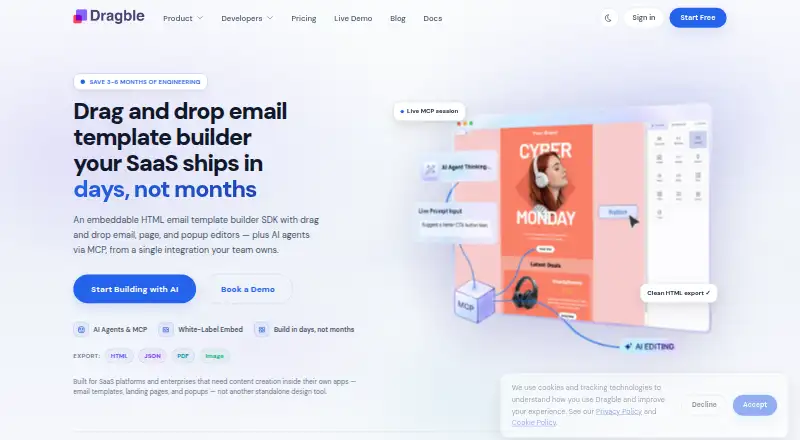
Dragble is an embeddable drag-and-drop SDK for SaaS products that want to add email, page, and popup builders inside their own products.
What Dragble is
Dragble is an embeddable drag-and-drop SDK for SaaS products that want to add email, page, and popup builders inside their own products. Its email editor uses a fixed 600px canvas and exports table-based HTML with inline CSS for clients such as Outlook, Gmail, and Apple Mail. The page builder creates full-width pages with standard HTML output, while popup settings include position, animation, close buttons, and triggers. The editor runs in the browser; the integrating product handles authentication, storage, and routing. The SDK supports React, Vue, Angular, and Vanilla JavaScript, with a CDN option for Vanilla JS. Exports include HTML, plain text, PDF, image, and ZIP, with availability depending on the plan. Dragble also describes MCP connections that let AI agents modify a live editor session and export HTML. A free plan is available; Starter is $99 a month after the 14-day trial, with renewal unless cancelled before the trial ends.
Good
- Supports React, Vue, Angular, and Vanilla JavaScript.
- Email output uses table-based HTML with inline CSS.
- Page and popup builders offer distinct layout controls.
- The editor leaves authentication and storage to the host product.
- Free plan is available.
Watch out
- Authentication, storage, and routing remain the integrating product’s responsibility.
- Starter costs $99 a month after the trial.
- Export availability varies by plan.
Who it suits
Dragble suits SaaS product and engineering teams, agencies, or enterprises embedding content creation in their own software. It is for products prepared to manage their own authentication, storage, and routing.
Verdict
Dragble provides embedded editors for email, pages, and popups, with framework options and multiple export formats. The host product must supply key application services, and paid Starter renews unless cancelled before its trial ends.
Plans and prices
From Dragble's own pricing page, checked 3 Oct 2026.
| Plan | Price | What it gives you |
|---|---|---|
| Free | Free | 3 projects · 10 GB storage · 10 core content blocks · Dragble branding |
| Starter | $99 a month | 5 projects · 250 GB storage · 25 MB max upload · white-label editor · all 14 blocks · PDF, image and ZIP export · After trial: $99/month. Renews automatically unless cancelled before the trial ends. |
| Pro | $249 a month | 10 projects · 350 GB storage · 35 MB max upload · AI features · MCP server · team collaboration · AMP for Email · After trial: $249/month. Renews automatically unless cancelled before the trial ends. |
| Business | $499 a month | 20 projects · 500 GB storage · 50 MB max upload · HMAC signature verification · priority support · 500 custom modules · 12 custom tools · After trial: $499/month. Renews automatically unless cancelled before the trial ends. |
| Enterprise | Priced on request | Unlimited everything · on-premise/self-host · dedicated support and SLA · security review support · 100 MB max upload · Configured per client; no trial; quote and onboarding directly. |
The facts
Each one read from Dragble's own pages, with the date it was checked.
What it does
- AI and MCP
- Dragble says MCP connects AI agents to a live editor session so they can add rows, update text, and export HTML.checked 3 Oct 2026
- AI data handling
- The privacy policy says AI inputs and relevant template context may be sent to third-party AI providers and that Dragble does not use prompts or AI interactions to train models.checked 3 Oct 2026
- Email output
- The email editor uses a 600px fixed-width canvas and exports table-based HTML with inline CSS for email clients including Outlook, Gmail, and Apple Mail.checked 3 Oct 2026
- Exports
- The product lists HTML, plain text, PDF, image, and ZIP exports; plan availability varies.checked 3 Oct 2026
- Frameworks
- The SDK supports React, Vue, Angular, and Vanilla JavaScript, with a CDN option for Vanilla JS.checked 3 Oct 2026
- Integrations
- The maker gives Mailchimp, SendGrid, and HubSpot as examples of email service providers that can receive exported HTML.checked 3 Oct 2026
- Intended customers
- Dragble describes its intended customers as SaaS platforms, product and engineering teams, and enterprises or agencies embedding content creation in their own products.checked 3 Oct 2026
- Page and popup builders
- The page builder creates full-width pages with standard HTML output, while the popup builder supports configurable position, animation, close buttons, and triggers.checked 3 Oct 2026
- Privacy and DPA
- The maker says a Data Processing Agreement is available to business and enterprise customers on request.checked 3 Oct 2026
- Product
- Dragble is an embeddable drag-and-drop SDK for adding email, page, and popup builders inside SaaS products.checked 3 Oct 2026
- Security
- The privacy policy says connections use HTTPS, sensitive data is stored encrypted, and the company conducts regular security reviews.checked 3 Oct 2026
- Storage and authentication
- The editor runs entirely in the browser, and the integrating product owns authentication, storage, and routing.checked 3 Oct 2026
- Support
- Business includes priority support, while Enterprise includes dedicated support and an SLA.checked 3 Oct 2026
The company
- Company and location
- The privacy policy identifies Muhammad Zaman, trading as Dragble, as the operator based in Lahore, Pakistan.checked 3 Oct 2026
The full review of Dragble
Dragble is an embeddable editing SDK for SaaS teams that want customers to build emails, pages, or popups inside their product. It is a capable toolkit when you can supply the surrounding application services; it is not a ready-made publishing platform.
Overview
Dragble provides a drag-and-drop editor layer for products that need their own content-creation experience. Email designs use a fixed 600px canvas and export table-based HTML with inline CSS for clients including Outlook, Gmail, and Apple Mail. The page builder outputs standard HTML, while the popup builder offers controls for position, animation, close buttons, and triggers.
The editor runs in the browser, but the integrating product must provide authentication, storage, and routing. That division suits teams extending an existing SaaS application, but adds meaningful engineering responsibility for anyone looking for a self-contained service.
Key features
Editors and exports
Reusable content blocks support repeatable layouts, and custom code editing offers room to work beyond the visual editor. Dragble lists HTML, plain text, PDF, image, and ZIP exports, with availability varying by plan. Starter expressly includes PDF, image, and ZIP export; the Free plan's stated features do not include those formats, so teams with specific export needs should check tier fit before adopting it.
The email output is structured for email clients rather than general web pages. Dragble gives Mailchimp, SendGrid, and HubSpot as examples of providers that can receive exported HTML, but the product remains an editor and export layer, not a complete email-sending workflow.
Frameworks, AI, and security
The SDK supports React, Vue, Angular, and Vanilla JavaScript; Vanilla JS also has a CDN option. This breadth gives product teams several integration paths, though it does not remove the need to build the host application's services.
On Pro and above, AI features and an MCP server are included. Dragble says MCP can connect AI agents to a live editor session to add rows, change text, and export HTML. AI inputs and relevant template context may be sent to third-party AI providers, while Dragble says it does not use prompts or AI interactions to train models. Connections use HTTPS, sensitive data is stored encrypted, and the company says it conducts regular security reviews. Business and Enterprise customers can request a Data Processing Agreement.
Pricing
Dragble has a free tier and four paid plans. The paid monthly tiers renew automatically unless cancelled before the trial ends, so the 14-day trial requires attention before it expires.
| Plan | Price | What it includes |
|---|---|---|
| Free | free | 3 projects, 10 GB storage, 10 core content blocks, and Dragble branding. |
| Starter | $99 a month | 5 projects, 250 GB storage, 25 MB maximum upload, white-label editor, all 14 blocks, and PDF, image, and ZIP export. |
| Pro | $249 a month | 10 projects, 350 GB storage, 35 MB maximum upload, AI features, MCP server, team collaboration, and AMP for Email. |
| Business | $499 a month | 20 projects, 500 GB storage, 50 MB maximum upload, HMAC signature verification, priority support, 500 custom modules, and 12 custom tools. |
| Enterprise | from $1,500 (priced on request) | Configured per client, with unlimited everything, on-premise or self-host deployment, dedicated support and an SLA, security review support, and 100 MB maximum upload. No trial. |
Free is a useful way to assess the embedded editor concept, but its three-project cap, limited block set, and branding make it a constrained choice for a customer-facing product. Starter removes branding and adds the full block set and named export formats, making it the entry point for a white-label deployment. Pro is the relevant step up for teams needing collaboration, AI, MCP, or AMP for Email; Business adds higher project, storage, and upload limits plus custom modules and tools. Enterprise is for deployments needing self-hosting, dedicated support, or an SLA, with custom configuration and no trial.
Platforms
Dragble is available for web and API use, with a self-hosted option. Its SDK can be integrated through React, Vue, Angular, or Vanilla JavaScript, so it targets software teams rather than end users seeking a standalone desktop or mobile editor.
Who it's for
Dragble is best suited to SaaS platforms, product and engineering teams, and agencies or enterprises embedding content creation in their own products. It is a strong fit when the goal is to let customers make content without leaving the host application. It is a weaker fit for individuals or teams that want Dragble itself to manage user accounts, storage, routing, or email delivery.
Pros and cons
Pros
- Three editor types in one SDK: email, full-width page, and popup builders cover several common embedded-content needs.
- Multiple integration routes: React, Vue, Angular, and Vanilla JavaScript support a range of host-product stacks.
- Email-focused output: fixed-width, table-based HTML with inline CSS is intended for major email clients.
- Tiered deployment options: paid plans add white-labeling, collaboration, custom tools, or self-hosting as requirements grow.
Cons
- The host product carries core services: authentication, storage, and routing remain the integrator's responsibility.
- White-labeling starts at Starter: the free plan retains Dragble branding and limits users to 10 core blocks.
- Paid plans are a substantial commitment: Starter begins at $99 a month after the trial, and renewal is automatic unless cancelled in time.
- AI involves third parties: prompts and relevant template context may be sent to AI providers, which may not suit every data-handling policy.
Alternatives
For a different kind of email tool, Canary is a free inbox app with email templates, a unified inbox, and read receipts; choose it for managing email rather than embedding customer-facing builders in a SaaS product. MJML is open source under the MIT license and offers a free-to-use REST API, making it an alternative for teams seeking an open-source email markup approach.
Blocks Edit, Unitpost, MailEditor, PostBrix, Serious Email Studio, and Stripo are other options to compare for email creation or delivery workflows. Browse Email Template Software and Email Design Software for more category choices.
Verdict
Choose Dragble if your SaaS product needs embedded email, page, or popup editing and your team can own the surrounding application services. Its strongest case is the combination of multiple builders, framework support, and progressively capable plans. Look elsewhere if you need a standalone publishing workflow or want the vendor to handle authentication, storage, and routing.
Alternatives to Dragble
- 1
Canary
Free planOpen sourceAndroidiOSWebAPI8.4From $36 a year - 2
MJML
Free planOpen sourceWebAPIExtensionLinux7.6Free plan - 3

Blocks Edit
Free planWebAPI7.4Free plan - 4

EmailBuilder.ai
Free planWebAPIExtension7.4From $39 a month - 5
MailEditor
Free planWebAPIExtension7.4From $9 a month - 6

Mela
Free planWebAPI7.4From $33 a month