
Maillifier
Maillifier processes emails forwarded to a dedicated Gmail account and prepares AI-drafted replies with Google Gemini.
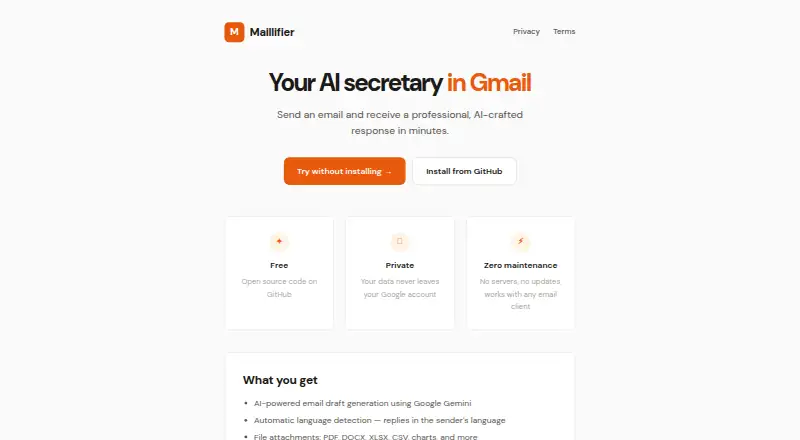
What Maillifier is
Maillifier processes emails forwarded to a dedicated Gmail account and prepares AI-drafted replies with Google Gemini. The maker says drafts typically arrive within 1–5 minutes. Users can define future drafting rules with the `#SET_USER_PROMPT` email command and add company information or tone guidance in a Google Doc knowledge base. An administrator can control access by whitelisting users through email commands. The home page lists support for PDF, DOCX, XLSX, and CSV attachments, charts, and more, while language detection enables replies in the sender’s language. The installed script uses Google Apps Script, Gmail, Drive, Docs, Sheets, and the Gemini API. Processing occurs within the user’s Google account, while email content is sent to Google’s Gemini API. Processed emails are permanently deleted after a response under the stated Zero-Log approach. Maillifier is free and open source, but requires a Google account with Gmail access and the user’s own Gemini API key. It drafts replies but does not send them automatically.
Good
- AI drafts typically arrive within 1–5 minutes
- Custom prompts and knowledge-base guidance
- Detects sender language for replies
- Supports common document and spreadsheet attachments
- Processed emails are deleted after response
Watch out
- Gmail is the listed email platform
- Requires your own Gemini API key
- Does not send replies automatically
- Gemini free-tier limits may interrupt use
Who it suits
It suits Gmail users who want inbox triage and drafted responses while keeping sending manual. It can also fit teams needing shared rules and whitelist-based access.
Verdict
Maillifier combines Gmail triage with configurable Gemini drafting and team access controls. It is a free option, but setup depends on Google services and your own API key, with sending left to the user.
Plans and prices
From Maillifier's own pricing page, checked 8 Oct 2026.
| Plan | Price | What it gives you |
|---|---|---|
| Free | Free | Open-source Google Apps Script project; requires your own Google account with Gmail access and Gemini API key |
The facts
Each one read from Maillifier's own pages, with the date it was checked.
What it does
- Access control
- An administrator can whitelist users and add or remove their access through email commands.checked 8 Oct 2026
- Attachments
- The home page lists support for PDF, DOCX, XLSX, and CSV attachments, charts, and more.checked 8 Oct 2026
- Data location
- The maker says the installed script processes data within the user's Google account and sends email content to Google's Gemini API for AI processing.checked 8 Oct 2026
- Email retention
- The privacy policy says processed emails are permanently deleted after a response is generated under its Zero-Log architecture.checked 8 Oct 2026
- Integrations
- The installed script uses Google Apps Script, Gmail, Google Drive, Google Docs, Google Sheets, and the Google Gemini API.checked 8 Oct 2026
- Knowledge base
- Users can add company information and tone guidelines to a Google Doc used as the Knowledge Base.checked 8 Oct 2026
- Language detection
- The home page says Maillifier detects the sender’s language and replies in that language.checked 8 Oct 2026
- Notable limits
- The repository troubleshooting section says Gemini API free-tier rate limits may be exceeded, in which case users can wait or set up Google Cloud billing.checked 8 Oct 2026
- Personalization
- Users can set personal rules for future drafts with the #SET_USER_PROMPT email command.checked 8 Oct 2026
- Processing time
- The maker says forwarded emails typically receive an AI-drafted reply within 1–5 minutes.checked 8 Oct 2026
- Purpose
- Maillifier processes emails forwarded to a dedicated Gmail account and generates AI-drafted replies using Google Gemini.checked 8 Oct 2026
- Security
- The privacy policy lists split-scope installation, HTTPS/TLS communication, encrypted-by-Google Script Properties for Gemini API keys, whitelist access control, and publicly auditable source code.checked 8 Oct 2026
- Setup requirements
- The terms require a Google account with Gmail access, and users are responsible for obtaining and managing their own Gemini API key.checked 8 Oct 2026
- Support
- The maker provides support at [email protected] and accepts questions or issues through its GitHub repository.checked 8 Oct 2026
Alternatives to Maillifier
- 1

Mailbutler Smart Assistant
Free planAndroidiOSWebExtension8.2Free plan - 2

Perplexity
Free planAndroidiOSWebAPI8.2From $20 a month - 3

Fyxer
Free planiOSWebAPImacOS8.1Free plan - 4

Serif
Free planiOSWebmacOSWindows8.1From $30 a month - 5

Spark +AI
Free planAndroidiOSmacOSWindows7.9From $10 a month - 6

Drag
AndroidiOSWebAPI7.8From $12 a month