
MadMapper
MadMapper is an application for video and LED mapping on macOS and Windows.
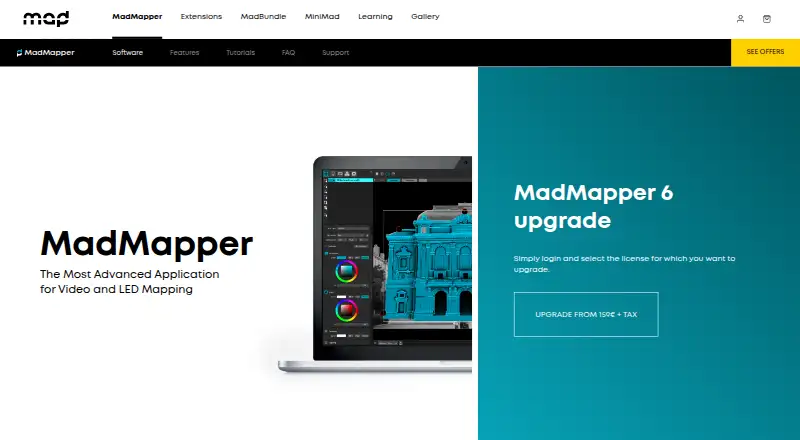
What MadMapper is
MadMapper is an application for video and LED mapping on macOS and Windows. It supports video up to 16K resolution and can connect as many projectors as the computer can handle. Its tools include Bezier masking, mesh warping, 3D calibration, space and LED scanning, live shader editing, cues, generative content, multichannel audio, and timelines. Control and networking options include MIDI, OSC with OSC Query, Art-Net, Ableton Link, Spout, Syphon, NDI, and the MiniMad remote controller. DMX features include Art-Net 4, sACN 3, universe synchronization, output up to 1000 fps, and up to 4096 DMX universes. It handles a range of video, image, 3D, and audio formats. The free demo adds watermarks and restricts project loading and saving, exports, scanner resolution, and DMX behavior. A Temporary installations license costs €39 a month, excluding tax; the Artists license is 399.00 EUR once, excluding tax.
Good
- Supports video up to 16K resolution.
- Can connect as many projectors as the computer can handle.
- Includes 3D calibration, masking, warping, and scanning tools.
- Supports Art-Net 4 and sACN 3.
- Free plan is available.
Watch out
- The free demo watermarks video output.
- Demo disables project loading and saving.
- Demo limits Space Scanner to one-quarter resolution.
- Paid licenses are priced in EUR, excluding tax.
Who it suits
MadMapper is suited to visual and digital artists, scenographers, stage designers, VJs, and other creative people working with mapped visuals. Its extensive control and DMX options may fit projects involving live control or lighting systems.
Verdict
MadMapper brings mapping, media, and live-control tools together for creative projection and LED work. Review the demo restrictions and license terms before choosing between the free option and paid licenses.
Plans and prices
From MadMapper's own pricing page, checked 15 Oct 2026.
| Plan | Price | What it gives you |
|---|---|---|
| Try MadMapper | Free | All features · watermarked input/output · DMX blackout every 30 seconds · Space Scanner at quarter resolution |
| Temporary installations | €39 a month | All features · temporary license supports current and future versions · From 39€/month excl tax |
| Artist | €399, paid once | All features · perpetual for current 6.xx version · one spare-computer seat · From 399€ excl tax |
| Artists | €399, paid once | All MadMapper features · perpetual license for current 6.xx version · one extra seat for a spare computer · excl tax |
The facts
Each one read from MadMapper's own pages, with the date it was checked.
What it does
- Audience
- The software is used by visual and digital artists, scenographers, stage designers, VJs, and other creative people.checked 30 Sep 2026
- Demo limitations
- The demo blocks project loading and saving, SVG/PNG/PDF export and material publishing, in addition to watermarking and DMX interruptions.checked 15 Oct 2026
- Demo limits
- The free demo adds watermarks, disables project loading and saving and SVG/PNG/PDF export, limits the Space Scanner to one-quarter resolution, blacks out DMX devices every 30 seconds, and disables material installation and publishing.checked 30 Sep 2026
- Deployment automation
- Mass-deployment documentation provides command-line authorization, deauthorization, login and license-information commands for macOS and Windows.checked 15 Oct 2026
- DMX
- The software supports Art-Net 4, sACN 3, universe synchronization, up to 1000 fps DMX output, and up to 4096 DMX universes.checked 30 Sep 2026
- Documentation depth
- The official manual covers interfaces, media, surfaces, DMX/LED, outputs, laser, modules, settings, timelines, live control, troubleshooting and technical references.checked 15 Oct 2026
- Generative materials
- Built-in generators and a live GLSL editor allow users to create and publish shader-based materials.checked 15 Oct 2026
- Integrations
- Networking and control options include MIDI, OSC, Art-Net, Spout, Syphon, NDI, Ableton Link, Blackmagic, USB cameras and MiniMad.checked 15 Oct 2026
- Laser control
- The MadLaser extension adds laser mapping and vectorization workflows to MadMapper.checked 15 Oct 2026
- LED and DMX
- LED scanning, fixture creation, Art-Net and sACN are supported, with up to 4096 DMX universes listed.checked 15 Oct 2026
- Licence model
- The legal page identifies MadMapper Sàrl copyright and reserves reproduction and modification rights, indicating proprietary software rather than open source.checked 15 Oct 2026
- License restrictions
- Perpetual licenses begin at two seats, seats cannot be added later, and license sharing is prohibited.checked 15 Oct 2026
- Limit: blending effort
- A Reddit user reports that recovering from a projector going out of alignment can be finicky and time-consuming.checked 15 Oct 2026
- Limit: content editing
- An independent review notes that MadMapper maps and plays prepared media but is not a non-linear video editor.checked 15 Oct 2026
- Limit: learning curve
- Tiorai reports that beginners may face a steep learning curve.checked 15 Oct 2026
- Limit: workflow scope
- TechJockey says MadMapper is not designed for live video mixing with an A/B crossfader and lacks a scripted-show timeline.checked 15 Oct 2026
- Media formats
- Supported media includes video formats such as MP4, H.264, H.265/HEVC, ProRes, DNxHD, and HAP; image formats such as JPEG, PNG, TIFF, EXR, and PSD; OBJ 3D files; and many audio formats.checked 30 Sep 2026
- Media support
- Supported media includes common H.264/H.265, ProRes, HAP, image, OBJ 3D and many audio formats, plus live camera input.checked 15 Oct 2026
- Minimum hardware
- MadMapper 6 requires at least 300 MB disk space, 2 GB RAM and an OpenGL 3.3-capable GPU; advanced work benefits from 2–4 CPU cores and 8 GB RAM.checked 15 Oct 2026
The company
- Founded
- The MadMapper concept and development began in 2010.checked 15 Oct 2026
- Headquarters
- Paris, France and Geneva, Switzerland; development team in Brussels, Belgiumchecked 28 Sep 2026
- Maker collaboration
- The product was created by 1024 architecture and GarageCube, with development based in Brussels.checked 15 Oct 2026
Money
- Limit: price
- WindowsReport calls MadMapper somewhat expensive, while Tiorai characterizes the one-time purchase as relatively high.checked 15 Oct 2026
Where it runs
- Mapping tools
- MadMapper includes Bezier masking, mesh warping, 3D calibration, space scanning, LED scanning, live shader editing, cues, generative content, multichannel audio, and timelines.checked 30 Sep 2026
Alternatives to MadMapper
- 1

Ghost Arcade
Free planOpen sourceiOSWebAPILinux8.4$1.99 one-time - 2
SurfaBeam Pro
Free planAndroidiOSmacOSWindows7.3From $39.99 a year - 3
MapMap
Free planOpen sourceLinuxmacOSWindows7.2Free plan - 4

Disguise Designer
Free planWebmacOSWindows7.1From $1,500 a year - 5

Christie Mystique
Free planWebAPIWindows6.9Free plan - 6

VIOSO
Free planWebLinuxWindows6.8From €49 a month