
Ghost Arcade
Ghost Arcade is projection-mapping and VJ software for building visual layers, applying effects, fitting visuals to surfaces, and performing live.
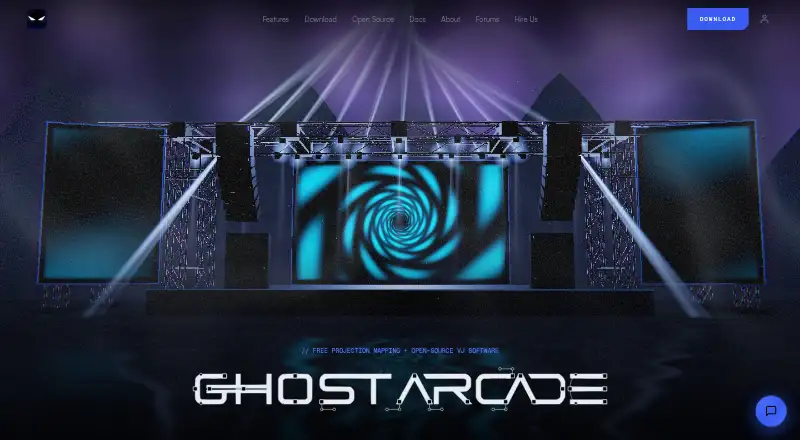
What Ghost Arcade is
Ghost Arcade is projection-mapping and VJ software for building visual layers, applying effects, fitting visuals to surfaces, and performing live. Mapping tools include corner and mesh warping, slices, shape masks, soft-edge blending, and independently warped multi-display outputs. A 3D stage simulator and projection simulator help with show planning and rehearsal. In VJ mode, two decks, an A/B crossfader with ten transition types, beat-quantised clip launching, macros, and snapshots support live control. The visual toolkit includes more than 180 effects, real-time GPU shader instruments, and ISF and GLSL shader support. Connections include MIDI, OSC, Ableton Link, Syphon/Spout output, and NDI video over a local network. AI shader generation accepts plain-English prompts but requires your own API key. The iPhone and iPad app adds clip launching, touch effects, mapping, camera inputs, and LiDAR scans on supported devices. Desktop software is open source under AGPL-3.0, and the site permits paid work. The desktop app is free with all features and no expiry; version 2.0.16 requires an email to download, while Linux is listed for the legacy build.
Good
- Desktop app includes all features free
- Supports mesh warping and soft-edge blending
- Includes more than 180 effects
- Connects through MIDI, OSC, and Ableton Link
- Open-source desktop software permits paid work
Watch out
- AI shader generation requires your own API key
- Version 2.0.16 desktop download requires an email
- Linux is listed for the legacy build
Who it suits
Ghost Arcade suits VJs and projection artists who need surface mapping, show rehearsal tools, and live visual controls. Its iPhone and iPad app may also suit performers seeking mobile clip launching and touch effects.
Verdict
Ghost Arcade brings mapping, show-planning, and live VJ controls into a free desktop app, with an accompanying iPhone and iPad app. Note the email requirement for the current desktop installer and the legacy-build status of Linux.
Plans and prices
From Ghost Arcade's own pricing page, checked 3 Oct 2026.
| Plan | Price | What it gives you |
|---|---|---|
| Desktop app (Ghost Arcade 2.0.16 and legacy 1.9) | Free | All features included · no tiers, trial, watermark, or expiry · 2.0.16 download requires email · Linux listed for legacy build |
| Ghost Arcade desktop | Free | all features · no tiers · no watermark · Mac, Windows, Linux · always |
| Ghost Arcade iPhone/iPad | $1.99, paid once | iPhone and iPad · iOS 16+ · one-time App Store purchase |
| iPhone and iPad app | $1.99, paid once | iOS 15 or later · no account · no data collected |
The facts
Each one read from Ghost Arcade's own pages, with the date it was checked.
What it does
- 3D stage simulator
- The stage simulator models trusses, decks, fixtures, PA, haze, lasers, beams and dome venues with live content on screens.checked 15 Oct 2026
- AI generation
- AI shader generation accepts plain-English descriptions and requires the user's own API key.checked 15 Oct 2026
- AI shader generation
- AI shader generation accepts plain-English descriptions and requires the user’s own API key.checked 3 Oct 2026
- Audio reactivity
- Audio control includes eight-band FFT analysis and kick/snare onset detection assignable to parameters.checked 15 Oct 2026
- Creator
- The maker identifies Justin Robie Wood as Ghost Arcade’s creator and says he began doing live visuals in 2008.checked 3 Oct 2026
- Documentation depth
- The documentation index covers installation, projects, mapping, simulators, VJ performance, instruments, MIDI/OSC, mobile, outputs, render core, performance and troubleshooting.checked 15 Oct 2026
- Download email
- The 2.0.16 desktop installer requires an email address, while the legacy 1.9 build is available without email.checked 3 Oct 2026
- Effects
- The product advertises more than 180 chainable effects across 21 categories, with audio-driven parameters.checked 15 Oct 2026
- GPU instruments
- Built-in GPU instruments include Smoke Riders, Fluid Riders, Volumetric Nodes, Gravity Wells, Planet, Ink Cloud and particle tools.checked 15 Oct 2026
- Integrations
- Official pages list Ableton Link, Syphon, Spout, NDI, WLED, Art-Net, sACN, DMX input and PJLink projector control.checked 15 Oct 2026
- Legacy requirements
- The legacy browser build uses WebGL 2, needs about 4 GB RAM and 500 MB disk, and remains available for weaker systems.checked 15 Oct 2026
- Licence
- The source is licensed under AGPL-3.0; modified network services must offer corresponding source code, while created videos and recordings remain the user's.checked 15 Oct 2026
- License and commercial use
- The desktop software is open source under AGPL-3.0, and the site says paid gigs, installations, broadcasts, and subcontracted work are permitted.checked 3 Oct 2026
- Limit: bugs and workflow gaps
- Reported issues included screen capture not appearing in fullscreen output, missing media after reopening projects, VJ layer persistence problems and webcam input not being draggable into the VJ grid.checked 15 Oct 2026
- Limit: performance
- Reddit users reported severe lag on some systems, including a Ryzen 5/RTX 3070 setup, and asked for CPU or performance tuning options.checked 15 Oct 2026
- MCP server
- The desktop app can host a local MCP server for clients such as Claude Desktop to trigger clips, move faders and inspect output; it is off by default and token-protected.checked 15 Oct 2026
- MIDI control
- MIDI Learn supports multiple devices, CC, notes, pitch bend and MIDI clock input and output at 24 PPQN.checked 15 Oct 2026
- Mobile companion
- A phone or tablet can connect over the local network as a touch clip launcher, mixer and mapping controller.checked 15 Oct 2026
The company
- Company attribution
- The site footer and App Store copyright attribute the product identity to Risk Capital Media LLC.checked 15 Oct 2026
- Maker
- The site identifies Justin Robie Wood as creator and describes more than fifteen years of touring and installation work behind the software.checked 15 Oct 2026
Where it runs
- Desktop platforms
- The site lists macOS 12 or later, Windows 10 or later, and Linux via AppImage and .deb, while noting Linux as a legacy build.checked 3 Oct 2026
- Limit: platform qualification
- Release notes say Windows and some NDI paths had limited hardware testing, and downloadable builds did not yet include NDI support in one release.checked 15 Oct 2026
- Mapping
- Mapping features include corner and mesh warping, slices, shape masks, soft edge blending, and independently warped multi-display outputs.checked 3 Oct 2026
- Mobile app
- The iPhone and iPad app supports clip launching, touch effects, projection mapping, camera inputs, and LiDAR point-cloud scans on supported devices.checked 3 Oct 2026
The full review of Ghost Arcade
Overview
Ghost Arcade is projection-mapping and VJ software for shaping visuals, planning a show, and performing live. It suits visual artists who want a capable desktop toolkit without a software fee, especially those who also value mobile controls. The main trade-offs are an email requirement for the current desktop installer and Linux support limited to a legacy build.
The desktop app combines mapping, show design, and live performance in one workflow. Its mapping tools cover corner and mesh warping, slices, shape masks, soft edge blending, and independently warped multi-display outputs. That breadth makes it relevant to both single-surface work and more involved projection setups.
The desktop software is open source under AGPL-3.0. The maker says paid gigs, installations, broadcasts, and subcontracted work are permitted. Ghost Arcade’s creator is Justin Robie Wood, who says he began doing live visuals in 2008.
Key features
Mapping and show planning
A 3D stage simulator and projection simulator let users plan and rehearse shows. Together with the range of warping and blending tools, they make Ghost Arcade a strong fit when aligning visuals to physical surfaces and preparing a setup before a performance matters.
Live performance and visual tools
VJ mode provides two decks, an A/B crossfader with ten transition types, beat-quantised clip launching, macros, and snapshots. These controls support live clip switching and repeatable performance actions; users who need a particular performance workflow should weigh the two-deck design against their own requirements.
The software includes more than 180 effects, real-time GPU shader instruments, and support for ISF and GLSL shaders. Connections include MIDI, OSC, Ableton Link, Syphon/Spout output, and NDI video over a local network. That combination gives experienced users substantial scope to build visuals and connect external control or video systems.
AI shader generation turns plain-English descriptions into shaders, but requires the user’s own API key. It is an optional route to shader creation, not a bundled service with its own included access.
Mobile companion
The iPhone and iPad app supports clip launching, touch effects, projection mapping, camera inputs, and LiDAR point-cloud scans on supported devices. It broadens the workflow beyond desktop, though the LiDAR feature is limited to compatible hardware.
Pricing
The desktop app is free at free, with all features included and no tiers, trial, watermark, or expiry. It is unusually straightforward for users who want the full desktop feature set without a software charge. The current 2.0.16 installer requires an email address; the legacy 1.9 build is available without email, and Linux is listed for the legacy build.
The iPhone and iPad app costs $1.99, paid once. It supports iOS 15 or later, requires no account, and its maker’s listing states that no data is collected. That one-time price is the relevant cost for users who want the mobile app; the desktop edition remains free.
There is no free trial because the desktop plan is free outright. The site links to a community forum, contact page, and Ko-fi support, and describes its open-source guide as usually replying instantly.
Platforms
The desktop app supports macOS 12 or later and Windows 10 or later. Linux is available via AppImage and .deb, but only as a legacy build, so Linux users should not expect the current desktop release. The separate mobile app supports iPhone and iPad on iOS 15 or later.
Who it's for
Ghost Arcade is a good choice for VJs and projection artists who want mapping, rehearsal, and live controls together, with no desktop license cost or watermark. Its open-source license and stated permission for commercial work make it suitable for paid productions as well as personal projects. It is less suitable for Linux users seeking the current release, or for anyone who does not want to provide an email address for the current desktop installer.
Pros and cons
- Pros: The free desktop plan includes all features with no watermark or expiry, making it a low-cost way to access a broad projection-mapping and VJ toolkit.
- Pros: Simulators, multi-display warping, and soft edge blending support planning and more complex projection arrangements.
- Pros: MIDI, OSC, Ableton Link, Syphon/Spout, and NDI connections give users multiple ways to integrate performance controls and video.
- Cons: The current desktop installer requires an email address, which may deter users who want an email-free download.
- Cons: Linux is supported only through the legacy build, limiting its appeal to users who need a current Linux release.
- Cons: AI shader generation requires the user’s own API key, adding a separate setup requirement.
Alternatives
For a broader comparison, see Projection Mapping Software.
- Screenberry is worth considering if you need a freemium option across Linux, macOS, web, and Windows. Its free Non-Commercial plan is restricted to personal, learning, evaluation, and non-paying use, with up to 2x 2K video output and a license that renews every 90 days with an internet requirement.
- Disguise Designer offers a free Starter plan for learning, training, and testing, including core functionality and project pre-visualisation without connecting to Disguise servers.
- VIOSO may suit users who prefer a freemium tool with a stated free trial; its free plan caps saved projects at 10 and storage at 250 MB, and adds a generic projector library and watermark link sharing.
- Christie Mystique is another freemium option, with a free Lite plan limited to one webcam, up to three Christie projectors, and flat screens.
- MadMapper has a free tryout that includes all features but watermarks video input and output, blacks out DMX channels every 30 seconds, and limits space-scanner resolution to one quarter.
- LightAct offers a free Creator plan with all features unlocked and unlimited outputs, but watermarks outputs.
- LumaPlane is a web-based option with a free Starter plan offering one project, unlimited planes, built-in gallery media, and fullscreen projector output.
- Modulo Kinetic is a paid option with a €70, paid once Designer 2D plan that is watermarked, limited to a 2D environment, and allows one blinking output.
Verdict
Choose Ghost Arcade if you want a free, commercially usable desktop app that brings projection mapping, show planning, and live VJ controls together. Its broad mapping and integration toolkit is the strongest reason to choose it. Look elsewhere if you need a current Linux release or want to avoid an email requirement for the current desktop installer.
Getting started
- Visit https://ghostarcade.live/
- Download the free desktop app; provide an email for version 2.0.16
- Use the legacy 1.9 download without email if preferred
- Install on macOS 12 or later, Windows 10 or later, or Linux legacy builds
- Buy the iPhone and iPad app for 1.99 USD once
- Connect MIDI, OSC, Ableton Link, Syphon or Spout, or NDI devices as needed
Questions
Is Ghost Arcade free?
The desktop app is free with all features, no tiers, no trial, no watermark, and no expiry. The iPhone and iPad app costs 1.99 USD once.
Which desktop systems are supported?
The site lists macOS 12 or later, Windows 10 or later, and Linux through AppImage and .deb as a legacy build.
Is it open source?
Yes. The desktop software is open source under the AGPL-3.0 license.
Can it be used for paid work?
The site says paid gigs, installations, broadcasts, and subcontracted work are permitted.
Does the mobile app require an account?
The iPhone and iPad app requires no account, and its listing states that no data is collected.
What integrations are available?
Supported connections include MIDI, OSC, Ableton Link, Syphon or Spout output, and NDI video over a local network.
Alternatives to Ghost Arcade
- 1

MadMapper
Free planAPImacOSWindows7.3From €39 a month - 2
SurfaBeam Pro
Free planAndroidiOSmacOSWindows7.3From $39.99 a year - 3
MapMap
Free planOpen sourceLinuxmacOSWindows7.2Free plan - 4

Disguise Designer
Free planWebmacOSWindows7.1From $1,500 a year - 5

Christie Mystique
Free planWebAPIWindows6.9Free plan - 6

VIOSO
Free planWebLinuxWindows6.8From €49 a month