MacroSpend
MacroSpend helps finance, IT, and advisory teams find software waste, renewal risks, duplicate vendors, and potential savings.
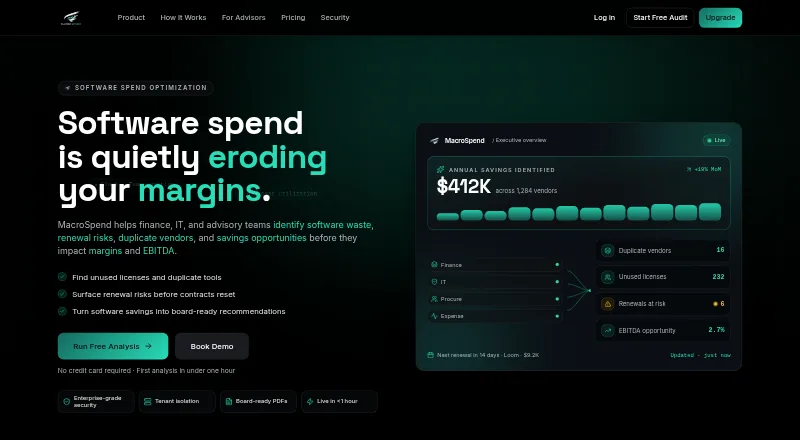
What MacroSpend is
MacroSpend helps finance, IT, and advisory teams find software waste, renewal risks, duplicate vendors, and potential savings. It takes in accounts payable, expense, license, and contract data through CSV uploads or manual entry. Its AI agents flag duplicate apps, idle licenses, renewal risks, and AI tool sprawl; findings include confidence scores, supporting evidence, and estimated annual savings. Suggested actions can include canceling, consolidating, downgrading, or renegotiating software, with approved recommendations routed to an owner. A risk-scored renewal calendar provides alerts 90 days ahead. The service connects with accounting, identity, and billing systems, while available no-code integrations vary by plan. Reports include executive briefs and board-ready PDFs; advisors can also create white-labeled PDFs and PPTX reports. MacroSpend says it encrypts data at rest and in transit, uses row-level tenant isolation, and makes daily backups. The free plan allows two CSV uploads per month and three team members.
Good
- Accepts CSV uploads and manual data entry.
- Flags idle licenses and duplicate applications.
- Provides renewal alerts 90 days ahead.
- Routes approved recommendations to an owner.
- Free plan includes three team members.
Watch out
- Free plan allows two CSV uploads monthly.
- Starter and higher listed prices are billed annually.
- SOC 2 Type I program is in progress.
Who it suits
MacroSpend is suited to SMBs, enterprise teams, advisory firms, CFOs, finance and procurement teams, IT staff, and advisors or PE teams seeking visibility into software spend and renewals.
Verdict
MacroSpend brings spend classification, renewal monitoring, and savings recommendations into one workflow. The free plan has upload and team-member limits; compare paid-plan integrations and usage intelligence against your needs.
Plans and prices
From MacroSpend's own pricing page, checked 29 Sep 2026.
| Plan | Price | What it gives you |
|---|---|---|
| Free | Free | 100 AI credits/month · 1 AI agent · up to 25 vendors · 3 executive briefs/month · Forever free |
| Starter | $39 a month | 3 AI agents · up to 100 vendors · renewal alerts · approval workflow · unlimited executive briefs · CSV and PDF exports · billed annually |
| Growth | $119 a month | 6 AI agents · up to 500 vendors · continuous monitoring and alerting · workflow automation · billed annually |
| Pro | $239 a month | All 9 AI agents · unlimited vendors · AI governance · negotiation playbooks · advanced forecasting and scenarios · billed annually |
| Enterprise | Priced on request | Unlimited vendors · all 9 AI agents plus custom · custom integrations · full Usage Intelligence Layer plus custom · Contact sales |
The facts
Each one read from MacroSpend's own pages, with the date it was checked.
What it does
- AI findings
- Its AI agents flag duplicate apps, idle licenses, renewal risk, and AI tool sprawl; findings include confidence scores, supporting evidence, and estimated annual savings.checked 29 Sep 2026
- Compliance
- The maker says its SOC 2 Type I program is in progress and that a DPA and security questionnaire are available on request.checked 29 Sep 2026
- Inputs
- It ingests accounts payable, expense, license, and contract data, and supports CSV uploads and manual entry.checked 29 Sep 2026
- Integrations
- MacroSpend describes connections to accounting integrations, identity systems, and billing platforms; the pricing page offers up to 5 no-code integrations on Growth and all on Pro.checked 29 Sep 2026
- Intended users
- MacroSpend describes itself as serving SMBs, enterprise teams, advisory firms, CFOs, finance, procurement, IT, and advisors or PE teams.checked 29 Sep 2026
- Purpose
- MacroSpend helps finance, IT, and advisory teams identify software waste, renewal risks, duplicate vendors, and savings opportunities.checked 29 Sep 2026
- Recommendations
- Recommendations can include canceling, consolidating, downgrading, or renegotiating software, and can be approved and routed to an owner.checked 29 Sep 2026
- Renewals
- The product provides a risk-scored renewal calendar with alerts 90 days out.checked 29 Sep 2026
- Reports
- MacroSpend generates executive briefs and board-ready PDFs; the homepage says advisors can create white-labeled PDFs and PPTX reports.checked 29 Sep 2026
- Security
- The maker states data is encrypted with AES-256 at rest and TLS 1.3 in transit, with row-level tenant isolation and daily backups.checked 29 Sep 2026
- Setup
- The pricing page says guided onboarding starts with an upload and that findings with AI summaries appear within minutes; the homepage says a first analysis takes under one hour.checked 29 Sep 2026
- Usage intelligence
- Identity integrations and the optional Usage Intelligence Layer can verify active versus inactive seats; the pricing page lists full usage intelligence on Growth and Pro.checked 29 Sep 2026
Money
- Free-tier limits
- The free plan includes 2 CSV uploads per month and 3 team members, according to the feature comparison.checked 29 Sep 2026
The full review of MacroSpend
MacroSpend is a web-based software-spend analysis tool for finance, IT, procurement, and advisory teams. It suits organizations that can provide spend and contract data and want to turn flagged waste or renewal risks into assigned actions. Its appeal is a connected path from analysis to recommendations; the trade-off is that richer monitoring and integrations sit on higher-priced plans.
Overview
MacroSpend draws on accounts payable, expense, license, and contract data, supplied through CSV uploads or manual entry. Its AI agents flag duplicate applications, unused licenses, renewal exposure, and AI-tool sprawl, with confidence scores, supporting evidence, and estimated annual savings to help teams assess each finding. Recommendations can then be approved and routed to an owner, rather than left as analysis alone.
A risk-scored renewal calendar sends alerts 90 days ahead. The product also creates executive briefs and board-ready PDFs; advisors can produce white-labeled PDFs and PPTX reports. Guided onboarding starts with an upload, with findings and AI summaries appearing within minutes; the homepage says a first analysis takes under an hour.
Key features
From spend findings to action
Suggested responses include cancellation, consolidation, downgrading, or renegotiation. Approval and owner routing give finance and procurement teams a way to move recommendations into work, though the value depends on supplying useful underlying data and acting on the findings.
Renewals and usage
The 90-day renewal alerts make upcoming commitments easier to review before deadlines. Identity integrations and the optional Usage Intelligence Layer can distinguish active from inactive seats. Full usage intelligence is included on Growth and Pro; Enterprise adds a full layer with custom options. That makes the lower plans less suited to teams that need robust seat-level verification.
Connections, reporting, and security
MacroSpend describes connections to accounting systems, identity providers, and billing platforms. Growth includes up to five no-code integrations, while Pro includes all integrations. The maker says data is encrypted with AES-256 at rest and TLS 1.3 in transit, with row-level tenant isolation and daily backups. Its SOC 2 Type I program is in progress; a DPA and security questionnaire are available on request.
Pricing
The free plan is a useful entry point, but its caps make it better for small-scale evaluation than sustained team-wide analysis: it allows 2 CSV uploads per month and 3 team members, alongside 100 AI credits per month, one AI agent, up to 25 vendors, and 3 executive briefs per month.
| Plan | Price and terms | What it includes |
|---|---|---|
| Free | free (billed Forever free) | 100 AI credits/month, 1 AI agent, up to 25 vendors, 3 executive briefs/month |
| Starter | $39 a month (billed billed annually) | 3 AI agents, up to 100 vendors, renewal alerts, approval workflow, unlimited executive briefs, CSV and PDF exports |
| Growth | $119 a month (billed billed annually) | 6 AI agents, up to 500 vendors, continuous monitoring and alerting, workflow automation, full usage intelligence, up to 5 no-code integrations |
| Pro | $239 a month (billed billed annually) | All 9 AI agents, unlimited vendors, AI governance, negotiation playbooks, advanced forecasting and scenarios, full usage intelligence, all integrations |
| Enterprise | Custom pricing | Unlimited vendors, all 9 AI agents plus custom, custom integrations, full Usage Intelligence Layer plus custom |
Starter is the step up for teams that need renewal alerts, approvals, and exports, but it does not include the full usage intelligence or continuous monitoring listed on Growth. Growth is the practical fit for teams managing a larger vendor base and needing recurring alerts and workflow automation. Pro is aimed at organizations that need unlimited vendors, all agents, governance, and forecasting. Enterprise suits requirements for custom agents or integrations. The paid monthly rates are billed annually, so they are not month-to-month prices.
Platforms
MacroSpend runs on the web.
Who it's for
MacroSpend is most compelling for SMB or enterprise finance, procurement, and IT teams, as well as advisory firms and PE teams, that need to identify software waste and track renewals in a shared workflow. Teams that only want lightweight spend analysis, or cannot provide relevant financial, license, or contract data, may find its analysis and higher-tier monitoring more than they need.
Pros and cons
- Pros: Findings carry evidence, confidence scores, and estimated savings, giving teams more to assess than a bare alert.
- Pros: Recommendations can be approved and assigned, while a 90-day renewal calendar gives teams time to act.
- Pros: The free tier offers a way to start without payment, and Growth and Pro add full usage intelligence.
- Cons: Free limits uploads to 2 per month and teams to 3 members, constraining regular or collaborative use.
- Cons: Full usage intelligence and continuous monitoring require Growth or above, and the listed paid rates are billed annually.
- Cons: Enterprise requires custom pricing, making it less straightforward to budget than the published tiers.
Alternatives
For a broader comparison, see Spend Analysis Software.
- MeRLIN Spend Analytics is a paid API and web option with pricing not stated; consider it if you are prepared to book a demo.
- ProcureSprint PR to PO is a paid web product from Mindsprint, which says it is headquartered in Singapore and has a global workforce of 3,200+ professionals.
- Deducta is a paid API and web alternative with custom quotes; choose it if you prefer to contact the vendor for a demo.
- Sievo Spend Analytics is a paid API and web option priced by customer spend per year, with unlimited user seats and no free trial.
- CostBits is a paid web alternative with a free trial; its Small plan specifies one legal entity, five users, and ten contracts.
- eProcureAI Spend Analytics is a paid web alternative whose Starter plan centers on intake and approvals, with unlimited requesters and approvers.
- SpendCraft is a paid API and web option with a free trial; Self-service starts at $899 a month and exact pricing scales with spend.
- ProcureVue is a paid web alternative.
Verdict
Choose MacroSpend if your team needs to connect software-spend findings to renewal alerts, evidence-backed savings recommendations, and assigned follow-through. Its free tier lowers the barrier to starting, but upload and member caps are tight; teams needing verified seat usage, continuous monitoring, or broad integrations should budget for Growth or Pro. Look elsewhere if those requirements or annual billing make the higher tiers a poor fit.
Getting started
- Visit https://macrospend.com/.
- Use the web service and begin guided onboarding with an upload.
- Upload CSV data or enter information manually.
- Review AI findings and summaries, which the pricing page says appear within minutes after upload.
- Choose a plan based on vendor, integration, agent, and reporting needs.
Limits worth knowing
The Free plan includes two CSV uploads per month and three team members, along with 100 AI credits per month, one AI agent, up to 25 vendors, and three executive briefs per month. Starter is $39 a month, billed annually, and includes three agents and up to 100 vendors.
Questions
Is MacroSpend free?
Yes. The permanent Free plan costs nothing.
What are the Free plan limits?
It includes two CSV uploads per month, three team members, 100 AI credits per month, one AI agent, up to 25 vendors, and three executive briefs per month.
Which platforms does MacroSpend support?
MacroSpend is available on the web.
What does MacroSpend connect to?
It describes connections to accounting integrations, identity systems, and billing platforms. Growth lists up to five no-code integrations, and Pro lists all integrations.
How much do the paid plans cost?
Starter is $39 a month, billed annually; Growth is $119 a month, billed annually; and Pro is $239 a month, billed annually. Enterprise uses contact sales, with no price stated.
What security measures does the maker describe?
The maker says data is encrypted with AES-256 at rest and TLS 1.3 in transit, with row-level tenant isolation and daily backups. It says its SOC 2 Type I program is in progress.
Alternatives to MacroSpend
- 1

CostBits
Web6.9From €171 a month - 2
Structera Spend Analytics
Free planWeb6.6£25 one-time - 3

SpendCraft
WebAPI6.3From $899 a month - 4
Spic&Scan
Web6.2€2,750 one-time - 5

ivoflow Spend Analytics
Self-hosted6.1From €59 a month - 66.1From $639 a month