LxCars
LxCars is a web-based ERP for motor-vehicle repair shops and dealerships, combining customer records, invoicing, vehicle management, mechanic time tracking, …
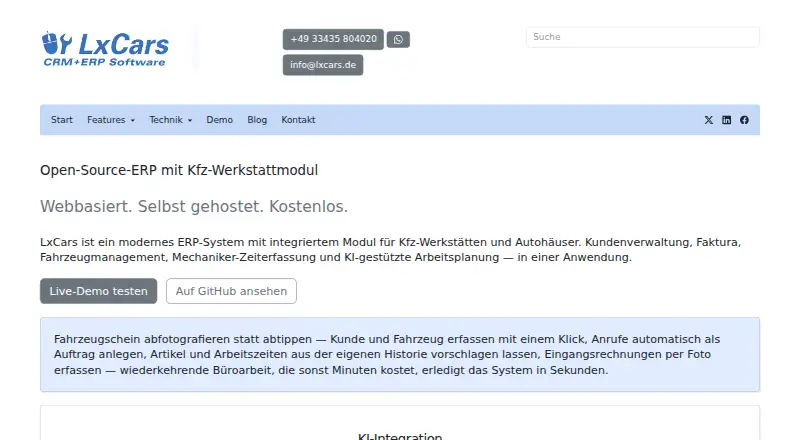
What LxCars is
LxCars is a web-based ERP for motor-vehicle repair shops and dealerships, combining customer records, invoicing, vehicle management, mechanic time tracking, and work planning. Its vehicle database connects to KBA vehicle data, and an AI-assisted scanner can extract details from photographed or uploaded registration documents. Workshop features include work instructions, time tracking, spare-part requests, defect management, and inspection reminders. Accounting tools cover quotes, orders, invoices, and delivery notes, with DATEV export and role-based access rights. The software can run locally or in Docker on customer infrastructure, using PostgreSQL on its own server without a cloud dependency. The Community plan is free, self-hosted, and MIT-licensed with the full software. Installation documentation specifies Linux server components including PHP 8 and PostgreSQL 16, or Docker and Docker Compose. Optional AI functions include call transcription, vehicle chat, work-item suggestions, number-plate recognition, incoming-invoice analysis, and an office assistant. WhatsApp messaging requires a Meta Business account and verified phone number.
Good
- Combines vehicle, customer, workshop, and accounting functions.
- Includes mechanic time tracking and spare-part requests.
- Community plan is full software and self-hosted.
- Can run without a cloud dependency.
Watch out
- Documented installation requires Linux components or Docker.
- WhatsApp messaging requires a Meta Business account.
- Demo data is regularly reset.
Who it suits
LxCars is aimed at vehicle repair shops and dealerships needing workshop, customer, vehicle, and invoicing functions together. Its self-hosted Community option suits operators prepared to manage Linux or Docker installation.
Verdict
LxCars brings workshop and dealership workflows into a self-hosted ERP with a free Community plan. Buyers should consider installation requirements and the limits on external-service features in the demo.
Plans and prices
From LxCars's own pricing page, checked 9 Oct 2026.
| Plan | Price | What it gives you |
|---|---|---|
| Community | Free | Self-hosted · MIT-licensed · Full software |
| Enterprise | Priced on request | Dedicated server · Individual configuration · Multi-branch businesses |
| Professional | Priced on request | Hosted · Setup, updates and backups included |
The facts
Each one read from LxCars's own pages, with the date it was checked.
What it does
- Accounting
- The ERP includes quotes, orders, invoices and delivery notes, plus DATEV export and role-based access rights.checked 9 Oct 2026
- AI data handling
- Text requests are sent encrypted to Anthropic or OpenAI APIs, while number-plate recognition runs locally and camera image and video data stay on the server.checked 9 Oct 2026
- AI features
- Six optional AI functions include call transcription, vehicle chat, work-item suggestions, number-plate recognition, incoming-invoice analysis and the Weroni office assistant.checked 9 Oct 2026
- Audience
- The maker describes the kivitendo migration service as intended for workshops and smaller dealerships and says the complete migration price depends on data volume, workstation count and training scope.checked 9 Oct 2026
- Demo limits
- The live demo uses sample data that is regularly reset, and WhatsApp, telephony and AI features are limited because they require external services.checked 9 Oct 2026
- Hosting and data
- The maker says LxCars can run locally or with Docker on the customer's infrastructure, with a PostgreSQL database on its own server and no cloud dependency.checked 9 Oct 2026
- Installation
- The documented installation uses Linux server components including PHP 8 and PostgreSQL 16, or Docker and Docker Compose.checked 9 Oct 2026
- Integrations
- WhatsApp customer messaging uses the Meta Business API and requires a Meta Business account and verified phone number.checked 9 Oct 2026
- Migration limits
- The automatic kivitendo migration does not transfer custom Perl extensions, non-standard custom reports or archived email correspondence.checked 9 Oct 2026
- Product
- LxCars is a web-based ERP for motor-vehicle repair shops and dealerships that combines customer management, invoicing, vehicle management, mechanic time tracking and work planning.checked 9 Oct 2026
- Support
- The kivitendo migration package includes two to four weeks of extended support after the transition.checked 9 Oct 2026
- Vehicle management
- Its vehicle database connects to KBA vehicle data and includes an AI-assisted scanner that extracts information from photographed or uploaded registration documents.checked 9 Oct 2026
- Workshop tools
- The mechanic mode supports work instructions, time tracking and spare-part requests, while the TÜV module provides defect management and inspection reminders.checked 9 Oct 2026
The company
- Company
- The site identifies the provider as Inter-Data, Ronny Zimmermann, at Bahnhofstraße 23, 15345 Rehfelde, Germany.checked 9 Oct 2026
- Headquarters
- Rehfelde, Germanychecked 28 Sep 2026
The full review of LxCars
LxCars is a self-hosted, web-based ERP for vehicle repair shops and dealerships that brings workshop and accounting workflows into one system. It suits operators who can manage a Linux server or Docker deployment and want control over their infrastructure. Its breadth is compelling, but the technical setup and reliance on external services for some features make it a poor fit for buyers seeking a turnkey cloud app.
Overview
LxCars combines customer and vehicle records with work planning, mechanic time tracking, invoicing and related dealership workflows. Its vehicle database connects to KBA data, and an AI-assisted scanner can extract details from uploaded or photographed registration documents. For a shop that wants operational records and billing in one ERP, that combination is more useful than a tool focused only on repair orders.
Hosting is a central choice, not a minor deployment detail: LxCars can run on the customer's infrastructure, locally or with Docker, using PostgreSQL on its own server. That avoids a cloud dependency, but puts server setup and ongoing responsibility on the customer. Documented installation calls for Linux server components including PHP 8 and PostgreSQL 16, or Docker and Docker Compose.
Key features
Workshop tools cover work instructions, mechanic time tracking and spare-part requests. A TÜV module adds defect management and inspection reminders. Together, these support day-to-day job execution and follow-up, while parts inventory, work-order management and vehicle history extend the system beyond basic customer records.
Quotes, orders, invoices and delivery notes cover core transaction paperwork, and DATEV export gives the accounting workflow a route into that ecosystem. Role-based access rights are useful where staff need different permissions. WhatsApp messaging uses the Meta Business API, so it requires a Meta Business account and verified phone number; shops without those prerequisites should not count on it as a ready-to-use channel.
Six optional AI functions include call transcription, vehicle chat, suggested work items, number-plate recognition, incoming-invoice analysis and the Weroni office assistant. Text requests are sent encrypted to Anthropic or OpenAI APIs, while number-plate recognition runs locally and camera image and video data remain on the server. This is a meaningful distinction for operators weighing automation against data handling, though the text tools still involve external AI services.
Pricing
| Plan | Price | What it includes | Best fit |
|---|---|---|---|
| Community | free | Self-hosted, MIT-licensed, full software | Shops able to run and maintain their own deployment |
| Professional | Custom pricing | Hosted service, setup, updates and backups | Teams that want hosting and routine infrastructure work handled |
| Enterprise | Custom pricing | Dedicated server and individual configuration for multi-branch businesses | Businesses needing a dedicated setup across branches |
The free Community plan gives access to the full software rather than a reduced feature tier, but it is self-hosted: server provisioning and administration remain part of the cost in time and expertise. Professional shifts hosting, setup, updates and backups to the provider. Enterprise targets multi-branch operators with dedicated infrastructure and individual configuration. Neither paid plan has a published price, so buyers should compare a quote with the effort of operating Community themselves.
The provider also offers a kivitendo migration service for workshops and smaller dealerships. Its complete price depends on data volume, workstation count and training scope. Migration does not carry over custom Perl extensions, non-standard custom reports or archived email correspondence, and the package includes two to four weeks of extended support after transition. That makes it a potential route off kivitendo, but not a frictionless transfer for heavily customized installations.
Platforms
LxCars is available for Linux, self-hosted deployment and the web. The combination suits a shop that wants browser-based access while keeping the system on its own infrastructure; it does not provide the plug-and-play convenience of a hosted-only service unless the Professional plan is chosen.
Who it's for
LxCars is best for independent repair shops and smaller dealerships that want workshop, vehicle and accounting workflows together and have the capacity to manage a Linux or Docker environment. Multi-branch businesses may prefer the Enterprise configuration. Shops that lack server expertise, or that need WhatsApp, telephony and AI features to work immediately without external-service setup, should look elsewhere.
Pros and cons
Pros
- Full-featured free tier: Community includes the full MIT-licensed software, making self-hosting a viable way to avoid a reduced trial or feature-limited edition.
- Workshop and back-office breadth: Work instructions, time tracking, parts requests, TÜV follow-up, invoices and DATEV export connect practical shop work with paperwork.
- Infrastructure control: Local or Docker hosting with a PostgreSQL database on the customer's server avoids cloud dependency.
- Specific data-handling choices: Number-plate recognition runs locally, while text requests to external AI APIs are encrypted.
Cons
- Technical ownership comes with the free plan: Linux, PHP and PostgreSQL requirements or a Docker setup make Community a poor match for shops seeking an effortless installation.
- External-service features need setup: WhatsApp requires Meta credentials and a verified phone number, and demo access to WhatsApp, telephony and AI is limited.
- Migration has gaps: Custom Perl extensions, non-standard reports and archived email are not transferred automatically from kivitendo.
- Paid tiers require a quote: Professional and Enterprise have custom pricing, so their cost cannot be compared directly without contacting the provider.
Alternatives
Browse Automotive Repair Software for the broader category. Choose Bay-Master instead if you want a paid option spanning Android, iOS, web and Windows, with scheduling, inventory, reporting, digital inspections and QuickBooks integration among its listed features. ARI is a better fit for buyers who want a paid cross-platform product with a free plan and trial; its ARI Pro monthly plan is $39.99 a month and includes invoicing, inspections, inventory, accounting, appointments, reminders and time tracking.
Carstio is worth comparing if you want free self-hosted software with unlimited users, clients and cars, and all features included. For alternatives without further feature or pricing detail, consider CCC ONE Repair Workflow, Mitchell RepairCenter, GEM-CAR, OpenAuto or Shop OS.
Verdict
Choose LxCars if you run a repair shop or smaller dealership that wants a full workshop ERP, values control over its data and can take responsibility for self-hosting. Its strongest case is the full-featured free Community edition paired with broad workshop and accounting tools. Look elsewhere if you need turnkey hosting without a custom quote, or depend on external-service features that require setup beyond the core deployment.
Getting started
- Open the LxCars website.
- Choose the self-hosted Community plan, hosted Professional plan or dedicated-server Enterprise plan.
- For a self-hosted installation, use Linux server components including PHP 8 and PostgreSQL 16, or Docker and Docker Compose.
- Run LxCars locally or on your own infrastructure.
Limits worth knowing
The free Community plan is self-hosted and depends on the customer's infrastructure. The live demo uses sample data that is regularly reset, and WhatsApp, telephony and AI features are limited because they require external services. Automatic kivitendo migration does not transfer custom Perl extensions, non-standard custom reports or archived email correspondence.
Questions
Is LxCars free?
Yes. The Community plan is free and includes the full software for self-hosting under the MIT license.
Which platforms does LxCars support?
LxCars is web-based and supports Linux and self-hosted deployment.
Can LxCars run without a cloud dependency?
Yes. It can run locally or in Docker on customer infrastructure, with PostgreSQL on its own server.
What does the vehicle management include?
The vehicle database connects to KBA vehicle data. An AI-assisted scanner extracts information from photographed or uploaded registration documents.
Does LxCars support WhatsApp?
Customer messaging uses the Meta Business API and requires a Meta Business account and a verified phone number.
Who provides LxCars?
The site identifies the provider as Inter-Data, Ronny Zimmermann, in Rehfelde, Germany.
Alternatives to LxCars
- 1

ARI
Free planAndroidiOSWebLinux8.2From $399.99 a year - 2
Fullbay
AndroidiOSWebAPI7.8From $188 a month - 3
GaragePlug
AndroidiOSWebmacOS7.8From $199.99 a month - 4

Workshop Software
AndroidiOSWebAPI7.8 - 5

Shop Boss
AndroidiOSWebAPI7.7From $199 a month - 6

GEM-CAR
AndroidiOSWebmacOS7.6From $149 a month