LOP
LOP is a load-planning tool for logistics professionals packing cargo into containers or trucks, with a particular focus on machinery and heavy industrial fr…
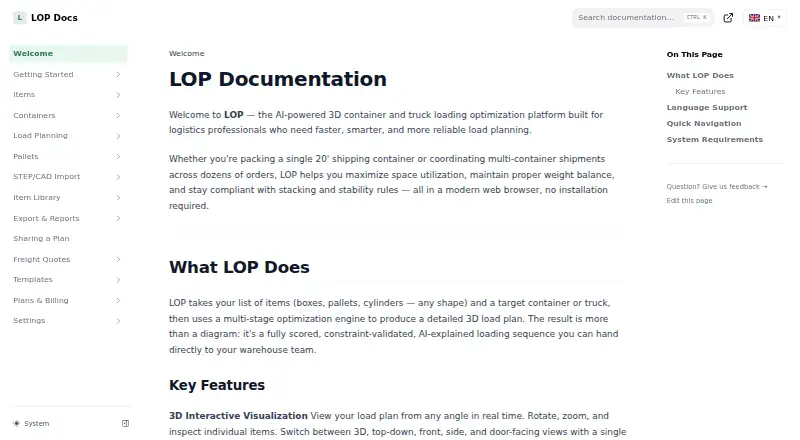
What LOP is
LOP is a load-planning tool for logistics professionals packing cargo into containers or trucks, with a particular focus on machinery and heavy industrial freight. It generates scored 3D plans that account for item rotation, crush strength, fragile goods, hazardous-material separation, weight, and center of gravity. Users can choose Quick Plan, Smart Plan, or Maximum Fill, then inspect and edit a plan in an interactive 3D editor. AI analysis explains the plan’s strategy, constraints, physical risks, and possible improvements. LOP imports Excel and CSV files, SAP IDoc XML, Oracle WMS Cloud CSV, and generic ERP or WMS spreadsheets. Paid plans export PDF reports, Excel workbooks, and CSV packing lists. Business and Enterprise plans add STEP, STL, OBJ, and PLY imports; Business files are limited to 250 MB each. The permanent Free tier is free and allows three plans monthly, with one container and 20 items per plan, one seat, and no exports. LOP’s dashboard and account pages work on phones, but its 3D editor is best suited to desktop or laptop use.
Good
- Plans for containers and trucks.
- Accounts for weight and cargo-handling constraints.
- Interactive 3D viewing and manual editing.
- Imports several spreadsheet and logistics formats.
- Free tier allows three plans monthly.
Watch out
- Free tier limits plans to one container.
- Free tier allows 20 items per plan.
- Free tier has no exports.
- 3D editor is best on desktop or laptop.
Who it suits
LOP suits logistics professionals planning container or truck loads, especially machinery and heavy industrial freight. It may also fit teams that need to import ERP or WMS data and account for handling constraints.
Verdict
LOP combines constrained load planning, 3D editing, and multiple business-data imports. Check the plan limits and export access against your workflow before choosing a tier.
Plans and prices
From LOP's own pricing page, checked 2 Oct 2026.
| Plan | Price | What it gives you |
|---|---|---|
| Free | Free | 3 plans/month · 1 container/plan · 20 items/plan · 1 seat · no exports · Free tier; permanent |
| Business | — | Unlimited plans, items, and containers · Unlimited AI subject to fair use · STEP/CAD imports up to 250 MB/file · Monthly or annual; monthly base fee plus monthly per-seat fee; 1 seat included, up to 25 |
| Enterprise | Priced on request | Custom seats · API · SSO · SLA · on-premise deployment option subject to agreement · Custom quote |
| Professional | — | Unlimited plans · 5 containers/plan · 200 items/plan · 150 AI requests per user/month · STEP/CAD import not included · Monthly base fee plus monthly per-seat fee; 1 seat included, up to 5 |
The facts
Each one read from LOP's own pages, with the date it was checked.
What it does
- AI analysis
- AI analysis explains a solved plan's strategy, constraints, physical risks, and possible improvements.checked 2 Oct 2026
- CAD
- Business and Enterprise support STEP, STL, OBJ, and PLY imports, with a 250 MB per-file limit stated for Business.checked 2 Oct 2026
- Data retention
- Enterprise customers can discuss data-retention requirements, but custom automated erasure is not currently provided.checked 2 Oct 2026
- Exports
- Paid plans can export load plans as PDF reports, Excel workbooks, and CSV packing lists.checked 2 Oct 2026
- Imports
- LOP supports Excel and CSV imports, SAP IDoc XML, Oracle WMS Cloud CSV, and generic ERP/WMS spreadsheets.checked 2 Oct 2026
- Intended users
- LOP describes its audience as logistics professionals and says it is built particularly for machinery and heavy industrial freight planning.checked 2 Oct 2026
- Mobile availability
- LOP says its dashboard, plans, libraries, settings, pricing, and account pages work on phones, while the 3D editor is best used on a desktop or laptop.checked 2 Oct 2026
- Optimization
- Its solver offers Quick Plan, Smart Plan, and Maximum Fill modes and handles item rotation, crush strength, fragile-item, hazardous-material separation, and center-of-gravity constraints.checked 2 Oct 2026
- Product
- LOP creates scored, constraint-validated 3D load plans for cargo packed into containers or trucks.checked 2 Oct 2026
- Security and identity
- The pricing page lists SSO/SAML for Enterprise, and account sign-in supports Google, Microsoft, or email.checked 2 Oct 2026
- Support
- Professional email support responds within two business days, Business priority email within four business hours, and Enterprise has a dedicated support channel under its SLA.checked 2 Oct 2026
- Visualization
- The interactive 3D editor supports real-time viewing from multiple angles and manual editing.checked 2 Oct 2026
The full review of LOP
LOP is a load-planning tool for building scored, constraint-validated 3D cargo plans for containers and trucks. It is best suited to logistics teams handling machinery or heavy industrial freight. Its combination of detailed constraints, imports and plan analysis is compelling, but the free tier is tightly capped and paid exports start above it.
Overview
LOP plans container and truck loads, with support for delivery sequencing, weight constraints and mixed fleets. The emphasis on crush strength, fragile goods, hazardous-material separation and center of gravity makes it more relevant to complex freight than to simple, casual packing. Its solver can produce a plan; users who need files to circulate or operationalize that plan will need a paid tier.
Key features
Constraint-aware planning
Quick Plan, Smart Plan and Maximum Fill offer different planning modes. The solver accounts for item rotation and physical constraints including crush strength, fragility, hazardous-material separation and center of gravity. That breadth matters when a dense load is not necessarily a safe or compliant one; it is less important for straightforward loads with few restrictions.
3D editing and AI analysis
The interactive editor shows a plan from multiple angles and allows manual changes, giving planners a way to inspect and adjust a generated arrangement. AI analysis explains the plan's strategy, constraints, physical risks and possible improvements. This makes the tool useful not only for generating a layout but also for understanding its tradeoffs.
Business data and CAD imports
LOP accepts Excel and CSV files, SAP IDoc XML, Oracle WMS Cloud CSV and generic ERP/WMS spreadsheets, which can reduce re-entry for teams already working in those formats. STEP, STL, OBJ and PLY imports are reserved for Business and Enterprise; Business sets a 250 MB per-file limit. Professional users who need CAD geometry must look at another tier.
Exports and access
Paid plans can export PDF reports, Excel workbooks and CSV packing lists. The Free plan has no exports, a consequential restriction for anyone who needs to share or use a plan outside the application. Google, Microsoft and email sign-in are supported; SSO/SAML is an Enterprise feature.
Pricing
| Plan | Price and terms | What it includes |
|---|---|---|
| Free | free; permanent | 3 plans/month, 1 container/plan, 20 items/plan, 1 seat; no exports |
| Professional | Custom pricing; monthly base fee plus monthly per-seat fee | 1 seat included, up to 5; unlimited plans, 5 containers/plan, 200 items/plan, 150 AI requests per user/month; no STEP/CAD imports |
| Business | Custom pricing; monthly base fee plus monthly per-seat fee | 1 seat included, up to 25; unlimited plans, items and containers; unlimited AI subject to fair use; STEP/CAD imports up to 250 MB/file |
| Enterprise | Custom quote | Custom seats, API, SSO, SLA and an on-premise deployment option subject to agreement |
Free is a permanent way to try the workflow, but three monthly plans, one container and 20 items per plan make it a poor fit for sustained operations, and the lack of exports limits handoff. Professional suits smaller teams that need higher planning volume but can work within five containers and 200 items per plan; its per-user AI allowance and lack of CAD imports are real ceilings. Business is the better fit for larger or CAD-dependent workloads, though unlimited AI remains subject to fair use. Enterprise is for organizations that need custom seats, API access, SSO, SLA terms or a possible on-premise deployment. There is no free trial.
Platforms
LOP is available on Android, iOS and the web. Its dashboard, plans, libraries, settings, pricing and account pages work on phones, but the 3D editor is best used on a desktop or laptop. Mobile is therefore useful for account and plan access, while detailed editing is better suited to a larger screen.
Who it's for
LOP is a strong candidate for logistics professionals planning machinery or heavy industrial freight, especially where load safety, weight and segregation constraints matter. Teams importing ERP/WMS data can benefit from its range of supported formats. It is less suitable for users who need exports on a free plan, CAD imports on Professional, or a phone-first 3D editing workflow.
Pros and cons
- Pro: The solver handles several meaningful physical and safety constraints, including crush strength and center of gravity, rather than focusing on fill alone.
- Pro: ERP/WMS spreadsheet and XML import options can fit established business data workflows.
- Pro: The 3D editor combines multiple viewing angles with manual editing, and AI analysis explains risks and possible improvements.
- Con: Free is limited to three plans monthly and has no exports, so it cannot support a complete recurring plan-sharing workflow.
- Con: Professional caps each plan at five containers and 200 items and excludes STEP/CAD imports, pushing demanding workloads toward Business.
- Con: The 3D editor is best on desktop or laptop, limiting the practicality of phone-based editing.
Alternatives
For a broader comparison, see Load Planning Software.
- CargoLoader3D is worth considering if its lifetime free plan's seven default spaces, five cargo items, manual placement and detailed reporting match a smaller mobile-supported workflow.
- Goodloading may suit teams looking for a free entry point with a trial and API, Linux, MacOS and web platforms, provided its free tier's exclusions of palletization, oval loads and axle loads are acceptable.
- ALPHA LOADING offers free education licensing for teachers and students, including up to 30 accounts per class.
- LoadingMCP is an option for those who want a browser-based 3D planner and compliance verdict without login or a card on its free plan.
- LoadOptimizer.ai is an alternative with a €39.99 a month Standard plan that includes unlimited AI optimizations but no API access, or a €99.99 a month Pro plan.
- PalletPlan may suit users seeking self-hosted or web access, a free 3D planner with PNG export and one saved plan, or a $7.99 a year Team plan with a three-seat minimum.
- MediaBeacon is another option.
- Stow8 is another web-based option with a free plan.
Verdict
Choose LOP if your team plans complex container or truck loads and needs constraints, data imports and analysis in one workflow. The main reason to choose it is the breadth of physical constraints alongside 3D editing; the main reason to look elsewhere is that exports, CAD access and higher operating limits require a paid tier, while the 3D editor is not phone-first.
Getting started
- Visit https://docs.lop.tools/.
- Choose the web app or use LOP on Android or iOS.
- Sign in with Google, Microsoft, or email.
- Start with the Free tier, which is permanent and includes three plans per month.
- Import a supported spreadsheet or enter load details for planning.
Limits worth knowing
The Free tier allows three plans per month, one container and 20 items per plan, and one seat. It does not include exports. The Professional plan allows five containers and 200 items per plan, with 150 AI requests per user per month; Business lists unlimited plans, items, and containers, with unlimited AI subject to fair use.
Questions
Is LOP free?
Yes. Its permanent Free tier is free.
What does the Free tier include?
It allows three plans per month, one container and 20 items per plan, and one seat. Exports are not included.
Which platforms does LOP support?
LOP is available on Android, iOS, and the web. Its 3D editor is best used on a desktop or laptop.
What files can LOP import?
It supports Excel and CSV, SAP IDoc XML, Oracle WMS Cloud CSV, and generic ERP or WMS spreadsheets. Business and Enterprise also support STEP, STL, OBJ, and PLY.
Can LOP export plans?
Paid plans can export PDF reports, Excel workbooks, and CSV packing lists.
Alternatives to LOP
- 1

Goodloading
Free planWebAPILinuxmacOS7.5From €18 a month - 2
Kubova
Free planWebAPI7.3From $29 a month - 3
Loggy
Free planWebSelf-hosted7.3From zł49 a month - 4
MAXCUBE
Free planWebAPI7.3From $25 a month - 5

EasyCargo
AndroidiOSWeb6.8From $799 a year - 6
PalletPlan
Free planWebSelf-hosted6.7From $7.99 a year