Look Digital Signage
Look Digital Signage is a platform for managing digital screens through a central CMS, whether an organization has one screen or thousands.
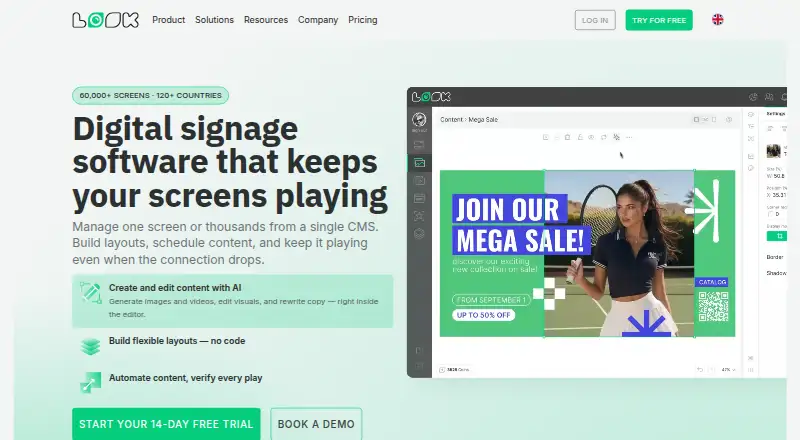
What Look Digital Signage is
Look Digital Signage is a platform for managing digital screens through a central CMS, whether an organization has one screen or thousands. Teams can create multi-zone layouts, schedule content by time, date, day, or location, and keep playback going during connection interruptions. It handles images, video, audio, websites, text, QR codes, video streams, and HTML ZIP archives. Its Content Creator provides AI image and video generation, visual editing, and copy rewriting. An alert center brings together playback logs, status notices, screenshots, and device health details; analytics cover playback views, uptime, frequency, and location. API and Zapier connections support automation, alongside built-in apps for services such as Instagram, Google Review, weather, and flight schedules. The 14-day trial includes the full feature set but is limited to two screens and shows a Look watermark until upgrading. PRO is listed at $11.70 per screen per month when billed annually, plus VAT. On-premise deployment is available under a non-exclusive license, with pricing by contacting sales.
Good
- Manages one screen or thousands from a central CMS.
- Playback continues when the connection drops.
- AI image and video generation is built into the editor.
- Scheduling and analytics include location metrics.
- Offers API and Zapier connections.
Watch out
- Trial is limited to two connected screens.
- Trial displays a Look watermark until upgrading to PRO.
- PRO price is per screen and excludes VAT.
Who it suits
It suits businesses that need to manage signage across multiple screens, schedule varied content, and monitor playback. Organizations preferring internal-server deployment can consider its on-premise option.
Verdict
Look Digital Signage combines screen management, content creation, scheduling, playback monitoring, and analytics. The trial has screen and watermark limits, while paid PRO pricing is per screen.
Plans and prices
From Look Digital Signage's own pricing page, checked 11 Oct 2026.
| Plan | Price | What it gives you |
|---|---|---|
| PRO | $11.70 a month | Per screen · 10 GB storage · up to 300 screens shown in calculator · Annually; page says save 10% with annual billing and shows $11.7 per screen/mo (+VAT). |
| On-premise | Priced on request | Self-hosted deployment · recurring payments not required · Non-exclusive license; contact sales for details. |
The facts
Each one read from Look Digital Signage's own pages, with the date it was checked.
What it does
- API access
- Yeschecked 20 Sep 2026
- Content creation
- Its Content Creator offers AI image and video generation, visual editing, and copy rewriting inside the editor.checked 11 Oct 2026
- Content types
- images,videos,audio,HTML ZIP archives,websites,video streams,text,QR codeschecked 20 Sep 2026
- Integrations
- Look describes API and Zapier connections for automating content, plus built-in apps including Instagram, Google Review, weather, and flight schedules.checked 11 Oct 2026
- Intended customers
- The company says it helps small and medium-sized businesses create an accessible communication channel with their audiences.checked 11 Oct 2026
- Layouts
- The visual designer supports multi-zone layouts adaptable to different resolutions, and the site also describes video walls and interactive touch experiences.checked 11 Oct 2026
- Offline playback
- Local cached content continues playing when the internet connection is unavailable.checked 11 Oct 2026
- On-premise option
- Look offers an on-premise option under a non-exclusive license for organizations that prefer not to use the cloud service with recurring payments.checked 11 Oct 2026
- Paid from
- 13.5checked 20 Sep 2026
- Playback monitoring
- The alert center provides playback logs with timestamps, status notifications, screenshots, and device health information.checked 11 Oct 2026
- Purpose
- Look lets users manage one screen or thousands from a single CMS, build layouts, schedule content, and keep playback running when the connection drops.checked 11 Oct 2026
- Scheduling and analytics
- Users can schedule playlists by time, day, date, or location and review playback views, uptime, frequency, and location metrics.checked 11 Oct 2026
- Security and deployment
- Look's enterprise page says single sign-on, role-based access, and encrypted cloud data are standard, and offers deployment on internal servers behind a corporate firewall.checked 11 Oct 2026
- Support
- The homepage advertises 24/7 in-app support from real people.checked 11 Oct 2026
- User roles
- advancedchecked 20 Sep 2026
Money
- Free plan
- Nochecked 20 Sep 2026
- Trial limits
- The 14-day free trial is full-featured but limited to two connected screens and displays a Look watermark until upgrading to PRO.checked 11 Oct 2026
The company
- Headquarters
- Wilmington, Delaware, United Stateschecked 28 Sep 2026
Where it runs
- Supported player platforms
- The downloads page lists Android, Windows, Linux, macOS, LG webOS Signage, and Raspberry Pi; the supported systems page also lists Samsung Tizen, Fire OS, Amazon Signage, and Google TV.checked 11 Oct 2026
The full review of Look Digital Signage
Overview
Look Digital Signage is a screen-management platform for organizations that need to create and coordinate displays across one or many locations. It is strongest for operators who value scheduled, monitored playback and a self-hosted deployment option; the per-screen PRO model is less appealing when costs need to stay fixed as a network grows.
Key features
Look combines a visual layout editor with a Content Creator that can generate images and video with AI, edit visuals, and rewrite copy. Multi-zone layouts adapt to different resolutions, and the company also supports video walls and interactive touch experiences. That breadth can help teams build varied screen content without separating creation from management, though a basic single-display playlist may not need all of these tools.
Schedules can be set by time, day, date, or location, and playback can continue offline when a screen loses its connection. The alert center gives operators timestamped playback logs, status notifications, screenshots, and device health information. Playback views, uptime, frequency, and location metrics add a way to review delivery across a network. These controls are useful for keeping dispersed screens accountable, but are more operational depth than a very small deployment may require.
Supported content includes images, video, audio, websites, video streams, text, QR codes, and HTML ZIP archives. API and Zapier connections support automation, while built-in apps include Instagram, Google Review, weather, and flight schedules. Advanced user roles are available. Look's enterprise offering includes single sign-on, role-based access, and encrypted cloud data; organizations can also deploy on internal servers behind a corporate firewall.
Pricing
The 14-day free trial is full-featured, but it is limited to two connected screens and carries a Look watermark until upgrading to PRO. That makes it useful for evaluating the workflow, but not for running a larger pilot or presenting unbranded content over an extended period.
PRO costs $11.70 a month, billed annually, per screen, plus VAT. It includes 10 GB of storage; the pricing calculator shows up to 300 screens. Per-screen billing ties cost directly to deployment size, so it is a straightforward fit for a modest network but can become a significant recurring commitment at scale. Annual billing saves 10% compared with the monthly rate.
The On-premise option uses a non-exclusive license, does not require recurring payments, and has custom pricing. It is aimed at organizations that prefer internal hosting over the cloud service and can discuss terms with sales. Look also has a free plan, but its cap and terms are not established here; the defined trial limits are the clearer basis for evaluating the product at no cost.
Platforms
Look supports Android, Windows, Linux, macOS, LG webOS Signage, Raspberry Pi, Samsung Tizen, Fire OS, Amazon Signage, and Google TV players. Its broader platform coverage also includes iOS, web, API, and self-hosted deployment. This range suits mixed-device estates, while the choice between cloud and internal-server deployment gives organizations another way to fit their infrastructure preferences.
Who it's for
Look is a good match for small and medium-sized businesses coordinating audience-facing screens, particularly when displays need location-aware schedules, outage-tolerant playback, and active health monitoring. It also suits larger organizations seeking internal deployment or enterprise access controls. A single-screen user wanting the lowest-cost ongoing option may find the trial's two-screen cap and PRO's per-screen annual billing less attractive.
Pros and cons
- Pros: Offline playback and scheduling by time, date, day, or location help maintain consistent delivery across sites.
- Pros: Playback logs, screenshots, alerts, device health, and performance metrics give operators practical oversight of screen networks.
- Pros: Broad player support and an on-premise option accommodate varied hardware and organizations that avoid cloud hosting.
- Cons: The 14-day trial allows only two connected screens and shows a watermark, limiting larger or polished evaluations.
- Cons: PRO is priced per screen and billed annually, so costs rise with deployment size rather than staying fixed.
Alternatives
For a screen network with a free tier, consider OptiSigns, whose Free plan supports up to 3 supported screen types, 25 basic apps, and 1 GB storage. EasySignage is another free option if one screen, 200 MB storage, and unlimited monthly bandwidth are sufficient.
Yodeck offers a free single-screen plan with essentials and unlimited file storage, making it worth considering for a one-screen setup. Fugo may suit readers prioritizing design tools: its Essential plan costs $24 a month and includes a content design studio, customizable templates, and more than 40 free options.
Layarva has a free plan for one screen with 1 GB media storage and one offline screen. Viewix offers a free tier with one screen, one user, and 5 GB storage. Xibo is an alternative with a 14-day free trial of its Professional plan, cloud-hosted CMS, and two players.
NEXON Vision is another option for readers comparing digital signage platforms. For a broader shortlist, see Digital Signage Software.
Verdict
Choose Look Digital Signage if you need one system for content creation, location-aware scheduling, offline playback, and monitoring across a screen network, especially if internal deployment matters. Its strongest case is operational control across varied devices; look elsewhere if the trial's screen and watermark limits or annual per-screen PRO cost do not fit your evaluation or budget.
Alternatives to Look Digital Signage
- 1

OptiSigns
Free planAndroidiOSWebAPI8.8From $9 a month - 2
Viewix
Free planAndroidiOSWebAPI8.6From $49 a month - 3

EasySignage
Free planAndroidWebAPILinux8.4From $7 a month - 4

Yodeck
Free planAndroidWebAPI8.3From $8 a month - 5

ScreenCloud
AndroidiOSWebAPI8.2From $20 a month - 6
Layarva
Free planAndroidWebAPILinux8.0From $1 a month