
Fugo
Fugo is cloud-based digital signage software for managing screen content, schedules and screen status from a central platform.
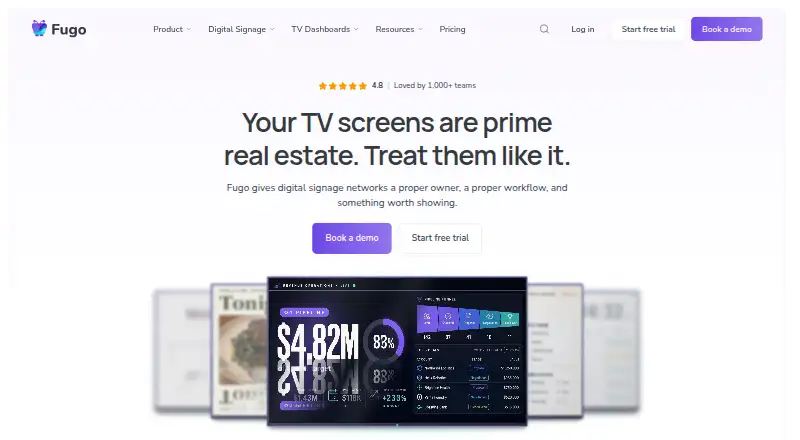
What Fugo is
Fugo is cloud-based digital signage software for managing screen content, schedules and screen status from a central platform. Teams can upload media, create playlists, schedule content, target screens, publish in bulk and mirror screens wirelessly. Supported content includes images, videos, PDFs, documents, web pages, dashboards, social and RSS feeds, news, weather and presentations. Fugo displays screen connection status and playback, and can alert users when screens go offline or need attention. The company lists 47 apps and integrations, including Power BI, Looker, Grafana, Tableau, Google Drive, Sheets and Slides. Most integrations are included in a plan, but some premium apps may cost extra, and connected third-party services need their own subscriptions. Fugo offers a free plan and a 14-day trial with Core features and no credit card requirement. Listed plans include Essential at $24 a month, Core at $36 a month and Enterprise at $40 a month billed annually. The browser player must remain open, awake and in the foreground, so it is not recommended as the main player for permanent everyday signage.
Good
- Supports bulk publishing and screen targeting
- Shows screen status and playback
- Can alert users when screens go offline
- 14-day trial includes Core features without a credit card
- Offers offline playback
Watch out
- Browser player must stay open and awake
- Browser player is not recommended for permanent everyday signage
- Some premium apps may charge separately
Who it suits
Fugo may suit small and midsize teams displaying content in storefronts, lobbies, waiting areas and other customer-facing spaces. Teams that need screen monitoring, scheduled publishing or dashboard integrations may find its tools relevant.
Verdict
Fugo brings content scheduling, screen targeting and status monitoring into a central platform. Its browser player has operational limits, and some integrations may carry separate charges.
Plans and prices
From Fugo's own pricing page, checked 4 Oct 2026.
| Plan | Price | What it gives you |
|---|---|---|
| Essential | $240 a year | 40+ free apps · web links · touch-enabled content · advanced scheduling · live playback preview on supported platforms · $240.00 per year (= $20.00/month, billed annually) |
| Core | $360 a year | Everything in Essential · premium apps · Power BI and Looker integrations · TV dashboards with hourly refresh · screen mirroring · embeddable channels · $360.00 per year (= $30.00/month, billed annually) |
| Enterprise | $480 a year | Everything in Core · on-premise dashboards · local app casting · Fugo API key · player variables · SSO · custom development · $480.00 per year (= $40.00/month, billed annually) |
The facts
Each one read from Fugo's own pages, with the date it was checked.
What it does
- API access
- Yeschecked 21 Sep 2026
- Audience
- Fugo describes Essential as suited to small and midsize teams using screens in storefronts, lobbies, waiting areas, and other customer-facing spaces.checked 4 Oct 2026
- Content tools
- The platform supports media uploads, playlists, scheduling, screen targeting, bulk publishing, and wireless screen mirroring.checked 4 Oct 2026
- Content types
- images,videos,PDFs,documents,web pages,dashboards,social feeds,RSS feeds,news,weather,presentationschecked 21 Sep 2026
- Deployment
- The Fugo Player is available for Windows, macOS, Linux, Android, and ChromeOS, as well as supported signage platforms and browser options.checked 4 Oct 2026
- Enterprise features
- Enterprise adds on-premise dashboards, local app casting, an API key, player variables, event notification emails, and SSO options.checked 4 Oct 2026
- Integration charges
- Most integrations are included in a Fugo plan, while some premium apps may charge separately and connected third-party tools require their own subscriptions.checked 4 Oct 2026
- Integrations
- Fugo states it has 47 apps and integrations, including Power BI, Looker, Grafana, Tableau, Google Drive, Sheets, and Slides.checked 4 Oct 2026
- Monitoring
- Fugo shows screen online status and playback, and can alert users when screens go offline or need attention.checked 4 Oct 2026
- Offline playback
- Yeschecked 21 Sep 2026
- Paid from
- 20checked 21 Sep 2026
- Product
- Fugo is cloud-based digital signage software for managing screen content, schedules, and screen health from a centralized platform.checked 4 Oct 2026
- Security
- Fugo says it is SOC 2 Type II compliant and that Power BI credentials are encrypted in Fugo and never stored on the TV.checked 4 Oct 2026
- Support
- Fugo offers help center articles and videos and chat-box support, with priority support listed in its plan comparison.checked 4 Oct 2026
- User roles
- customchecked 21 Sep 2026
Where it runs
- Browser player limit
- Fugo says its browser player depends on the browser remaining open, awake, and in the foreground, so it is not recommended as the primary player for permanent everyday signage.checked 4 Oct 2026
The company
- Company
- Fugo Ltd is registered in England and Wales and gives its registered office as Scott House, Suite 1, The Concourse, Waterloo Station, London, SE1 7LY, United Kingdom.checked 4 Oct 2026
- Headquarters
- London, United Kingdomchecked 28 Sep 2026
Money
- Free plan
- Yeschecked 21 Sep 2026
- Trial
- The 14-day free trial includes full access to Core plan features and does not require a credit card.checked 4 Oct 2026
The full review of Fugo
Fugo is cloud-based digital signage software for teams managing content across one or more screens. It is best suited to small and midsize organizations that need scheduled, targeted publishing and a way to monitor screen status. Its central management and broad content support are useful, but browser playback is not a sound choice for permanent everyday signage.
Overview
Fugo combines content publishing with screen monitoring in a cloud platform. Teams can upload media, build playlists, schedule and target content, publish to screens in bulk, and mirror screens wirelessly. Status and playback monitoring, with alerts when a screen goes offline or needs attention, gives operators a way to spot issues without checking each display individually. Offline playback can help scheduled content continue when a connection drops.
Supported content ranges from images, videos, PDFs and documents to web pages, dashboards, social and RSS feeds, news, weather and presentations. Fugo says it offers 47 apps and integrations, including Power BI, Looker, Grafana, Tableau, Google Drive, Sheets and Slides. Most integrations are included in a plan, but some premium apps may cost extra, and connected third-party services require their own subscriptions. Fugo says it is SOC 2 Type II compliant; it also says Power BI credentials are encrypted in Fugo and never stored on the TV.
Key features
Publishing and monitoring
Scheduling, screen targeting and bulk publishing suit teams that need different material on different displays without managing each screen one at a time. Wireless mirroring adds a way to show content from another device. Online status and playback views, plus offline or attention alerts, make the monitoring side more than a basic playlist manager.
Players and integrations
The Fugo Player is available for Windows, macOS, Linux, Android and ChromeOS, along with supported signage platforms and browser options. The browser player depends on a browser staying open, awake and in the foreground, so Fugo does not recommend it as the main player for permanent everyday signage. For continuous displays, a supported dedicated player is the more appropriate fit.
The integration range makes Fugo relevant for teams displaying dashboards and cloud-based content, but the headline app count does not mean every connected service is covered by the plan price. Budget for possible premium-app charges and separate subscriptions to third-party tools.
Pricing
Fugo has a free plan, paid plans and a 14-day trial. The trial includes full access to Core features and requires no credit card. The paid plan prices are:
- Essential: $24 a month, billed monthly. It includes a content design studio, customizable templates, 40+ free apps, web links, touch-enabled content and advanced scheduling. It is aimed at the small and midsize teams Fugo associates with storefronts, lobbies, waiting areas and other customer-facing spaces. It gives up Core's premium apps, Power BI and Looker integrations, TV dashboards, and screen mirroring and casting.
- Core: $36 a month, billed monthly. It includes everything in Essential, plus premium apps, Power BI and Looker integration, TV dashboards, and screen mirroring and casting. Choose it when those dashboard and casting capabilities justify the step up from Essential.
- Enterprise: $40 a month, billed annually. It includes everything in Core, plus on-premise dashboards, local app casting, a Fugo API key, player variables and single sign-on. Those additions make it the relevant tier for organizations needing these deployment or administration options. Its annual billing is a material commitment compared with the monthly billing of Essential and Core.
Fugo also lists custom user roles and API access. Priority support appears in its plan comparison; help center articles, videos and chat-box support are also offered. Some premium apps may carry separate charges, and third-party service subscriptions are separate.
Platforms
Fugo lists support for Android, API, extension, iOS, Linux, macOS, web and Windows. Its player availability also includes ChromeOS, supported signage platforms and browser options. The browser caveat matters: it is dependent on an active foreground browser and is not recommended as the primary player for permanent signage.
Who it's for
Fugo fits small and midsize teams running customer-facing screens in storefronts, lobbies and waiting areas, particularly when they need centralized scheduling, varied content and remote screen-status alerts. Core is a stronger fit when dashboard integrations or casting matter; Enterprise makes sense when on-premise dashboards, local casting or single sign-on are requirements. Teams seeking a dependable permanent setup should avoid relying on the browser player, and buyers should account for possible extra integration and third-party subscription costs.
Pros and cons
- Pros: Centralized scheduling, targeting and bulk publishing reduce the burden of managing screens individually.
- Pros: Status and playback monitoring with alerts helps operators identify displays that are offline or need attention.
- Pros: Broad content support and integrations cover common signage material as well as dashboard, document and social feeds.
- Cons: Browser playback requires the browser to remain open, awake and in the foreground, ruling it out as Fugo's recommended primary player for permanent signage.
- Cons: Some premium apps may cost extra, and connected services require their own subscriptions, making total cost depend on the setup.
- Cons: Essential lacks several dashboard, premium-app and casting features included in Core, while Enterprise requires annual billing.
Alternatives
For a broader comparison, see Digital Signage Software.
- OptiSigns is worth considering if a free plan with support for up to three screen types, 25 basic apps and 1GB storage is a better starting point.
- EasySignage may suit a one-screen setup: its always-free plan is limited to one screen and includes 200 MB storage and unlimited monthly bandwidth.
- Yodeck offers a free plan for a single screen with essentials and unlimited file storage.
- Play Digital Signage is another freemium option, with a free screen plan and paid tiers that include templates, scheduling, an editor and media library.
- DigitalSignage.com has a free plan with three screens, 1 GB cloud storage and one account per email, a potential fit for a small deployment.
- PiSignage offers two free player licenses with lifetime subscriptions for two screens, or a new player plan billed annually at 35.00 USD.
- MediaSignage has a free plan with three screens and 1 GB cloud storage.
- NEXON Vision offers a free plan with 1 GB storage and three screens, while its Business plan includes 100 GB storage, unlimited screens and users for €3 a month plus VAT.
Verdict
Fugo is a strong choice for customer-facing signage teams that want scheduling, varied content, integrations and screen-health monitoring in one platform. Choose it when those centralized controls matter more than keeping every integration cost inside the base plan. Look elsewhere if browser playback is your intended permanent setup or if a tightly capped free plan better matches a small screen deployment.
Getting started
- Open the Fugo website
- Choose the free plan or start the 14-day trial
- Select a supported player platform such as Windows, macOS, Linux, Android, or ChromeOS
- Upload media and organize it into playlists
- Schedule content and target screens
- Connect available apps or integrations
- Publish content to connected screens
Limits worth knowing
The browser player depends on the browser staying open, awake, and in the foreground, so it is not recommended as the primary player for permanent everyday signage. Some premium integrations may have separate charges, and connected third-party services require their own subscriptions.
Questions
Is Fugo free?
Yes. Fugo offers a free plan and a 14-day trial with full Core plan features without requiring a credit card.
What does Fugo cost?
Listed plans are Essential at $24 a month billed monthly, Core at $36 a month billed monthly, and Enterprise at $40 a month billed annually.
Which platforms can run Fugo Player?
Fugo Player is available for Windows, macOS, Linux, Android, and ChromeOS, along with supported signage platforms and browser options.
Does Fugo offer integrations?
Yes. Fugo lists 47 apps and integrations, including Power BI, Looker, Grafana, Tableau, Google Drive, Sheets, and Slides.
Does Fugo have an API?
Yes. Fugo provides API access; Enterprise adds a Fugo API key.
Who makes Fugo?
Fugo makes the product and is headquartered in London, United Kingdom.
Alternatives to Fugo
- 1

OptiSigns
Free planAndroidiOSWebAPI8.8From $9 a month - 2
Viewix
Free planAndroidiOSWebAPI8.6From $49 a month - 3

EasySignage
Free planAndroidWebAPILinux8.4From $7 a month - 4

Yodeck
Free planAndroidWebAPI8.3From $8 a month - 5

ScreenCloud
AndroidiOSWebAPI8.2From $20 a month - 6
Layarva
Free planAndroidWebAPILinux8.0From $1 a month