
LightSpeedRead
LightSpeedRead is a speed-reading tool that displays words or small groups of words one after another at a fixed screen position, using Rapid Serial Visual P…
What LightSpeedRead is
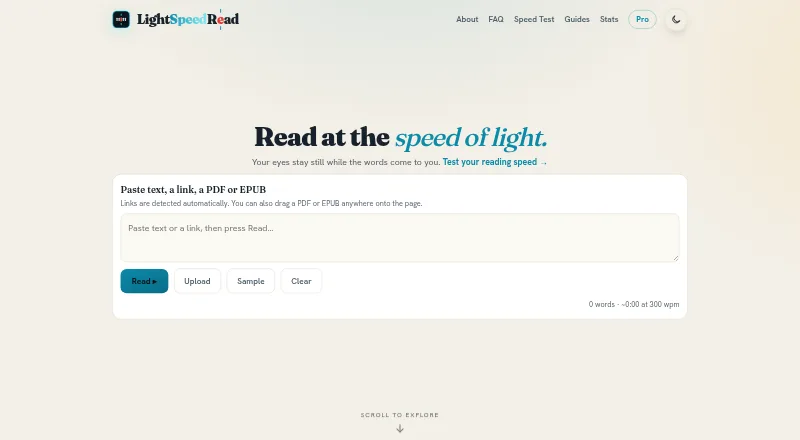
LightSpeedRead is a speed-reading tool that displays words or small groups of words one after another at a fixed screen position, using Rapid Serial Visual Presentation (RSVP). Its web reader accepts pasted text, links, PDFs, and EPUBs. Controls include reading speed, pauses for long words and punctuation, gradual ramp-up, themes, fonts, emphasis, and word size. It marks a word’s optimal recognition point with a red letter aligned to a center line. Submitting an article URL sends it to r.jina.ai to fetch and extract the text; pages behind logins or paywalls may not extract cleanly. Pasted or uploaded text is processed in the browser, and the Chrome extension reads page text only when invoked. The free option includes the website reader and Chrome extension reading up to 600 wpm. Pro costs $2.99 a month or $19 a year and includes an advertised ceiling of 1000 wpm, chunk reading, read-aloud voice, reading stats, and optional cloud sync. The iOS app is marked “Coming soon.” The maker warns that RSVP at high speeds can reduce comprehension and suggests slowing down or rereading dense or important material normally.
Good
- Accepts text, links, PDFs, and EPUBs.
- Offers adjustable speed, pauses, themes, and fonts.
- Processes pasted and uploaded text in the browser.
- Free extension reading is available up to 600 wpm.
Watch out
- Article links may not extract cleanly behind logins or paywalls.
- RSVP at high speeds can reduce comprehension.
- The iOS app is marked “Coming soon.”
- Pro costs $2.99 a month or $19 a year.
Who it suits
LightSpeedRead suits readers who want to pace text through RSVP and adjust speed, pauses, and display settings. It is also relevant to people who read pasted material or web pages in a browser.
Verdict
LightSpeedRead offers RSVP controls for browser-based reading, with a free option and additional Pro features. Its own guidance cautions against using high speeds for dense or important material without slowing down or rereading normally.
Plans and prices
From LightSpeedRead's own pricing page, checked 15 Oct 2026.
| Plan | Price | What it gives you |
|---|---|---|
| Free | Free | Website reader, speed test, calculator and guides · Chrome extension up to 600 wpm · no account or ads |
| Pro monthly | $2.99 a month | Up to 1000 wpm · chunk reading · read-aloud voice · light and sepia themes · serif font and word-size controls · speed ramp · smart pause presets · reading stats · cloud sync · per month; cancel anytime |
| Pro yearly | $19 a year | Up to 1000 wpm · chunk reading · read-aloud voice · light and sepia themes · serif font and word-size controls · speed ramp · smart pause presets · reading stats · cloud sync · per year; cancel anytime |
The facts
Each one read from LightSpeedRead's own pages, with the date it was checked.
What it does
- Article extraction
- Pasting a URL sends that address to r.jina.ai for article extraction, and login-protected or paywalled pages may fail to extract cleanly.checked 15 Oct 2026
- Article links
- Pasting a URL sends it to r.jina.ai to fetch and extract article text; pages behind logins or paywalls may not extract cleanly.checked 29 Sep 2026
- Chrome extension behavior
- The extension reads page text only when invoked through selection, context menu, toolbar button or keyboard shortcut and does not run in the background.checked 15 Oct 2026
- Chunk reading
- The product can display several words at once, with Pro specifying two to three words per chunk.checked 15 Oct 2026
- Comprehension limit
- The maker says RSVP can reduce comprehension at high speeds and recommends slowing down or rereading dense or important material normally.checked 29 Sep 2026
- Comprehension trade-off
- The maker says comprehension tends to decline as RSVP speed rises and recommends slowing down or rereading dense or important material normally.checked 15 Oct 2026
- Data handling
- The maker says it does not sell or share personal information and does not use advertising networks or third-party trackers.checked 29 Sep 2026
- Data practices
- The privacy policy says LightSpeedRead does not sell or share personal information, use advertising networks or build behavioral profiles.checked 15 Oct 2026
- Extension availability
- The site marks its Chrome extension as available and says it can read selected text or a whole article from a web page.checked 29 Sep 2026
- Extension privacy
- The Chrome extension reads page text only when invoked and processes it on the device; it does not run in the background on browsed pages.checked 29 Sep 2026
- Independent ranking
- iTechGuides places LightSpeedRead at number 5 of 27 speed-reading apps.checked 15 Oct 2026
- Input formats
- The web reader accepts pasted text, URLs, PDF files and EPUB files.checked 15 Oct 2026
- Keyboard controls
- Playback supports space for play or pause, arrow keys for stepping and speed, F for fullscreen and Esc to exit fullscreen.checked 15 Oct 2026
- Limit: guided training
- iTechGuides lists guided training as not included.checked 15 Oct 2026
- Limit: paid features
- iTechGuides reports that chunk reading, read-aloud and statistics require Pro.checked 15 Oct 2026
- Limit: URL access
- Pages behind logins, paywalls or automated-reading blocks may not be extracted successfully from a URL.checked 15 Oct 2026
- Local processing
- Pasted and uploaded reading content is processed in the browser and is not sent to LightSpeedRead.checked 15 Oct 2026
- Mobile availability
- The website adapts to small screens and runs in a mobile browser; the iOS app for iPhone and iPad is marked “Coming soon.”checked 29 Sep 2026
Where it runs
- Browser privacy
- Pasted or uploaded text is processed locally in the browser and is not sent to LightSpeedRead.checked 29 Sep 2026
- iOS availability
- The homepage describes an iPhone and iPad app as coming soon.checked 15 Oct 2026
The company
- Company headquarters
- The privacy policy identifies the data controller as Silver Directive LLC in Miami, Florida, United States.checked 15 Oct 2026
- Headquarters
- Miami, Florida, United Stateschecked 28 Sep 2026
- Maker legal name
- The privacy policy identifies Silver Directive LLC as the company operating the LightSpeedRead brand.checked 15 Oct 2026
Money
- Limit: free speed ceiling
- iTechGuides reports that free Chrome extension reading stops at 600 words per minute.checked 15 Oct 2026
The full review of LightSpeedRead
Overview
LightSpeedRead is an RSVP reader that displays words or short groups in sequence at a fixed point on screen. It suits readers who want adjustable pacing for their own articles and documents. Its free entry point is useful, but the speed-first format is a poor fit when careful comprehension is the priority.
Key features
The web reader accepts pasted text, article links, PDFs and EPUBs, while the Chrome extension can read selected text or a whole web article. A link is sent to r.jina.ai for extraction, so login-protected and paywalled pages may not come through cleanly. That makes document uploads and accessible pages more dependable sources than restricted articles.
Words stay in a fixed position rather than requiring the eye to scan across lines. A red letter marks the optimal recognition point and aligns it to a center line. Adjustable speed, pauses for long words and punctuation, gradual ramp-up, themes, fonts, emphasis and word-size controls let readers tailor the presentation. Pro adds chunk reading and a read-aloud voice; the free web reader also includes a speed test, calculator and guides, alongside comprehension exercises. These tools support experimentation, but there is no guided training.
The maker cautions that comprehension may fall at high speeds and recommends slowing down or rereading dense or important material normally. The ability to adjust pacing is useful, but RSVP should not replace conventional reading when nuance or accuracy matters.
Pasted and uploaded text is processed locally in the browser. The Chrome extension reads page text only when invoked and processes it on-device, rather than running in the background. The maker says it does not sell or share personal information or use advertising networks or third-party trackers. Pro users may opt to sync history and settings across devices; those records are stored in Supabase. Extension payments go through ExtensionPay and Stripe, while iOS subscriptions go through Apple; the maker says it does not store card details.
Pricing
The free plan costs nothing and includes the website reader, speed test, calculator and guides without an account or ads. Chrome extension reading is capped at 600 wpm, so this tier is a sensible starting point for occasional use, but not for readers who want the extension above that ceiling.
Pro monthly costs $2.99 a month, billed per month. Pro yearly costs $19 a year, billed per year. Both raise the speed limit to 1000 wpm and add chunk reading, read-aloud voice, themes and font controls, speed ramp, pause presets, reading stats and cloud sync. Either can be cancelled anytime. Monthly suits readers who prefer a shorter billing commitment; yearly costs less over a full year for readers ready to commit. The free plan gives up these Pro features and the higher speed ceiling.
Platforms
LightSpeedRead runs on the web and as a Chrome extension. The website adapts to small screens and works in a mobile browser; its iPhone and iPad app is marked “Coming soon,” so it is not yet an iOS app option.
Who it's for
Choose LightSpeedRead if you want an adjustable RSVP reader for web material and personal PDFs or EPUBs, especially if you value local processing of pasted and uploaded text. It is less suited to readers seeking a structured training program, or to anyone who needs high-confidence comprehension of demanding material at speed.
Pros and cons
- Pros: The free web reader includes useful supporting tools without requiring an account or showing ads, making it easy to try before paying.
- Pros: The extension can read selected text or a whole page, while its on-device processing occurs only when invoked.
- Pros: Pro combines a 1000 wpm ceiling with extensive pace and display controls, plus optional cross-device sync.
- Cons: Free extension reading stops at 600 wpm, limiting the free tier for faster readers.
- Cons: URL extraction may fail on login-protected or paywalled pages, adding friction for restricted sources.
- Cons: High-speed RSVP can reduce comprehension, and there is no guided training to build reading skills systematically.
Alternatives
Speed Reading Apps is the broader category directory for comparing options.
Pick Reading Trainer if you want a curriculum-based starting point across Android, iOS, web or Windows; its free plan includes the first curriculum unit and a couple of exercises, with a free trial also offered.
Ledor is a free, no-account, ad-free alternative with all features included, available on Android, iOS, Linux and web.
Consider Outread if its extension, iOS and macOS availability better suits your devices; its free tier has basic features and Outread+ unlocks all features for $4.99 a month.
Superead is another freemium choice for Android, iOS and web, with limited features on its free plan.
Dogear is a free iOS and macOS option with no ads, subscription or account.
Flash-Read is worth considering if you want a web reader whose free guest tier allows three stories; its Starter plan costs $4.49 a month.
LumaRead offers web reading with a free allowance of 1,500 words per day, one book in its library and speeds up to 600 wpm; its Monthly plan costs $3.99 a month.
Reedy is a free Android and extension option supported by ads and in-app purchases.
Verdict
LightSpeedRead is a good choice for readers who want to bring their own text to a flexible RSVP reader, with a genuinely usable free web tier and a clear upgrade path. Its best reason to choose it is the combination of adjustable pacing, broad document input and a 1000 wpm Pro ceiling. Look elsewhere if you need guided instruction, dependable extraction of restricted pages, or a format suited to close reading rather than speed.
Getting started
- Open the LightSpeedRead website reader
- Paste text, a link, PDF or EPUB into the reader
- Install the available Chrome extension for page reading
- Invoke the extension on selected text or a whole article
- Choose the free plan or Pro monthly or yearly subscription
- Sign in to Pro if you want optional history and settings sync
Limits worth knowing
The free plan limits Chrome extension reading to 600 words per minute. Pro raises the advertised ceiling to 1000 wpm and adds chunk reading, read-aloud voice, expanded controls, statistics and cloud sync.
Questions
Is there a free plan?
Yes. The Free plan costs nothing and includes the website reader, speed test, calculator, guides and Chrome extension reading up to 600 wpm. It does not require an account and has no ads.
What does Pro cost?
Pro monthly costs $2.99 a month. Pro yearly costs $19 a year, with both plans billed on their stated terms and cancellable anytime.
Which platforms are supported?
LightSpeedRead supports the web, a Chrome extension and iOS. The website runs in a mobile browser, while the iOS app is marked Coming soon.
Is my reading text sent to LightSpeedRead?
Pasted or uploaded text is processed locally in the browser. The extension processes page text on the device when invoked; optional synced records are stored in Supabase for Pro users who enable sync.
Can it read article links?
Yes. Submitting a URL sends it to r.jina.ai to fetch and extract article text, though login- or paywall-protected pages may not extract cleanly.
Alternatives to LightSpeedRead
- 1
Superead
Free planAndroidiOSWebmacOS8.0From $59.99 a year - 2
Ledor
Free planOpen sourceAndroidiOSWebLinux7.7Free plan - 3

FastReadi
Free planiOS7.3From $3.33 a month - 4
Reading Trainer
Free planAndroidiOSWebWindows7.2Free plan - 5
SpeedyRead
Free planiOS7.2From $1.99 a month - 6

Outread
Free planiOSExtensionmacOS6.9From $29.99 a year