Dogear
Dogear is a speed-reading trainer that measures comprehension after each passage.
What Dogear is
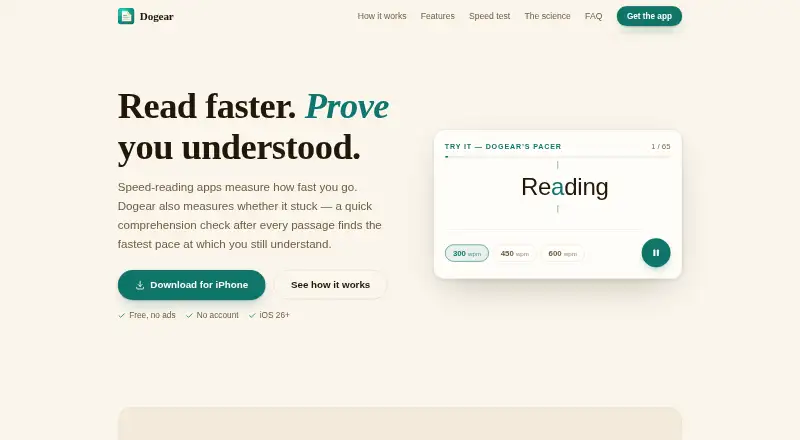
Dogear is a speed-reading trainer that measures comprehension after each passage. It offers word-by-word RSVP reading and guided highlighting over normal text, with adjustable speeds from 100 to 900 words per minute. Its comprehension-safe speed is the fastest pace at which the reader reaches at least 80% comprehension. Readers can paste articles, notes or book excerpts from the clipboard, and Dogear saves their place. Progress tracking includes a daily-goal ring, a seven-day streak strip and charts combining pace and comprehension. Controls include a countdown, scrubber, rewind, one-to-three-word chunks, haptics, font and text-size choices, bold word starts, pause-at-punctuation and pivot guides. On supported iPhones, Apple's on-device foundation model can generate passages and quizzes. Without Apple Intelligence, Dogear uses built-in passages and quizzes and does not transmit user text. Dogear says it collects no personal data, requires no account and has no third-party advertising or analytics SDKs. It works fully offline without its launch-time settings-file download. The App Store listing requires iOS 26 or later and lists iPadOS 26, macOS 26 on Apple silicon and visionOS 26 compatibility.
Good
- Offers RSVP and guided-highlighting modes.
- Tracks pace alongside comprehension.
- Accepts pasted reading material and saves place.
- Works fully offline.
- No account or personal-data collection, according to Dogear.
Watch out
- App Store listing requires iOS 26 or later.
- Apple model passage generation is limited to supported iPhones.
- No third-party advertising or analytics SDKs; no listed weakness beyond compatibility.
Who it suits
Dogear suits readers who want structured speed-reading practice with comprehension measures and progress tracking. It is aimed at compatible Apple devices, with iOS 26 or later required by the App Store listing.
Verdict
Dogear combines adjustable reading practice with comprehension scoring and progress tools. Check the listed Apple OS requirements for your device before choosing it.
Plans and prices
From Dogear's own pricing page, checked 1 Oct 2026.
| Plan | Price | What it gives you |
|---|---|---|
| Free | Free | no ads · no subscription · no account · Free |
The facts
Each one read from Dogear's own pages, with the date it was checked.
What it does
- Compatibility
- The App Store listing requires iOS 26 or later and also lists iPadOS 26, macOS 26 on Apple silicon, and visionOS 26 compatibility.checked 1 Oct 2026
- Comprehension metric
- Its comprehension-safe speed is the fastest pace at which the reader scores at least 80% comprehension.checked 1 Oct 2026
- Fallback content
- On devices without Apple Intelligence, Dogear uses built-in passages with comprehension quizzes and does not transmit user text.checked 1 Oct 2026
- Offline operation
- The app works fully offline without its launch-time settings-file download.checked 1 Oct 2026
- Privacy
- Dogear says it collects no personal data, requires no account, and has no third-party advertising or analytics SDKs.checked 1 Oct 2026
- Progress tracking
- The app includes a daily-goal ring, a 7-day streak strip, and trend charts combining pace and comprehension.checked 1 Oct 2026
- Purpose
- Dogear is a speed-reading trainer that measures comprehension after each passage.checked 1 Oct 2026
- Reading controls
- Controls include a 3-2-1 countdown, scrubber, rewind, 1–3 word chunks, haptics, font choices, text-size adjustment, bold word starts, pause-at-punctuation, and pivot guides.checked 1 Oct 2026
- Reading modes
- It offers word-by-word RSVP reading and guided highlighting across normal text.checked 1 Oct 2026
- Reading speed
- Reading speed is adjustable from 100 to 900 words per minute.checked 1 Oct 2026
- Support
- Support is available by email at [email protected], with iPhone model and iOS version requested for problem reports.checked 1 Oct 2026
- Text input
- Users can paste articles, notes, or book excerpts from the clipboard, and Dogear saves their place.checked 1 Oct 2026
Where it runs
- On-device AI
- Apple’s on-device foundation model generates passages and quizzes on supported iPhones.checked 1 Oct 2026
The full review of Dogear
Dogear is a speed-reading trainer for Apple users who want retention measured alongside pace. It fits readers prepared to practise regularly with their own material or structured exercises, and its free, account-free approach removes both subscription and sign-up friction. The iOS 26 requirement is the key compatibility check before choosing it.
Overview
Dogear pairs two training styles: word-by-word RSVP, which presents one word at a time, and guided highlighting that advances through conventional text. Speeds range from 100 to 900 words per minute, but its most useful measure is comprehension-safe speed—the fastest setting at which a reader still achieves at least 80% comprehension on the follow-up questions. That threshold discourages chasing a large words-per-minute figure when understanding has already fallen away.
Clipboard import supports articles, notes and book excerpts, while saved position makes longer reading practical across sessions. A daily-goal ring, seven-day streak strip and trend charts combining pace with comprehension turn isolated drills into an ongoing record. Readers who want a simple speed counter will find this more structured than necessary; learners trying to improve without sacrificing recall get a clearer feedback loop.
Key features
Deliberate pacing controls
A 3-2-1 countdown, scrubber and rewind help start or revisit a passage cleanly. One-, two- and three-word chunks, pause-at-punctuation and adjustable speed let users moderate the visual rhythm instead of accepting a single presentation style. Haptics, font choices, text-size adjustment, bold word starts and pivot guides address readability and focus preferences. This breadth is useful for methodical practice, although tuning many controls may be less appealing to someone seeking an instant, hands-off reader.
Exercises and progress
Comprehension questions follow each passage, making the safe-speed score actionable rather than merely descriptive. The goal ring and streak strip encourage regular sessions, while pace-versus-comprehension trends reveal whether faster reading is holding up. The app therefore suits readers who value measurable training more than a general-purpose document reader.
On-device generation and privacy
On supported iPhones, Apple’s on-device foundation model creates passages and quizzes. Devices without Apple Intelligence fall back to built-in passages with comprehension quizzes, and user text is not transmitted. Dogear requires no account, says it collects no personal data, and includes neither third-party advertising nor analytics SDKs. It also works fully offline without a launch-time settings download, a meaningful advantage for private or disconnected practice.
Pricing
Dogear has one plan: Free, at free, billed Free. It includes no ads, no subscription and no account requirement. There is no free trial because the product is already free. Readers who want the complete feature set without recurring charges get a straightforward choice, while those expecting premium tiers, expanded quotas or paid support options will not find a graduated plan structure.
Platforms
Dogear supports iOS and macOS, with the App Store listing requiring iOS 26 or later and also naming iPadOS 26, macOS 26 on Apple silicon and visionOS 26 compatibility. The published supported-platform entry specifically identifies iOS, so Apple users should confirm the exact operating system and device combination before installing. It is not positioned as a cross-platform option for Android, Windows or web readers.
Who it's for
Choose Dogear if you use Apple devices, want to import your own reading, and need comprehension to constrain speed practice. It is particularly well suited to students, professionals and habitual readers who will use the goals, streaks and trend charts over time. Privacy-conscious users also benefit from account-free, offline operation and on-device generation. Look elsewhere if your devices do not meet the Apple OS requirements, if you need Android or browser access, or if you want a broad e-book service rather than a training tool.
Pros and cons
- Pro: Comprehension-safe speed ties progress to an 80% understanding threshold, not speed alone.
- Pro: RSVP and guided highlighting, with 100–900 words-per-minute adjustment, support different training preferences.
- Pro: Clipboard imports and saved position make personal articles, notes and excerpts usable for repeat practice.
- Pro: No account, ads, personal-data collection or third-party analytics, plus full offline operation, reduces privacy and connectivity concerns.
- Con: iOS 26 or later and the Apple ecosystem exclude older hardware and non-Apple users.
- Con: The extensive pacing and display controls may feel over-configurable for readers wanting a minimal reading interface.
Alternatives
Browse the Speed Reading Apps list when you want to compare a wider field. Reading Trainer is a better fit for Android, web or Windows coverage and offers a freemium curriculum with a free first unit and some exercises. Pick Ledor if you need Android, Linux or web support with all features free, no ads and no account.
LightSpeedRead suits browser users who want a free website reader and Chrome extension, with paid Pro features at $2.99 a month. Outread is the alternative for extension, iOS and macOS users who want a basic free tier and an Outread+ option at $4.99 a month. Superead is aimed at readers seeking Android, iOS and web access alongside a broader e-book and article offering.
Flash-Read is a web choice with three free guest stories and a 4.49 USD monthly Starter plan for unlimited stories and text uploads. LumaRead fits web readers who can work within a 1,500-word daily free limit or prefer its 3.99 USD monthly unlimited plan. Reedy is an Android or extension alternative with a no-cost, ad-supported freemium model.
Verdict
Dogear is the right choice for Apple users who want a private, free practice tool that proves whether faster reading remains comprehensible. Its 80% safe-speed metric, imported text, detailed controls and progress views give disciplined learners a stronger training framework than a basic speed display. Choose another app when cross-platform access, a larger content library or compatibility below Apple’s current OS requirements matters more than that focused measurement.
Alternatives to Dogear
- 1
Superead
Free planAndroidiOSWebmacOS8.0From $59.99 a year - 2
Ledor
Free planOpen sourceAndroidiOSWebLinux7.7Free plan - 3
LightSpeedRead
Free planiOSWebExtension7.5From $19 a year - 4

FastReadi
Free planiOS7.3From $3.33 a month - 5
Reading Trainer
Free planAndroidiOSWebWindows7.2Free plan - 6
SpeedyRead
Free planiOS7.2From $1.99 a month