Light Brush
Light Brush is a free digital painting application for Windows, macOS, Linux, Android, and the web.
What Light Brush is
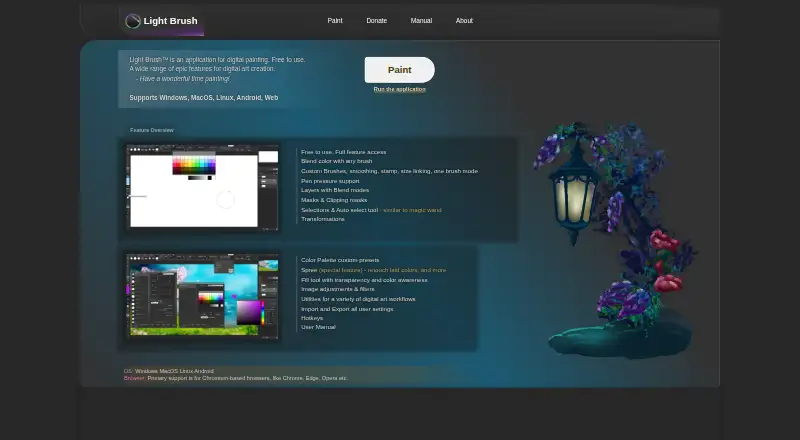
Light Brush is a free digital painting application for Windows, macOS, Linux, Android, and the web. Its brush tools include customization, smoothing, stamps, size linking, and color blending with any brush. It supports pen pressure, though behavior depends on browser, brush settings, and operating system, and may not work on Windows 7 or earlier. Artwork tools include layers with blend modes, layer masks, and clipping masks. Users can select areas with area, lasso, or automatic pixel selection tools, then transform content or selections. Spree allows retouching newly drawn or erased content before it is committed to a layer. The manual lists PNG, JPG/JPEG, GIF, BMP, WebP, WebM, and SVG for opening and importing images; image saving supports PNG and JPG, while LBC is available for projects. Settings and presets are stored in the browser cache and can be moved with import and export features. The privacy policy says the service may collect contact details and usage data, including IP address, browser details, visited pages, and visit duration.
Good
- Free with full feature access.
- Includes layers, blend modes, and masks.
- Offers custom brushes and stroke smoothing.
- Opens and imports a range of image formats.
Watch out
- Pen pressure may not work on Windows 7 or earlier.
- Settings and presets are stored in browser cache.
- Privacy policy says usage data may be collected.
- Image saving supports PNG and JPG.
Who it suits
Light Brush suits digital painters seeking brush customization, layer tools, and selection or transformation features across desktop, Android, and web platforms. Pen-pressure behavior may vary by setup.
Verdict
Light Brush combines painting, layer, selection, and retouching tools across several platforms. Check pressure behavior, file-format needs, and browser-cache settings before choosing it.
Plans and prices
From Light Brush's own pricing page, checked 8 Oct 2026.
| Plan | Price | What it gives you |
|---|---|---|
| Light Brush | Free | Free to use · full feature access |
The facts
Each one read from Light Brush's own pages, with the date it was checked.
What it does
- Brushes
- It supports custom brushes, smoothing, stamps, size linking, and color blending with any brush.checked 8 Oct 2026
- Files
- The manual lists PNG, JPG/JPEG, GIF, BMP, WebP, WebM, and SVG as supported image opening and import formats; saving as an image supports PNG and JPG, with LBC available for projects.checked 8 Oct 2026
- Layers and masks
- The app supports layers with blend modes, layer masks, and clipping masks.checked 8 Oct 2026
- Pressure
- The maker lists pen pressure support; its manual says pressure behavior depends on browser, brush settings, and operating system, and may not work on Windows 7 or earlier.checked 8 Oct 2026
- Privacy
- The privacy policy says the service may collect contact details and usage data, including IP address, browser details, visited pages, and visit duration.checked 8 Oct 2026
- Purpose
- Light Brush is an application for digital painting.checked 8 Oct 2026
- Security
- The privacy policy says the maker uses commercially acceptable means to protect personal data but cannot guarantee absolute security.checked 8 Oct 2026
- Selection and transforms
- It offers area, lasso, and automatic pixel selection tools, plus transformations for content and selections.checked 8 Oct 2026
- Settings storage
- The manual says settings and presets are stored in the browser cache and can be migrated using import and export features.checked 8 Oct 2026
- Spree
- Spree lets users retouch newly drawn or erased content before it is committed to a layer.checked 8 Oct 2026
- Support
- The contact page accepts general inquiries, feedback or requests, and bug reports, and asks bug reporters to include reproduction steps and relevant browser, OS, or device details.checked 8 Oct 2026
The company
- Maker
- The About page identifies Dmitriy Burmistrov as the maker and says he began digital painting in 2019; it does not state a founding year or headquarters.checked 8 Oct 2026
Where it runs
- Platforms
- The maker lists Windows, macOS, Linux, Android, and web support, with primary browser support for Chromium-based browsers such as Chrome, Edge, and Opera.checked 8 Oct 2026
The full review of Light Brush
Overview
Light Brush is a digital painting app for artists who want a broad set of editing tools without a subscription. It is best suited to people comfortable working in a browser or across desktop and Android devices, provided their workflow does not depend on consistent pen-pressure behavior or exports beyond PNG and JPG.
Key features
Brush customization, smoothing, stamps, size linking, and color blending with any brush give painters room to tune their marks; stroke stabilization adds control when drawing. Pen pressure is supported, but its behavior depends on the browser, brush settings, and operating system, and may not work on Windows 7 or earlier. That caveat makes pressure-dependent work a setup-specific choice rather than a safe assumption.
Layers support blend modes, layer masks, and clipping masks, while area, lasso, and automatic pixel selection tools pair with transformations for both selections and content. Spree allows newly drawn or erased content to be retouched before it is committed to a layer. Together, these tools make Light Brush more than a basic sketchpad, with useful control over both selection and revision.
The app opens and imports PNG, JPG/JPEG, GIF, BMP, WebP, WebM, and SVG, but image saving is limited to PNG and JPG; LBC is available for projects. Artists who need to deliver image files in other formats should plan on a conversion step. Settings and presets live in the browser cache and can be migrated through import and export, so preserving them requires some attention when changing browsers or clearing cached data.
The privacy policy says the service may collect contact details and usage data such as IP address, browser details, visited pages, and visit duration. The maker uses commercially acceptable means to protect personal data but cannot guarantee absolute security. The contact page accepts inquiries, feedback, requests, and bug reports, and asks bug reporters to include reproduction steps and relevant browser, operating system, or device details.
Pricing
Light Brush costs nothing, with full feature access. There is no paid tier to weigh against a reduced free version, and no free trial; the free plan is the product's sole stated plan. That makes it easy to try the complete toolset, though the export and pressure limitations still matter regardless of price.
Platforms
Light Brush supports Windows, macOS, Linux, Android, and the web. That range is useful for artists who move between desktop and browser-based work, but browser-dependent pressure behavior and browser-cached settings make the web setup worth considering carefully.
Who it's for
Choose Light Brush if you want a free painting app with customizable brushes, layered editing, masks, selection tools, and retouching before committing marks. Look elsewhere if your work requires reliable pressure response on a specific setup, or if your deliverables must be saved directly as formats beyond PNG and JPG.
Pros and cons
- Pro: The free plan includes full feature access, so brush, layer, mask, selection, and retouching tools are not held back for a higher tier.
- Pro: Import support spans common image formats as well as SVG and WebM, which broadens what can be brought into a project.
- Con: Image export is restricted to PNG and JPG, despite the wider range of import formats.
- Con: Pressure behavior varies with browser, brush settings, and operating system, and may fail on Windows 7 or earlier.
- Con: Settings and presets are stored in browser cache, making migration or cache clearing a consideration for anyone who wants to retain them.
Alternatives
Digital Painting Software is the category page for comparing more options. Drawpile is another free option, with official community servers available at no cost. Choose Krita if you prefer free, open-source software without subscriptions or trials. ibisPaint may suit artists looking for a mobile option that also supports iOS; its free version includes unlimited usage time, 64MB of cloud storage, and advertisements. Sketchbook is worth considering for its free mobile app with brushes, layers, guides, rulers, and stroke tools. FireAlpaca offers free customizable brushes, layered artwork, animation tools, and CMYK display. Limner has a free Windows and macOS tier with no account or key required, while vector, animation, and book projects are desktop Plus features. Pixia is another free option, though support is not provided for its free software. Tux Paint is free and open source under GPL v2 and can be installed on as many machines as you wish.
Verdict
Light Brush is a strong fit for artists who want a free, full-featured painting workspace across web, desktop, and Android, especially if they value masks, selection tools, and pre-commit retouching. Its central trade-off is clear: pressure response depends on the setup, and image exports stop at PNG and JPG. Choose it for the breadth of its included tools; look elsewhere if either constraint would interrupt your workflow.
Alternatives to Light Brush
- 1
ibisPaint
Free planAndroidiOSmacOSWindows8.1From $27.99 a year - 2

Concepts
Free planAndroidiOSWindows8.0Free plan - 3

Drawpile
Free planOpen sourceAndroidiOSWebAPI7.9Free plan - 4
FireAlpaca
Free planLinuxmacOSWindows7.6$39.99 one-time - 5
Sketchbook
Free planAndroidiOSmacOSWindows7.5Free plan - 6
Clip Studio Paint
AndroidiOSWebmacOS7.4From $10.99 a year