Tux Paint
Tux Paint is free computer art software for children, with tools for making pictures on Windows, macOS, Linux, and Android.
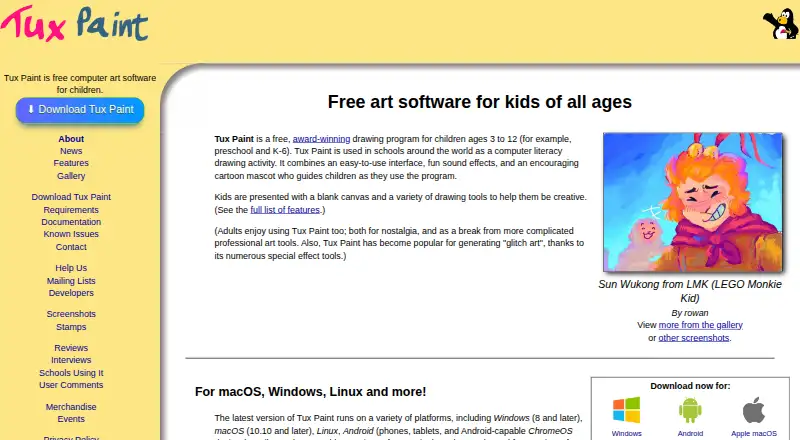
What Tux Paint is
Tux Paint is free computer art software for children, with tools for making pictures on Windows, macOS, Linux, and Android. Children can draw with brushes, stamps, shapes, text, and labels, as well as choose from more than 90 Magic effects. Finished pictures can be saved in a virtual picturebook, exported, shown as slideshows, or exported as animated GIFs. Parents and teachers can add brushes, stamps, and fonts, and use Tux Paint Config to adjust how the program behaves. Classroom controls include full-screen mode and options to disable printing and quitting or limit printing frequency. Optional accessibility tools include an on-screen keyboard, keyboard or joystick pointer control, and adjustable button and interface font sizes. Tux Paint runs on the user's computer without requiring Internet access. The project says parts of the software have been translated into 129 languages. It is distributed under the GNU General Public License, version 2, and the free plan allows installation on as many machines as desired. Android installation sources include Google Play and F-Droid; Linux packages include Flatpak and Snap. The official site also lists an unofficial iOS port for iOS 15.6 or later, which is not free and includes in-app advertisements.
Good
- Free and open source under GNU GPL version 2
- Includes more than 90 Magic effects
- Runs without an Internet connection
- Offers classroom printing and quitting controls
- Optional accessibility settings include pointer controls
Watch out
- Pressure sensitivity is not supported
- The listed iOS port is unofficial and not free
- The iOS port includes in-app advertisements
Who it suits
Tux Paint suits children looking for a drawing program, and parents or teachers who want classroom controls and customization. Its optional accessibility settings may also suit users who need alternative pointer or keyboard controls.
Verdict
Tux Paint offers a broad set of child-focused drawing tools, classroom controls, and accessibility options at no cost. The listed platforms are Windows, macOS, Linux, and Android; iOS is only listed as an unofficial paid port with advertisements.
Plans and prices
From Tux Paint's own pricing page, checked 8 Oct 2026.
| Plan | Price | What it gives you |
|---|---|---|
| Tux Paint | Free | Free and open source under GPL v2 · install on as many machines as you wish |
The facts
Each one read from Tux Paint's own pages, with the date it was checked.
What it does
- Accessibility
- Optional accessibility features include an on-screen keyboard, keyboard or joystick pointer control, adjustable button size, and adjustable interface font.checked 8 Oct 2026
- Classroom controls
- Controls include full-screen mode and options to disable printing and quitting or limit how often printing is allowed.checked 8 Oct 2026
- Customization
- Parents and teachers can add brushes, stamps, and fonts, and use Tux Paint Config to change program behavior.checked 8 Oct 2026
- Drawing tools
- It includes brushes, stamps, shapes, text and label tools, and more than 90 Magic special-effects tools.checked 8 Oct 2026
- Integrations
- The official download page lists Google Play and F-Droid as Android installation sources and Flatpak and Snap packages for Linux.checked 8 Oct 2026
- Internet requirement
- Tux Paint runs on the user's computer and does not require Internet access.checked 8 Oct 2026
- Languages
- The features page says parts of Tux Paint have been translated into 129 languages.checked 8 Oct 2026
- License
- The project distributes Tux Paint under the GNU General Public License, version 2.checked 8 Oct 2026
- Purpose
- Tux Paint is free computer art software designed for children.checked 8 Oct 2026
- Save and export
- Pictures can be saved to a virtual picturebook and exported, and saved drawings can be viewed as slideshows or exported as animated GIFs.checked 8 Oct 2026
- Support and community
- The project provides documentation, contact details, and mailing lists, and says hundreds of people worldwide have contributed.checked 8 Oct 2026
Where it runs
- iOS availability
- The official site lists an unofficial iOS port for iOS 15.6 or later and says it is not free and contains in-app advertisements.checked 8 Oct 2026
Alternatives to Tux Paint
- 1

ibisPaint
Free planAndroidiOSmacOSWindows8.1From $27.99 a year - 2

Concepts
Free planAndroidiOSWindows8.0Free plan - 3

Drawpile
Free planOpen sourceAndroidiOSWebAPI7.9Free plan - 4
FireAlpaca
Free planLinuxmacOSWindows7.6$39.99 one-time - 5
Sketchbook
Free planAndroidiOSmacOSWindows7.5Free plan - 6
Clip Studio Paint
AndroidiOSWebmacOS7.4From $10.99 a year