Laplink PCmover
Laplink PCmover transfers selected files, folders, settings, user profiles, and applications from an old PC to a new PC or operating system.
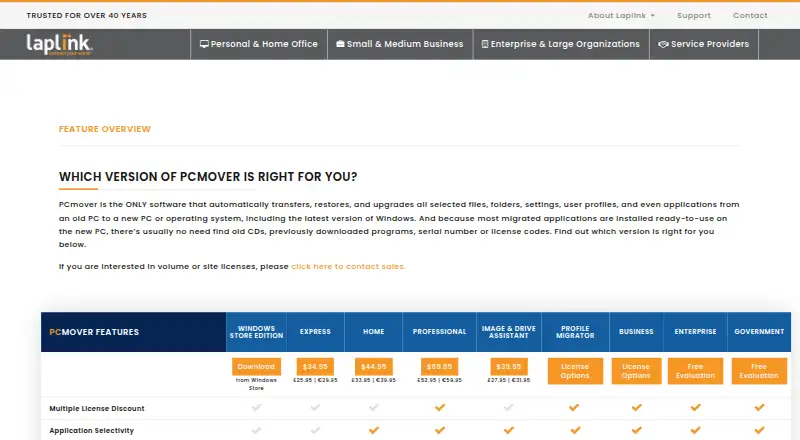
What Laplink PCmover is
Laplink PCmover transfers selected files, folders, settings, user profiles, and applications from an old PC to a new PC or operating system. Most migrated applications are installed ready to use, although some may need a license code or reactivation. An AI Assistant summarizes what will and will not move, answers natural-language questions, and guides users through a recommended transfer plan. PCmover can select a connection method, including Wi-Fi Direct, based on the fastest method it detects. Professional supports Windows 7, 8, 8.1, 10, and 11, and includes an undo feature plus transfer assistance from a certified migration expert by phone or remotely, any time of day. It requires an internet connection for download and registration. Home is limited to C: to C: transfers and the logged-on user; it does not support domain users, in-place upgrades, or restoring an old PC. PCmover does not migrate antivirus or antispyware programs or specific hardware drivers, and some applications may not work with the destination operating system.
Good
- Transfers selected files, settings, and user profiles
- AI Assistant explains transfer choices
- Professional includes transfer undo
- Professional includes migration expert assistance
Watch out
- No free plan is listed
- Home is limited to C: to C: transfers
- Antivirus and antispyware programs are not migrated
- Some applications may not work on the destination system
Who it suits
PCmover may suit Windows users moving selected data, settings, profiles, and applications to a new PC. Users who want transfer assistance or an undo option should note that those details are listed for Professional.
Verdict
PCmover is designed to move selected PC content and applications, with transfer guidance and different limits by edition. Check Home's restrictions and the exclusions for security software and hardware drivers before choosing an edition.
Plans and prices
From Laplink PCmover's own pricing page, checked 30 Sep 2026.
| Plan | Price | What it gives you |
|---|---|---|
| PCmover Home (download) | $44.95, paid once | 1 source PC to 1 destination PC · currently logged-on local user only · C: to C: only · $44.95 |
| PCmover Professional (download) | $69.95, paid once | 1 source PC to 1 destination PC · unlimited transfer attempts · each additional computer requires a separate license · $69.95 |
The facts
Each one read from Laplink PCmover's own pages, with the date it was checked.
What it does
- AI assistance
- The AI Assistant summarizes what will or will not transfer, answers questions in natural language, and guides users through a recommended transfer plan.checked 30 Sep 2026
- Connection options
- PCmover can select a transfer connection, including Wi-Fi Direct, based on the fastest method it detects.checked 30 Sep 2026
- Government security
- The Government edition supports FIPS-compliant algorithms and can use FIPS-compliant AES encryption for certain resources; Laplink says this does not mean PCmover is FIPS certified.checked 30 Sep 2026
- Guarantee
- Laplink advertises a 30-day money-back guarantee for PCmover purchases.checked 30 Sep 2026
- Home limitations
- Home is limited to C: to C: transfers, the logged-on user, and does not support domain users, in-place upgrades, or restoring an old PC.checked 30 Sep 2026
- Purpose
- PCmover transfers selected files, folders, settings, user profiles, and applications from an old PC to a new PC or operating system.checked 30 Sep 2026
- Support
- Professional includes free transfer assistance from a certified PC migration expert by phone or remotely, 24 hours a day, 7 days a week.checked 30 Sep 2026
- Transfer caveats
- PCmover does not migrate antivirus or antispyware programs or specific hardware drivers, and some applications may not work with the destination operating system.checked 30 Sep 2026
- Undo
- Professional lists an undo feature for transfers.checked 30 Sep 2026
Where it runs
- Applications
- Most migrated applications are installed ready to use on the new PC, though some may require a license code or reactivation.checked 30 Sep 2026
- Windows compatibility
- Professional supports Windows 7, 8, 8.1, 10, and 11, and requires an internet connection for download and registration.checked 30 Sep 2026
The company
- Company
- Laplink Software is privately held, headquartered in Bellevue, Washington, and was founded in 1983.checked 30 Sep 2026
- Headquarters
- Bellevue, Washington, United Stateschecked 23 Sep 2026
Alternatives to Laplink PCmover
- 1
Endstate
Free planOpen sourceLinuxmacOSSelf-hostedWindows7.8Free plan - 2
EaseUS Todo PCTrans
Free planWindows6.6From $59.95 a year - 3
PC Migration Pro
Free planWindows6.5$19.95 one-time - 4
PickMeApp
Free planWindows6.5From $10 a year - 5
ForensiT User Profile Wizard
Free planWindows6.4From $3.50 a year - 6

ManageEngine OS Deployer
Free planWebWindows6.4From $645 a year