KintoHub
KintoHub is an open source build and deployment platform for software built from Git repositories and deployed to Kubernetes.
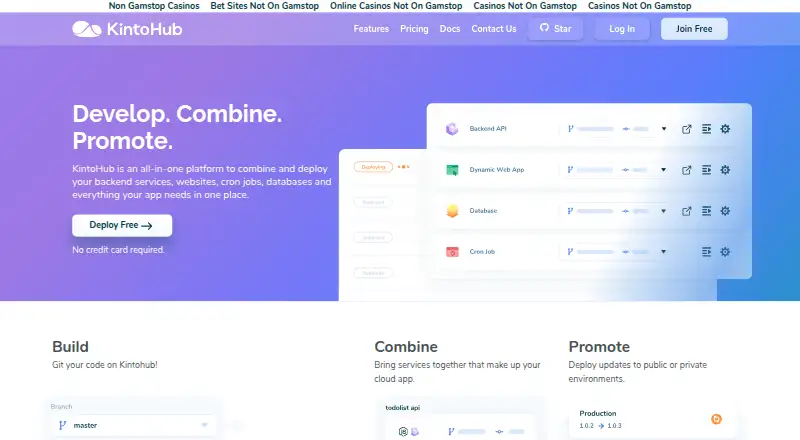
What KintoHub is
KintoHub is an open source build and deployment platform for software built from Git repositories and deployed to Kubernetes. It supports websites, APIs, jobs, and databases. Its workflow turns source code into KintoBlocks, combines them into a project, and deploys the project so the app is available through APIs. Repositories can come from public or private GitHub, Bitbucket, and GitLab projects using a valid Git URL; its CI/CD uses GitHub Workflows and a custom GitHub Action. Deployment options include DockerHub images, Dockerfiles, Helm charts, multiple environments, and release rollbacks. For web apps, documented features include custom domains, environment variables, metrics, autoscaling, and support for server-side rendering or always-running servers. KintoHub advertises free Let’s Encrypt SSL for custom domains and website password protection. Its catalog includes MongoDB, MySQL, PostgreSQL, Minio, RabbitMQ, NATS, Redis, Elasticsearch, and InfluxDB. The free plan is free and includes three services with 256 MB each, up to 1 GB persistent data, and up to three shared vCPU, with no credit card required. Self-hosting uses Helm on Kubernetes and requires an external registry.
Good
- Supports GitHub, Bitbucket, and GitLab repositories
- Offers Dockerfiles and Helm chart deployment
- Free plan requires no credit card
- Web apps can use custom domains and autoscaling
Watch out
- Self-hosting requires Kubernetes
- Self-hosting requires an external registry
- Free plan limits each of three services to 256 MB
Who it suits
KintoHub suits teams building from Git repositories and deploying websites, APIs, jobs, or databases to Kubernetes. Its self-hosted option may suit teams prepared to manage Kubernetes and an external container registry.
Verdict
KintoHub brings repository-based builds, Kubernetes deployment, and web-app controls into one platform. Review the free plan’s resource limits and the self-hosted registry requirement against your deployment needs.
Plans and prices
From KintoHub's own pricing page, checked 7 Oct 2026.
| Plan | Price | What it gives you |
|---|---|---|
| Free | Free | 3 services with 256 MB each · up to 1 GB persistent data · up to 3 shared vCPU · no credit card required |
| Pay-as-you-go | — | $2 per gb month memory · dedicated vCPU starting at $1.5 USD /month · $0.28 per GB/month storage · Accounts are billed monthly |
The facts
Each one read from KintoHub's own pages, with the date it was checked.
Where it runs
- Application types
- The platform supports deploying websites, APIs, jobs, and databases.checked 7 Oct 2026
What it does
- CI/CD
- KintoHub says its CI/CD functionality uses GitHub Workflows and a custom GitHub Action.checked 7 Oct 2026
- Deployment features
- The homepage says users can deploy DockerHub images, use Dockerfiles and Helm charts, configure multiple environments, and roll back releases.checked 7 Oct 2026
- Repository integrations
- The docs say users can deploy from public or private GitHub, Bitbucket, and GitLab repositories using a valid Git URL.checked 7 Oct 2026
- Security
- The homepage advertises free Let’s Encrypt SSL for custom domains and password protection for websites.checked 7 Oct 2026
- Self-hosting
- The installation docs describe installing KintoHub with Helm on Kubernetes and list Kubernetes 1.15+, kubectl, and Helm v3.5+ as prerequisites.checked 7 Oct 2026
- Self-hosting limitation
- The installation docs say KintoHub does not support its private Docker registry and requires an external registry.checked 7 Oct 2026
- Service catalog
- The homepage lists MongoDB, MySQL, PostgreSQL, Minio, RabbitMQ, NATS, Redis, Elasticsearch, and InfluxDB in its catalog.checked 7 Oct 2026
- Support
- The contact page says the team usually responds within 24 hours and links to Discord and GitHub for help and discussions.checked 7 Oct 2026
- Web hosting
- The web app docs list custom domains, environment variables, metrics, autoscaling, and support for apps requiring server-side rendering or an always-running server.checked 7 Oct 2026
- What it does
- KintoHub describes itself as an open source build and deployment platform for building from Git repositories and deploying to Kubernetes.checked 7 Oct 2026
- Workflow
- Its documented workflow builds source code into KintoBlocks, combines them into a project, deploys the project, and makes the app accessible through APIs.checked 7 Oct 2026
The company
- Headquarters
- The contact page lists KintoHub headquarters at 9/F, 1 Des Voeux Road West, Sheung Wan, Hong Kong.checked 7 Oct 2026
The full review of KintoHub
KintoHub is an open-source platform that turns Git repositories into applications running on Kubernetes. It is aimed at developers and teams comfortable with containers who need one workflow for websites, APIs, jobs, and databases. The free tier is a practical way to start small, while resource-metered billing and a required external registry make it less suitable for anyone seeking an all-inclusive hosting bill.
Overview
KintoHub converts source code into KintoBlocks, combines those blocks into a project, and deploys the project so applications can be reached through APIs. Public or private repositories from GitHub, Bitbucket, and GitLab can be connected with a valid Git URL. That repository-first model keeps deployment close to application code, but it assumes users are willing to work with Kubernetes concepts rather than a simplified shared-hosting interface.
The platform spans websites, APIs, background jobs, and databases. It can therefore serve a small product stack rather than only a front-end site. Teams wanting a single deployment layer across several application types will get more from it than users who only need basic static hosting.
Key features
Build and release workflow
- Git-based CI/CD: GitHub Workflows and a custom GitHub Action provide the documented automation path. This is a natural fit for GitHub-centered teams, although the automation layer is GitHub-specific even when source repositories live on Bitbucket or GitLab.
- Flexible inputs: DockerHub images, Dockerfiles, and Helm charts are supported. Multiple environments and release rollbacks help teams separate stages and recover from a bad deployment without changing platforms.
- Broad service catalog: MongoDB, MySQL, PostgreSQL, Minio, RabbitMQ, NATS, Redis, Elasticsearch, and InfluxDB are listed as available services. That selection covers common databases, queues, object storage, search, and metrics workloads.
Web and security controls
- Production web controls: Custom domains, environment variables, metrics, and autoscaling support applications that need more than a simple static file host, including server-side rendering and always-running servers.
- Domain protection: Free Let's Encrypt SSL for custom domains and password protection for websites address basic transport and access-control needs without adding a separate certificate service.
Self-hosting
KintoHub can be installed with Helm on Kubernetes. The documented prerequisites are Kubernetes 1.15 or newer, kubectl, and Helm 3.5 or newer. Self-hosters must provide an external Docker registry because KintoHub does not support its private registry; that dependency adds infrastructure work and may affect organizations with strict registry requirements.
Pricing
KintoHub uses a freemium model, with paid service from $1/mo. The Free plan costs free, requires no credit card, and includes three services limited to 256 MB each, up to 1 GB of persistent data, and up to three shared vCPU. It suits prototypes, small internal services, and learning deployments, but the service, memory, storage, and shared-CPU ceilings will constrain a growing production stack.
Pay-as-you-go has custom pricing rather than a published plan price. Accounts are billed monthly at $2 per GB-month of memory, dedicated vCPU starting at $1.5 USD per month, and $0.28 per GB/month of storage. This structure lets usage scale with resources, but the final bill depends on allocation and runtime, so it is harder to budget than a fixed hosting package. Readers should estimate memory, compute, and storage before moving a larger workload from the free tier.
Platforms
KintoHub is available through the web and supports API, Linux, macOS, Windows, and self-hosted deployments. The self-hosted option is specifically Kubernetes-based and retains the external-registry requirement, while the web and API access suit teams managing deployments from existing development environments.
Who it's for
KintoHub is a strong match for developers, platform teams, and small organizations that already use Git, containers, and Kubernetes and want one place to build and deploy mixed application stacks. It also suits projects that benefit from multiple environments, rollback capability, and web-app controls such as autoscaling and metrics.
It is less appropriate for non-technical site owners, teams unwilling to manage Kubernetes-related infrastructure, or businesses that require a predictable flat monthly hosting charge. Self-hosters must operate an external registry, and resource-based billing demands ongoing cost oversight.
Pros and cons
Pros
- One workflow for varied workloads: Websites, APIs, jobs, and databases can share the KintoBlocks-to-project deployment model.
- Useful deployment flexibility: DockerHub images, Dockerfiles, Helm charts, multiple environments, and rollbacks cover different release practices.
- Capable web controls: Custom domains, SSL, variables, metrics, autoscaling, and password protection address common production needs.
- Accessible entry point: The no-card free plan provides three small services and limited persistent data for experimentation.
Cons
- Free-tier ceilings are tight: Three 256 MB services, 1 GB of persistent data, and three shared vCPU leave little room for substantial production workloads.
- Costs are usage-dependent: Monthly memory, vCPU, and storage charges require forecasting rather than relying on one fixed plan price.
- Self-hosting has a registry gap: An external Docker registry is mandatory because KintoHub's private registry is unsupported.
- GitHub-specific automation: The documented CI/CD mechanism centers on GitHub Workflows and its custom Action.
Alternatives
For a broader directory of deployment tools, see Application Deployment Software and Continuous Delivery Software.
- ManageEngine Patch Manager Plus is the better choice when workstation and server patching is the priority; its free edition covers up to 20 workstations and five servers.
- FileWave fits device administration rather than Kubernetes application deployment, with a forever-free Community Edition for up to 15 computers, 15 tablets, and 15 Chrome devices.
- Fleet is worth choosing when publicly available source code and an always-free version matter more than KintoHub's build-and-deploy workflow.
- Open Computer Orchestration targets managed-device orchestration, offering a free tier for 20 devices.
- OPSI is an alternative for endpoint management, with a free Community edition covering unlimited devices and one worker process.
- Patch My PC is aimed at software updating on Windows environments, including a free non-commercial Home Updater.
- Pckgr RMM is a better fit for remote monitoring and management, with Pro starting at $10 per month for 10 devices.
- Pushlink focuses on Android installation management, with a free plan for up to five installations.
Verdict
Choose KintoHub if you want Git-driven Kubernetes deployments for a mixed set of web applications, services, jobs, and databases, and can manage resource-based charges. Its strongest advantage is the combination of flexible deployment inputs and practical web controls around a repository-centered workflow. Look elsewhere if you need flat-rate hosting, a generous free production tier, or self-hosting without bringing your own Docker registry.
Alternatives to KintoHub
- 1
Fleet
Free planOpen sourceAndroidiOSWebAPI8.6From $7 a month - 2

OPSI
Free planOpen sourceWebAPILinuxmacOS8.4From €4.99 a year - 3

FileWave
Free planAndroidiOSWebAPI8.3Free plan - 4

ManageEngine Patch Manager Plus
Free planAndroidiOSWebAPI8.2From $245 a year - 5

Patch My PC
Free planWebmacOSSelf-hostedWindows7.7From $3.50 a year - 6

Uyuni
Free planOpen sourceWebAPILinuxSelf-hosted7.4Free plan