Kinovea
Kinovea is a free Windows desktop tool for annotating video and analyzing sport and motion.
What Kinovea is
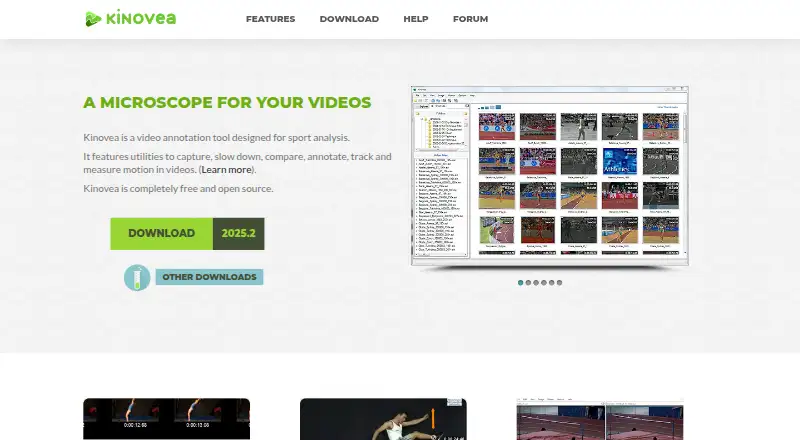
Kinovea is a free Windows desktop tool for annotating video and analyzing sport and motion. It can capture footage, slow it down, compare videos, add annotations, track motion, and measure movement. Users can show two videos side by side and synchronize them around a common event. Measurement tools support manual checks of angles, distances, and times, along with semi-automatic tracking of point trajectories. Grid-based calibration accommodates rotated or perspective-aware coordinate systems, and tools can compensate for lens distortion. Capture supports UVC cameras, supported machine-vision cameras, and JPEG or MJPEG network camera streams. Annotations can be saved as KVA files, measurements exported as CSV, and videos exported with annotations or synchronized frames. XML-described custom tools can be created or modified, including tools for tracking points and measuring distances or angles. Kinovea requires Windows 7 to 11 with .NET Framework 4.8. It does not work on Mac computers with Apple Silicon, including through Parallels or virtualization. The software is GPL v2, needs no internet access or account, collects no user data or telemetry, and can be used personally, academically, or commercially without registration. Its Kinovea plan is free.
Good
- Compares two videos synchronized on a common event.
- Measures angles, distances, and times.
- Exports measurements as CSV.
- No internet access or account required.
- Free for personal, academic, or commercial use.
Watch out
- Windows 7 to 11 and .NET Framework 4.8 required.
- Does not work on Apple Silicon Macs.
- No free trial is listed.
Who it suits
Kinovea suits people analyzing sport or movement footage, including classroom users and Olympic training contexts. It is for Windows users; Mac computers with Apple Silicon are not supported.
Verdict
Kinovea combines video comparison, annotation, tracking, and measurement in a free Windows desktop program. Check the operating system requirements before choosing it, particularly if using a Mac with Apple Silicon.
Plans and prices
From Kinovea's own pricing page, checked 7 Oct 2026.
| Plan | Price | What it gives you |
|---|---|---|
| Kinovea | Free | Free forever · no licenses or subscriptions · no use limits stated |
The facts
Each one read from Kinovea's own pages, with the date it was checked.
What it does
- Calibration
- Measurement tools include grid-based calibration for rotated or perspective-aware coordinate systems and compensation for lens distortion.checked 7 Oct 2026
- Camera support
- Capture supports UVC cameras, supported machine-vision cameras, and JPEG or MJPEG network camera streams.checked 7 Oct 2026
- Core tools
- It provides tools to capture, slow down, compare, annotate, track and measure motion in videos.checked 7 Oct 2026
- Custom tools
- Users can create and modify custom tools described in XML, including tools with tracked points and distance or angle measurements.checked 7 Oct 2026
- Integrations and exports
- Annotations can be saved in KVA files, measurements exported as CSV, and videos exported with annotations or synchronized frames.checked 7 Oct 2026
- Intended audience
- The project describes the software as suitable for classroom use and Olympic training.checked 7 Oct 2026
- License and use
- Kinovea is released under GPL v2 and may be used for personal, academic or commercial purposes without registration.checked 7 Oct 2026
- Measurement
- Users can measure angles, distances and times manually or track point trajectories semi-automatically.checked 7 Oct 2026
- Operating system
- The download page lists Windows 7 to 11 with .NET Framework 4.8 as the supported operating system requirement.checked 7 Oct 2026
- Privacy
- The desktop software requires no internet access, has no user accounts, and does not collect user data or telemetry.checked 7 Oct 2026
- Purpose
- Kinovea is a video annotation tool designed for sport and motion analysis.checked 7 Oct 2026
- Support
- Users can ask questions on the forum and contact the project at [email protected].checked 7 Oct 2026
- Video comparison
- Users can view two videos side by side and synchronize them on a common event.checked 7 Oct 2026
Where it runs
- Platform limitation
- The download page says Kinovea will not work on Mac computers with Apple Silicon chips, including through Parallels or virtualization.checked 7 Oct 2026
Alternatives to Kinovea
- 1

Frame.io
Free planAndroidiOSWebAPI8.3From $15 a month - 2

Roboflow
Free planAndroidiOSWebAPI8.3From $39 a month - 3

Label Studio
Free planOpen sourceWebAPILinuxmacOS8.2From $99 a month - 4

Kollaborate
iOSWebAPIExtension7.8From $7 a month - 5
MAXQDA
Free planWebExtensionmacOSWindows7.8From $41 a month - 6

FrameQuery
Free planWebAPImacOSWindows7.7From $19 a month