
KDevelop
KDevelop is a free, open-source integrated development environment for Linux, macOS and Windows.
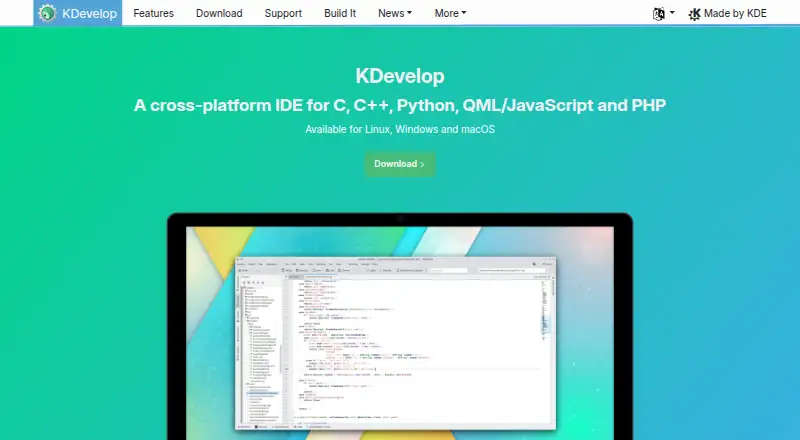
What KDevelop is
KDevelop is a free, open-source integrated development environment for Linux, macOS and Windows. Its built-in parser backends support C, C++ and JavaScript/QML, while Python and PHP support is available through optional plugins. For supported languages, it provides semantic syntax highlighting, navigation and code completion. Navigation tools include symbol-use searches, jumps to declarations or definitions, Quick Open, and project, class and function browsers. KDevelop supports CMake and QMake, partial custom Makefile support, and tools such as make and ninja. Graphical debugging is available for C/C++ and Python; PHP debugging requires an extra plugin. The IDE also includes unit test integration, formatting tools and a Problems view. Version-control integrations include Git, Bazaar, Subversion, CVS and Perforce, with Mercurial as an optional plugin. Users can arrange views, configure color schemes and set shortcuts. Windows nightly builds may be unstable or incomplete, and independently developed Chocolatey packages may not be current.
Good
- Free and open source.
- Supports CMake and QMake.
- Graphical debugging for C/C++ and Python.
- Includes unit test integration.
- Git and several other version-control integrations are listed.
Watch out
- Windows nightly builds may be unstable or incomplete.
- Chocolatey packages may not be current.
- PHP debugging requires an extra plugin.
- Python and PHP use optional plugins.
Who it suits
KDevelop suits developers seeking a free IDE with support for C, C++, or JavaScript/QML, and optional Python or PHP plugins. Its build, navigation and debugging tools may also suit people working with the listed build systems and version controls.
Verdict
KDevelop offers a broad set of coding, build, navigation and debugging tools at no cost. Windows users should note the nightly build and Chocolatey package caveats.
Plans and prices
From KDevelop's own pricing page, checked 4 Oct 2026.
| Plan | Price | What it gives you |
|---|---|---|
| KDevelop | Free | Free IDE; no paid tiers stated |
The facts
Each one read from KDevelop's own pages, with the date it was checked.
What it does
- Build systems
- Supported build systems include CMake, QMake, partially supported custom Makefiles, and a generic build system.checked 4 Oct 2026
- Code intelligence
- For fully supported languages, KDevelop provides semantic syntax highlighting, code navigation, and completion.checked 4 Oct 2026
- Code navigation
- Navigation features include finding symbol uses, jumping to declarations or definitions, Quick Open, and project, class, and function browsers.checked 4 Oct 2026
- Code tools
- Supported languages include semantic syntax highlighting, code navigation and completion.checked 3 Oct 2026
- Customization
- Users can arrange split views and tool views, configure color schemes, and assign shortcuts to almost every IDE action.checked 4 Oct 2026
- Debugging
- The IDE provides graphical debugger support for C/C++ and Python, with PHP support through an extra plugin.checked 4 Oct 2026
- Documentation
- KDevelop integrates QtHelp documentation files, man pages, and CMake help pages.checked 4 Oct 2026
- Downloads
- The download page lists distribution packages and Snap for Linux, a nightly 64-bit build and Chocolatey package for Windows, and a release installer for macOS.checked 4 Oct 2026
- Extensibility
- KDevelop uses a plugin architecture, and the project site names Clang-Tidy, Heaptrack and Perforce support as examples of extensions.checked 3 Oct 2026
- Languages
- C/C++, Objective-C, Qt QML, and JavaScript are fully supported; Python and PHP support is provided through optional plugins.checked 4 Oct 2026
- Other features
- The feature list includes unit test integration, graphical debugging for C/C++ and Python, and code formatting support.checked 3 Oct 2026
- Other tools
- KDevelop includes unit test integration, code formatter support, a filterable Problems view, and Vim-compatible input mode.checked 4 Oct 2026
- Plugins
- The project describes KDevelop as extensible, with plugins such as Clang-Tidy, Heaptrack, and Perforce support.checked 4 Oct 2026
- Privacy
- KDE says its hosted Matomo analytics immediately anonymizes IP records and automatically removes detailed records after 30 days.checked 3 Oct 2026
- Product
- KDevelop is a cross-platform IDE for C, C++, Python, QML/JavaScript, and PHP.checked 4 Oct 2026
- Release caveat
- The Windows nightly build may be unstable and contain bugs or incomplete features, and the Chocolatey packages are developed independently from KDE and may not be up to date.checked 4 Oct 2026
- Release limitation
- The site says Windows nightly builds are compiled from the master branch and may be unstable or contain bugs or incomplete features.checked 3 Oct 2026
- Security
- KDE directs users who find a security issue in KDE software to report it and says its security advisories are listed there.checked 3 Oct 2026
- Support
- KDE community support is provided without warranty by volunteers, with help available through its discussion forum and Matrix rooms.checked 4 Oct 2026
- Version control
- KDevelop has GUI integration for Git, Bazaar, Subversion, CVS, and Perforce, with Mercurial available through an optional plugin.checked 4 Oct 2026
The company
- Headquarters
- Berlin, Germanychecked 28 Sep 2026
The full review of KDevelop
KDevelop is a free, open-source IDE for multi-language development, with its deepest built-in support aimed at C, C++, and JavaScript/QML. It fits programmers who want project navigation, builds, tests, debugging, and version control in one desktop application. The strongest case is a CMake- or QMake-based codebase; Python and PHP users should first check whether the needed plugins cover their workflow.
Overview
KDevelop brings a broad development workflow into one environment rather than splitting editing, build invocation, debugging, and source browsing among separate tools. Its semantic understanding is most complete for C, C++, and JavaScript/QML, while Python and PHP support depends on optional plugins. That distinction matters: teams standardizing on the built-in languages get a more coherent experience, whereas plugin-dependent projects may require extra setup and ongoing compatibility checks.
The project is free and open source, with no paid tiers or trial to manage. KDE provides community help through a discussion forum and Matrix rooms, but that assistance comes from volunteers without a warranty. KDE also provides a route for reporting security issues and publishes security advisories.
Key features
For fully supported languages, semantic syntax highlighting, completion, and navigation help you understand unfamiliar code quickly. You can find symbol uses, jump directly to declarations or definitions, use Quick Open, and browse projects, classes, and functions. These facilities are particularly useful in large C or C++ repositories where simple text search becomes cumbersome.
Build integration covers CMake and QMake, and KDevelop can invoke tools such as make and ninja. Custom Makefiles receive only partial support, so projects built around heavily customized Make workflows may be better served by an IDE with stronger native handling for them.
The integrated graphical debugger supports C/C++ and Python. PHP debugging requires an additional plugin, making PHP a less turnkey choice. Unit-test integration, code formatting, and a filterable Problems view help keep diagnostics and routine checks inside the IDE. Vim-compatible input mode is available for users who prefer modal editing.
Version-control GUI integrations cover Git, Bazaar, Subversion, CVS, and Perforce; Mercurial support is available through an optional plugin. Documentation can be opened through QtHelp files, Man pages, and CMake help pages. The plugin architecture also enables extensions such as Clang-Tidy, Heaptrack, and Perforce support, although relying on plugins means the final feature set varies by project.
Interface customization is substantial: split views and tool views can be arranged, color schemes configured, and shortcuts assigned to almost every IDE action. That flexibility rewards users willing to shape their workspace, but it can take time to settle on an efficient layout.
Pricing
| Plan | Price | What you get |
|---|---|---|
| KDevelop | free | Free IDE; no paid tiers stated |
There is no free trial because the software is free, and no seat, usage, or renewal charge is stated. That makes KDevelop suitable for individual developers, students, open-source contributors, and teams that want to avoid per-user licensing. The trade-off is community rather than commercial support: help is volunteer-provided and without warranty.
Platforms
KDevelop supports Linux, macOS, and Windows. Linux users can obtain distribution packages or a Snap, while macOS has a release installer. Windows offers a nightly build and a Chocolatey package, but neither option is equally reassuring: nightly builds come from the master branch and may be unstable, buggy, or incomplete, and Chocolatey packages are maintained independently from KDE and may not be current. Windows users who need a conservative, predictable release should weigh that caveat before adopting it as a primary IDE.
Who it's for
Choose KDevelop for C, C++, or JavaScript/QML projects where semantic code intelligence, CMake or QMake builds, graphical debugging, and integrated tests are central. It is also a sensible free option for developers who value extensive version-control integrations, built-in technical documentation, Vim input, and a highly configurable workspace.
Look elsewhere when your project depends heavily on custom Makefiles, requires PHP debugging without plugin work, or needs a stable Windows package with a clearly maintained release channel. Python and PHP teams should also confirm that the optional language plugins provide the depth they expect.
Pros and cons
Pros
- Completely free and open source: there are no paid tiers, trials, seats, or renewal costs to budget for.
- Strong C/C++ workflow: semantic navigation, CMake/QMake support, graphical debugging, tests, and documentation work together in one IDE.
- Broad integration: Git, Subversion, CVS, Bazaar, Perforce, make, ninja, QtHelp, Man pages, and CMake help are accessible from the environment.
- Extensible and configurable: plugins, split views, shortcuts, color schemes, and Vim mode let experienced users tailor the workspace.
Cons
- Uneven language coverage: Python and PHP rely on optional plugins, and PHP debugging needs an extra plugin.
- Partial custom-Makefile support: unconventional build systems may not integrate as smoothly as CMake or QMake.
- Windows release uncertainty: the nightly build may be unstable or incomplete, while Chocolatey packages may lag behind KDE.
- No formal support promise: KDE community assistance is volunteer-based and provided without warranty.
Alternatives
Qt Creator is the better choice when you want a freemium IDE spanning more platforms, including Android, iOS, web, and Windows, with an open-source plan and a free trial.
C++Builder suits developers seeking a paid product with a free Community Edition and a free trial across desktop and mobile platforms.
Arm Keil MDK is aimed at users who need a freemium environment with a non-commercial Community plan and Cortex-M tooling.
Infineon ModusToolbox is a free alternative focused on Infineon microcontroller development across Windows, Linux, and macOS.
C2000Ware is a free download for C2000 microcontroller work, with an installer that requires export approval.
CLion is worth considering for a freemium C/C++ IDE offering a free non-commercial plan and trial.
CS+ is a free option for development and production, subject to evaluation-compiler limits in the stated plan.
Eclipse IDE is another free, open-source desktop IDE for Linux, macOS, and Windows.
For broader comparisons, see the C++ IDEs, IDE Software, and Integrated Development Environments lists.
Verdict
KDevelop is an excellent fit for developers building C, C++, or JavaScript/QML software with CMake or QMake who want a capable, customizable IDE at zero cost. Its main reasons to look elsewhere are plugin-dependent language support, partial custom-Makefile integration, and the less dependable Windows distribution options.
Alternatives to KDevelop
- 1

GeneXus
Free planAndroidiOSWebAPI8.2From $99 a year - 2

PyCharm
Free planOpen sourceAPILinuxmacOSSelf-hosted8.2From $100 a year - 3
Omnis Studio
Free planAndroidiOSWebAPI8.1From $9.38 a month - 4

CLion
Free planExtensionLinuxmacOSSelf-hosted7.8From $10.90 a month - 5

IntelliJ IDEA
Free planAPIExtensionLinuxmacOS7.8Free plan - 6
Qt Creator
Free planAndroidiOSWebLinux7.7From €546 a year