C++Builder
C++Builder is an integrated C++ development environment for building native applications, with Windows development emphasized on its product page.
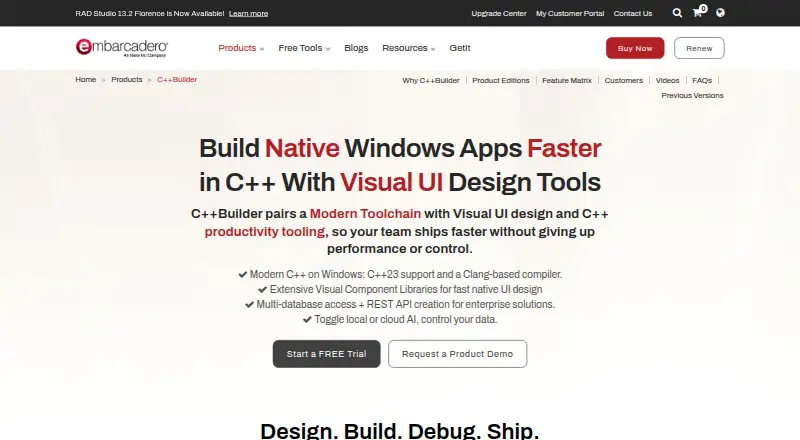
What C++Builder is
C++Builder is an integrated C++ development environment for building native applications, with Windows development emphasized on its product page. Its compiler has initial support for C++23 and combines Clang enhancements with Dinkumware STL. For Windows interfaces, the VCL component library supplies visual and non-visual components. Build configurations can use MSBuild and CMake, and the IDE includes debugging and testing tools. FireDAC provides native connections to Oracle, SQL Server, MySQL, SQLite, PostgreSQL, DB2 and Firebird. HTTP and REST client libraries can invoke REST services, and the product includes components for AWS and Azure. Subversion and Git repositories are supported for version control; plugins can add IDE tool windows, code completion, syntax highlighting and debugging hooks. Embarcadero offers a free trial that lasts 30 days. The free Community Edition permits limited commercial use only while annual revenue remains under US$5,000 and the team has no more than five developers. Other named editions include Pro Term License, Professional, Enterprise and Architect. Enterprise Edition includes an InterBase ToGo license for encrypted embedded database capabilities. Embarcadero is an Idera, Inc. company, with corporate headquarters in Austin, Texas.
Good
- Initial C++23 support with a Clang-enhanced compiler and Dinkumware STL.
- VCL supplies Windows user-interface components.
- MSBuild and CMake support build configurations.
- FireDAC connects natively to seven named database systems.
- HTTP and REST libraries plus AWS and Azure components.
- Includes integrated debugger and testing tools.
Watch out
- Community Edition ends at US$5,000 annual revenue or more than five developers.
- Community Edition does not include or support Kai.
Who it suits
C++Builder suits developers building native applications, particularly Windows applications, who want an IDE with database connectivity, build-system support and integrated debugging and testing tools. The free Community Edition is aimed at individuals or teams that remain within its revenue and developer limits.
Verdict
Choose C++Builder if you need a native C++ development environment with Windows-focused interface components, database connectivity and support for MSBuild or CMake.
Plans and prices
From C++Builder's own pricing page, checked 8 Oct 2026.
| Plan | Price | What it gives you |
|---|---|---|
| Community Edition | Free | Limited commercial use · individual revenue under $5,000 per year · teams of no more than 5 developers |
| Architect | Priced on request | Perpetual license · enterprise database, cloud, or web-enabled apps |
| Enterprise | Priced on request | Perpetual license · client/server or multi-tier apps, REST services, and similar |
| Professional | Priced on request | Perpetual license · individual developers and small teams building desktop apps |
| Pro Term License | — | Annual license · individual developers or small teams building desktop apps · Annually |
The facts
Each one read from C++Builder's own pages, with the date it was checked.
What it does
- AI availability
- Community Edition does not include or support Kai, which the page describes as a separately sold premium add-on for paid editions.checked 8 Oct 2026
- Build tools
- The product page says C++Builder supports MSBuild and CMake for continuous build configurations.checked 8 Oct 2026
- Cloud and REST
- C++Builder includes HTTP and REST client libraries to invoke REST services and specific AWS and Azure components.checked 8 Oct 2026
- C++ standard
- The product page says C++Builder has initial support for C++23 with a Clang-enhanced compiler and Dinkumware STL.checked 8 Oct 2026
- Database integrations
- FireDAC provides native connectivity to databases including Oracle, SQL Server, MySQL, SQLite, PostgreSQL, DB2, and Firebird.checked 8 Oct 2026
- IDE extensions
- Plugins can add IDE tool windows, code completion, syntax highlighting, and debugging hooks, among other capabilities.checked 8 Oct 2026
- Product
- C++Builder is an integrated C++ development environment for building native applications, with Windows development emphasized on its product page.checked 8 Oct 2026
- Security
- The product page describes encrypted embedded database capabilities through the InterBase ToGo license included with Enterprise Edition.checked 8 Oct 2026
- Support
- The support page says product support is for customers with a current support contract; the first year of Support and Maintenance is included with a C++Builder purchase.checked 8 Oct 2026
- Version control
- The product page names Subversion and Git repositories as supported version control integrations.checked 8 Oct 2026
- Visual design
- Its VCL component library provides visual and non-visual components for Windows user interfaces.checked 8 Oct 2026
The company
- Founded
- 1993checked 28 Sep 2026
- Headquarters
- Austin, Texas, United Stateschecked 28 Sep 2026
- Maker
- Embarcadero says it is an Idera, Inc. company; its contact page lists corporate headquarters in Austin, Texas.checked 8 Oct 2026
Money
- Free edition limits
- Community Edition is licensed until an individual or company reaches US$5,000 annual revenue or the development team grows beyond five developers.checked 8 Oct 2026
- Trial
- Embarcadero offers a C++Builder free trial, and its trial page says the download provides a 30-day free trial.checked 8 Oct 2026
The full review of C++Builder
C++Builder is an integrated development environment for building native applications in C++. It is most compelling for developers building Windows software who want interface components and database connectivity within their development environment. Its feature set is broad, but the free edition’s commercial and team-size limits make licensing a key part of the decision.
Overview
The IDE combines a C++ compiler, debugger, build support and visual components. It has initial C++23 support through a Clang-enhanced compiler and Dinkumware STL, while its VCL library supplies visual and non-visual components for Windows user interfaces. That makes C++Builder a focused option for Windows application development, rather than a neutral choice for every C++ workflow.
Key features
- Build, debug and test: Support for MSBuild and CMake covers continuous build configurations, and the IDE includes an integrated debugger and testing tools. Keeping those capabilities together can simplify a Windows development workflow; it is less of a draw if you need a development environment centered on another operating system.
- Database connectivity: FireDAC offers native connections to Oracle, SQL Server, MySQL, SQLite, PostgreSQL, DB2 and Firebird. That range suits applications that need to work with different database systems without committing to just one of those options.
- Services and cloud: HTTP and REST client libraries can call REST services, with specific components for AWS and Azure. These integrations help when an application needs to connect to services, though they do not change C++Builder’s Windows-focused UI strengths.
- Version control and extensibility: The IDE integrates with Git and Subversion repositories. Plugins can add features such as tool windows, code completion, syntax highlighting and debugging hooks, giving teams ways to extend the environment around their workflow.
- Embedded database security: Enterprise Edition includes an InterBase ToGo license for encrypted embedded database capabilities. This may suit applications that need that capability, but it is tied to the Enterprise tier.
Pricing
C++Builder is paid software, with a 30-day free trial. Its free Community Edition can be a reasonable starting point for eligible developers, but the annual revenue and team limits rule it out for some commercial projects.
- Community Edition: free. It allows limited commercial use for individuals earning under $5,000 per year and teams of no more than five developers. The cap applies to annual revenue and team size, and Community Edition does not include or support Kai, a separately sold premium add-on for paid editions.
- Pro Term License: Custom pricing, billed annually. This annual license is aimed at individual developers or small teams building desktop apps. Its term-based model differs from the perpetual licenses below.
- Professional: Custom pricing for a perpetual license, aimed at individuals and small teams building desktop apps.
- Enterprise: Custom pricing for a perpetual license suited to client/server or multi-tier applications, REST services and similar projects. It includes the InterBase ToGo license for encrypted embedded database capabilities.
- Architect: Custom pricing for a perpetual license aimed at enterprise database, cloud or web-enabled applications.
The Professional, Enterprise and Architect tiers are perpetual licenses, while Pro Term License is billed annually. A C++Builder purchase includes the first year of Support and Maintenance; ongoing product support is for customers with a current support contract.
Platforms
C++Builder is a self-hosted development environment. Its supported operating system is Windows, even though the product’s listed platforms include Android, iOS and macOS as well as Windows. The strongest UI emphasis remains Windows-specific through VCL.
Who it's for
C++Builder fits developers and small teams building native Windows applications, especially when the work depends on database connections, REST services, or a visual component library. Enterprise Edition is the relevant tier for teams that need its client/server and multi-tier focus or the included InterBase ToGo license. Developers who exceed Community Edition’s revenue or team caps need a paid edition; those seeking a non-Windows-centered C++ environment should consider other options.
Pros and cons
- Pros: VCL supplies visual and non-visual Windows UI components; FireDAC connects to seven named database systems; MSBuild and CMake support build configurations; the IDE includes integrated debugging and testing tools.
- Cons: The product’s UI strengths are Windows-focused; Community Edition is restricted to individuals under $5,000 in annual revenue and teams of no more than five; Kai is not included or supported in the free edition; paid plans use custom pricing.
Alternatives
Qt Creator is worth considering if you want a freemium IDE available across Android, iOS, Linux, macOS, web and Windows. Its free open-source version carries LGPL/GPL obligations for Qt framework use.
Arm Keil MDK is another freemium option, with a community tier for non-commercial use and support for Cortex-M devices.
Infineon ModusToolbox is free and supports Windows, Linux and macOS for development in Infineon’s microcontroller ecosystem.
C2000Ware is a free option for C2000 microcontrollers; its installer requires export approval.
KDevelop is a free IDE for Linux, macOS and Windows with no paid tiers stated.
CLion offers a free non-commercial plan for individual learning, self-education and open-source contributions without commercial use.
CS+ is free for development and production with CS+ for CC, though evaluation compiler limits apply when using an evaluation compiler.
Eclipse IDE is a free and open-source alternative for Windows, Linux and macOS.
Verdict
Choose C++Builder if your work is centered on native Windows applications and benefits from VCL, broad database connectivity, and integrated build and debugging tools. Look elsewhere if Windows-focused UI development is not your priority, or if Community Edition’s commercial and team limits do not fit and custom-priced paid plans are a poor match.
Getting started
- Visit https://www.embarcadero.com/products/cbuilder.
- Download the 30-day free trial, or choose Community Edition if your use fits its revenue and team limits.
- Select a named edition: Community Edition, Pro Term License, Professional, Enterprise or Architect.
- Use Windows development tools such as VCL, MSBuild or CMake, as applicable to your project.
Limits worth knowing
Community Edition is limited to individual or company annual revenue under US$5,000 and teams of no more than five developers. Its free license also excludes and does not support Kai.
Questions
Is C++Builder free?
Community Edition is free for limited commercial use, subject to its revenue and team-size limits. A 30-day free trial is also available.
What are the Community Edition limits?
It is licensed only while individual or company annual revenue is under US$5,000 and the development team has no more than five developers.
Which platforms does C++Builder support?
Windows is the supported operating system listed for the development environment. The product page emphasizes Windows development.
Who makes C++Builder?
Embarcadero makes C++Builder and says it is an Idera, Inc. company. Its corporate headquarters are in Austin, Texas.
Does C++Builder have database and cloud integrations?
FireDAC connects to Oracle, SQL Server, MySQL, SQLite, PostgreSQL, DB2 and Firebird. HTTP and REST libraries and specific AWS and Azure components are also included.
Alternatives to C++Builder
- 1

GeneXus
Free planAndroidiOSWebAPI8.2From $99 a year - 2

PyCharm
Free planOpen sourceAPILinuxmacOSSelf-hosted8.2From $100 a year - 3
Omnis Studio
Free planAndroidiOSWebAPI8.1From $9.38 a month - 4

CLion
Free planExtensionLinuxmacOSSelf-hosted7.8From $10.90 a month - 5

IntelliJ IDEA
Free planAPIExtensionLinuxmacOS7.8Free plan - 6
Qt Creator
Free planAndroidiOSWebLinux7.7From €546 a year