
JupyterLite
JupyterLite is a free, open-source JupyterLab distribution that runs in a browser, without a dedicated application server.
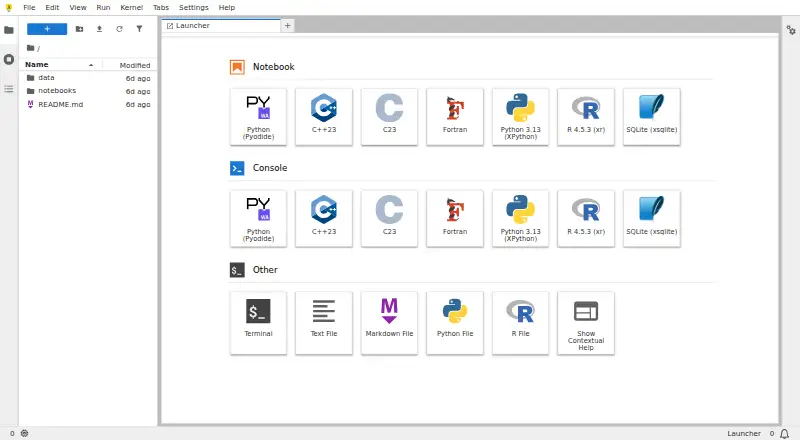
What JupyterLite is
JupyterLite is a free, open-source JupyterLab distribution that runs in a browser, without a dedicated application server. It offers JupyterLab and Jupyter Notebook interfaces, as well as a minimal browser REPL. Its documented Python kernels use Pyodide or Xeus Python, and contributors maintain an R kernel based on Xeus R. The documentation lists interactive visualization support for Altair, bqplot, ipywidgets, matplotlib, and Plotly. Users can create, edit, save, upload, and download files through the browser; files are stored there, usually in IndexedDB. Data stays in the browser unless an enabled extension sends it elsewhere or notebook code uses the browser’s fetch mechanism. JupyterLite can be served as static HTTP(S) assets, embedded in another application, or deployed to several static hosting services. Browser storage is limited, and the documentation says smaller uploads up to about 50 MB should be suitable. Some Python packages may not work because of WebAssembly kernel constraints. Where browser and operating system support it, a JupyterLite site can be installed as an app.
Good
- Runs in a browser without a dedicated application server
- Offers JupyterLab, Notebook, and REPL interfaces
- Supports documented Python and R kernels
- Browser-based file editing, upload, and download
- Can be deployed to static hosts
Watch out
- Browser storage has limited capacity
- Some Python packages may not work
- Only the last two releases are actively supported
Who it suits
JupyterLite suits people who want to work with notebooks in a browser and deploy them as static assets. It may also fit those who need browser-based Python or R, provided their packages work within its WebAssembly constraints.
Verdict
JupyterLite provides notebook interfaces and kernels in the browser, with static deployment options and browser-based file storage. Check package compatibility and storage limits for your intended work.
Plans and prices
From JupyterLite's own pricing page, checked 9 Oct 2026.
| Plan | Price | What it gives you |
|---|---|---|
| JupyterLite | Free | Open-source browser-based computing · no dedicated application server required · kernel and package compatibility depends on the browser environment |
The facts
Each one read from JupyterLite's own pages, with the date it was checked.
What it does
- Deployment
- A JupyterLite site can be served as static HTTP(S) assets locally or on static hosts, embedded in larger applications, and does not require a dedicated application server.checked 9 Oct 2026
- Files and storage
- Files created in JupyterLite are stored in browser storage, by default IndexedDB, and users can edit, save, upload, and download files through the browser.checked 9 Oct 2026
- Hosting options
- The documentation includes deployment guides for GitHub Pages, ReadTheDocs, Vercel, Netlify, GitLab Pages, and Binder.checked 9 Oct 2026
- Integrations
- JupyterLite uses the JupyterLab extension system and supports configuring deployments with extensions, kernels, and content.checked 9 Oct 2026
- Interfaces
- JupyterLite supports the JupyterLab and Jupyter Notebook interfaces, as well as a minimal browser REPL application.checked 9 Oct 2026
- Notable limit
- Browser storage has limited capacity; the documentation says smaller uploads up to about 50 MB should be fine.checked 9 Oct 2026
- Package compatibility
- Some Python packages may not work because WebAssembly kernels cannot use certain native extensions, system libraries, threading, or filesystem access patterns.checked 9 Oct 2026
- Privacy
- The documentation says data stays in the browser unless an enabled extension sends it to an external service or notebook code uses the browser’s fetch mechanism.checked 9 Oct 2026
- Project status
- JupyterLite is part of the Project Jupyter Frontends subproject, and the project says only its last two releases are actively supported.checked 9 Oct 2026
- Python kernels
- The project documents Python kernels based on Pyodide and Xeus Python, which run in the browser.checked 9 Oct 2026
- R kernel
- JupyterLite contributors also maintain an R kernel based on Xeus R.checked 9 Oct 2026
- Visualization
- The documentation lists support for interactive visualization libraries including Altair, bqplot, ipywidgets, matplotlib, and Plotly.checked 9 Oct 2026
- What it is
- JupyterLite is a JupyterLab distribution that runs entirely in the browser.checked 9 Oct 2026
Where it runs
- Installable app
- Where supported by the browser and operating system, a JupyterLite website can be installed as an application; the documentation shows Linux and Android examples.checked 9 Oct 2026
Alternatives to JupyterLite
- 1

Replit
Free planAndroidiOSWebLinux8.4From $18 a month - 2

Playcode
Free planAndroidiOSWebAPI8.2From $25 a month - 3

StackBlitz
Free planAndroidiOSWebAPI8.2Free plan - 4

JDoodle
Free planAndroidiOSWebAPI8.0From $4 a month - 5

CodeHS
Free planAndroidiOSWeb7.6From $990 a year - 6

Google Colab
Free planWebAPIExtensionSelf-hosted7.6Free plan