JTrac
JTrac is a free, open-source web application for tracking bugs, action items, and tasks.
What JTrac is
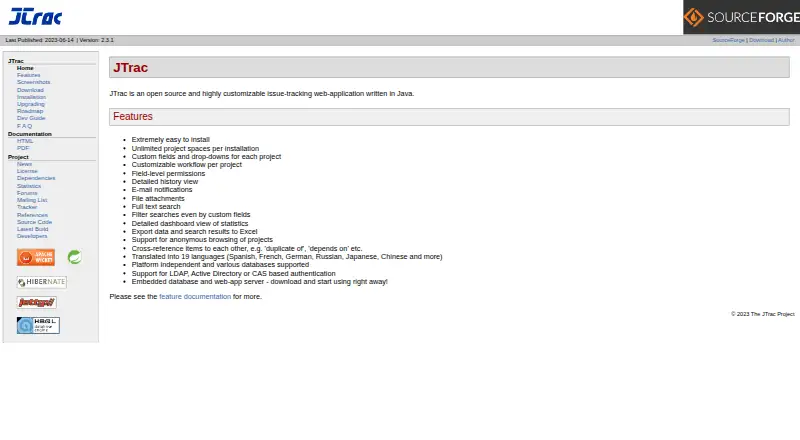
JTrac is a free, open-source web application for tracking bugs, action items, and tasks. Written in Java and licensed under Apache Software License 2.0, it can run with Java 8 or higher using its embedded web server and database, or deploy as a WAR in a compatible servlet container. Teams can set project-specific workflows, roles, and field-level permissions, and add dropdown, free-text, numeric, and date/time fields. Each project space allows up to 10 dropdown fields, 5 free-text fields, 3 numeric fields, and 3 date/time fields. JTrac includes item history, attachments, full-text search, custom-field filtering, dashboards, and Excel export of search results. Status changes trigger email notifications by default, with SMTP configured by an administrator. Authentication options include LDAP, Active Directory, and CAS single sign-on; LDAP authenticates users but does not create accounts or map them to project spaces. JTrac is self-hosted for Linux, macOS, and Windows, and its intended users include developers, end users, IT, and quality engineers.
Good
- Custom workflows, roles, and field-level permissions.
- Search, dashboards, item history, and file attachments.
- Exports search results to Excel.
- Supports LDAP, Active Directory, and CAS authentication.
Watch out
- Each project has limits on custom-field counts.
- LDAP does not create users or map project access.
- Requires Java 8 or higher.
Who it suits
JTrac suits developers, end users, IT teams, and quality engineers seeking a customizable, self-hosted issue tracker. It requires Java 8 or higher.
Verdict
JTrac combines issue tracking with customizable project workflows and search tools in a self-hosted application. Its field limits and the extra user setup required for LDAP are worth considering.
Plans and prices
From JTrac's own pricing page, checked 9 Oct 2026.
| Plan | Price | What it gives you |
|---|---|---|
| JTrac | Free | Open-source issue tracker · self-hosted installation |
The facts
Each one read from JTrac's own pages, with the date it was checked.
What it does
- Authentication
- JTrac supports LDAP and Active Directory authentication, plus CAS single sign-on integration.checked 9 Oct 2026
- Authentication limit
- LDAP support provides authentication only; administrators must still create users and map them to project spaces in JTrac.checked 8 Oct 2026
- Custom field limits
- Each project space allows up to 10 dropdown, 5 free-text, 3 numeric, and 3 date/time custom fields.checked 8 Oct 2026
- Custom fields
- Project spaces support dropdown, free-text, date-picker, and numeric custom fields, with limits of 10, 5, 3, and 3 respectively.checked 9 Oct 2026
- Database and backups
- JTrac stores database data and uploaded attachments in its home directory, which the guide recommends backing up regularly in production.checked 9 Oct 2026
- Deployment
- JTrac can run with its embedded Jetty server and HSQLDB, or deploy as a WAR in a servlet 3.1 compliant container.checked 9 Oct 2026
- Email integration
- Status changes trigger email notifications by default, and administrators can configure SMTP, including authenticated or SSL connections.checked 9 Oct 2026
- Installation
- JTrac can run with Java 8 or higher and includes an embedded web server and database for quick setup.checked 8 Oct 2026
- Intended users
- The project lists developers, end users, IT, and quality engineers as its intended audience.checked 8 Oct 2026
- Languages
- The feature documentation lists translations for 23 locales.checked 9 Oct 2026
- License
- The project is licensed under the Apache Software License, Version 2.0.checked 8 Oct 2026
- Notifications
- Item status changes trigger email notifications by default, and administrators configure the SMTP server.checked 8 Oct 2026
- Product
- JTrac is an open-source, customizable issue-tracking web application written in Java.checked 8 Oct 2026
- Project age
- The introduction says JTrac development started in 2004.checked 9 Oct 2026
- Purpose
- JTrac is a customizable, Java-based web application for issue and bug tracking.checked 9 Oct 2026
- Requirements
- Running JTrac requires Java 8 or higher; the installation guide says a JRE is sufficient.checked 9 Oct 2026
- Search and reporting
- JTrac supports full-text search, filtering by custom fields, dashboards, and exporting search results to Excel.checked 8 Oct 2026
- Security guidance
- The installation guide recommends changing the default admin password, especially for internet-facing installations.checked 9 Oct 2026
- Support
- The developer guide directs users with setup questions to the JTrac forums.checked 9 Oct 2026
- Tracking
- It can track bugs, action items, and tasks using project-specific custom fields and workflows.checked 8 Oct 2026
- Tracking tools
- JTrac provides item history, file attachments, full-text search, custom-field filtering, dashboards, and Excel export.checked 9 Oct 2026
- Workflow and permissions
- Each project can have its own customizable workflow, roles, and field-level permissions.checked 9 Oct 2026
- Workflow controls
- Administrators can define project roles, workflow states, and field-level permissions.checked 8 Oct 2026
The full review of JTrac
JTrac is a Java-based issue tracker for teams that want to run and configure their own project spaces. Its strongest case is adaptable workflows and field-level control without a software fee; teams that need automation or broader planning tools should look elsewhere.
Overview
JTrac tracks bugs, tasks, and action items in a self-hosted web application. Each project can have its own workflow, roles, and field permissions, which makes it useful when different teams need different ways to route work or control what contributors can change.
It requires Java 8 or higher. Teams can start with the embedded web server and database or deploy a WAR in a servlet 3.1-compliant container. In production, the database and uploaded attachments reside in JTrac’s home directory, making regular backups an important part of operating it. The installation guide also recommends changing the default administrator password, especially for internet-accessible installations.
Key features
Custom fields cover dropdowns, free text, numeric values, and dates or times. Each project space allows up to 10 dropdown, 5 free-text, 3 numeric, and 3 date/time fields. That is enough structure for many focused issue forms, but teams with extensive data-capture needs may run into the caps.
Items retain history and support file attachments. Full-text search, custom-field filters, dashboards, and Excel export help teams find and review work without relying on a separate reporting tool. Status changes trigger email notifications by default; administrators configure SMTP, including authenticated or SSL connections.
Authentication supports LDAP, Active Directory, and CAS single sign-on. LDAP provides authentication only: administrators still need to create JTrac users and map them to project spaces. That extra administration matters for organizations expecting directory integration to provision access automatically. The feature documentation lists translations for 23 locales.
JTrac supports custom workflows, but not workflow automation, roadmaps, or time tracking. It is therefore a better fit for teams focused on configurable issue handling than for those looking to coordinate plans, automate transitions, or record effort in the same product.
Pricing
JTrac is free: its sole JTrac plan costs nothing and provides an open-source issue tracker for self-hosted installation. The project is licensed under the Apache Software License, Version 2.0. There are no paid tiers or seat quotas to weigh, but free software does not remove the work of installation, access administration, backups, or server upkeep.
Platforms
JTrac is a web application for self-hosted use, with Linux, macOS, and Windows among its listed platforms. Its Java runtime requirement and embedded-server option suit teams able to manage their own deployment; it is not a hosted service.
Who it's for
The project names developers, end users, IT teams, and quality engineers as its intended audience. It suits groups that want to shape project-specific issue workflows and permissions and are comfortable operating Java software themselves. Teams needing automated workflows, roadmaps, time tracking, or automatic LDAP user provisioning should consider a different tool.
Pros and cons
- Pros: Project-specific workflows, roles, and field permissions let teams adapt issue handling to each project.
- Pros: Full-text search, custom-field filtering, dashboards, item history, attachments, and Excel export cover core tracking and review needs.
- Pros: Free, open-source self-hosting avoids per-seat software charges.
- Cons: Field caps may restrict projects that need extensive custom data capture.
- Cons: LDAP does not create users or assign them to project spaces, leaving that work to administrators.
- Cons: No workflow automation, roadmaps, or time tracking limits its usefulness as a broader planning system.
- Cons: Self-hosting makes deployment, backups, and account security the team’s responsibility.
Alternatives
For a wider set of issue-tracking options, browse Issue Tracking Software.
- GitHub Codespaces is a freemium option with a free plan and paid 2-core and 4-core compute plans; consider it when you want a different tool from a broad cross-platform selection.
- Linear offers a free plan with unlimited members, two teams, and 250 issues, plus a paid Basic plan at $10 a month; it is an option for teams whose needs fit those free-plan limits.
- YouTrack has a free cloud plan for up to 10 users with 30 GB storage and a Cloud plan at $5.40 a month; choose it if a capped hosted plan is preferable to self-hosting.
- MantisBT is another free, open-source bug tracker for self-hosted installation, making it a direct alternative for teams comparing self-managed trackers.
- Backlog has a free forever plan capped at 10 users, one project, and 100 MB storage, with Git and Subversion and a board; it suits teams whose work fits those limits.
- Bugzilla is a free, open-source alternative for teams considering another tracker.
- Trac is free, open-source project software for self-hosted use; consider it as another self-managed option.
- Azure Test Plans is a freemium option with a Basic + Test Plans tier at $52 a month; consider it if you want to compare another product with a test-planning tier.
Verdict
Choose JTrac if your team wants a free, self-hosted issue tracker with project-specific workflows and permissions, and can take responsibility for deployment and maintenance. Its main advantage is that configurable control; its main reason to look elsewhere is the absence of automation and broader planning features, alongside the administration LDAP still leaves to you.
Getting started
- Open the JTrac website
- Prepare a system with Java 8 or newer
- Run JTrac with its embedded Jetty server and HSQLDB
- Alternatively deploy the WAR in a servlet 3.1 compliant container
- Change the default administrator password
- Configure SMTP and authentication settings as needed
Limits worth knowing
Each project space allows up to 10 dropdown, 5 free-text, 3 numeric, and 3 date/time custom fields. LDAP authenticates users but does not create accounts or map them to project spaces.
Questions
What does JTrac cost?
The JTrac plan costs nothing. It is open source and licensed under Apache Software License 2.0.
Which platforms can run JTrac?
JTrac is available for Linux, macOS, Windows, web access, and self-hosted deployments.
Does JTrac support single sign-on?
Yes. Authentication options include LDAP, Active Directory, and CAS single sign-on.
How is JTrac installed?
It runs with Java 8 or higher using an embedded Jetty server and HSQLDB, or as a WAR in a servlet 3.1 compliant container.
What notifications are available?
Item status changes trigger email notifications by default, and administrators configure the SMTP server.
Alternatives to JTrac
- 1

Jira
Free planAndroidiOSWebAPI8.4Free plan - 2

Linear
Free planAndroidiOSWebAPI8.4From $10 a month - 3
Zoho Sprints
Free planAndroidiOSWebAPI8.2From $1 a month - 4

Azure Test Plans
Free planWebAPIExtensionLinux8.1From $6 a month - 5
Redmine
Free planOpen sourceWebAPILinuxmacOS7.8Free plan - 6

Backlog
Free planAndroidiOSWebAPI7.7From $35 a month