
JMStudio
JMStudio is 3DMakerpro’s software for capturing and processing scans from its Fox, Toucan, Moose, Seal, Mole, Lynx, and Whale scanners.
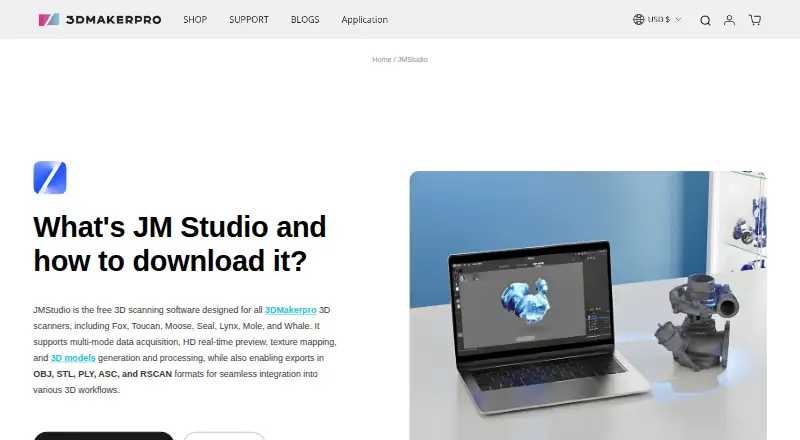
What JMStudio is
JMStudio is 3DMakerpro’s software for capturing and processing scans from its Fox, Toucan, Moose, Seal, Mole, Lynx, and Whale scanners. During capture, it provides real-time visual feedback, markerless AI tracking, and tracking on complex surfaces. Its processing tools include AI-based noise removal and geometry optimization, plus surface refinement and smoothing. It can export STL, OBJ, PLY, ASC, and RSCAN files, and generate watertight STL files for slicing software.
The software is free and runs on Windows 10/11 64-bit, macOS 12, 13, and 14, Android, and iOS; mobile scanning can be wireless. Listed minimum desktop requirements are an Intel Core i5 8th generation CPU, 16 GB RAM, and an MX250 GPU with 2 GB VRAM; an NVIDIA 3060 with 4 GB VRAM is recommended. JMStudio is intended for creators, engineers, and manufacturers, with accessibility for beginners also noted. Manuals, tutorials, a forum, live chat, and email support are available.
Good
- Free for 3DMakerpro scanners
- Live visual feedback and markerless tracking
- Exports five listed file formats
- Can generate watertight STL files
Watch out
- Works with listed 3DMakerpro scanners
- Desktop minimum includes 16 GB RAM
- Windows support lists 10/11 64-bit
Who it suits
JMStudio suits users of compatible 3DMakerpro scanners who need to capture, refine, or export 3D scans. Its stated audience includes creators, engineers, manufacturers, and beginners.
Verdict
JMStudio combines scanner capture, mesh processing, and export tools for 3DMakerpro hardware. Check scanner compatibility and the listed desktop requirements before choosing it.
Plans and prices
From JMStudio's own pricing page, checked 2 Oct 2026.
| Plan | Price | What it gives you |
|---|---|---|
| JMStudio | Free | For 3DMakerpro scanners · Exports STL, OBJ, PLY, ASC, and RSCAN |
The facts
Each one read from JMStudio's own pages, with the date it was checked.
What it does
- 3D printing
- The FAQ says JMStudio can generate watertight STL files for importing into slicing software such as Cura or Lychee.checked 2 Oct 2026
- Data collection
- The privacy policy says its products and services may collect device, IP address, operating system, browser, usage, diagnostic, and location information.checked 2 Oct 2026
- Export formats
- JMStudio exports STL, OBJ, PLY, ASC, and RSCAN files.checked 2 Oct 2026
- Intended users
- The JMStudio page describes the software as built for creators, engineers, and manufacturers, and says it is designed to be accessible to beginners.checked 2 Oct 2026
- Live capture
- The software provides real-time visual feedback and lists markerless AI visual tracking and tracking on complex surfaces as features.checked 2 Oct 2026
- Privacy and security
- 3DMakerpro’s privacy policy says it uses technical, administrative, and physical measures designed to safeguard data and prevent unauthorized access; it does not specify a JMStudio security certification.checked 2 Oct 2026
- Processing
- Its page describes one-click AI optimization that removes noise and optimizes geometry, plus tools to refine surfaces and smooth geometry.checked 2 Oct 2026
- Purpose
- JMStudio is 3DMakerpro’s 3D scanning software for use with its scanners.checked 2 Oct 2026
- Scanner compatibility
- The maker says JMStudio works with its Fox, Toucan, Moose, Seal, Mole, Lynx, and Whale scanners.checked 2 Oct 2026
- Software compatibility
- The maker lists Autodesk CAD, Blender, Fusion 360, Cinema 4D, Maya, Rhino, SolidWorks, and ZBrush as compatible software ecosystems.checked 2 Oct 2026
- Support
- The maker links to manuals, software, tutorials, a forum, live chat, and email support.checked 2 Oct 2026
- System requirements
- The listed minimum is an Intel Core i5 8th generation CPU, 16 GB RAM, and MX250 GPU with 2 GB VRAM; the recommended GPU is an NVIDIA 3060 with 4 GB VRAM.checked 2 Oct 2026
Where it runs
- Desktop platforms
- The download section lists Windows 10/11 64-bit and macOS 12, 13, and 14 as compatible.checked 2 Oct 2026
- Mobile platforms
- The page lists a mobile app for Android and iOS and describes wireless scanning.checked 2 Oct 2026
The company
- Founded
- 2015checked 28 Sep 2026
- Headquarters
- Shenzhen, Chinachecked 28 Sep 2026
The full review of JMStudio
JMStudio is 3DMakerpro’s scanning application for capturing and processing 3D models with its scanners. It is best for people who already own a compatible scanner and want capture, mesh cleanup, and export in one workflow. The free software is a strong companion for that hardware, but it is not a scanner-agnostic choice.
Overview
JMStudio brings live capture together with mesh reconstruction and refinement. Real-time visual feedback, markerless AI tracking, and tracking on complex surfaces are aimed at helping users follow capture as it progresses. Afterward, one-click AI optimization can remove noise and optimize geometry, with additional surface refinement and smoothing tools for further cleanup.
That combination gives compatible scanner owners a route from acquisition to a finished mesh in the same application. Exports include STL, OBJ, PLY, ASC, and RSCAN. The maker names Autodesk CAD, Blender, Fusion 360, Cinema 4D, Maya, Rhino, SolidWorks, and ZBrush as compatible software ecosystems. JMStudio can also generate watertight STL files for use in slicing software such as Cura or Lychee.
Key features
- Live scanning: Visual feedback and markerless tracking support users who want to monitor a scan as it is captured. Tracking on complex surfaces is a useful focus, but all of this depends on using one of the supported 3DMakerpro scanners.
- Mesh reconstruction and cleanup: One-click AI optimization targets noise and geometry, while refinement and smoothing tools allow additional adjustments. This suits users who want more than raw capture, though the software does not replace a dedicated CAD or modeling application for every downstream task.
- Export and printing: The five export formats support onward work in named CAD and 3D tools, and watertight STL generation provides a clear route to slicing. Choose a format based on the destination workflow rather than assuming every format serves the same purpose.
- Wireless mobile capture: Android and iOS apps are offered, with wireless scanning described as part of the mobile workflow. Desktop users should still account for the published hardware requirements before relying on a computer for processing.
Pricing
JMStudio costs nothing. The free plan is for 3DMakerpro scanners and includes exports to STL, OBJ, PLY, ASC, and RSCAN. That makes it an easy software choice for owners of supported hardware; it is not a low-cost entry point for users with other scanners, since compatibility is limited to 3DMakerpro’s Fox, Toucan, Moose, Seal, Mole, Lynx, and Whale lines.
Platforms
JMStudio supports Windows 10/11 64-bit, macOS 12, 13, and 14, Android, and iOS. The listed minimum desktop setup is an Intel Core i5 8th generation CPU, 16 GB RAM, and an MX250 GPU with 2 GB VRAM; the recommended GPU is an NVIDIA 3060 with 4 GB VRAM. These requirements make the desktop version a better fit for users with a capable computer than for those relying on older or entry-level hardware.
Who it's for
The software is aimed at creators, engineers, and manufacturers, while also being designed to be accessible to beginners. It fits best when the user has a supported 3DMakerpro scanner and wants a single place for capture, mesh processing, and export. Anyone choosing a scanner-independent tool, or without a computer that meets the desktop requirements, should consider other options.
Support includes manuals, software, tutorials, a forum, live chat, and email. 3DMakerpro’s privacy policy describes technical, administrative, and physical measures intended to safeguard data and prevent unauthorized access. It also says its products and services may collect device, IP address, operating system, browser, usage, diagnostic, and location information.
Pros and cons
- Pro: Free access includes real-time capture, mesh reconstruction, processing, and five export formats, giving compatible scanner owners a substantial end-to-end workflow without a software charge.
- Pro: Watertight STL generation supports a direct move from scanning into 3D printing slicers.
- Con: Scanner compatibility is confined to 3DMakerpro models, so owners of other hardware cannot use it as their scanning companion.
- Con: The stated desktop minimum of 16 GB RAM and an MX250 GPU rules out some less capable computers; the recommended GPU is more demanding still.
- Con: The privacy policy describes general safeguards but does not specify a JMStudio security certification.
Alternatives
- Revo Scan 6 is another free scanning and post-processing option, but it is for Revopoint scanners; choose it if your hardware is from that maker instead.
- MeshInspector is a freemium mesh and point-cloud tool with Linux and web support, making it worth considering when those platforms matter.
- MeshLab is a free, open-source mesh processing and editing system for Linux, macOS, and Windows; choose it when an open-source mesh workflow is the priority.
- Polycam offers a free tier with limited space, object, and AI captures, plus GLTF exports and public link sharing; consider it when those capabilities and its Android, iOS, or web availability better match your workflow.
- RealityScan is a freemium option for Android, iOS, Linux, and Windows users.
- 3D Scanner App is a freemium option for iOS and macOS.
- Qlone has a free download for scanning objects on iOS and macOS; premium export, animated AR view, and 4K scanning require an upgrade.
- Structure is a paid option with a seven-day free trial and platforms including Android, iOS, Linux, macOS, web, and Windows.
Verdict
JMStudio is the right choice for owners of a supported 3DMakerpro scanner who want free capture, mesh cleanup, and export tools together. Its hardware-specific compatibility is the main reason to choose it—and the main reason to look elsewhere if your scanner is from another maker.
Getting started
- Open the JMStudio page on the 3DMakerpro website
- Download the Windows, macOS, Android, or iOS version
- Connect a compatible Fox, Toucan, Moose, Seal, Mole, Lynx, or Whale scanner
- Capture scans with live visual feedback and tracking
- Optimize, refine, or smooth the scan geometry
- Export STL, OBJ, PLY, ASC, or RSCAN files
Limits worth knowing
The free JMStudio plan is for 3DMakerpro scanners and exports STL, OBJ, PLY, ASC, and RSCAN files. Desktop operation has a minimum of an Intel Core i5 8th generation CPU, 16 GB RAM, and an MX250 GPU with 2 GB VRAM.
Questions
Is JMStudio free?
Yes. The JMStudio plan costs 0.00 USD and is for 3DMakerpro scanners.
Which scanners work with JMStudio?
Supported scanners are Fox, Toucan, Moose, Seal, Mole, Lynx, and Whale.
Which platforms can run JMStudio?
It supports Windows 10/11 64-bit, macOS 12/13/14, Android, and iOS.
What files can JMStudio export?
Exports include STL, OBJ, PLY, ASC, and RSCAN. It can also generate watertight STL files for slicing software such as Cura or Lychee.
Which software ecosystems are compatible?
The maker lists Autodesk CAD, Blender, Fusion 360, Cinema 4D, Maya, Rhino, SolidWorks, and ZBrush.
What desktop hardware is required?
The minimum listed setup is an Intel Core i5 8th generation CPU, 16 GB RAM, and an MX250 GPU with 2 GB VRAM. An NVIDIA 3060 with 4 GB VRAM is recommended.
Alternatives to JMStudio
- 1
Structure
Free planAndroidiOSWebAPI8.0From $199 a year - 2

MeshInspector
Free planWebAPILinuxmacOS7.8From $300 a year - 3
MeshLab
Free planOpen sourceiOSAPILinuxmacOS7.7Free plan - 4

3D Scanner App
Free planiOSmacOS7.5From $69.99 a year - 5

Polycam
Free planAndroidiOSWeb7.5From $150 a year - 6
RealityScan
Free planAndroidiOSLinuxWindows7.4From $1,250 a year