
Interlink
Interlink is a free WordPress plugin for auditing a site's internal links and finding posts that may need more links.
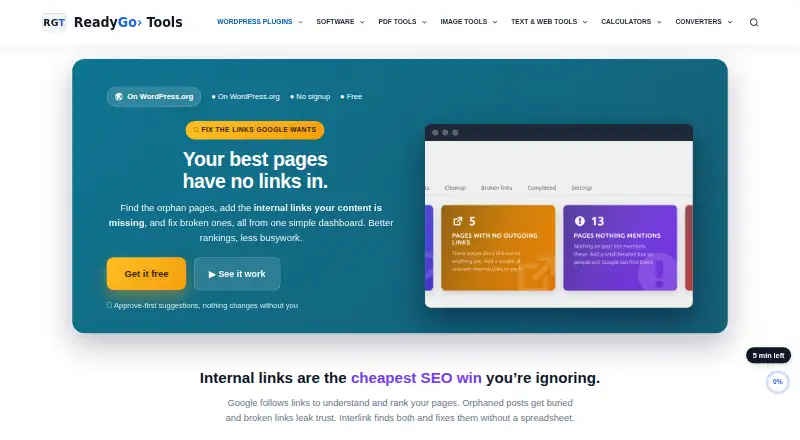
What Interlink is
Interlink is a free WordPress plugin for auditing a site's internal links and finding posts that may need more links. Its reports show total internal links, orphaned and under-linked posts, well-linked posts, and recommended link counts. It suggests relevant destinations, but requires approval before making content changes; when links are inserted, it uses existing text and supports undo. Optional auto-link rules map keywords to URLs, can be limited to shared categories or tags, and can run when a post is saved. The plugin also reports anchor-text diversity, prioritizes cornerstone content, and provides an editor meta box with link status. Other tools include CSV export, weekly scans, role controls, and settings import and export. By default, analysis runs locally on the WordPress database without external requests or tracking. If AI relevance is enabled with the user's API key, post text and titles plus candidate titles are sent directly to OpenAI or Google Gemini. Interlink requires WordPress 5.5 or higher and PHP 7.4 or higher, and is tested up to WordPress 7.1.2.
Good
- Reports orphaned and under-linked posts.
- Requires approval before changing content.
- Inserted links can be undone.
- Default analysis runs locally without external requests or tracking.
- Offers CSV exports and weekly scheduled scans.
Watch out
- Requires WordPress 5.5 or higher.
- Requires PHP 7.4 or higher.
- Optional AI relevance sends post and candidate text externally.
Who it suits
Interlink suits WordPress site owners who want to find orphaned or under-linked posts and review link suggestions. The maker particularly highlights sites with 20 or more posts, older archives, or un-audited broken links.
Verdict
Interlink provides link audits and controlled ways to add internal links, including optional keyword-based automation. Its default local analysis and approval-first suggestions may suit site owners who want to review changes before they are made.
Plans and prices
From Interlink's own pricing page, checked 30 Sep 2026.
| Plan | Price | What it gives you |
|---|---|---|
| Free | Free | WordPress plugin · no signup · WordPress 5.5+ · PHP 7.4+ · Free |
The facts
Each one read from Interlink's own pages, with the date it was checked.
Where it runs
- Approve-first workflow
- Suggestions require user approval before any content changes are made.checked 30 Sep 2026
What it does
- Automation
- Auto-link rules can map keywords to URLs, optionally restrict links by shared category or tag, and optionally apply on post save.checked 30 Sep 2026
- Compatibility
- The plugin requires WordPress 5.5 or higher and PHP 7.4 or higher, and is tested up to WordPress 7.1.2.checked 30 Sep 2026
- Data handling
- By default, analysis runs locally against the site's WordPress database with no external requests or tracking.checked 30 Sep 2026
- Exports and scheduling
- Features include CSV export, weekly scheduled scans, role control, and settings import/export.checked 30 Sep 2026
- Installation
- Users install it from the WordPress Plugins screen or by uploading it to /wp-content/plugins/, then activate and rescan the site.checked 30 Sep 2026
- Integrations
- Rank Math focus keywords can be used as preferred anchors, and optional integrations exist for OpenAI, Google Gemini, and Google Search Console.checked 30 Sep 2026
- Intended users
- The maker highlights sites with 20 or more posts, old archives, low visibility, siloed content, or un-audited broken links as especially suitable.checked 30 Sep 2026
- Internal-link audit
- The audit reports total internal links, orphaned posts, under-linked posts, well-linked posts, and recommended link counts.checked 30 Sep 2026
- Non-destructive editing
- The plugin only turns existing text into links, never writes new sentences, and supports undo for inserted links.checked 30 Sep 2026
- Optional AI data flow
- When enabled with the user's own API key, AI relevance sends post titles and text plus candidate titles directly to OpenAI or Google Gemini.checked 30 Sep 2026
- Performance
- The plugin has zero front-end footprint, loads assets only on its admin screens, and caches the link map in a small table.checked 30 Sep 2026
- Purpose
- Interlink audits internal links, finds orphan posts, suggests relevant links, and identifies broken internal links.checked 30 Sep 2026
- SEO controls
- It provides anchor-text diversity reporting, cornerstone-content prioritization, and an editor meta box showing links and status.checked 30 Sep 2026
- Support status
- The WordPress listing provides a support forum, and it currently reports no submitted reviews.checked 30 Sep 2026
The full review of Interlink
Interlink is a WordPress plugin for auditing internal links and managing suggested or rule-based linking. It is best suited to site owners who want to improve link coverage without handing over every change to automation. Its strongest case is the combination of local analysis, approval-first suggestions, and a free plan.
Overview
Interlink finds orphaned, under-linked, and well-linked posts, flags broken internal links, and recommends link counts. That makes it useful for bringing structure to older archives or large sites whose internal links have grown unevenly. The plugin does not create new copy: it links existing text and supports undo for inserted links, a meaningful safeguard for editors wary of automated content changes.
By default, analysis runs against the site's WordPress database without external requests or tracking. Optional AI relevance uses the user's own OpenAI or Google Gemini API key and sends post text and titles, along with candidate titles, to that provider. This is a clear trade-off: local analysis keeps data on the site, while AI adds an external data flow.
Key features
The audit breaks down total internal links, orphaned posts, under-linked posts, well-linked posts, and recommended link counts. Anchor-text diversity reporting, cornerstone-content prioritization, and an editor meta box showing link status give editors more context than a list of suggestions alone. Rank Math focus keywords can serve as preferred anchors.
Suggestions wait for user approval before changing content. For teams comfortable with more automation, rules can map keywords to URLs, optionally limit links to shared categories or tags, and run when a post is saved. These controls offer flexibility, but rule-based linking still calls for editorial oversight to avoid links that fit a keyword but not the reader's intent.
CSV export, weekly scheduled scans, role control, and settings import and export support ongoing maintenance. Optional integrations include OpenAI, Google Gemini, and Google Search Console. The plugin says it has no front-end footprint: assets load only on admin screens, and its link map is cached in a small table.
Pricing
Interlink's Free plan costs nothing. It is a WordPress plugin with no signup, and requires WordPress 5.5+ and PHP 7.4+. There is no paid tier to weigh against the free version in this offer, so it is an accessible starting point for a WordPress site that needs audits, suggestions, and optional automatic linking.
Interlink suits sites with 20 or more posts, old archives, low visibility, siloed content, or broken links that have not been audited. It does not fit sites outside WordPress, or teams seeking a hosted service rather than a self-hosted plugin.
Platforms
Interlink is for self-hosted WordPress sites. Installation is through the WordPress Plugins screen or by uploading the plugin to /wp-content/plugins/, followed by activation and a rescan. It requires WordPress 5.5 or higher and PHP 7.4 or higher, and is tested up to WordPress 7.1.2.
Who it's for
Choose Interlink if you manage a WordPress site with enough posts for orphan and under-linked content to become hard to spot manually, and you want to review proposed changes before they go live. Its local-by-default analysis is also a good fit when avoiding routine external requests matters. If you enable AI relevance, account for the fact that post text and titles are sent to the selected AI provider.
The WordPress listing provides a support forum, but currently reports no submitted reviews. That leaves less user feedback to consult when judging support experience.
Pros and cons
- Pros: Free to install with no signup, and the approval-first workflow keeps suggested edits under editorial control.
- Pros: Audits cover orphaned, under-linked, and broken links, while reporting and scheduled scans support repeat maintenance.
- Pros: Local analysis is the default, and the plugin keeps its assets off the public-facing site.
- Cons: It requires a self-hosted WordPress installation and the stated minimum WordPress and PHP versions.
- Cons: AI relevance sends post text and titles to OpenAI or Google Gemini when enabled, so it is not a purely local option in that mode.
- Cons: Automatic rules can add links on post save; sites that want every change reviewed should leave that behavior off and use suggestions instead.
Alternatives
For a broader comparison, see Internal Linking Tools.
- LinkBoss may suit readers who prefer a web platform and want a free-credit entry point: its free plan includes 50 credits on signup for one site, with no credit card required.
- Link Whisper is another self-hosted option; its free version offers manually inserted outbound link suggestions.
- Linkagent is worth considering for users who want an AGPL-3.0 self-hosted option with every feature ungated and can provide their own infrastructure.
- Linkbot offers a web-based free Starter plan for one website property and up to 1,000 URLs, with reports and diagnostics but no automated linking or ongoing sync.
- Uix Page Builder is a free self-hosted WordPress plugin alternative.
- Orbis Internal Link Assistant may suit buyers who prefer a one-time license, with plans for one site, five sites, or unlimited sites.
- LinkStorm is a paid web and extension option with a free trial, for readers considering a subscription instead.
- LinkVector is a paid web alternative for readers seeking a subscription-based tool.
Verdict
Interlink is a strong fit for WordPress site owners who want a no-cost way to find gaps in internal linking and add links without surrendering editorial control. Its local default, undo support, and optional automation cover a useful range of workflows. Look elsewhere if you need a hosted, non-WordPress tool, or avoid its AI features if sending post text to an external provider is unacceptable.
Getting started
- Open the WordPress Plugins screen or upload the plugin to /wp-content/plugins/.
- Activate the plugin.
- Rescan the site to analyze its internal links.
Questions
How much does Interlink cost?
The Free plan costs nothing, billed Free.
Which platforms does Interlink support?
It is a WordPress plugin for self-hosted and web use.
What does Interlink audit?
It reports internal link totals, orphaned, under-linked, and well-linked posts, recommended link counts, and broken internal links.
Does Interlink change content automatically?
Suggestions require user approval before content changes. Auto-link rules can optionally apply when a post is saved.
Does Interlink send site data to external services?
By default, analysis runs locally against the WordPress database without external requests or tracking. If optional AI relevance is enabled with the user's API key, post titles and text and candidate titles are sent directly to OpenAI or Google Gemini.
What does Interlink require?
It requires WordPress 5.5 or higher and PHP 7.4 or higher, and is tested up to WordPress 7.1.2.
Alternatives to Interlink
- 1
Internal Link Juicer
Free planOpen sourceWebSelf-hosted7.7From $69.99 a year - 2

Link Whisper
Free planOpen sourceWebAPISelf-hosted7.7From $1 a month - 3
Magic Rinku
Free planOpen sourceWebAPI7.7From $9 a month - 4
Link&Cluster
Free planOpen sourceSelf-hosted7.4$34 one-time - 5
InterLinks
Free planWeb7.3From $9 a month - 6
Core+ Links
Free planOpen sourceWebSelf-hosted7.2Free plan