Inno3D TuneIT
INNO3D TuneIT OC & RGB Utility V5.02 is a free Windows utility for overclocking and RGB control on listed INNO3D GeForce cards.
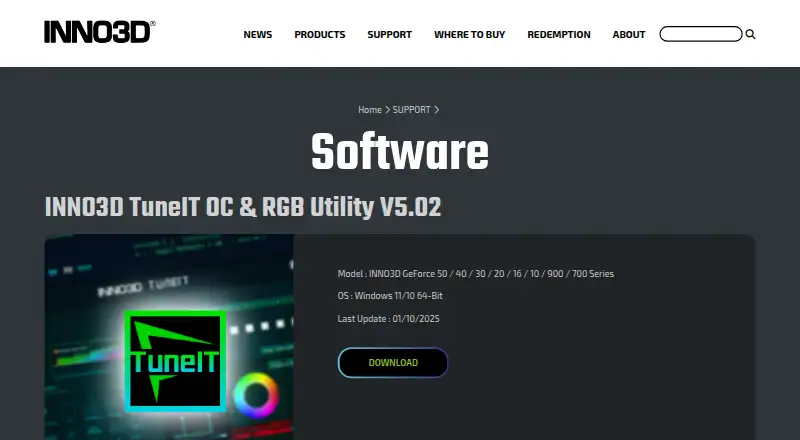
What Inno3D TuneIT is
INNO3D TuneIT OC & RGB Utility V5.02 is a free Windows utility for overclocking and RGB control on listed INNO3D GeForce cards. Users can adjust GPU and memory clock, fan speed, target power and target temperature. Its monitoring page displays GPU clock, temperature, fan speed, memory profiles, driver version and BIOS version, with real-time GPU information monitoring available. RGB controls let users change the mode, brightness and effect speed or create a custom effect. The settings page also includes software startup options. The listed supported cards are INNO3D GeForce 50, 40, 30, 20, 16, 10, 900 and 700 Series models, and the release is specified for Windows 11 or Windows 10 64-bit. INNO3D provides a download link and a technical support form requesting product details, hardware configuration and a problem description. For RMA requests, customers are directed to the store where they bought the card.
Good
- Free utility for listed INNO3D GeForce cards.
- Controls GPU and memory clocks.
- Includes fan, target power and temperature controls.
- Offers custom RGB effects.
- Displays GPU, driver and BIOS details.
Watch out
- Supports listed INNO3D GeForce models only.
- Requires Windows 10 or 11 64-bit.
- RMA requests go through the original store.
Who it suits
It suits owners of listed INNO3D GeForce cards using Windows 10 or 11 64-bit who want clock, fan, power or RGB controls. Users can also view listed GPU and system details in its monitoring page.
Verdict
TuneIT combines GPU adjustments, monitoring and RGB controls for specified INNO3D cards. Confirm that the card model and Windows version match its listed support requirements.
Plans and prices
From Inno3D TuneIT's own pricing page, checked 5 Oct 2026.
| Plan | Price | What it gives you |
|---|---|---|
| INNO3D TuneIT OC & RGB Utility V5.02 | Free | For INNO3D GeForce 50 / 40 / 30 / 20 / 16 / 10 / 900 / 700 Series · Windows 11/10 64-bit |
The facts
Each one read from Inno3D TuneIT's own pages, with the date it was checked.
What it does
- Certification
- The company page states that Innovision has ISO9001:2015 certification.checked 4 Oct 2026
- Download
- The software page provides a Download link for the utility.checked 4 Oct 2026
- GPU monitoring
- The guide says the home page displays GPU clock, temperature, fan speed, memory profiles, driver version, and BIOS version.checked 5 Oct 2026
- Live monitoring
- The guide says real-time GPU information monitoring is available.checked 5 Oct 2026
- Operating system
- The page specifies Windows 11/10 64-Bit.checked 4 Oct 2026
- Overclocking controls
- Users can change GPU and memory clock, fan speed, target power, and target temperature.checked 5 Oct 2026
- Privacy safeguards
- INNO3D says it maintains administrative, technical, and physical safeguards designed to protect personal information submitted through its channels.checked 5 Oct 2026
- Purpose
- TuneIT is an INNO3D OC and RGB utility for supported GeForce graphics cards.checked 5 Oct 2026
- RGB controls
- The RGB settings page supports changing the RGB mode, brightness, and effect speed, and creating a custom RGB effect.checked 5 Oct 2026
- RMA guidance
- For RMA requests, the support form directs customers to contact the store where they purchased their INNO3D graphics card.checked 4 Oct 2026
- Startup settings
- The settings page lets users change software startup options.checked 5 Oct 2026
- Support
- INNO3D provides a technical support form that asks for product details, hardware configuration, and a problem description.checked 5 Oct 2026
- Support channel
- INNO3D provides a support form that requests product name and serial number.checked 4 Oct 2026
- Support data handling
- The support form says submitted information is used for technical support, kept confidential, and distributed only to related staff or parties.checked 5 Oct 2026
- Supported hardware
- The current download page lists INNO3D GeForce 50, 40, 30, 20, 16, 10, 900, and 700 series cards.checked 5 Oct 2026
- Supported models
- The listed models are INNO3D GeForce 50, 40, 30, 20, 16, 10, 900 and 700 Series.checked 4 Oct 2026
- Update date
- The listed last update is 01/10/2025.checked 4 Oct 2026
The company
- Company
- Innovision Multimedia Limited says it was established in Hong Kong in 1998 and has manufacturing operations in Shenzhen, China, set up since 1990.checked 5 Oct 2026
- Company certification
- INNO3D states that Innovision has ISO 9001:2015 certification.checked 5 Oct 2026
- Company history
- The company page says Innovision Multimedia Limited was established in 1998 in Hong Kong.checked 4 Oct 2026
- Founded
- 1998checked 28 Sep 2026
- Headquarters
- Singaporechecked 28 Sep 2026
Money
- Free download
- INNO3D’s FAQ describes the TuneIT download as free.checked 5 Oct 2026
Where it runs
- Platform requirement
- The listed TuneIT release supports Windows 11/10 64-bit.checked 5 Oct 2026
The full review of Inno3D TuneIT
Overview
Inno3D TuneIT is a Windows utility for monitoring and adjusting supported INNO3D GeForce graphics cards. It is best for owners who want clock, fan and RGB controls in one place; if you do not have a compatible card, it is not the right tool.
Key features
TuneIT combines live GPU monitoring with a home screen showing clock speed, temperature, fan speed, memory profiles, driver version and BIOS version. That makes it useful both for checking a card’s status and for making adjustments, rather than a tuning panel alone.
Its controls cover GPU and memory clocks, fan speed, target power and target temperature, with tuning profiles and power-limit control. This breadth gives owners several ways to shape card behavior, but the adjustments are most relevant to users who have a clear reason to change those settings. RGB controls let users change lighting mode, brightness and effect speed or create a custom effect. Startup options round out the utility without expanding its hardware scope.
Pricing
INNO3D TuneIT OC & RGB Utility V5.02: free. The download covers supported INNO3D GeForce 50, 40, 30, 20, 16, 10, 900 and 700 Series cards running Windows 11/10 64-bit. There is no paid tier or trial to compare. Its zero-cost access is a straightforward fit for owners of those cards, but it does not extend to other GPU brands or unsupported series.
Platforms
TuneIT supports Windows 11/10 64-bit. Compatibility is also tied to the named INNO3D GeForce series, so confirm both the card family and Windows version before choosing it.
Who it's for
TuneIT suits INNO3D GeForce owners who want monitoring, overclocking controls and RGB adjustments together without paying for the utility. It is a poor fit for users with another GPU brand, an unsupported card series or an operating system other than Windows 11/10 64-bit.
Pros and cons
- Pros: Live monitoring and key card readings sit alongside controls for GPU and memory clocks, fan speed, target power and temperature.
- Pros: RGB mode, brightness, speed and custom-effect controls make it useful for owners who want lighting adjustments in the same utility.
- Pros: The utility is free for the supported card families.
- Cons: Support is limited to specified INNO3D GeForce series, excluding owners of other GPU brands.
- Cons: It requires Windows 11/10 64-bit, ruling out other operating systems.
Alternatives
For another free Windows option, ASUS GPU Tweak III is worth considering; its product page states no price or usage limits. GALAX Xtreme Tuner Plus may suit GALAX card owners who want an iPhone app, but that app requires the Xtreme Tuner PC software.
Gainward ExperTool is another free Windows choice for Nvidia GPUs, with driver requirements that differ by 32-bit and 64-bit systems. Intel VTune Profiler is a free option for Linux, Windows or self-hosted use, available standalone or through Intel oneAPI Toolkit, with community support.
For AMD Radeon users on Windows 10 or 11 64-bit, AMD GPU Tuner is a free, MIT-licensed project that requires a compatible Adrenalin driver. Linux users can consider NVIDIA_OC Daemon or CoreCtrl, both free options; CoreCtrl is described as a GNU/Linux application.
EVGA Precision X1 is another free downloadable Windows option, with EVGA graphics cards required for the listed plan.
Browse the GPU Tuning Software and GPU Overclocking Software lists for more options.
Verdict
Choose TuneIT if you own a supported INNO3D GeForce card and want a free utility that brings monitoring, tuning and RGB controls together. Its main limitation is decisive: users with a different GPU brand, unsupported series or non-Windows system should look elsewhere.
Getting started
- Open the INNO3D software page
- Confirm your card is from a supported GeForce series
- Confirm Windows 11 or Windows 10 64-bit compatibility
- Use the Download link for TuneIT V5.02
- Open the utility to monitor, tune, or configure RGB settings
Limits worth knowing
The utility is restricted to listed INNO3D GeForce 50, 40, 30, 20, 16, 10, 900, and 700 Series cards running Windows 11 or Windows 10 64-bit.
Questions
What does INNO3D TuneIT cost?
It is free, and INNO3D describes the download as free.
Which operating systems are supported?
The listed release supports Windows 11 and Windows 10 in 64-bit editions.
Which graphics cards are supported?
Supported families are INNO3D GeForce 50, 40, 30, 20, 16, 10, 900, and 700 Series.
What can the utility monitor?
The home page displays GPU clock, temperature, fan speed, memory profiles, driver version, and BIOS version, with real-time monitoring.
How is technical support handled?
INNO3D's support form asks for product details, hardware configuration, and a problem description. RMA requests are directed to the store where the card was purchased.
Alternatives to Inno3D TuneIT
- 1
CoreCtrl
Free planOpen sourceLinux7.1Free plan - 2
MSI Afterburner
Free planAndroidWindows7.1Free plan - 3

ASUS GPU Tweak III
Free planWindows6.7Free plan - 4

GALAX Xtreme Tuner Plus
Free planAndroidiOSWindows6.7Free plan - 5
Intel VTune Profiler
Free planLinuxSelf-hostedWindows6.5Free plan - 6
Gainward ExperTool
Free planWindows6.4Free plan