
ImageToPixelApp Minecraft Pixel Art Generator
ImageToPixelApp Minecraft Pixel Art Generator is a free web tool for turning PNG or JPG images into Minecraft pixel art.
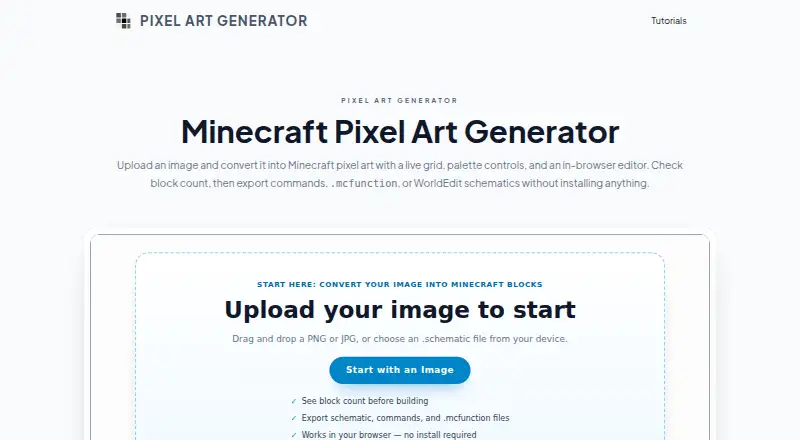
What ImageToPixelApp Minecraft Pixel Art Generator is
ImageToPixelApp Minecraft Pixel Art Generator is a free web tool for turning PNG or JPG images into Minecraft pixel art. A live grid and block-palette controls help shape a design, with options for custom selections and filters. Large images are resized automatically for previews. The in-browser canvas offers brush, eraser, color picker, and zoom tools, while brightness, contrast, saturation, and grid size can be adjusted as you work. For output, the tool provides paged command block instructions, .mcfunction files, raw commands, block totals, and WorldEdit .schematic files. Schematics are intended for Minecraft Java Edition worlds and servers that run WorldEdit. Block counts can help estimate materials for a build, including murals, map art references, and server logos. Command and placement methods may be constrained by chat length, command block size, chunk loading, or server permissions. Tutorials address palettes, image resizing, schematics, and multi-page command output.
Good
- Free plan for the core job.
- Accepts PNG and JPG uploads.
- Offers editable palettes and canvas tools.
- Exports schematics and command formats.
- Totals blocks by type for planning.
Watch out
- Command methods may hit chat-length limits.
- Placement can depend on chunk loading and server permissions.
Who it suits
It suits Minecraft builders who want to turn an image into a pixel-art reference or plan materials for a build. Java Edition users working with WorldEdit can use its schematic export.
Verdict
ImageToPixelApp combines image conversion, palette adjustment, and canvas editing with several export options. Check whether your intended command or schematic workflow fits its stated limits.
The facts
Each one read from ImageToPixelApp Minecraft Pixel Art Generator's own pages, with the date it was checked.
What it does
- Adjustments
- Users can adjust contrast, brightness, and saturation while previewing changes in real time.checked 5 Oct 2026
- Block counts
- The export step totals blocks by type so builders can plan materials for survival builds.checked 7 Oct 2026
- Canvas editing
- The canvas includes brush, eraser, picker, and zoom tools for refining the design.checked 7 Oct 2026
- Command exports
- Exports include paged command block output, .mcfunction files, and raw commands.checked 7 Oct 2026
- Editing
- The canvas editor includes brush, eraser, picker, and zoom tools for refining designs.checked 5 Oct 2026
- Export limits
- The site notes that placement methods can face limits involving chat length, command block size, chunk loading, and server permissions.checked 7 Oct 2026
- Exports
- The tool exports paged command block output, .mcfunction files, raw commands, block counts, and WorldEdit .schematic files.checked 5 Oct 2026
- Image formats
- Users can upload PNG and JPG files, and large images are automatically resized for previews.checked 7 Oct 2026
- Input formats
- Users can upload PNG and JPG images, and large images are auto-resized for smooth previews.checked 5 Oct 2026
- Intended users
- The site presents the tool for builders creating Minecraft murals, map art references, and server logos.checked 7 Oct 2026
- Minecraft workflow
- The page describes schematic export for Minecraft Java Edition workflows, including worlds and servers running WorldEdit.checked 5 Oct 2026
- Palette controls
- Users can choose block palettes, including custom selections, and adjust grid size, brightness, contrast, and saturation.checked 7 Oct 2026
- Palettes
- Users can choose block palettes, including custom selections, and tune palette filters.checked 5 Oct 2026
- Pricing
- A directory listing describes the product as free to use with no paid tier required for its core job.checked 7 Oct 2026
- Purpose
- The browser based editor converts uploaded images into Minecraft pixel art.checked 7 Oct 2026
- Schematic export
- Users can export WorldEdit .schematic files for Minecraft Java Edition workflows.checked 7 Oct 2026
- Tutorials
- The page points users to tutorials for palettes, resizing, schematics, and multi-page command block output.checked 5 Oct 2026
- WorldEdit integration
- The site describes schematic export for Java Edition servers and single player worlds that run WorldEdit.checked 7 Oct 2026
Money
- Build planning
- The exporter totals each block type so users can estimate materials before building.checked 5 Oct 2026
The company
- Maker details
- The opened maker page does not state a maker name, headquarters, or founding date.checked 7 Oct 2026
Alternatives to ImageToPixelApp Minecraft Pixel Art Generator
- 1

BlockArtLab Minecraft Image Converter
Free planWeb7.3$1.99 one-time - 2
Pixvael Minecraft Pixel Art Generator
Free planWebExtension6.6Free plan - 3

Coffee & Fun Minecraft Pixel Art Generator
Free planWeb6.0Free plan - 4

Image2Pixel Minecraft Converter
Free planWeb6.0Free plan - 5
Minecraft Image Converter
Free planWeb6.0Free plan - 6

Minecraft Pixel Art Generator
Free planWeb6.0Free plan