Image Vectorizer
Image Vectorizer is a paid macOS desktop app that converts bitmap images into monochrome vector graphics for copying or export.
What Image Vectorizer is
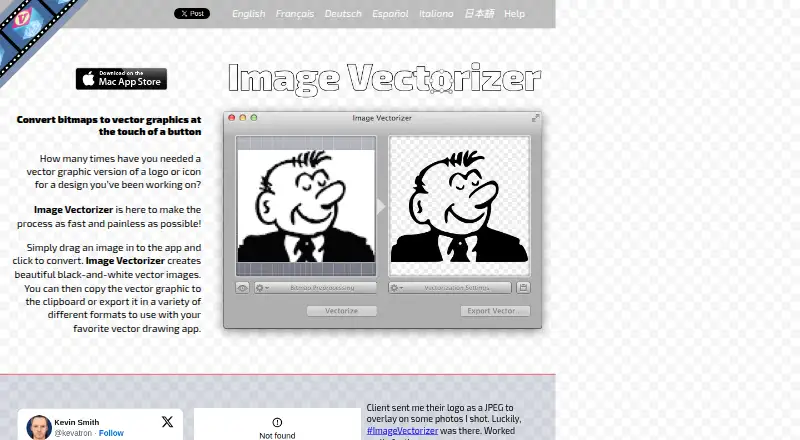
Image Vectorizer is a paid macOS desktop app that converts bitmap images into monochrome vector graphics for copying or export. It imports JPG, PNG, GIF, and TIFF files and can receive images directly from a scanner. The maker says it works best with black-and-white line art, including pencil drawings, outlines, logos, and blueprints. Image preparation controls include rotation, flipping, borders, color balance, blur, sharpening, median, halftone, and outline effects. Vectorization settings cover path decomposition, speckle suppression, corner thresholds, curve optimization, quantization, conversion threshold, rotation, color, fill, and output DPI. Photos can receive dot, line, or hatch halftone treatments. Results export as EPS, PDF, SVG, or DXF, or copy as PDF vector data. The app creates two-color output, does not support color vectorization, and does not perform OCR. It costs 4.99 USD as a one-time purchase and requires macOS 10.8 or later.
Good
- Imports common bitmap formats
- Direct scanner input
- Adjustable preprocessing and tracing controls
- Exports EPS, PDF, SVG, and DXF
- Supports halftone photo effects
Watch out
- No color vectorization
- No OCR for text
- Mac-only application
- 4.99 USD one-time purchase
Who it suits
It suits Mac users converting monochrome artwork, scans, logos, or blueprints into files for drawing and CAD applications. It is less suitable for color tracing or text recognition.
Verdict
Image Vectorizer offers extensive preparation and tracing controls for two-color artwork, with several export formats. Its monochrome output and lack of OCR define the main boundaries.
Plans and prices
From Image Vectorizer's own pricing page, checked 9 Oct 2026.
| Plan | Price | What it gives you |
|---|---|---|
| Image Vectorizer | $4.99, paid once | Mac only · One-time purchase |
The facts
Each one read from Image Vectorizer's own pages, with the date it was checked.
What it does
- Best for
- The maker says it works best for black-and-white line art such as pencil drawings, outlines, logos, and blueprints.checked 9 Oct 2026
- Color limit
- Color vectorization is not supported; the app creates two-color images by default, with foreground and background color controls and optional fill color.checked 9 Oct 2026
- Developer and age
- The App Store identifies Icosasoft Software Inc. as the developer and says the app requires macOS 10.8 or later.checked 9 Oct 2026
- Export formats
- It exports EPS, PDF, SVG, and DXF files and can copy vector data to the clipboard as PDF.checked 9 Oct 2026
- Input and scanning
- It imports common bitmap formats including JPG, PNG, GIF, and TIFF, and can import directly from a scanner.checked 9 Oct 2026
- Integration
- Exported formats are intended for use with vector drawing apps; the maker names Sketch, iDraw, Illustrator, and CAD packages as examples.checked 9 Oct 2026
- OCR limit
- The app does not perform OCR on text.checked 9 Oct 2026
- Photo effects
- Photos can be converted with built-in halftone effects, including dots, lines, and hatching.checked 9 Oct 2026
- Preprocessing
- Bitmap preprocessing includes rotate, flip, border, color balance, blur, sharpen, median, halftone, and outline controls.checked 9 Oct 2026
- Privacy
- The maker's privacy policy says the application does not collect information through the app, while website visits, support contacts, and Apple-provided information may be collected.checked 9 Oct 2026
- Security and compliance
- The privacy policy says the maker adopts security measures to protect information and states an intention to be fully GDPR compliant; the policy was last updated May 25, 2018.checked 9 Oct 2026
- Support
- Support is offered through the help page, Facebook, Twitter, and [email protected].checked 9 Oct 2026
- Vectorization controls
- Settings include path decomposition, speckle suppression, corner threshold, curve optimization, output quantization, conversion threshold, rotation, color, fill, and output DPI.checked 9 Oct 2026
- What it does
- Converts bitmap images into black-and-white vector graphics that can be copied to the clipboard or exported.checked 9 Oct 2026
The company
- Headquarters
- Halifax, Nova Scotia, Canadachecked 28 Sep 2026
Alternatives to Image Vectorizer
- 1

Vectorization.eu
Free planWebAPIExtensionLinux7.7From $0.05 a year - 2
SVGcode
Free planOpen sourceAndroidWebmacOSSelf-hosted7.6Free plan - 3
Avidemux
Free planOpen sourceWebLinuxmacOSWindows7.3Free plan - 4
WinTopo
Free planWindows7.2£150 one-time - 5

Vectorizer.AI
WebAPILinuxmacOS7.1From $9.99 a month - 6

Vecto
Free planLinuxmacOSWindows6.7$7.99 one-time